Ideogram Character AI Generator
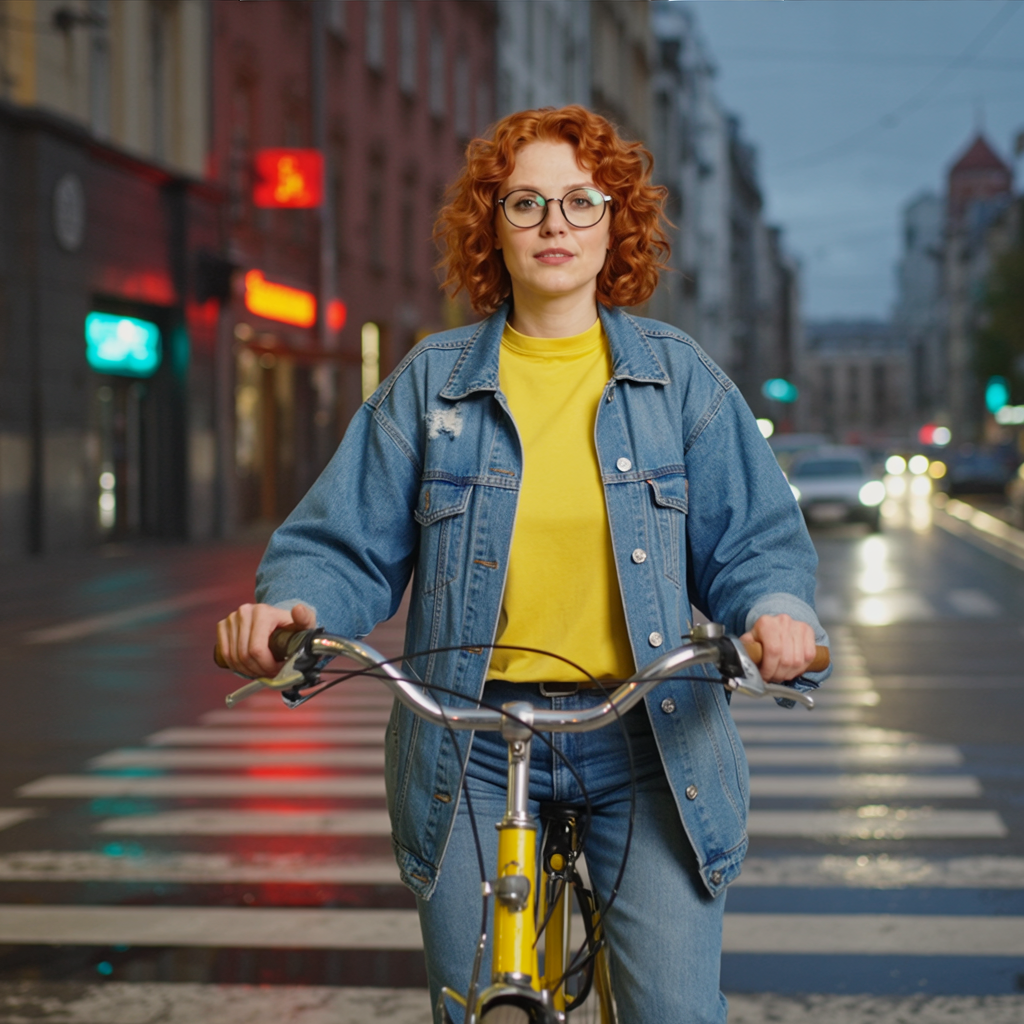
Generated on PixelDojo with Ideogram Character. Produced by PixelDojo's generation pipeline.
Ideogram Character costs 5 credits per image at its Default rendering speed, and it placed a reference character into a brand new scene in about 47 seconds on August 26, 2026, keeping her face, glasses, hair, and outfit intact. The tool needs a character_reference_image on every request, not just a prompt, because the whole point is holding identity across a change of scene rather than generating a face from scratch. This page covers what the 5 credits paid for, how fast it ran, and how the three rendering speeds compare on price.
The 5 credit scene swap, first result kept
Every example below was produced on PixelDojo. Hover to see the prompt.
Place this exact woman on a bicycle crossing a rainy city crosswalk at dusk, neon shop signs reflecting in puddles, cinematic wide shot, keep her face, glasses, red curly hair, denim jacket and yellow shirt identical
Ideogram Character
What identity lock actually needs
A reference image is required, not optional
character_reference_image is a required field on every request. Without a source photo of the character, the tool has nothing to lock onto and the request fails validation before anything is charged.
What we saw in the output
The same woman from our reference sheet, red curly hair, round glasses, denim jacket over a yellow shirt, now sitting on a bicycle at a rainy crosswalk. Neon shop signs in red and teal reflect off the wet road, car headlights blur in the background, and the crosswalk stripes and dusk light all came through as asked.
Three rendering speeds, three prices
Turbo costs 3 credits and is the fastest, cheapest option. Default costs 5 credits, the balance we tested. Quality costs 7 credits and is the slowest, highest-fidelity setting.
Up to four images per request
numberOfImages accepts 1 to 4. The credit price scales with the count, so four variations at Default speed would run 20 credits in one call.
Magic prompt rewriting is optional
magic_prompt_option can rewrite a short prompt into a richer one automatically, or be turned off to send the prompt exactly as written. We left it off so the scene description landed unchanged.
Square by default
With no aspect_ratio or resolution set, the request defaults to a 1:1 frame. Ours came back at 1024x1024. Seven aspect ratios and ten fixed resolutions are available if a different frame is needed.
One reference photo, one new scene, one try. 5 credits at Default speed, about 47 seconds.
Why Choose Pixel Dojo for Ideogram Character
Professional-quality results with cutting-edge AI technology
5 credits at Default speed
The price scales with rendering_speed and with numberOfImages. One image at Default is 5 credits.
About 47 seconds, measured
Timed on August 26, 2026 from request to finished file, Default speed, first result kept.
Identity held across a full scene change
Face, glasses, hair color and curl, jacket, and shirt all carried over into a different location, lighting, and pose.
How It Works
How we ran it, so you can repeat it:
Start from a real reference image
We used a character sheet image from an earlier generation as character_reference_image. The tool needs an actual photo to lock onto, not just a text description.
Describe the new scene, not the character
The prompt named the bicycle, the crosswalk, the neon signs, and the dusk lighting, then explicitly asked to keep the face, glasses, hair, and outfit identical.
Pick a rendering speed on purpose
We set rendering_speed to Default, which is what charged 5 credits instead of 3 for Turbo or 7 for Quality.
Loved by creators on PixelDojo
Real feedback from people using PixelDojo, pulled from our in-product surveys.
good tools in one place
Prompt updates, strong features, and a community that is always willing to help and hear/act on professional feedback. I've never had a better experience.
user friendly all in one thing
I really like the schedule of AI work performed!
The best tools for IA on the web !
The guy that operates the website is constantly updating it
Explore more AI tools on PixelDojo
AI Tools
Compare & Switch
- Best AI Image Generators
- Best AI Video Generators
- Midjourney Alternatives
- Civitai Alternatives
- Runway Alternatives
- Leonardo Alternatives
- Pika Alternatives
- Luma Alternatives
- Magnific Alternatives
- Veo Alternatives
- Flux Alternatives
- Freepik Alternatives
- Seedance Alternatives
- Seedream Alternatives
- Pixverse Alternatives
- GPT Image Alternatives
- Synthesia Alternatives
- Playground Alternatives
- NightCafe Alternatives
- Canva AI Alternatives
- ElevenLabs Alternatives
- ComfyUI Alternatives
- Fal Alternatives
- Replicate Alternatives
Common Questions
Everything you need to know about Ideogram Character
What does Ideogram Character cost?
It depends on rendering_speed and how many images you request. Turbo is 3 credits per image, Default is 5, and Quality is 7. Our test ran one image at Default for 5 credits.
How fast is Ideogram Character?
About 47 seconds in our August 26, 2026 run at Default speed, from submission to the finished file. Turbo should run faster and Quality slower, though we only timed Default.
Does it actually keep the character consistent?
Yes, in our test. Face, glasses, red curly hair, denim jacket, and yellow shirt all carried over correctly into a completely different scene, lighting, and pose.
How do I call it from the API?
POST to /api/v1/models/ideogram-character/run with your API key, a prompt, and a character_reference_image URL. rendering_speed defaults to Default if you leave it out.
What if I just need a plain text-to-image, not identity lock?
Use Ideogram 4 Turbo instead. It has no reference-image requirement, costs 1 credit, and is built for generating a scene from a prompt alone rather than preserving a specific character.
Can I get more than one image per request?
Yes. numberOfImages accepts 1 to 4, and the credit charge multiplies by that count at whatever rendering speed you chose.