Kling Image Edit
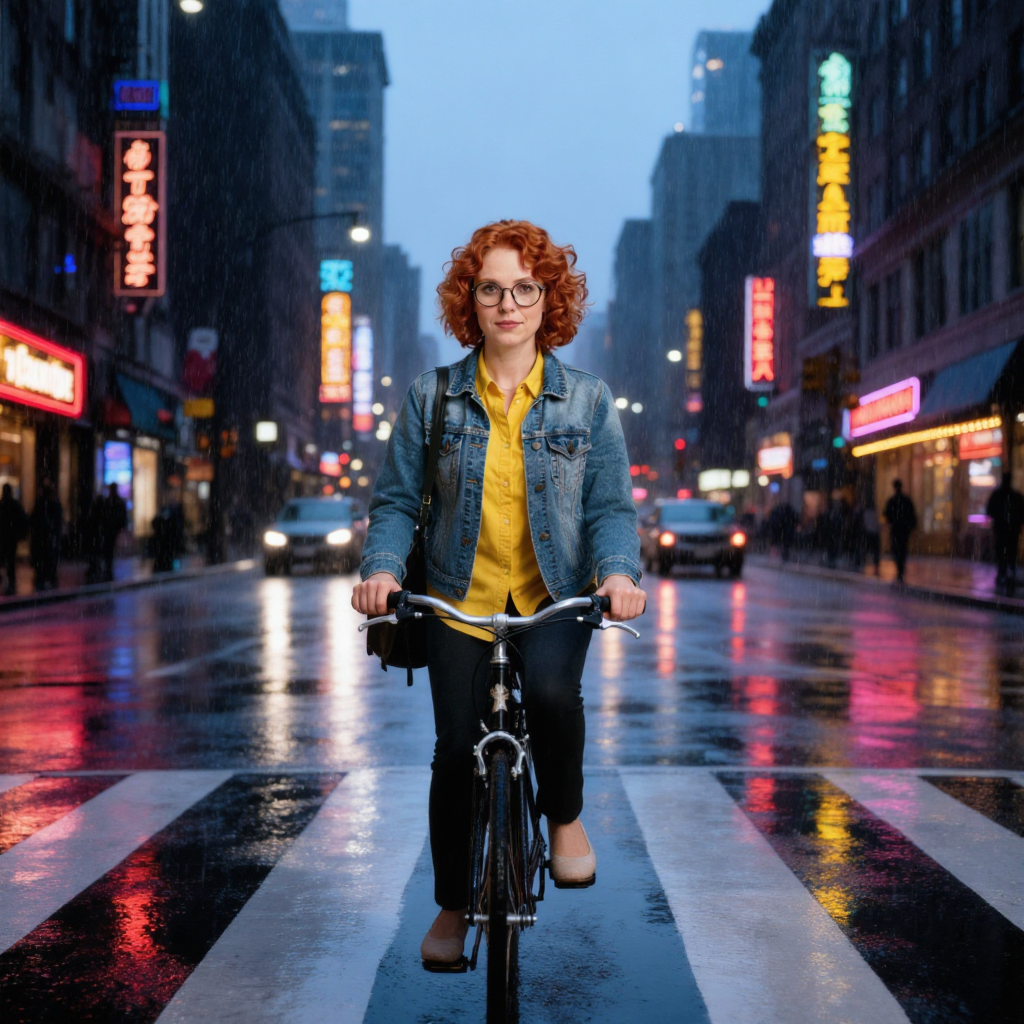
Generated on PixelDojo with Kling Image Edit. Produced by PixelDojo's generation pipeline.
Kling Image Edit costs 1 credit per image and returned our test in about 38 seconds on August 26, 2026. We gave it the hardest edit in our test set: keep a woman's face, glasses, hair color and outfit exact, but move her onto a bicycle in a rainy neon-lit crosswalk at dusk. It followed every part of that instruction on the first try. Here is what it produced and how it prices out.
The 1 credit edit, first result kept
Every example below was produced on PixelDojo. Hover to see the prompt.
Place this exact woman on a bicycle crossing a rainy city crosswalk at dusk, neon shop signs reflecting in puddles, cinematic wide shot, keep her face, glasses, red curly hair, denim jacket and yellow shirt identical
Kling Image Edit
What one hard edit instruction showed
What the edit produced
A photorealistic woman with red curly hair, round glasses and a denim jacket over a yellow top, riding a bicycle across a rain-slicked crosswalk at dusk. Neon shop signage in Chinese-style characters lines both sides of the street and reflects in the wet pavement, with car headlights and taillights adding warm streaks. The photographic look of the source image carried through instead of being redrawn into an illustration.
Identity and scene both landed
Every element the instruction named came back: the bicycle, the rain, the dusk lighting, the neon reflections, and the person's face, glasses, hair color and jacket. That is not guaranteed on an edit this large; our identical instruction sent to a different edit model the same day kept the identity markers but redrew the whole scene as a daytime illustration and dropped the bicycle.
1K is the default, 2K costs the same
The resolution field takes 1K or 2K at the same price. We ran the 1K default, which returned a 1024 by 1024 pixel file.
Up to nine images, one edit instruction
num_images takes 1 to 9, at 1 credit each. A nine-image spread from one instruction is 9 credits in a single call.
Seed is accepted but does nothing
A seed field exists for compatibility with older integrations, but this version of Kling does not support one and it is dropped before the request is sent. Do not plan on reproducible output from a fixed seed here.
Eight aspect ratios, three output formats
16:9, 9:16, 1:1, 4:3, 3:4, 3:2, 2:3 and 21:9 for framing, plus PNG, JPEG or WEBP for the file. We ran the square default.
1 credit, about 38 seconds, one hard instruction: swap the scene and keep the person. It did both.
Why Choose Pixel Dojo for Kling Image Edit
Professional-quality results with cutting-edge AI technology
1 credit per image
Flat per output. Nine images from one instruction is 9 credits in one call.
About 38 seconds, measured
Timed on August 26, 2026 from request to finished file at the 1K default.
Held the photographic look under a full scene change
Face, hair color, glasses and outfit all carried through, and the new scene stayed photorealistic instead of drifting into an illustration.
How It Works
How we ran it, so you can repeat it:
Send the image and the instruction together
Kling Image Edit needs an image_url and a prompt describing the change. Ours named the new scene and every identity detail to preserve in one instruction.
Leave resolution and aspect ratio at their defaults unless you need otherwise
1K and 2K are the same 1 credit price. We ran 1K square and it returned a 1024 by 1024 file.
Generate from the tool page or the API
POST to /api/v1/models/kling-image-edit/run with the same prompt and image. Ours charged 1 credit and took about 38 seconds.
Loved by creators on PixelDojo
Real feedback from people using PixelDojo, pulled from our in-product surveys.
very useful set of tools for image creation, upscaling and enhancement
ease of use, variety of tools, high quality trainings, and a well-maintained discord channel
Ease of use, friendliness and support of the owner, continued innovation.
it is an amazing site to create a pics and vids for those who don't have the hardware themselves
good tools in one place
Prompt updates, strong features, and a community that is always willing to help and hear/act on professional feedback. I've never had a better experience.
Explore more AI tools on PixelDojo
AI Tools
Compare & Switch
- Best AI Image Generators
- Best AI Video Generators
- Midjourney Alternatives
- Civitai Alternatives
- Runway Alternatives
- Leonardo Alternatives
- Pika Alternatives
- Luma Alternatives
- Magnific Alternatives
- Veo Alternatives
- Flux Alternatives
- Freepik Alternatives
- Seedance Alternatives
- Seedream Alternatives
- Pixverse Alternatives
- GPT Image Alternatives
- Synthesia Alternatives
- Playground Alternatives
- NightCafe Alternatives
- Canva AI Alternatives
- ElevenLabs Alternatives
- ComfyUI Alternatives
- Fal Alternatives
- Replicate Alternatives
Common Questions
Everything you need to know about Kling Image Edit
What does Kling Image Edit cost?
1 credit per image. A single request returns 1 to 9 images at 1 credit each, so nine in one call is 9 credits. Resolution, aspect ratio and output format do not change the price.
How fast is Kling Image Edit?
About 38 seconds in our August 26, 2026 run, timed from request to finished file at the 1K default. Turnaround moves with queue load.
Does it keep the subject's identity through a big scene change?
On our test, yes. We asked it to move a character onto a bicycle in a completely different scene while keeping her face, glasses, hair color and outfit identical, and all of that landed alongside the new scene, still photorealistic.
What is the difference between Kling Image and Kling Image Edit?
Kling Image generates from a text prompt alone. Kling Image Edit takes an existing image plus a text instruction and changes it. Both cost 1 credit, so a generate-then-edit pass is 2 credits total.
How do I call it from the API?
POST to /api/v1/models/kling-image-edit/run with your API key, a prompt, and an image_url. Same key and request shape as every other model in the catalog.
Can I animate the edited image afterward?
That is a separate model. Kling Motion Control takes a character image plus a motion reference video, at 3 credits per second on the standard tier, and drives the character with that motion. It is a different mechanism from a text-instruction edit.