P-Image Edit
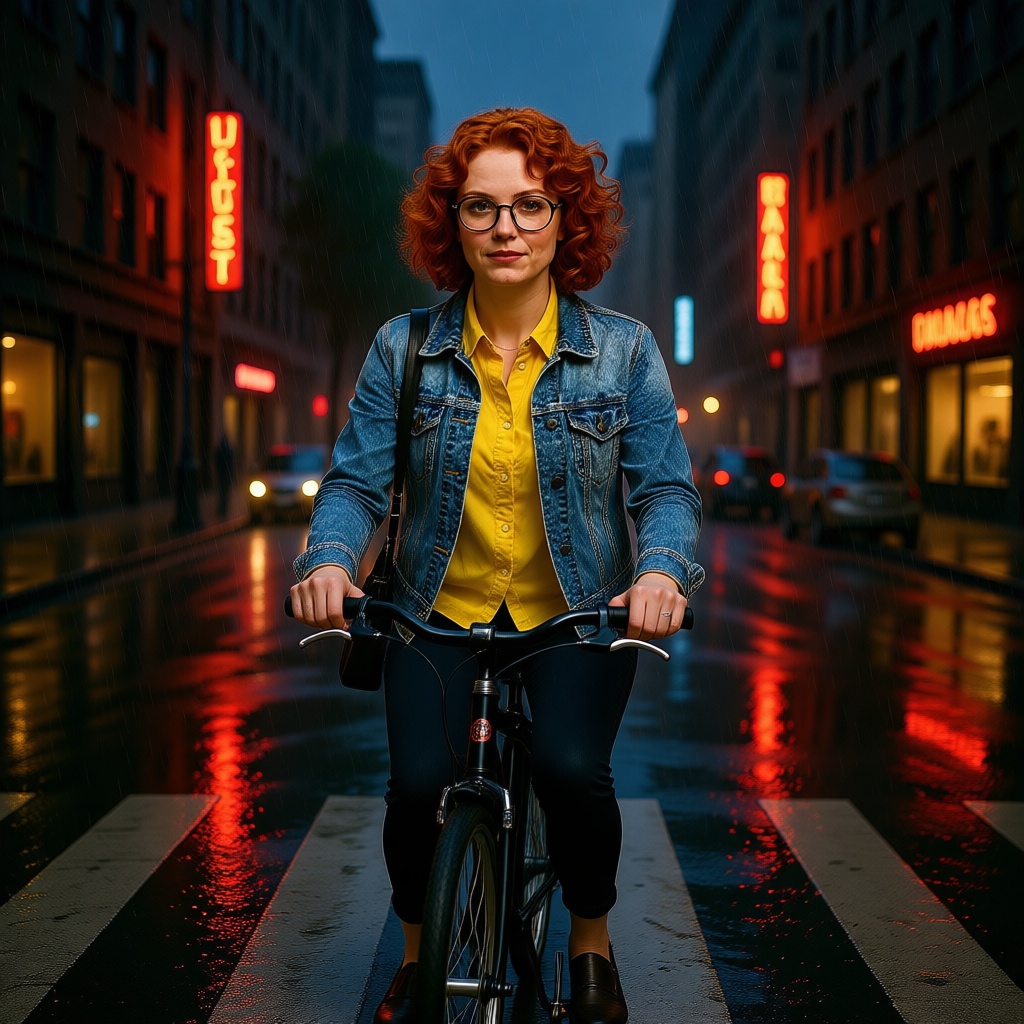
Generated on PixelDojo with P-Image Edit. Produced by PixelDojo's generation pipeline.
P-Image Edit costs 0.25 credit per image and placed a character into a brand new scene in about 13 seconds on August 26, 2026. We took a portrait we already had, gave it one instruction describing a completely different setting, and it kept the person recognizable while rebuilding everything around her. That is the test this page is built on.
Studio portrait in, rainy street scene out
Every example below was produced on PixelDojo. Hover to see the prompt.
Place this exact woman on a bicycle crossing a rainy city crosswalk at dusk, neon shop signs reflecting in puddles, cinematic wide shot, keep her face, glasses, red curly hair, denim jacket and yellow shirt identical
P-Image Edit
What one instruction actually did
The instruction we gave it
Place this exact woman on a bicycle crossing a rainy city crosswalk at dusk, neon shop signs reflecting in puddles, cinematic wide shot, keep her face, glasses, red curly hair, denim jacket and yellow shirt identical.
What it kept
The face, the round glasses, the red curly hair and the denim jacket over the yellow shirt all carried over recognizably. The bag strap over her shoulder is still there. That is the harder part of an edit like this, and it held.
What it built from nothing
A rainy crosswalk at dusk with a bicycle under her, wet asphalt with visible reflections, and tall buildings lined with neon signage on both sides. None of that existed in the source image, which was a plain studio portrait against a tan background.
Where it got vague
The neon signs in the background read as glowing shapes rather than legible words. That is normal for small background text at this distance and is worth knowing before you plan a shot around readable signage.
Up to 5 reference images in one call
We sent one. The same 0.25 credit per output image applies whether you send one reference or combine up to five into a single composition.
No standalone tool page
P-Image Edit shares its dashboard page with P-Image rather than having its own URL. The API endpoint is separate and works exactly like every other model's.
One reference image, one instruction, first result kept. 0.25 credit, about 13 seconds.
Why Choose Pixel Dojo for P-Image Edit
Professional-quality results with cutting-edge AI technology
0.25 credit per output image
Flat, regardless of how many of the up to 5 reference images you send in.
About 13 seconds, measured
Timed on August 26, 2026 from request to finished file, for a full scene replacement, not a small touch-up.
Identity held across a total scene change
Face, hair, glasses and outfit all survived a jump from a plain studio background to a rainy night street, on the first try.
How It Works
Reproduce the scene swap:
Start from a clean reference
We used a plain studio portrait with nothing else in frame, which makes it easy to tell what the model built new versus what it carried over.
Name every detail that has to survive
Our instruction spelled out face, glasses, red curly hair, denim jacket and yellow shirt explicitly. All five carried through the scene change.
Send it and check the identity, not just the scene
From the tool page or a POST to /api/v1/models/p-image-edit/run. Ours charged 0.25 credit and took about 13 seconds for the full rebuild.
Loved by creators on PixelDojo
Real feedback from people using PixelDojo, pulled from our in-product surveys.
The Flux Pro Ultra is just amazing!
Very easy to use, and they have fast wan 2.2 video generation with custom loras available.
The overall quality of the site and it's amazing variety of tools. The continued updates of the UI. The unbelievable level of tech support.
THIS IS SO DOPE !
I have already recommended it to friends
All the tools, plus the guidance
Explore more AI tools on PixelDojo
AI Tools
Compare & Switch
- Best AI Image Generators
- Best AI Video Generators
- Midjourney Alternatives
- Civitai Alternatives
- Runway Alternatives
- Leonardo Alternatives
- Pika Alternatives
- Luma Alternatives
- Magnific Alternatives
- Veo Alternatives
- Flux Alternatives
- Freepik Alternatives
- Seedance Alternatives
- Seedream Alternatives
- Pixverse Alternatives
- GPT Image Alternatives
- Synthesia Alternatives
- Playground Alternatives
- NightCafe Alternatives
- Canva AI Alternatives
- ElevenLabs Alternatives
- ComfyUI Alternatives
- Fal Alternatives
- Replicate Alternatives
Common Questions
Everything you need to know about P-Image Edit
How much does P-Image Edit cost?
0.25 credit per output image. That price holds whether you send a single reference image or combine up to five into one request.
How fast is P-Image Edit?
About 13 seconds in our August 26, 2026 test, for a full scene replacement that kept the subject's face, hair, glasses and outfit consistent. Small touch-ups on an unchanged background should be at least as fast.
How is P-Image Edit different from P-Image?
P-Image generates from a text prompt alone at 0.1 credit. P-Image Edit starts from one to five reference images plus an instruction, at 0.25 credit, and it is the one to use when something in the frame has to match an existing photo.
How many reference images can I send?
Up to five in a single request. That is enough to combine a subject, an outfit and a background reference into one instruction, at the same 0.25 credit for the output image.
When should I use P-Image Ideogram instead?
When the image needs to carry readable text. P-Image Ideogram starts at 0.1 credit and scales to 1 depending on how much reasoning budget you give it for typography and layout. P-Image Edit is built for placing and recomposing existing subjects, not for lettering.
How do I call P-Image Edit from the API?
POST to /api/v1/models/p-image-edit/run with your API key, a prompt, and an images array of one to five URLs. Same key and same endpoint shape as every other model in the catalog.