Qwen 3 Pro AI Generator
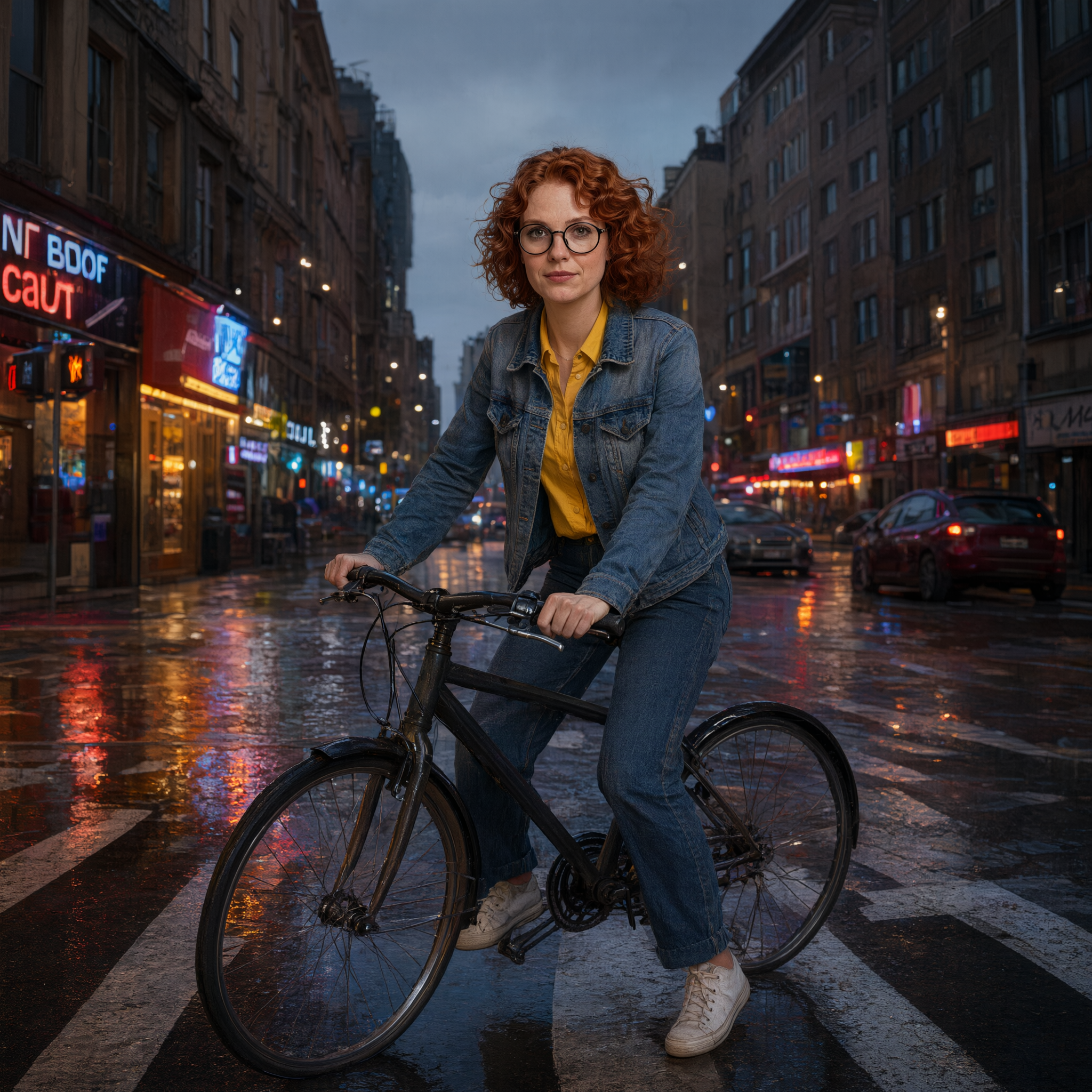
Generated on PixelDojo with Qwen 3 Pro. Produced by PixelDojo's generation pipeline.
Qwen 3 Pro costs 2 credits per image when you omit the size field, which is the setting we used. Our test on August 26, 2026 handed it a character reference photo and asked it to place her on a bicycle in a completely different rainy city scene, keeping her face, glasses, hair, and outfit identical. It took about 73 seconds and the result held every one of those details.
The scene rewrite that kept her identical
Every example below was produced on PixelDojo. Hover to see the prompt.
Place this exact woman on a bicycle crossing a rainy city crosswalk at dusk, neon shop signs reflecting in puddles, cinematic wide shot, keep her face, glasses, red curly hair, denim jacket and yellow shirt identical
Qwen 3 Pro
What the identity test showed
What actually landed in the result
A wide cinematic shot of the same woman straddling a bicycle at a crosswalk, wet asphalt reflecting red and blue neon signage behind her, overcast dusk sky, parked cars in the background. Her face, glasses, curly red hair, denim jacket, and yellow shirt all match the reference photo. Nothing from the original studio-style reference background survived, which is correct, since the instruction asked for a full scene change.
Output resolution matched the input
With size omitted in edit mode, the result came back at 2048 by 2048 pixels, the same square dimensions as the reference photo we sent in. That is the documented behavior: omitting size in edit mode matches the input image's resolution.
This is the sharpest identity result in our test series
Of every image-in, character-out test we ran for this series of pages, this one held the most detail from the reference: exact glasses shape, exact jacket cut, exact hair texture, in a scene that shares nothing visually with the source photo.
How it compares with QWEN Image Plus and Max
QWEN Image Plus and QWEN Image Max are text-to-image only, at 1 and 2 credits, with no reference-image edit mode at all. If the job is placing a specific character or product into a new scene, Qwen 3 Pro is the one in this family built for it.
The test: one character reference, one full scene rewrite, one instruction to keep her identical. Result: 2 credits, about 73 seconds, everything asked for showed up.
Why Choose Pixel Dojo for Qwen 3 Pro
Professional-quality results with cutting-edge AI technology
One model, two modes
Omit the image field and it generates from a prompt alone. Supply one to three reference images and the same prompt field becomes the edit instruction. There is no separate edit endpoint to learn.
The identity lock actually held
Face, red curly hair, round glasses, denim jacket, and yellow shirt all carried over unchanged into a completely different setting: a rainy crosswalk at dusk with neon signage, on a bicycle, none of which existed in the reference photo.
2 credits with size omitted
Omitting the size field bills at the 2K rate, 2 credits per image. Explicitly requesting a 1K size drops that to 1 credit; in edit mode, an explicit size also lets the output resolution differ from the input's.
How It Works
How we ran this identity test:
Start from a character reference, not a blank prompt
We used a four-variant character sheet image generated in an earlier test as the single reference image for this edit.
Name every detail that must not change
Our instruction spelled out face, glasses, hair color, jacket, and shirt explicitly, alongside the new scene description, rather than trusting the model to infer what to keep.
Check the result against the reference, item by item
We compared the output to the source photo detail by detail rather than judging it as a standalone image, since the entire point of the test was whether identity survived a full scene change.
Loved by creators on PixelDojo
Real feedback from people using PixelDojo, pulled from our in-product surveys.
I love this app
It has all the tools I can think of...
deployment rate of splendid features is incredible. Legend
large selection of tools on one platform
the amount you can do on this site
all in one place
Explore more AI tools on PixelDojo
AI Tools
Compare & Switch
- Best AI Image Generators
- Best AI Video Generators
- Midjourney Alternatives
- Civitai Alternatives
- Runway Alternatives
- Leonardo Alternatives
- Pika Alternatives
- Luma Alternatives
- Magnific Alternatives
- Veo Alternatives
- Flux Alternatives
- Freepik Alternatives
- Seedance Alternatives
- Seedream Alternatives
- Pixverse Alternatives
- GPT Image Alternatives
- Synthesia Alternatives
- Playground Alternatives
- NightCafe Alternatives
- Canva AI Alternatives
- ElevenLabs Alternatives
- ComfyUI Alternatives
- Fal Alternatives
- Replicate Alternatives
Common Questions
Everything you need to know about Qwen 3 Pro
How much does Qwen 3 Pro cost?
2 credits per image with size omitted, which bills at the 2K rate. An explicit 1K size drops that to 1 credit per image. This applies to both text-to-image and edit mode; the price does not change based on how many reference images you send, up to three.
How fast is Qwen 3 Pro's edit mode?
About 73 seconds in our August 26, 2026 test, for a single reference image and a full scene rewrite instruction.
Can it really keep a character's face and outfit identical in a new scene?
In our test, yes. We asked it to move a specific woman, matching her face, glasses, hair, and clothing exactly, into a rainy city scene that shared nothing with the reference photo, and every named detail came through correctly on the first attempt.
What resolution does the edit come back at?
With size omitted, it matches the input image's resolution. Our 2048 by 2048 reference photo produced a 2048 by 2048 result. Specify a size explicitly if you want the output at a different resolution than the source.
How does it differ from QWEN Image Plus or QWEN Image Max?
Both of those are generation-only, at 1 and 2 credits, with no reference-image edit mode. Qwen 3 Pro adds the ability to send up to three reference images and an edit instruction on the same endpoint, which is what our test used.
How do I call it from the API?
POST to /api/v1/models/qwen-3-pro/run with your API key, a prompt, and optionally an image field with one to three reference URLs. Same key and request shape as every other model in the catalog.