QWEN Image 2.0 Pro vs Seedream 5
Generated on PixelDojo. Produced by PixelDojo's generation pipeline.
QWEN Image 2.0 Pro costs 2 credits per image and returned our test in about 38 seconds. Seedream 5 costs 2.5 credits at its 2K default and took 117 seconds on the same prompt. Use QWEN Image 2.0 Pro when you want a fast, cheap, subject-focused shot; use Seedream 5 when the brief needs a full built-out scene behind the subject. We ran the same fisherman portrait prompt through both on August 26, 2026 and kept the first result from each.
Same prompt, same day, two different crops
Every example below was produced on PixelDojo. Hover to see the prompt.
Portrait of a middle-aged fisherman mending a net at golden hour, weathered hands in focus, shallow depth of field, natural skin texture, documentary photography style
QWEN Image 2.0 Pro
Portrait of a middle-aged fisherman mending a net at golden hour, weathered hands in focus, shallow depth of field, natural skin texture, documentary photography style
Seedream 5
Price, speed, and what each one actually rendered
Price
QWEN Image 2.0 Pro is a flat 2 credits per image regardless of size. Seedream 5 is tiered: 1.25 credits at its 1K setting, 2.5 credits at the 2K default. On the default settings both ship with, QWEN Image 2.0 Pro is 20 percent cheaper per image.
Measured speed
QWEN Image 2.0 Pro finished in about 38 seconds. Seedream 5 took 117 seconds on the identical prompt, roughly three times longer. Both numbers move with queue load, so treat them as typical rather than guaranteed.
Resolution and size options
QWEN Image 2.0 Pro offers 21 preset sizes across a 1K, 2K, and a maximum tier, square through ultrawide, defaulting to 2048 by 2048. Seedream 5 offers 8 aspect ratio presets plus an automatic 1K or 2K mode, and a custom mode that accepts any width and height between 1296 and 4096 pixels as long as the total stays under about 4.2 megapixels.
What QWEN Image 2.0 Pro's output looked like
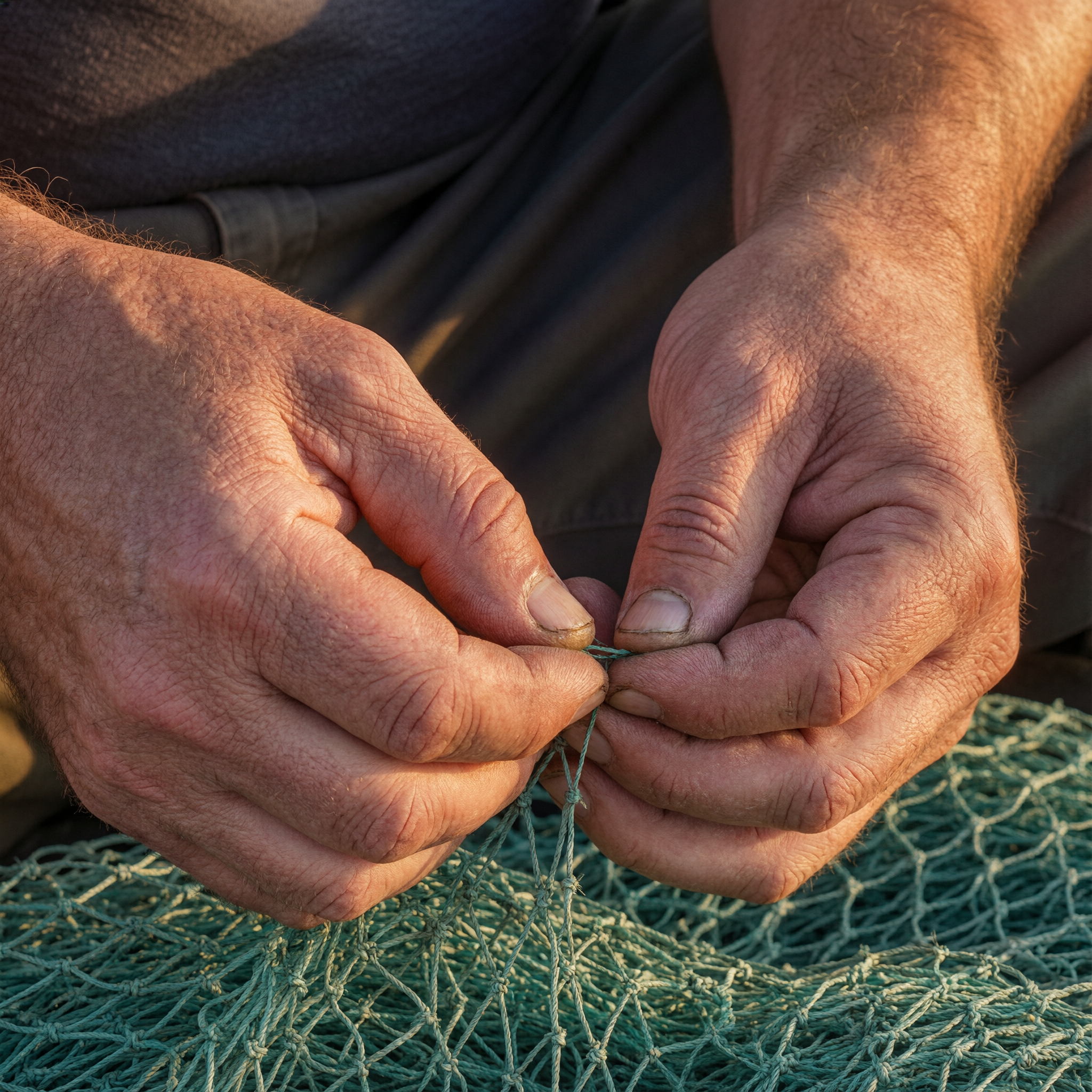
An extreme close crop: two sunburned hands working a knot in a green fishing net, forearms and a gray sleeve at the edges, no face in frame at all. The skin held cracked knuckles, wrist veins, and forearm hair correctly, and the twine between the fingers was sharp. It answered the hands-in-focus half of the prompt and dropped the portrait framing to do it.
What Seedream 5's output looked like
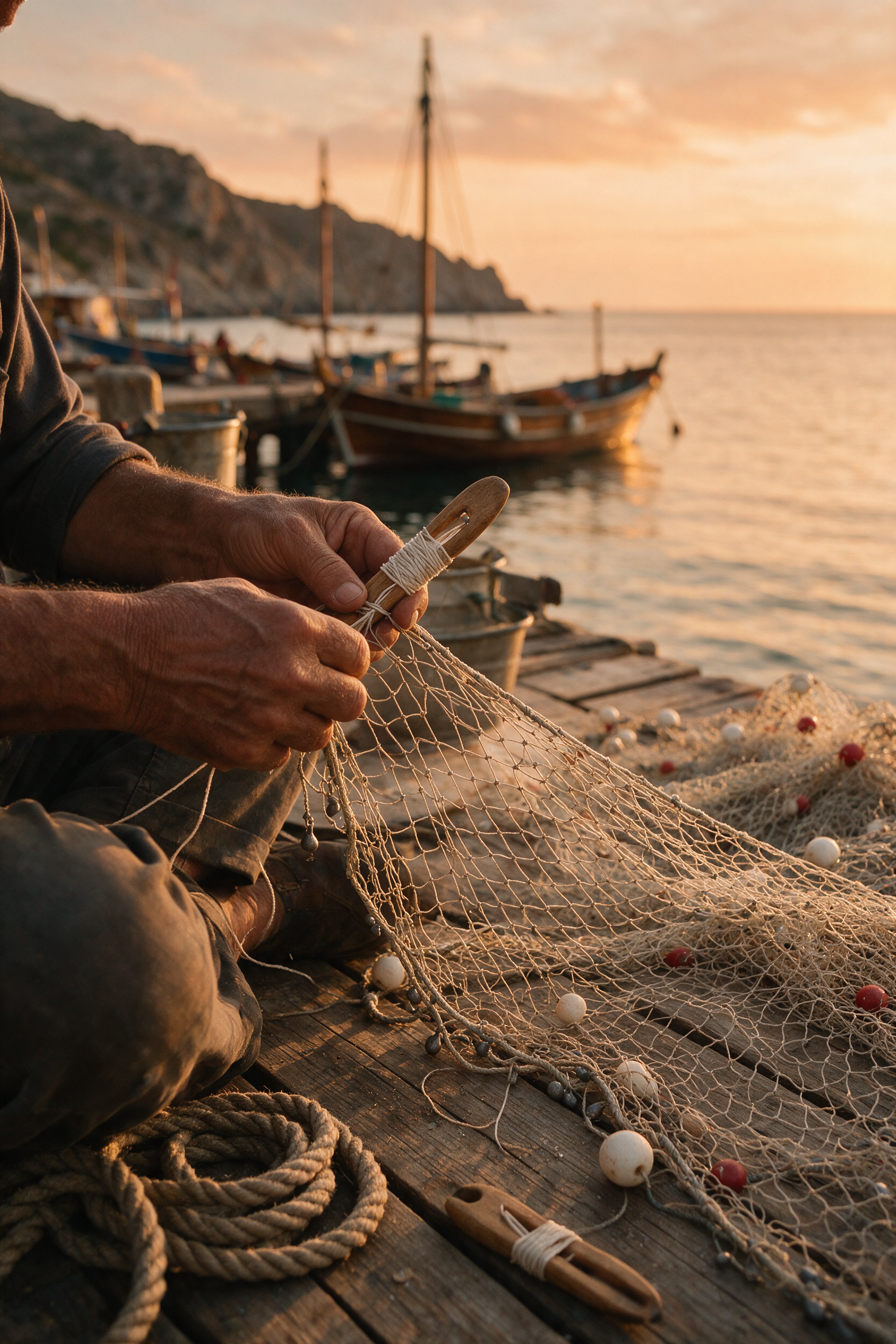
A full harbor scene at golden hour: a wooden fishing boat and a sailboat moored beyond a stone quay, a headland behind them, coiled rope and a tin bucket on the dock planks in the foreground. The fisherman's hands stayed in sharp focus around a wooden net needle and a pale netting edge strung with floats while the harbor fell into soft, warm-toned background blur.
Editing an existing image
Both models take reference images alongside a prompt instead of generating from nothing. QWEN Image 2.0 Pro accepts up to three, routed internally through its edit endpoint. Seedream 5 accepts image URLs directly on the same endpoint, up to the Pro tier's reference cap, at the same per-image price.
One prompt, two models, same day. QWEN Image 2.0 Pro: 2 credits, about 38 seconds. Seedream 5: 2.5 credits, 117 seconds.
How It Works
How we ran the comparison, so you can repeat it:
Send the identical prompt to both
We used the same fisherman portrait prompt, word for word, on QWEN Image 2.0 Pro and Seedream 5 at their default settings, on August 26, 2026.
Keep the first result from each
No retries, no reroll. QWEN Image 2.0 Pro returned in about 38 seconds for 2 credits. Seedream 5 returned in 117 seconds for 2.5 credits at its 2K default.
Judge by what the shot needs
Zoom into the hands for texture and correctness, then look at what surrounds them. That is the actual difference between these two on this prompt: a tight, fast crop against a full, slower scene.
Loved by creators on PixelDojo
Real feedback from people using PixelDojo, pulled from our in-product surveys.
All the tools, plus the guidance
Excellent tools. Ease of use. Well thought out interface. Wide variety of AI tools and features which are up to date with more added each month
I really like how the site is kept up to date, and the leaderboard (where I'm currently #11 most popular artist)
This is the best image generator I've used so far. Well done!
es facil de comprender asi uno no sea programador
amazing web site
Explore more AI tools on PixelDojo
AI Tools
Compare & Switch
- Best AI Image Generators
- Best AI Video Generators
- Midjourney Alternatives
- Civitai Alternatives
- Runway Alternatives
- Leonardo Alternatives
- Pika Alternatives
- Luma Alternatives
- Magnific Alternatives
- Veo Alternatives
- Flux Alternatives
- Freepik Alternatives
- Seedance Alternatives
- Seedream Alternatives
- Pixverse Alternatives
- GPT Image Alternatives
- Synthesia Alternatives
- Playground Alternatives
- NightCafe Alternatives
- Canva AI Alternatives
- ElevenLabs Alternatives
- ComfyUI Alternatives
- Fal Alternatives
- Replicate Alternatives
Common Questions
Everything you need to know about QWEN Image 2.0 Pro vs Seedream 5
Which is cheaper, QWEN Image 2.0 Pro or Seedream 5?
QWEN Image 2.0 Pro, at a flat 2 credits per image. Seedream 5 is 2.5 credits at its 2K default, or 1.25 credits if you drop it to the 1K tier, which puts it just under QWEN Image 2.0 Pro's price when you accept the smaller output.
Which one is faster?
QWEN Image 2.0 Pro, measurably. Our run finished in about 38 seconds against 117 seconds for Seedream 5 on the identical prompt, timed the same day.
Which one should I use for a portrait?
Depends on what the portrait needs. QWEN Image 2.0 Pro gave us a tight, correct close-up on hands and skin texture in a third of the time. Seedream 5 gave us the full scene, harbor, boats, and golden-hour sky, behind the same subject. Pick QWEN Image 2.0 Pro for detail on a fast budget, Seedream 5 when the background has to carry the shot.
What resolutions does each support?
QWEN Image 2.0 Pro has 21 preset sizes across three tiers, topping out at 2048 by 2048. Seedream 5 has 8 aspect ratio presets, an automatic 2K mode, and a custom mode up to 4096 pixels on a side within a roughly 4.2 megapixel total-pixel cap.
Can either one edit a photo I already have?
Yes, both. Send reference images with your prompt instead of generating from a blank page. QWEN Image 2.0 Pro takes up to three; Seedream 5 takes image URLs on the same request at no extra cost per image.
How do I call these from the API?
POST to /api/v1/models/qwen-image-2.0-pro/run or /api/v1/models/seedream-5/run with the same API key and the same request shape, just a different apiId in the path.