Recraft V4.1 Pro SVG AI Generator
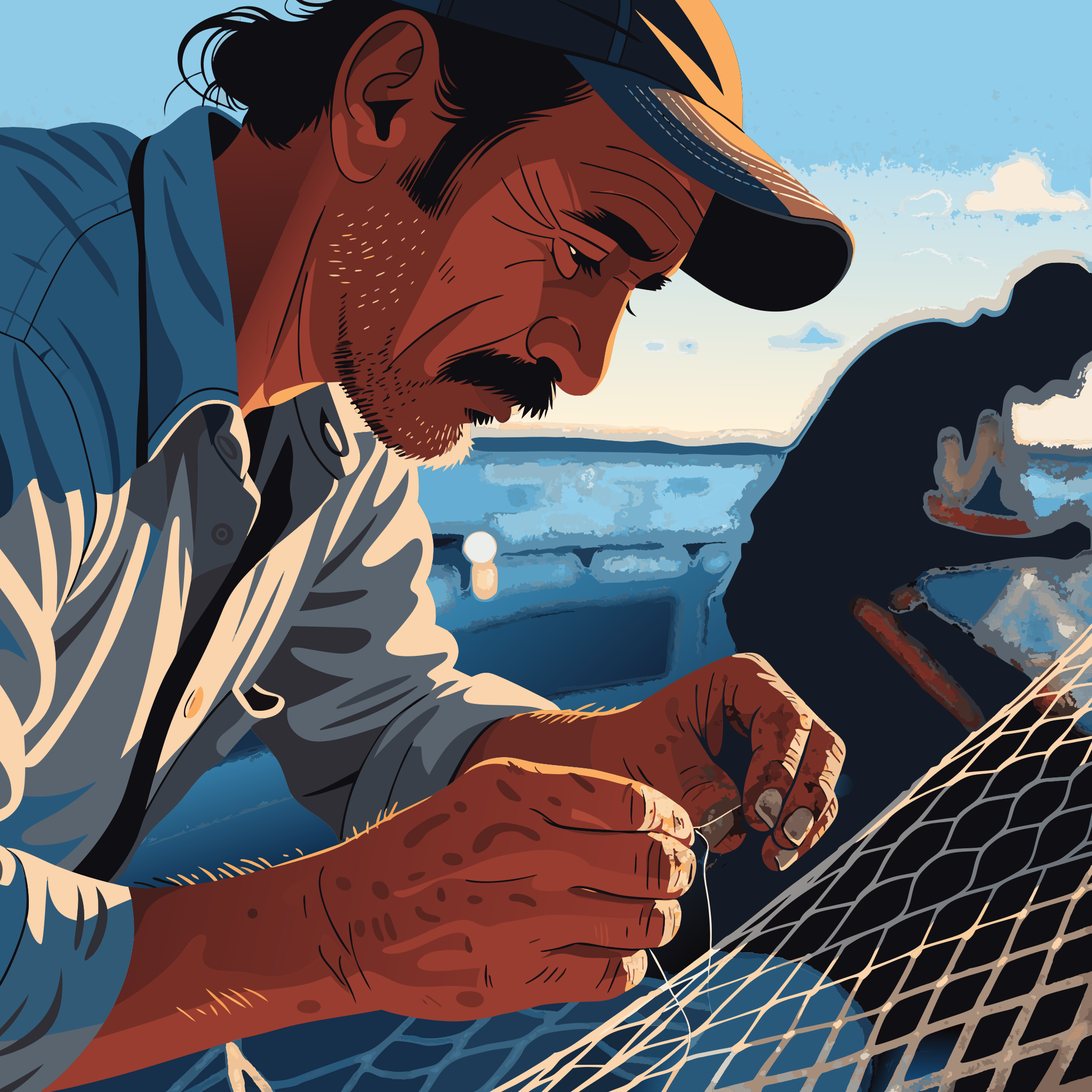
Generated on PixelDojo with Recraft V4.1 Pro SVG. Produced by PixelDojo's generation pipeline.
Recraft V4.1 Pro SVG costs 5 credits per image and returned our test in about 38 seconds on August 26, 2026, in one request with no polling. The result is not a photo rendered to look vector-ish. It is an actual SVG document, paths and all, that opens and edits like any vector file. We sent it a photographic portrait prompt to see what it does with a scene that was never meant to be flat art, and it drew one anyway.
What a photography prompt looks like as an SVG
Every example below was produced on PixelDojo. Hover to see the prompt.
Portrait of a middle-aged fisherman mending a net at golden hour, weathered hands in focus, shallow depth of field, natural skin texture, documentary photography style
Recraft V4.1 Pro SVG
Raster alternatives if you need a photograph instead
Switch models without switching tools. Each one runs in the same PixelDojo studio.
What the Pro SVG variant actually is
What we actually got back
A weathered fisherman in a dark cap and blue plaid shirt, mustache and stubble rendered in flat cel-shaded color, hunched over a net with both hands working a knot at the fingers. Dusk sky behind him, a boat hull in soft silhouette. Bold black linework, graphic color blocking, no photographic grain or gradient blending. The scene it built was correct. The rendering style ignored the photography instruction entirely, because vector output cannot fake a photograph.
Fourteen aspect ratios plus a custom size
1:1, 16:9, 9:16, 4:3, 3:4, 3:2, 2:3, 2:1, 1:2, 14:10, 10:14, 4:5, 5:4 and 6:10, or send an explicit width by height in the roughly 2048 pixel Pro size family instead.
One tool, six variants
Recraft exposes tier (standard or Pro) times variant (raster, SVG or utility) from a single tool. Pro SVG is one of six combinations, priced 1 or 5 credits depending on tier.
Standard SVG is the budget version of this
Recraft V4.1 SVG, the standard tier, costs 1 credit and outputs roughly 1024 pixel vector work with less path detail. Pro SVG spends the extra 4 credits on finer geometry at double the linear resolution.
Utility mode is a different job entirely
The same tool also has a Utility variant tuned for flat-lit, front-facing product mockups rather than illustration or photography. It sits at the same 1 or 5 credit price points as raster and SVG.
A legacy svg:true flag still works
Older integrations that pass svg: true instead of variant: svg get promoted automatically. New callers should use variant directly.
5 credits, about 38 seconds, one call, and the file that came back was real SVG XML, not a raster PNG wearing a vector filter.
Why Choose Pixel Dojo for Recraft V4.1 Pro SVG
Professional-quality results with cutting-edge AI technology
5 credits, flat
Pro tier plus SVG variant is 5 credits per image regardless of aspect ratio or size. The standard tier SVG variant is 1 credit; Pro raster is also 5.
About 38 seconds, one request
Timed from submission to finished file on August 26, 2026. It landed inside the API's synchronous window, so the file came back in the same response.
The output is a working vector file
Structured paths at a 2048 by 2048 viewBox, not a raster image saved with an .svg name. It opens in a vector editor and scales without blurring.
It draws, it does not photograph
Asked for documentary photography, it delivered a bold, cel-shaded illustration instead. That is the SVG variant doing what SVG variants do: this model does not have a photorealistic mode.
How It Works
Reproduce the 5 credit vector portrait:
Pick tier pro and variant svg
Recraft is one tool with two settings that decide both the price and the file type. Tier pro plus variant svg is what makes the job 5 credits and the output a real SVG.
Write the prompt like you would for any image
The model still reads a full scene description, including style words. It will build the scene correctly; it just renders every scene as vector art, so photography instructions get reinterpreted as illustration.
Generate in the app or over the API
Run it from the Recraft tool page, or POST to /api/v1/models/recraft-v4.1-pro-svg/run. Ours took about 38 seconds and returned in the same response.
Loved by creators on PixelDojo
Real feedback from people using PixelDojo, pulled from our in-product surveys.
Creative freedom, range of tools and options.
I love the training feature
the quality is the best
All the tools needed in one dashboard
Very fair and very broad in tools.
Accurate results
Explore more AI tools on PixelDojo
AI Tools
Compare & Switch
- Best AI Image Generators
- Best AI Video Generators
- Midjourney Alternatives
- Civitai Alternatives
- Runway Alternatives
- Leonardo Alternatives
- Pika Alternatives
- Luma Alternatives
- Magnific Alternatives
- Veo Alternatives
- Flux Alternatives
- Freepik Alternatives
- Seedance Alternatives
- Seedream Alternatives
- Pixverse Alternatives
- GPT Image Alternatives
- Synthesia Alternatives
- Playground Alternatives
- NightCafe Alternatives
- Canva AI Alternatives
- ElevenLabs Alternatives
- ComfyUI Alternatives
- Fal Alternatives
- Replicate Alternatives
Common Questions
Everything you need to know about Recraft V4.1 Pro SVG
How much does Recraft V4.1 Pro SVG cost?
5 credits per image, flat. Aspect ratio and size do not change the price. The standard tier SVG variant is 1 credit at roughly half the linear resolution.
How fast is Recraft V4.1 Pro SVG?
About 38 seconds in our August 26, 2026 run, returned in a single request with no job polling needed.
Is the output actually an SVG file, or a PNG made to look vector-y?
A real SVG document. Ours came back as structured path data in a 2048 by 2048 viewBox, openable and editable in any vector tool, not a rasterized image saved with a vector extension.
Will it produce a photorealistic image if I ask for one?
No. We asked for documentary photography and got a flat, cel-shaded illustration instead. The SVG variant always draws vector art regardless of the prompt's style instruction, because that is the only kind of image an SVG can hold.
How is Pro SVG different from standard Recraft V4.1 SVG?
Both are vector output on the same tool. Standard is 1 credit at roughly 1024 pixel geometry; Pro is 5 credits with finer paths at roughly 2048 pixel geometry. Pick Pro when the file needs to hold up at a larger print size.
How do I call it from the API?
POST to /api/v1/models/recraft-v4.1-pro-svg/run with your API key and a prompt. Every Recraft tier and variant combination has its own model id on the same request shape.