Riverflow AI Generator
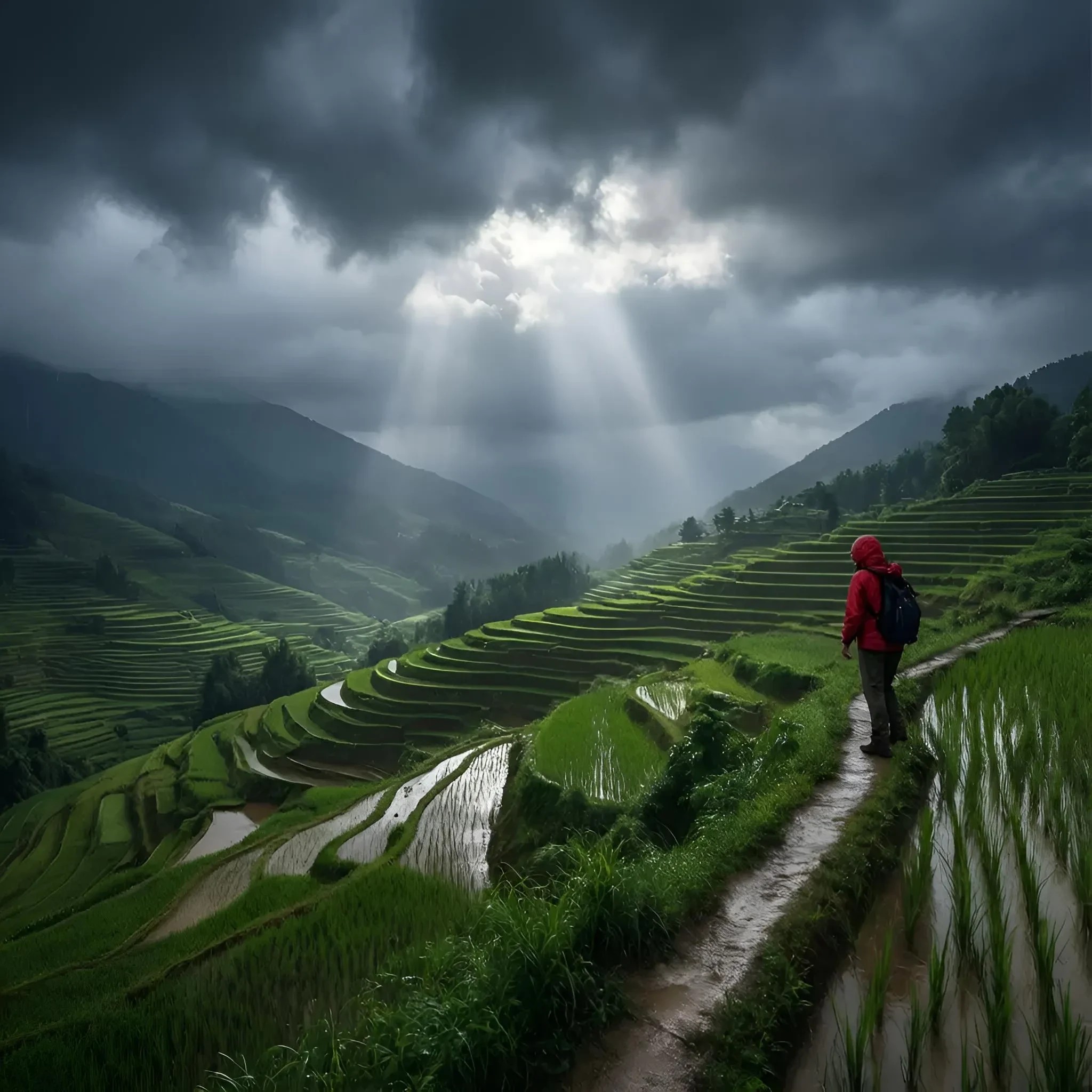
Generated on PixelDojo with Riverflow Fast. Produced by PixelDojo's generation pipeline.
Riverflow Fast costs 1 credit per image and returned our landscape test in about 52 seconds on August 26, 2026, arriving through a job poll rather than the first response. We sent one storm-light prompt with no other settings and kept the first result. Here is the rate card, the image it actually returned, and where the Pro tier earns its higher price.
The 1 credit landscape, first result
Every example below was produced on PixelDojo. Hover to see the prompt.
Storm light over a terraced rice valley after rain, low clouds drifting through, a hiker in a red jacket on the ridge path, epic scale
Riverflow Fast
Other photoreal image models to compare it against
Switch models without switching tools. Each one runs in the same PixelDojo studio.
Riverflow, setting by setting
What came back
Dark storm clouds parting for a shaft of light over green terraced rice paddies stepping down a valley, water pooled in the terraces reflecting the sky, and a hiker in a red jacket with a dark backpack walking a wet dirt path along the ridge. The god-ray lighting and the water reflections in the terraces were both things we asked for by name and both showed up.
Fast versus Pro
Fast is 1 credit at 1K or 2K. Pro is 3 credits at the same two tiers and 7 credits at 4K. Pro is the one to reach for when the output needs to survive a large print or a tight crop.
Three resolution tiers
1K, 2K and 4K. Fast tops out at 2K; only Pro unlocks 4K. Our run used the 2K default.
One to four outputs per call
num_outputs takes 1 through 4, each priced at the same per-image rate for the chosen model and tier.
Reference images steer, they do not start the image
Send up to a handful of reference URLs to guide style and composition. The model still generates a new frame from the prompt rather than modifying what you sent in.
A seed field for repeatable output
Pass an integer seed to get the same composition back on a repeat request with the same prompt and settings.
1 credit, about 52 seconds, one call, first result kept. No reference image, no retries.
Why Choose Pixel Dojo for Riverflow
Professional-quality results with cutting-edge AI technology
1 credit on Fast at 1K or 2K
Riverflow Fast is a flat 1 credit at either resolution tier. Pro is 3 credits at 1K or 2K and 7 credits at 4K.
About 52 seconds, measured
Timed from request to finished file on August 26, 2026. It went past the synchronous window and returned through a status poll.
The default aspect ratio is square
We did not set aspect_ratio, so it defaulted to 1:1 and returned a 2048 by 2048 image even though the prompt described a wide landscape. Set aspect_ratio explicitly for a true wide frame.
It generates fresh frames, it does not edit
Reference images are accepted but only as style and composition guidance. Riverflow always renders a new image from the prompt rather than modifying the reference directly.
How It Works
Reproduce our 1 credit landscape run:
Leave model on fast
Fast is the schema default and the cheapest tier at 1 credit. Switch to pro only when you need the higher resolution ceiling.
Set aspect_ratio explicitly for a landscape frame
We skipped this and got a square image back. Naming the ratio you want, like 16:9 or 3:2, is what actually controls the shape of the output.
Generate in the app or over the API
Run it from the Riverflow tool page, or POST to /api/v1/models/riverflow/run. Ours took about 52 seconds and charged 1 credit.
Loved by creators on PixelDojo
Real feedback from people using PixelDojo, pulled from our in-product surveys.
es facil de comprender asi uno no sea programador
amazing web site
phenomenal site. would highly recommend
Amazing features, easy to use, privacy
the number of options, and especially the quick response to questions on Discord
Love you guys!!
Explore more AI tools on PixelDojo
AI Tools
Compare & Switch
- Best AI Image Generators
- Best AI Video Generators
- Midjourney Alternatives
- Civitai Alternatives
- Runway Alternatives
- Leonardo Alternatives
- Pika Alternatives
- Luma Alternatives
- Magnific Alternatives
- Veo Alternatives
- Flux Alternatives
- Freepik Alternatives
- Seedance Alternatives
- Seedream Alternatives
- Pixverse Alternatives
- GPT Image Alternatives
- Synthesia Alternatives
- Playground Alternatives
- NightCafe Alternatives
- Canva AI Alternatives
- ElevenLabs Alternatives
- ComfyUI Alternatives
- Fal Alternatives
- Replicate Alternatives
Common Questions
Everything you need to know about Riverflow
How much does Riverflow cost?
Fast is 1 credit per image at 1K or 2K resolution. Pro is 3 credits at those same tiers and 7 credits at 4K. num_outputs multiplies the per-image rate directly.
How fast is Riverflow?
About 52 seconds in our August 26, 2026 run on the Fast tier. It returned through a job poll rather than the same response, so build for an async wait.
What resolution does it output by default?
2K, which for our square-default run meant 2048 by 2048 pixels. Set the resolution field to 1k or 4k, or leave it and it uses 2k.
Why did my landscape prompt come back square?
aspect_ratio defaults to 1:1 if you do not set it. Riverflow does not infer a wide frame from the prompt text, so pass an explicit aspect ratio for a true landscape crop.
Is Riverflow Pro worth the extra credits?
For most single-subject scenes, Fast already holds detail well at 1 credit. Pay for Pro when you need 4K output or extra fidelity on a complex, busy composition.
How do I call Riverflow from the API?
POST to /api/v1/models/riverflow/run with your API key and a prompt. Set model to fast or pro; fast is the default if you omit it.