Family Photo Restoration
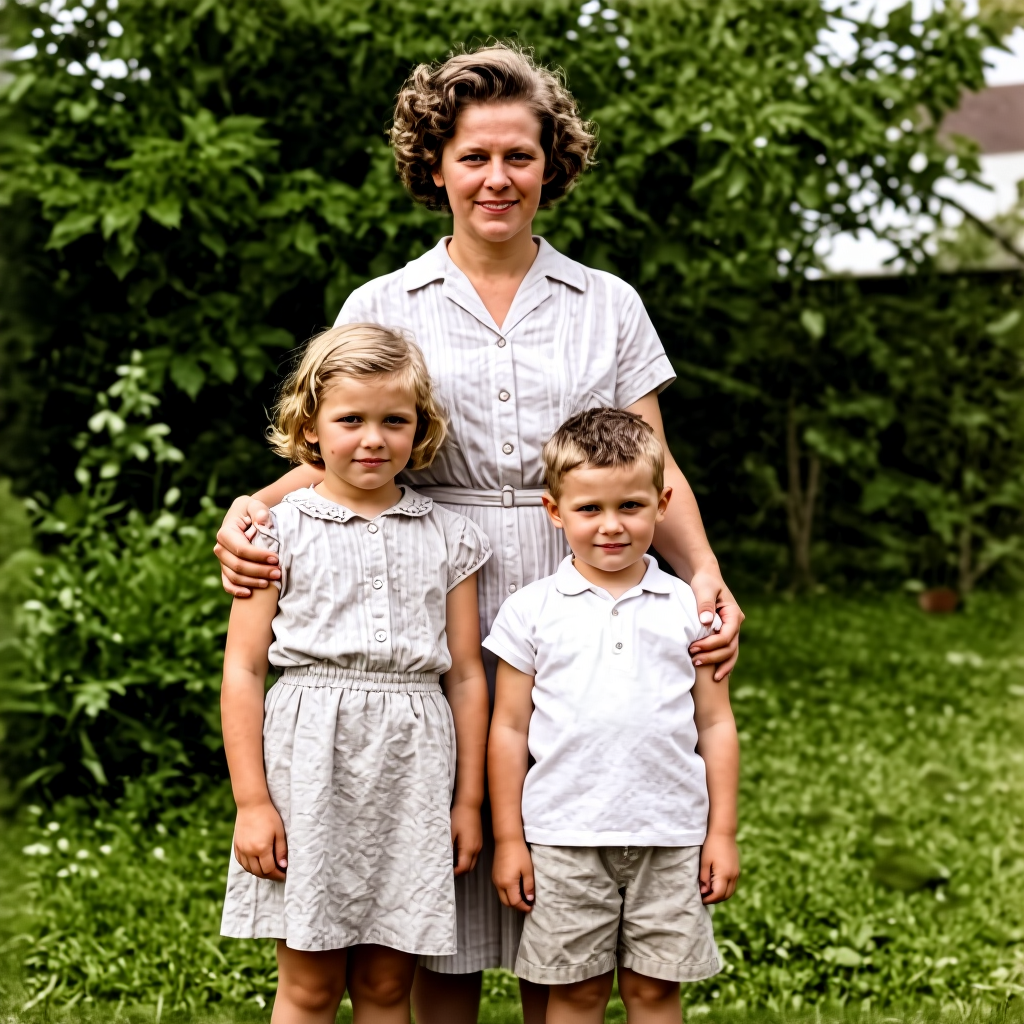
Generated on PixelDojo with Flux Edit (Kontext dev). Produced by PixelDojo's generation pipeline.
You can restore and colorize an old family photo with AI by uploading the scan to an image editing model and describing the damage you want removed and the color you want added, in one instruction. We ran this on a scratched, creased black and white photo on August 26, 2026: 1 credit, about 21 seconds, and the scratches, the crease line and the black and white cast were all gone in the result, with the people, their poses and the garden behind them kept exactly as they were.
The 1 credit restoration, scratches gone and color added
Every example below was produced on PixelDojo. Hover to see the prompt.
Restore this old damaged family photograph: remove the scratches, dust spots and creases, sharpen the faces and clothing detail, and add natural, realistic color to the skin tones, hair, clothing and garden background while keeping the same people, poses and composition
Flux Edit (Kontext dev)
One edit instruction, one damaged photo, August 26, 2026: 1 credit on the Flux Edit dev model, about 21 seconds, scratches and creases gone, natural color added, same three people in the same poses.
Why Choose Pixel Dojo for Family Photo Restoration
Professional-quality results with cutting-edge AI technology
1 credit per restoration
The dev tier of Flux Edit runs this for 1 credit. There is no separate fee for the colorization part of the instruction.
About 21 seconds, measured
Timed from the edit request to the finished file on August 26, 2026. No retries were needed to remove the damage.
Faces, poses and background stayed correct
The three people, their poses and the garden setting in the result matched the source photo. Only the damage and the missing color changed.
How It Works
Three steps from a damaged scan to a finished restoration:
Start from the actual photo, not a description
Restoration only works when the model has the real image to work from. We did not have a real family archive to pull from for this walkthrough, so we generated a stand-in: a worn black and white portrait of a mother and two children in a garden, with a visible crack line and dust spots, to use as our damaged input. If you already have a scanned print or a phone photo of one, that file is your starting point instead.
Send it to the Image Editor with one restoration instruction
We asked to remove the scratches, dust spots and creases, sharpen the faces and clothing detail, and add natural, realistic color to skin, hair, clothing and the garden background, while keeping the same people, poses and composition. The Flux Edit model ran that in about 21 seconds for 1 credit. The crack line and dust spots were gone, the black and white cast was replaced with a plausible color palette, brown wavy hair on the mother and blonde hair on the children, pale clothing, and a saturated green garden behind them. The three people and their poses matched the original exactly.
Check the crop and re-run if the edges moved
Our source image included the edge of a photo album page around the print. The restored version cropped in tight and dropped that album border entirely, which is normal for an edit model reframing around the main subject. If keeping the exact original framing matters, say so directly in the instruction, for example asking it to preserve the full frame with no cropping.
Loved by creators on PixelDojo
Real feedback from people using PixelDojo, pulled from our in-product surveys.
Love you guys!!
Trained my Lora super fast. Still working out how to creat content wit it, but I love it so far.
I love this app
It has all the tools I can think of...
deployment rate of splendid features is incredible. Legend
large selection of tools on one platform
Explore more AI tools on PixelDojo
AI Tools
Compare & Switch
- Best AI Image Generators
- Best AI Video Generators
- Midjourney Alternatives
- Civitai Alternatives
- Runway Alternatives
- Leonardo Alternatives
- Pika Alternatives
- Luma Alternatives
- Magnific Alternatives
- Veo Alternatives
- Flux Alternatives
- Freepik Alternatives
- Seedance Alternatives
- Seedream Alternatives
- Pixverse Alternatives
- GPT Image Alternatives
- Synthesia Alternatives
- Playground Alternatives
- NightCafe Alternatives
- Canva AI Alternatives
- ElevenLabs Alternatives
- ComfyUI Alternatives
- Fal Alternatives
- Replicate Alternatives
Common Questions
Everything you need to know about Family Photo Restoration
What does it cost to restore and colorize an old photo with AI?
1 credit for the dev tier of Flux Edit, the model we used in our August 26, 2026 run. A single instruction handled both the damage removal and the colorization together.
How long does the restoration take?
About 21 seconds in our run, measured from the edit request to the finished file. Actual turnaround moves with queue load.
Will the AI keep the same people and poses?
In our test, yes. The mother and two children kept their exact poses, positions and expressions. Only the scratches, creases and missing color changed. Say so explicitly in your instruction if identity preservation matters to you, for example keep the same people and poses.
Does it need a real scan, or can it start from nothing?
It needs the actual photo. We generated a stand-in damaged photo for this walkthrough because we did not have a real family archive on hand, but a real restoration always starts from your scanned print or a phone photo of it, not a text description.
Will it keep the full original framing?
Not automatically. Our source image included the edge of a photo album page, and the restored result cropped in tighter and dropped that border. If the original framing matters, add an instruction such as preserve the full frame with no cropping.
How do I call this from the API?
POST to /api/v1/models/flux-edit/run with your API key, the photo as input_image_1, your restoration instruction as the prompt, and model set to dev for the 1 credit tier. The pro and max tiers accept the same request shape at a higher price.