Graduation Announcement Cards AI Generator
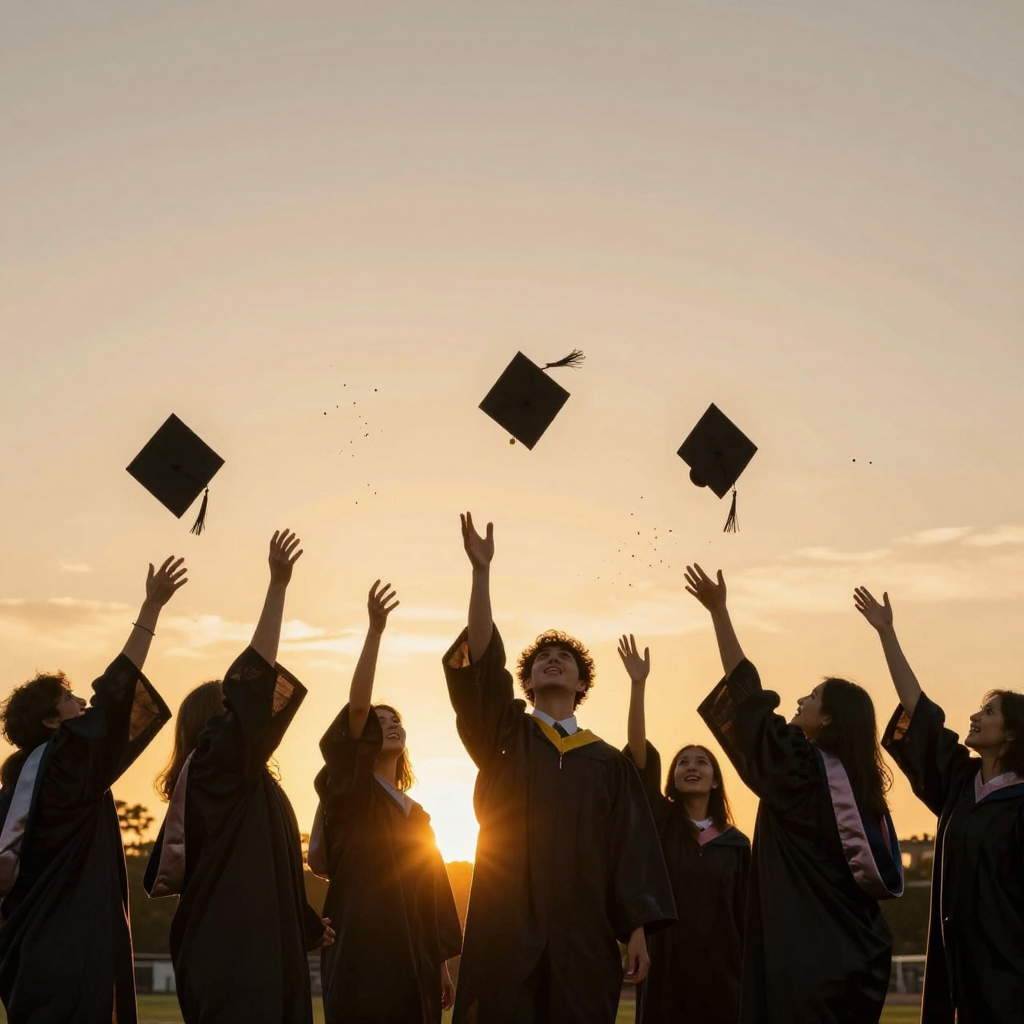
Generated on PixelDojo with z-image-turbo. Produced by PixelDojo's generation pipeline.
You can make a graduation announcement card with AI by generating a celebratory scene, adding the graduate's name, school and date with an image editor since generated lettering is not reliable, and upscaling before you print or mail it. We ran the first step on August 26, 2026, generating a cap toss scene at sunset on Z-Image Turbo for 0.5 credit in about 13 seconds.
The 0.5 credit scene, headline space included
Every example below was produced on PixelDojo. Hover to see the prompt.
A joyful graduation cap toss silhouetted against a golden sunset sky, graduates in gowns celebrating, confetti scattered in the air, cinematic warm light, wide open sky at the top of the frame for a headline
z-image-turbo
One prompt, one celebration scene, August 26, 2026: 0.5 credit on Z-Image Turbo, about 13 seconds, open sky left above the caps for a name and date.
Why Choose Pixel Dojo for Graduation Announcement Cards
Professional-quality results with cutting-edge AI technology
0.5 credit per attempt
Cheap enough to try a few moods, times of day or crowd sizes before you settle on the one you letter and print.
About 13 seconds, measured
Timed from request to finished file on August 26, 2026. No queue wait, no retry needed to get a usable scene.
Faces read clearly, not just silhouettes
We asked for a silhouette against the sunset and the model still kept expressions and gown detail visible, which reads warmer on a printed card than a flat black outline.
How It Works
Three steps from blank prompt to a card ready photo:
Describe the celebration, not the wording
Our prompt asked for a joyful graduation cap toss silhouetted against a golden sunset sky, graduates in gowns celebrating, confetti scattered in the air, cinematic warm light, wide open sky at the top of the frame for a headline. Z-Image Turbo ran it for 0.5 credit and returned the scene in about 13 seconds. Seven graduates in gowns came back with caps mid toss against a warm orange sunset, faces lit rather than fully silhouetted, and a clean band of sky above them with nothing printed on it. This is a generic celebration scene, not a photo of a specific graduate, which makes it a fit for a themed announcement rather than a keepsake portrait.
Add the name, school and date with the Image Editor
Send the finished scene to the Image Editor with an instruction such as adding the graduate's name, the school name and the ceremony date in the open sky area, in a font and color you specify. Editing an existing image this way runs on the Flux Edit model for 1 credit, and it types the exact details you give it instead of guessing at letterforms during generation. If you have an actual photo of the graduate you want on the card instead of this generic scene, send that real photo to the Image Editor instead, with an instruction to add a similar sunset background around them.
Upscale before you print or mail it
Our file came back at 1024 by 1024 pixels, which is fine for a digital share but soft once a print shop enlarges it to a card. Run the finished card through Creative Upscale for 0.5 credit before ordering prints or mailing announcements.
Loved by creators on PixelDojo
Real feedback from people using PixelDojo, pulled from our in-product surveys.
Excellent tools. Ease of use. Well thought out interface. Wide variety of AI tools and features which are up to date with more added each month
I really like how the site is kept up to date, and the leaderboard (where I'm currently #11 most popular artist)
This is the best image generator I've used so far. Well done!
es facil de comprender asi uno no sea programador
amazing web site
phenomenal site. would highly recommend
Explore more AI tools on PixelDojo
AI Tools
Compare & Switch
- Best AI Image Generators
- Best AI Video Generators
- Midjourney Alternatives
- Civitai Alternatives
- Runway Alternatives
- Leonardo Alternatives
- Pika Alternatives
- Luma Alternatives
- Magnific Alternatives
- Veo Alternatives
- Flux Alternatives
- Freepik Alternatives
- Seedance Alternatives
- Seedream Alternatives
- Pixverse Alternatives
- GPT Image Alternatives
- Synthesia Alternatives
- Playground Alternatives
- NightCafe Alternatives
- Canva AI Alternatives
- ElevenLabs Alternatives
- ComfyUI Alternatives
- Fal Alternatives
- Replicate Alternatives
Common Questions
Everything you need to know about Graduation Announcement Cards
What does an AI graduation announcement card cost?
0.5 credit for the base scene on Z-Image Turbo, the model we used. Add 1 credit if you send it to the Image Editor to letter in the name, school and date, and 0.5 credit to upscale before printing. A full three step run is 2 credits.
How fast does it come back?
About 13 seconds in our August 26, 2026 run, measured from the prompt to the finished 1024 by 1024 file.
Can the AI write the graduate's name and date directly on the card?
Not reliably from a text prompt. Leave that wording out of the generation step and add it afterward with the Image Editor, which types exactly what you give it.
Can I use a real photo of the graduate instead of a generated scene?
Yes. Our scene shows generic graduates because we generated it from a text description. If you already have a photo of the actual graduate, send that to the Image Editor with an instruction to add a matching sunset background and the announcement text, keeping their real face.
Will the card print sharp?
Our base file came back at 1024 by 1024 pixels, which is fine on a screen but soft once enlarged to card size. Run it through Creative Upscale first, for 0.5 credit, before you order prints.
Can I generate a few versions to compare before choosing one?
Yes. The model runs at POST /api/v1/models/z-image-turbo/run with the same API key each time, so you can call it repeatedly with small changes, such as a different time of day, and pick the version you like before spending the edit credit.