Museum Style Art Prints
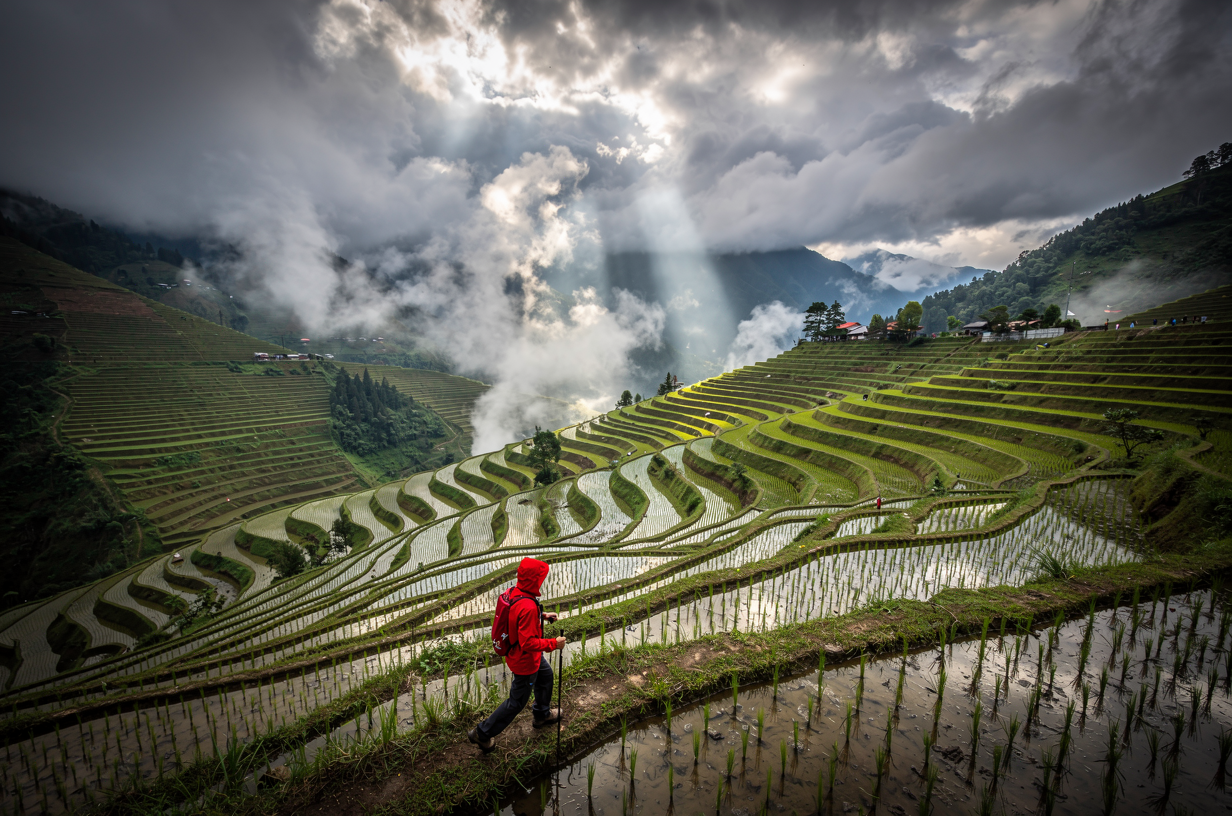
Generated on PixelDojo with flux-2-pro. Produced by PixelDojo's generation pipeline.
You can make printable wall art with AI by describing the scene like a fine art brief, generating it at a resolution built for printing, and enlarging the file if a bigger frame needs more pixels. We ran the first step on August 26, 2026: a storm lit rice terrace landscape on Flux 2 Pro for 1.5 credits in about 29 seconds, framed at a 3:2 ratio that matches a standard photo print. This page walks through the steps that turn a text description into a file ready for a real frame, using the exact prompt and the real credit cost at each stage.
What the terrace landscape print looks like
Every example below was produced on PixelDojo. Hover to see the prompt.
Storm light over a terraced rice valley after rain, low clouds drifting through, a hiker in a red jacket on the ridge path, epic scale
flux-2-pro
One prompt, one landscape, August 26, 2026: 1.5 credits on Flux 2 Pro, about 29 seconds, kept on the first result.
Why Choose Pixel Dojo for Museum Style Art Prints
Professional-quality results with cutting-edge AI technology
1.5 credits at the default resolution
Flux 2 Pro priced our landscape run at 1.5 credits for the 1 MP default, with no extra charge for the aspect ratio or the light and scale detail named in the prompt.
About 29 seconds, measured
Timed from request to finished file on August 26, 2026, kept on the first result with no retries.
4 MP is only half a credit more
Moving from the 1 MP default to the full 4 MP tier raises the price from 1.5 to 2 credits, cheap headroom for a bigger print compared to most upscaling passes.
How It Works
Three steps, one landscape, ready for a real frame:
Describe the scene like a fine art brief
Name the subject, the light and something for scale instead of camera settings. Our prompt asked for storm light over a terraced rice valley, low clouds drifting through and a hiker in a red jacket on the ridge path for scale, at epic scale overall. It ran on Flux 2 Pro for 1.5 credits and came back in about 29 seconds as a 1232 by 816 pixel image in a 3:2 frame, with light breaking through the clouds and the hiker's red jacket carrying the eye down the ridge.
Pick a resolution and a frame ratio before you print
Flux 2 Pro's resolution setting runs from 0.5 MP up to 4 MP. The 1 MP default we used costs 1.5 credits, and the full 4 MP tier is only 2 credits, the cheapest way to buy a bigger base file. The aspect ratio list covers 3:2, 2:3, 4:5, 5:4, 3:4, 4:3, 1:1, 16:9 and 9:16, so you can match a real frame size instead of cropping after the fact. We picked 3:2, a standard photo print ratio.
Scale it up before it goes to a real print
If a large or gallery size frame needs more pixels than the 4 MP ceiling gives you, run the finished file through Creative Upscaler. It takes a scale factor from 1 to 10 and charges a flat 0.5 credits no matter which multiplier you choose, so a 10x pass costs the same as a 2x pass.
Loved by creators on PixelDojo
Real feedback from people using PixelDojo, pulled from our in-product surveys.
It has all the tools I can think of...
deployment rate of splendid features is incredible. Legend
large selection of tools on one platform
the amount you can do on this site
all in one place
It is a lot of fun to uae and easy too.
Explore more AI tools on PixelDojo
AI Tools
Compare & Switch
- Best AI Image Generators
- Best AI Video Generators
- Midjourney Alternatives
- Civitai Alternatives
- Runway Alternatives
- Leonardo Alternatives
- Pika Alternatives
- Luma Alternatives
- Magnific Alternatives
- Veo Alternatives
- Flux Alternatives
- Freepik Alternatives
- Seedance Alternatives
- Seedream Alternatives
- Pixverse Alternatives
- GPT Image Alternatives
- Synthesia Alternatives
- Playground Alternatives
- NightCafe Alternatives
- Canva AI Alternatives
- ElevenLabs Alternatives
- ComfyUI Alternatives
- Fal Alternatives
- Replicate Alternatives
Common Questions
Everything you need to know about Museum Style Art Prints
What does it cost to make wall art with AI?
1.5 credits at Flux 2 Pro's default 1 MP resolution, the tier we used. The full 4 MP tier costs 2 credits. Running the result through Creative Upscaler afterward adds a flat 0.5 credits no matter which scale factor you pick.
How fast is the image?
About 29 seconds in our August 26, 2026 run, measured from the prompt to the finished 1232 by 816 pixel file.
What resolution do I actually need for a real print?
Flux 2 Pro offers four tiers: 0.5, 1, 2 and 4 MP. We used the 1 MP default. For a large or gallery size frame, generate at the 4 MP tier for 2 credits, or run the finished file through Creative Upscaler afterward for a flat 0.5 credits at a scale factor up to 10x.
Which aspect ratio matches a real frame?
Flux 2 Pro supports 3:2, 2:3, 4:5, 5:4, 3:4, 4:3, 1:1, 16:9 and 9:16. We used 3:2, a standard photo print ratio, so the crop already matched the frame instead of needing a trim after generation.
Do I need a real photo to start from?
No. Our landscape came from a text description alone. If you already have a photo you want turned into a print, send it to the Image Editor instead of writing a prompt from scratch.
Can I generate a whole batch of prints automatically?
Yes. POST your prompt to /api/v1/models/flux-2-pro/run with your API key, the same key and request shape as every other model in the catalog, so a list of prompts can run as a batch without opening the app.