Photo Editing Models
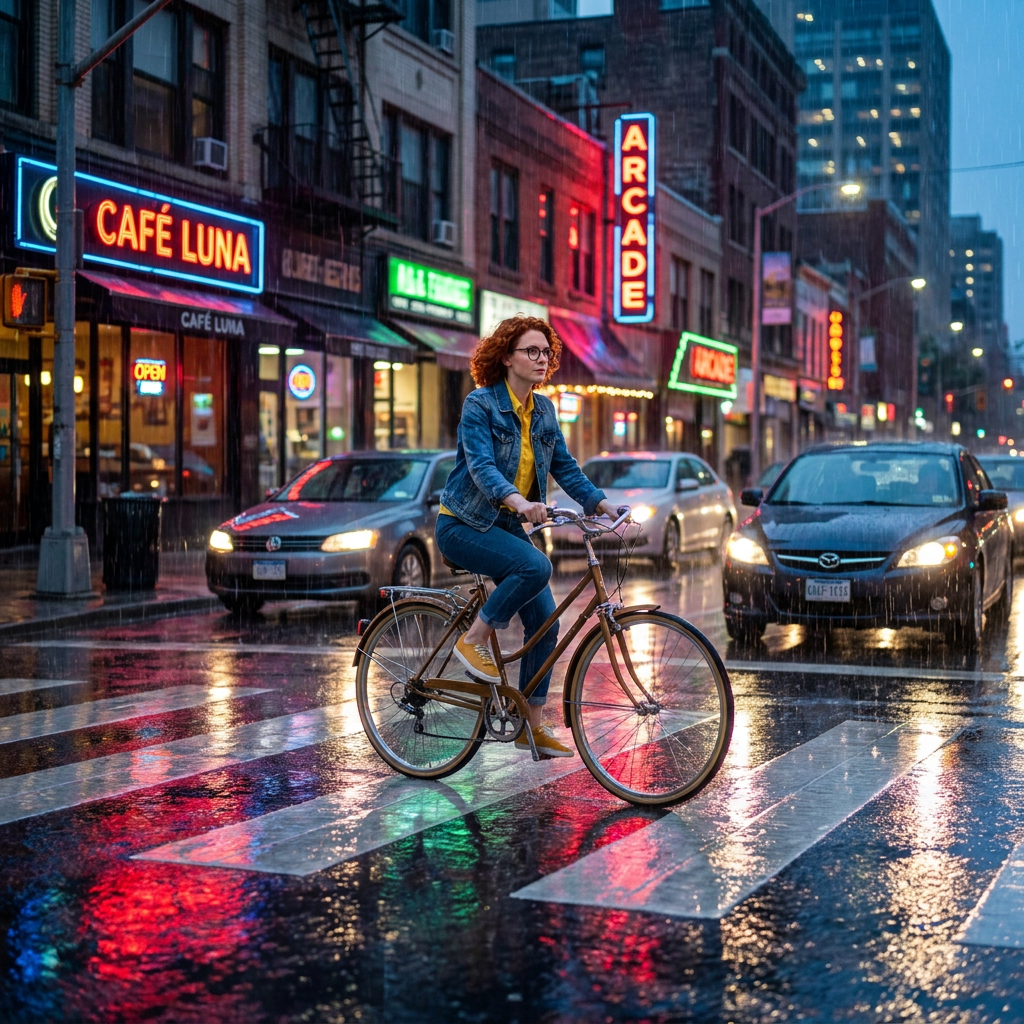
Generated on PixelDojo with Google Nano Banana Pro, Qwen Image 2 Edit, Flux Kontext Pro. Produced by PixelDojo's generation pipeline.
Google Nano Banana Pro handled our photo edit best, and it is also the most expensive of the three at 3 credits. We took one portrait of a woman with red curly hair, round glasses, a denim jacket and a yellow shirt, and gave the same instruction to Nano Banana Pro, Qwen Image 2 Edit and Flux Kontext Pro on August 26, 2026: put her on a bicycle crossing a rainy city crosswalk at dusk, keep her identity identical, cinematic wide shot. Nano Banana Pro took about 40 seconds and was the only one that delivered a true wide shot with readable shop signage. Qwen Image 2 Edit cost 1 credit, finished in about 22 seconds and kept her glasses and collared shirt exactly right. Flux Kontext Pro cost 1 credit, took about 194 seconds and preserved the face best while ignoring the framing. We ranked on how much of the instruction survived.
Side-by-side, same prompt
Every model below ran the identical prompt on PixelDojo so the outputs are directly comparable: “Place this exact woman on a bicycle crossing a rainy city crosswalk at dusk, neon shop signs reflecting in puddles, cinematic wide shot, keep her face, glasses, red curly hair, denim jacket and yellow shirt identical”
Google Nano Banana Pro
40sOnly one that gave a real wide shot and wrote readable shop signs. Identity kept. 3 credits, about 40 seconds.
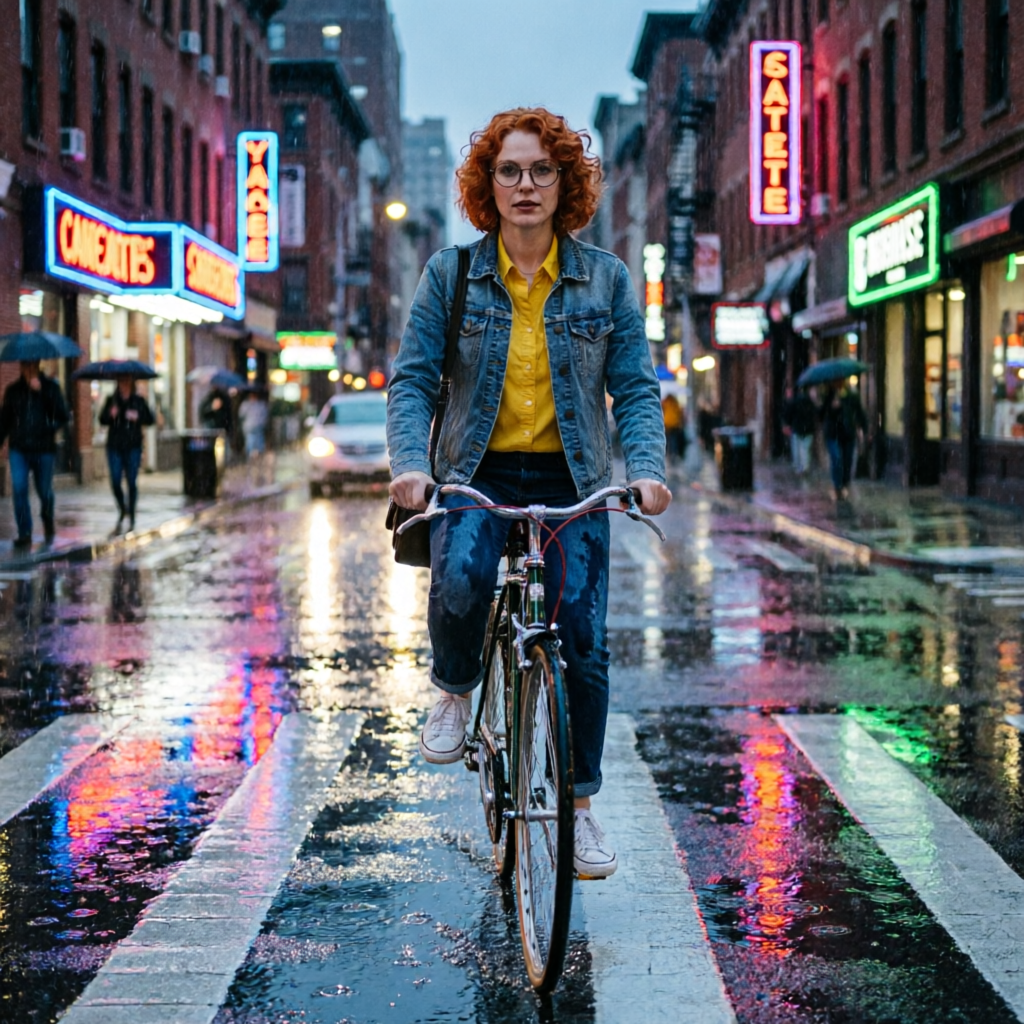
Qwen Image 2 Edit
22sFastest and cheapest. Kept the round glasses and the collared yellow shirt exactly. 1 credit, about 22 seconds.
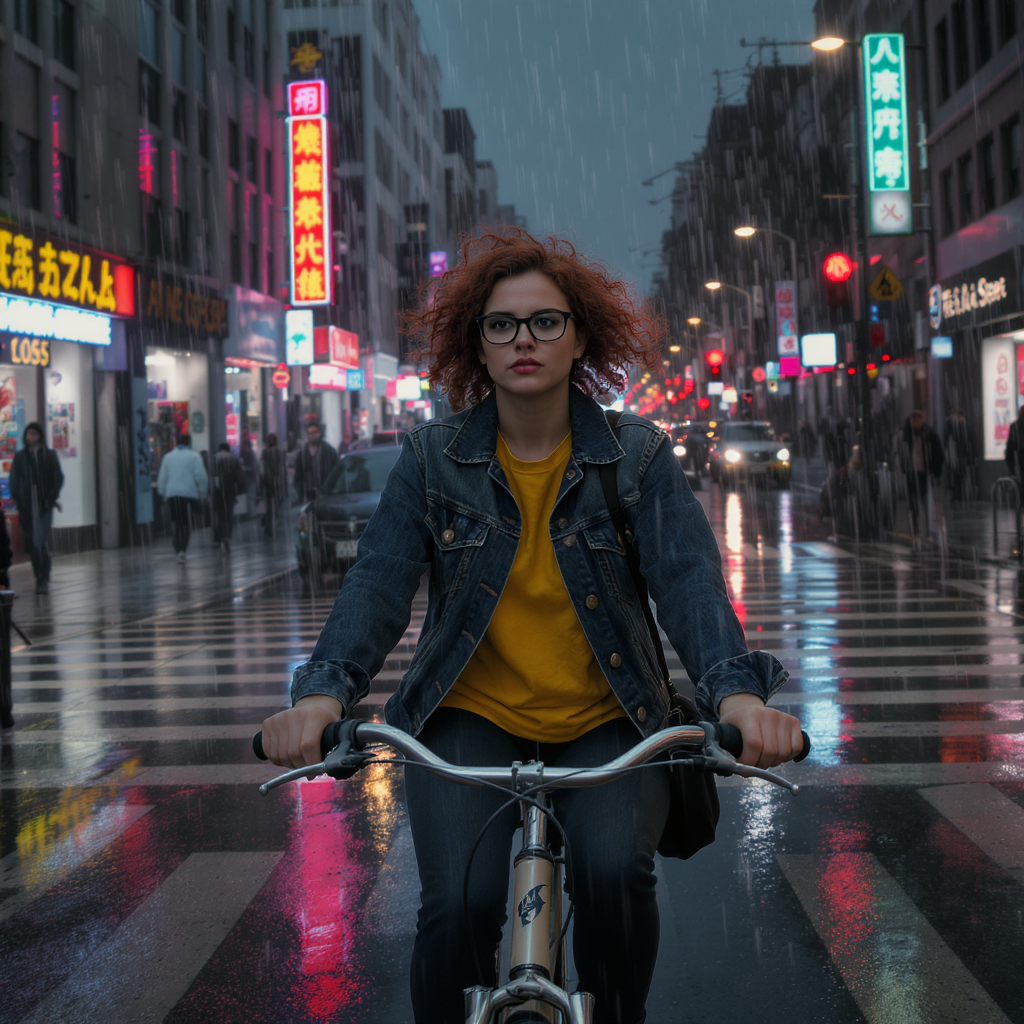
Flux Kontext Pro
194sBest face fidelity at large size, but it ignored the wide shot and the signage came back as unreadable glyphs. 1 credit, about 194 seconds.
What each model kept, what it changed, and when to avoid it
1. Google Nano Banana Pro, 3 credits, about 40 seconds
This is the only result that answered the whole instruction. The camera pulled back into a genuine cinematic wide shot with the rider small in a busy street, white zebra stripes running across wet asphalt, rain falling in visible streaks, cars with headlights on and neon reflecting in long red, green and blue smears across the road. It also wrote real words. The shop signs read as actual legible names rather than invented letterforms, which is the difference between a usable street scene and one you have to blur. Her red curly hair, round glasses, denim jacket, yellow shirt and yellow shoes all carried over from the source. Skip it when the face has to carry the picture. At this framing she is a small figure and you cannot check the likeness at a glance, and it costs three times what the other two charge for a single edit.
2. Qwen Image 2 Edit, 1 credit, about 22 seconds
Qwen Image 2 Edit was the fastest edit in this test and the cheapest, and it was the most faithful on the details people actually notice. The round black frames stayed round. The yellow shirt stayed a collared button shirt rather than turning into a t shirt. The copper curl pattern is recognisably the same person, and even the black bag strap crossing her chest survived the move. The scene around her is a rainy street with crosswalk stripes, pedestrians under umbrellas, and neon bleeding into the puddles, framed somewhere between a medium and a wide shot. The weakness is text. Our shop signs came back as invented letterforms that look like words at a glance and spell nothing when you read them. Skip it if a sign, a label or a logo has to be legible in the finished frame.
3. Flux Kontext Pro, 1 credit, about 194 seconds
Flux Kontext Pro gave us the best face in the test and the least obedient edit. She is head on and large in frame, and at that size the likeness holds up: the same freckled complexion, the same copper curls, the same denim jacket over yellow. If you were building a character who has to be recognisable across a series of images, this is the file that proves the identity carried. Against that, it ignored the words cinematic wide shot and delivered a frontal medium shot instead, the glasses drifted from round toward a squarer frame, and every neon sign in the background is decorative gibberish. It was also far and away the slowest, at about 194 seconds against about 22 for Qwen Image 2 Edit on the same day. Skip it when you need the scene, the framing or the signage to be right.
One source portrait, one instruction, three edit models. Prices ran 1 to 3 credits. Measured turnaround ran about 22 seconds to about 194 seconds.
Why Choose Pixel Dojo for Photo Editing Models
Professional-quality results with cutting-edge AI technology
Identity survived all three edits
Hair, glasses, jacket and shirt carried over in every result. The differences were framing, text and how large the face sits in frame.
Legible text is the rarest skill
Only one of the three wrote shop signage you can actually read. The other two produced letterforms that spell nothing.
Speed varied by nine times on one prompt
About 22 seconds at the fast end and about 194 seconds at the slow end, both at 1 credit, both on August 26, 2026.
How It Works
How we set the test up, and how to repeat it on your own photo:
Start from one source image
We used a single frontal portrait so every model had exactly the same information about the person. Feeding different references to different models would make the identity comparison meaningless.
Write the change and the things that must not change
Our instruction named the new scene and then listed what to preserve: face, glasses, red curly hair, denim jacket, yellow shirt. Naming what stays fixed is what makes the result checkable.
Compare each edit back against the source
Open the original next to each result and check the named details one at a time. That is how the glasses drift and the shirt collar change showed up, and neither is visible without the side by side.
Loved by creators on PixelDojo
Real feedback from people using PixelDojo, pulled from our in-product surveys.
You keep adding to it to stay up to date and that is GOLD.
very easy to use and good support
Very easy to use
super easy to use
it's very easy to use
Practically every Ai suite in one place? Who wouldn't?
Explore more AI tools on PixelDojo
AI Tools
Compare & Switch
- Best AI Image Generators
- Best AI Video Generators
- Midjourney Alternatives
- Civitai Alternatives
- Runway Alternatives
- Leonardo Alternatives
- Pika Alternatives
- Luma Alternatives
- Magnific Alternatives
- Veo Alternatives
- Flux Alternatives
- Freepik Alternatives
- Seedance Alternatives
- Seedream Alternatives
- Pixverse Alternatives
- GPT Image Alternatives
- Synthesia Alternatives
- Playground Alternatives
- NightCafe Alternatives
- Canva AI Alternatives
- ElevenLabs Alternatives
- ComfyUI Alternatives
- Fal Alternatives
- Replicate Alternatives
Common Questions
Everything you need to know about Photo Editing Models
What is the best AI model for photo editing?
Google Nano Banana Pro in our August 26, 2026 test. It cost 3 credits, took about 40 seconds, and was the only model that delivered the wide framing we asked for and wrote readable text into the scene. Qwen Image 2 Edit is the better value at 1 credit and about 22 seconds if legible signage is not required.
Which edit model keeps a face most consistent?
Flux Kontext Pro held the likeness best at large size in our test, which matters when you are building a recurring character. The trade is that it ignored our framing instruction and took about 194 seconds against about 22 seconds for the fastest model.
How much does one AI photo edit cost?
1 credit for Qwen Image 2 Edit, 1 credit for Flux Kontext Pro and 3 credits for Nano Banana Pro. Our full three model comparison cost 5 credits.
Why did the shop signs come out as nonsense?
Rendering real words is a separate skill from rendering a scene, and most edit models approximate the shape of text rather than the letters. Two of our three did exactly that. If a sign, label or logo must be readable, pick a model that has proven it on your prompt before you build a set of images around it.
Can I edit my own photo rather than a generated one?
Yes. Upload the photo and write the change you want in plain language. All three models here take an existing image plus an instruction, which is the same flow we used to produce this comparison.
How do I call these edit models from the API?
POST to /api/v1/models/nano-banana-pro/run, /api/v1/models/qwen-image-2-edit/run or /api/v1/models/flux-kontext-pro/run with your API key, passing the source image alongside the instruction. One key covers all three.