Stained Glass Models AI Generator
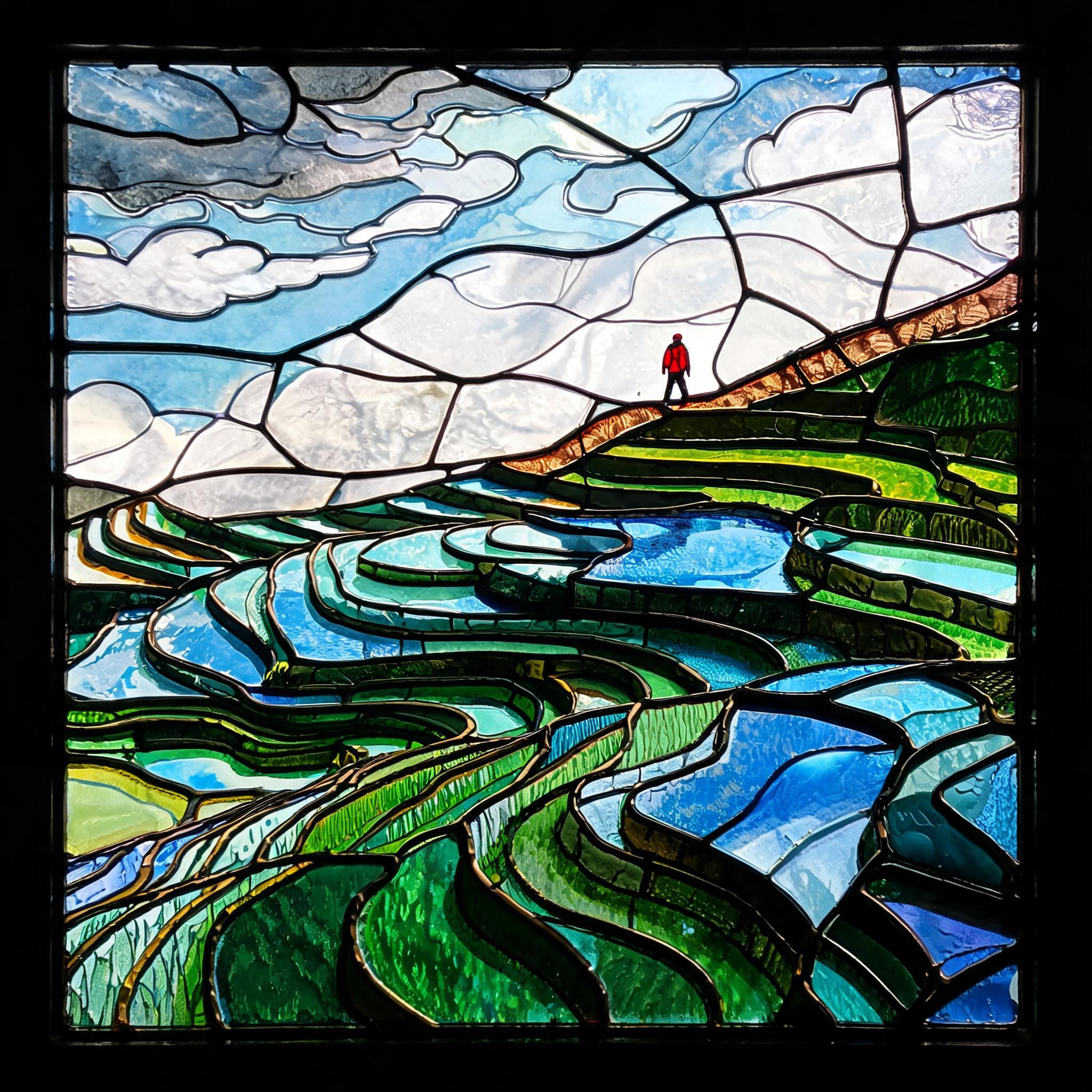
Generated on PixelDojo. Produced by PixelDojo's generation pipeline.
Seedream 5 Lite was the only model that turned the whole picture into glass. We sent one leaded window prompt to three image models on August 26, 2026, and all three charged exactly 1 credit. Seedream 5 Lite took 34 seconds and returned a 2048 by 2048 panel where every shape is a separate pane with lead around it. Kling Image took 44 seconds and built a proper decorative glass border, then filled the middle with a photograph. Flux 2 Dev was fastest at 17 seconds and drew black lines on top of a rainy landscape photo. Price is not the deciding factor here, because the price is the same.
Side-by-side, same prompt
Every model below ran the identical prompt on PixelDojo so the outputs are directly comparable: “A stained glass window panel of a terraced rice valley after rain, low clouds drifting through, a hiker in a red jacket on the ridge path, heavy black leading between panes of colored glass, backlit jewel tones”
Seedream 5 Lite
34sEvery shape is a pane with lead around it, and the glass carries rolled texture. 1 credit, 34 seconds, 2048 by 2048.
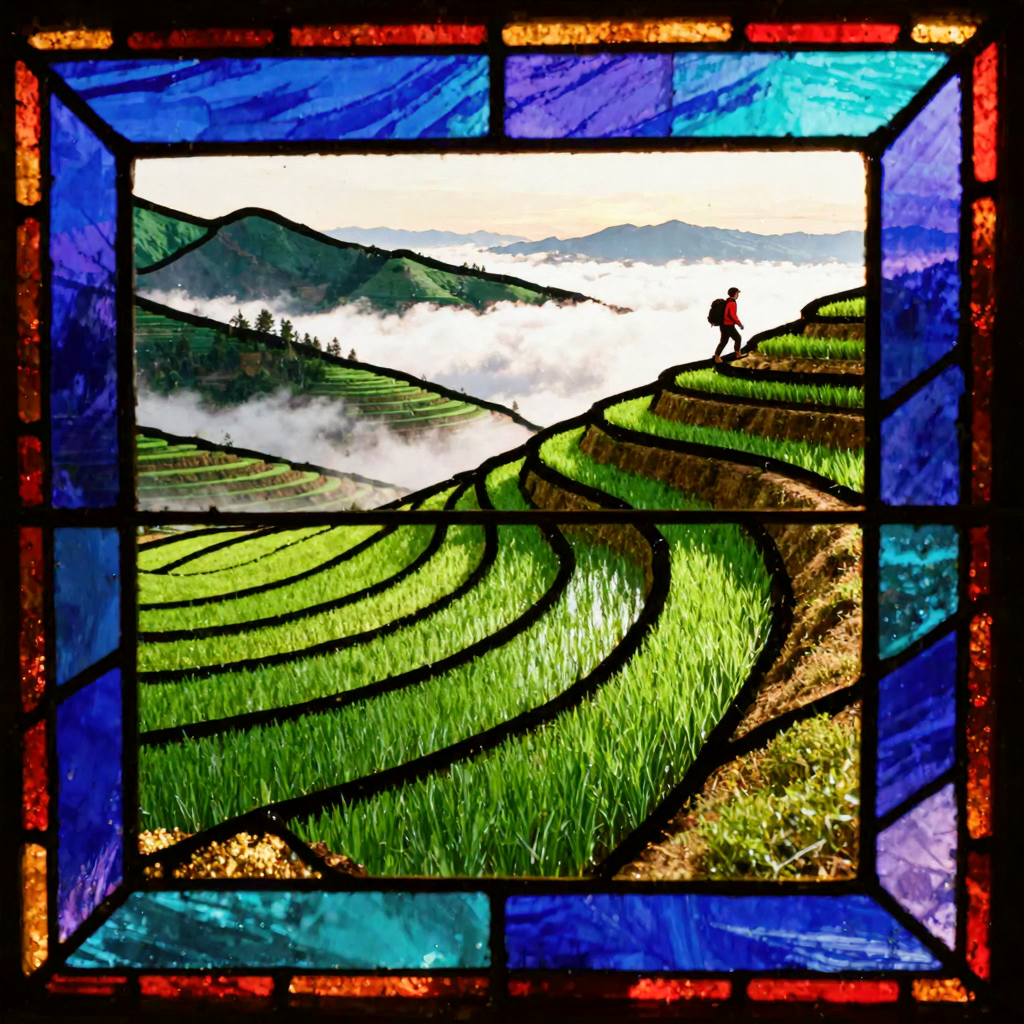
Kling Image
44sThe only one that built a decorative glass border, but the scene inside it stayed photographic. 1 credit, 44 seconds.
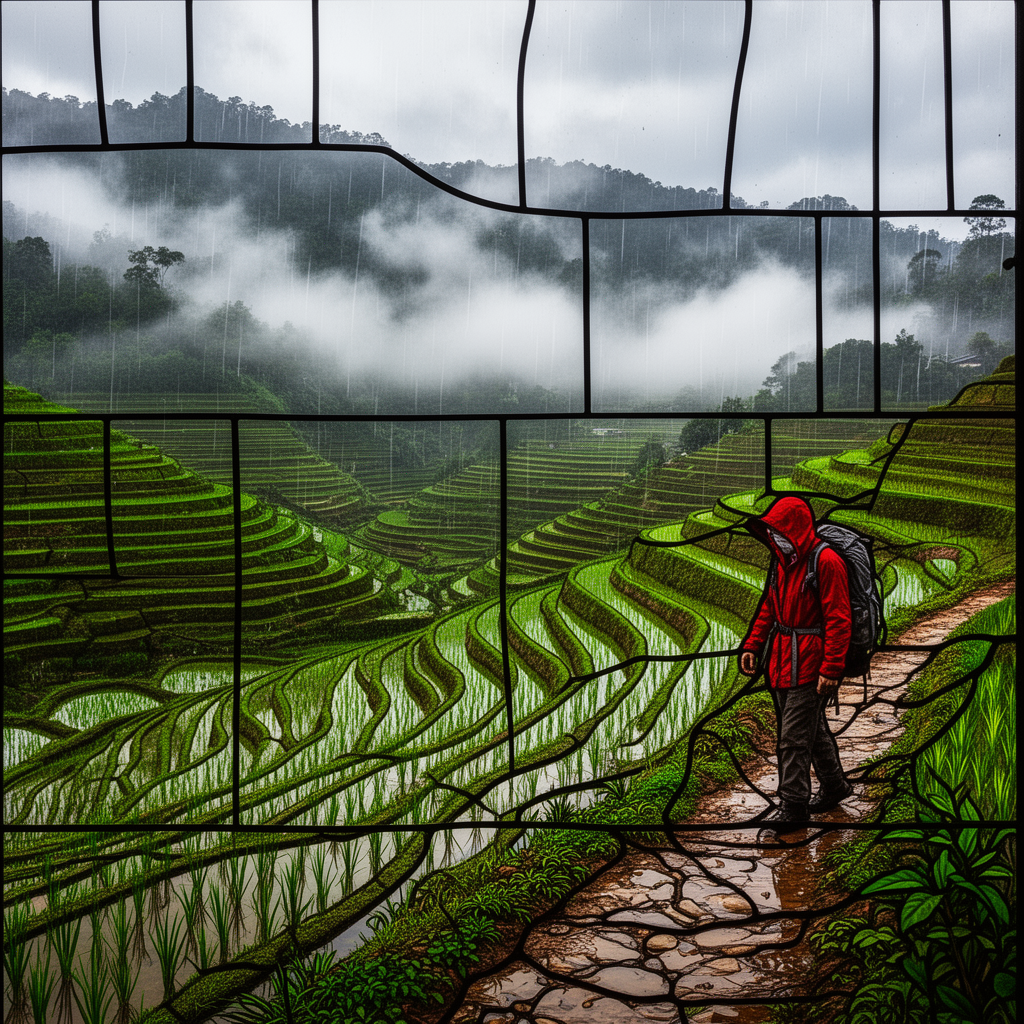
Flux 2 Dev
17sFastest by 17 seconds and a beautiful rainy landscape, but the lead lines are drawn over a photograph. 1 credit, 17 seconds.
How far each model committed to glass and lead
1. Seedream 5 Lite, 1 credit, 34 seconds
The basis for this ranking is how much of the frame is actually glass. Seedream 5 Lite is the only file where the answer is all of it. Every region has a black lead line running around it, the lead follows the shape it encloses instead of cutting across it, and the panes carry rolled and mottled surface texture so light reads as passing through rather than bouncing off. The terraces became long curved ribbons of green, teal and blue glass. The sky is opalescent white and pale blue panes. The hiker is a small red figure on the ridge, made of about four panes, which is exactly how a real window would handle a figure that size. A black frame runs around the whole panel. It came back 2048 by 2048, the biggest file in the test. Skip it if you need the hiker to be a real person with a face, or if 34 seconds is too slow for the number of variants you want to sift.
2. Kling Image, 1 credit, 44 seconds
The most interesting near miss. Kling Image was the only model of the three that understood a stained glass panel is an object with a frame, and it built one: a border of blue, purple, teal, red and amber glass segments running all the way round the edge, with lead between each one and mitred corners. That border on its own is worth keeping. Inside the frame, though, it stopped. The rice terraces, the sea of cloud and the small hiker are all photographic, with a sparse black grid laid over them that does not follow anything underneath. So you get real glass around a photograph. Skip it if you want the picture itself made of glass, and skip it when you are iterating, because at 44 seconds it was the slowest run in the test and it costs the same 1 credit as the fastest. It returned 1024 by 1024.
3. Flux 2 Dev, 1 credit, 17 seconds
By far the fastest at 17 seconds, less than half what Seedream 5 Lite took, for the same 1 credit. It is also the best photograph of the three by a distance. Rain streaks fall across a hillside of flooded rice terraces, mist sits in the trees behind, and a hiker in a red rain jacket with a grey pack walks a wet stone path in the foreground, hood up, head down. If you asked for a rainy valley you would keep it. As stained glass it does not work. The lead lines are sparse black strokes drawn across the top of the image, they run straight through terraces and clouds without following an edge, and there are no panes, no flat colour and no glass texture anywhere. Skip it whenever the glass is the brief rather than the subject. It returned 1024 by 1024.
One prompt, three models, one session. All three cost 1 credit. Turnaround ran 17 to 44 seconds. Only one file had glass in it rather than lines over a photo.
Why Choose Pixel Dojo for Stained Glass Models
Professional-quality results with cutting-edge AI technology
Same price, very different files
All three runs cost exactly 1 credit. The only things that separate them are what arrived and how long it took.
Watch what the lead line does
Real leading follows the edge of the shape it holds. Two of the three drew lines that cut straight across the picture instead.
Fastest was not best here
17 seconds against 34 and 44. The quickest file was the least like glass, so speed bought nothing on this brief.
How It Works
What we did to get these three panels:
One prompt, identical wording
Each model received the same request naming a stained glass window panel, heavy black leading, panes of coloured glass and backlit jewel tones. Default settings, first result kept, no retries.
Timed each request end to end
A clock reading before submission and another when the file arrived. That produced 17, 34 and 44 seconds.
Checked the lead, not the scene
We opened each file and followed the black lines. Lead that traces the edge of a shape means glass. Lines that cut across a cloud mean a photograph underneath.
Loved by creators on PixelDojo
Real feedback from people using PixelDojo, pulled from our in-product surveys.
You guys, the LORA training is the BEST in the space right now, great job with that!
Tons of variety. Ease of use. Tools for beginners and advance users.
easiest workflow to get best output image or video
awesome functionality, UX, constant flood of improvements, discord interactivity
Awesome site with so many features
Love how I can almost create anything
Explore more AI tools on PixelDojo
AI Tools
Compare & Switch
- Best AI Image Generators
- Best AI Video Generators
- Midjourney Alternatives
- Civitai Alternatives
- Runway Alternatives
- Leonardo Alternatives
- Pika Alternatives
- Luma Alternatives
- Magnific Alternatives
- Veo Alternatives
- Flux Alternatives
- Freepik Alternatives
- Seedance Alternatives
- Seedream Alternatives
- Pixverse Alternatives
- GPT Image Alternatives
- Synthesia Alternatives
- Playground Alternatives
- NightCafe Alternatives
- Canva AI Alternatives
- ElevenLabs Alternatives
- ComfyUI Alternatives
- Fal Alternatives
- Replicate Alternatives
Common Questions
Everything you need to know about Stained Glass Models
Which AI model is best for stained glass style?
Seedream 5 Lite on this test. It was the only one of the three that made the entire scene out of leaded panes, for 1 credit in 34 seconds at 2048 by 2048. Kling Image is the pick if you want a decorative glass border around a scene.
How much does a stained glass image cost?
1 credit on all three models we ran. Seedream 5 Lite, Kling Image and Flux 2 Dev are each flat rate per image, so the full three way comparison cost 3 credits.
Which one was fastest?
Flux 2 Dev at 17 seconds, then Seedream 5 Lite at 34 and Kling Image at 44. Measured with clock brackets around each request on August 26, 2026.
Why do models draw lines over a photo instead of making glass?
Because a photo of a scene is the easier answer to a scene prompt, and lead lines can be added on top of one. The tell is whether the lines follow the edges of shapes. If they cut straight across a cloud or a terrace, you have a photo with a grid on it.
How do I prompt for better leading?
Name the construction, not the vibe. Our prompt asked for heavy black leading between panes of coloured glass and for backlit jewel tones. The model that took it seriously put lead around every shape and gave the panes rolled surface texture.
Can I call these models from an API?
Yes. POST to /api/v1/models/seedream-5-lite/run, /api/v1/models/kling-image/run or /api/v1/models/flux-2-dev/run with the same key and the same request shape.