Watercolor Style Models AI Generator
Generated on PixelDojo with Seedream 5 Lite, Flux Krea Dev, QWEN Image Plus. Produced by PixelDojo's generation pipeline.
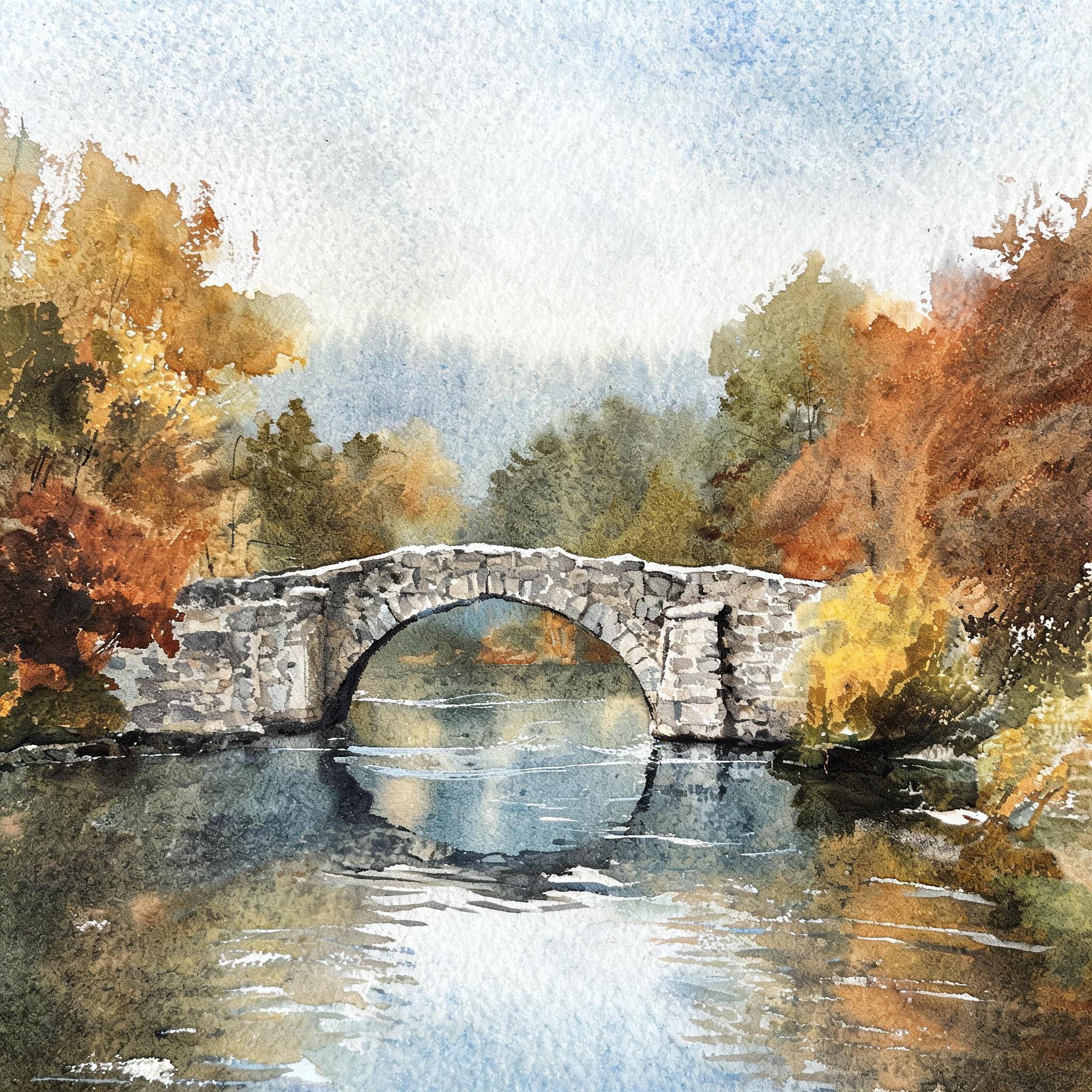
Seedream 5 Lite produced the most believable watercolor of the three, and price was not the deciding factor because all three cost exactly 1 credit. We sent one autumn stone bridge prompt to Seedream 5 Lite, Flux Krea Dev and QWEN Image Plus on August 26, 2026 and timed each request. Seedream 5 Lite took about 33 seconds and came back at 2048 by 2048 with visible cold press paper tooth and real pigment granulation in the sky. Flux Krea Dev took about 18 seconds and was the only one that painted a visible paper edge, so the result reads as a finished sheet. QWEN Image Plus took about 27 seconds and gave the widest frame at 1664 by 928, but it painted line and wash rather than the loose bleeding washes we asked for. We ranked on how much of the actual medium showed up in the file.
Side-by-side, same prompt
Every model below ran the identical prompt on PixelDojo so the outputs are directly comparable: “Watercolor painting of an old stone bridge over a river in autumn woodland, loose wet on wet washes, visible cold press paper texture, soft bleeding edges, muted palette”
Seedream 5 Lite
33sReal cold press tooth and pigment settling in the washes, at 2048 by 2048. 1 credit, about 33 seconds.
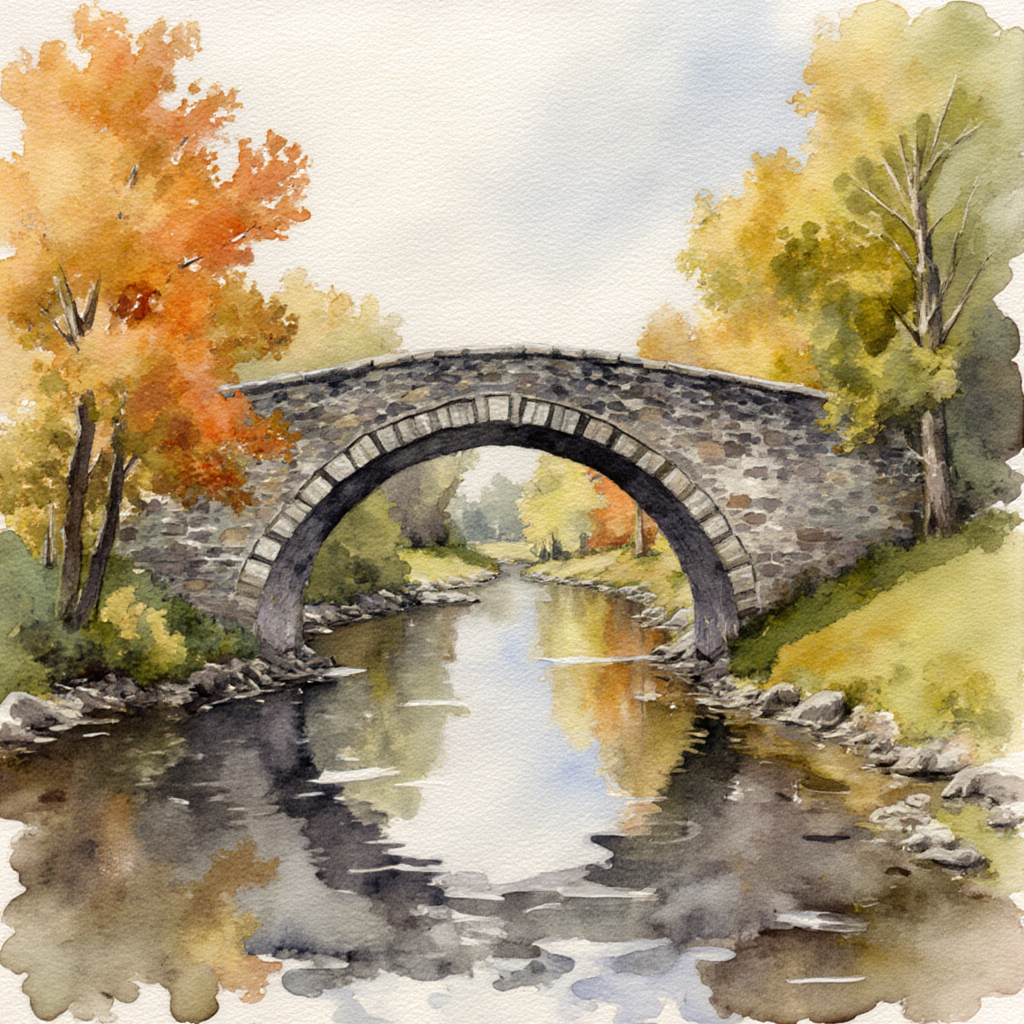
Flux Krea Dev
18sOnly one that painted a ragged paper edge, so it reads as a sheet rather than a crop. 1 credit, about 18 seconds.
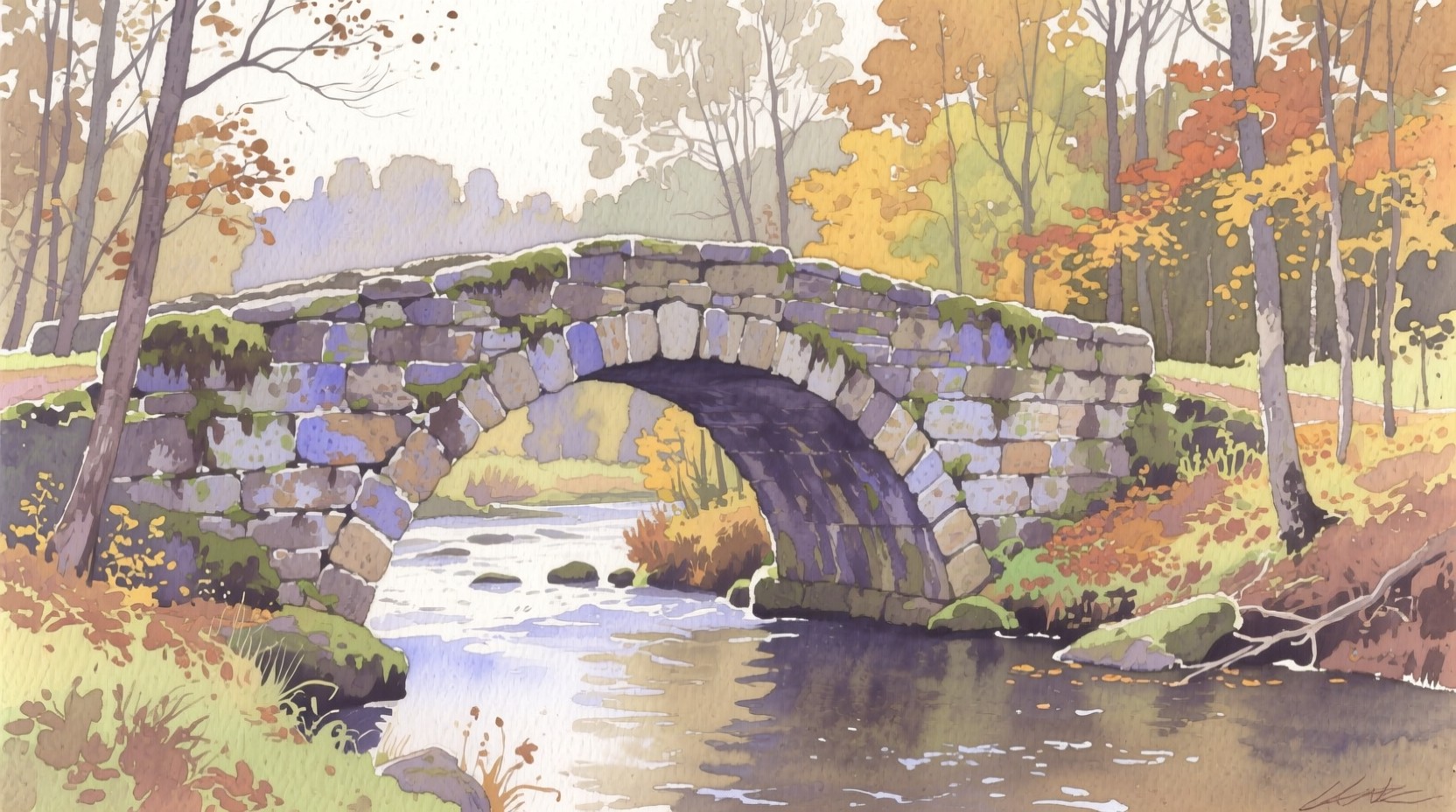
QWEN Image Plus
27sWidest frame at 1664 by 928, but it delivered outlined line and wash, not loose bleeding washes. 1 credit, about 27 seconds.
Three takes on the same bridge, and what the paint is doing in each
1. Seedream 5 Lite, 1 credit, about 33 seconds
This is the one that behaves like paint on paper. The whole sky carries a cold press tooth, with pigment collecting in the low points of the texture the way a granulating blue actually settles, and there is fine spatter through the upper half. The autumn canopy is built from dry brush scumbling over damp washes so the ochres and rusts bleed into each other at the edges instead of meeting at a line. The bridge stonework is blocked in with separate grey wash shapes that dried with visible hard edges, and the water below keeps bare white paper for the sparkle rather than painting highlights back in. It arrived at 2048 by 2048, the largest of the three. Skip it if you want the painting to sit on a visible sheet, because it fills the frame edge to edge and reads as a scan crop rather than a whole page.
2. Flux Krea Dev, 1 credit, about 18 seconds
Flux Krea Dev was the fastest of the three and it did something none of the others tried. It painted the untouched cream margin of the paper, so the washes stop in irregular ragged edges and the image reads as a finished sheet you could photograph and frame. Inside that border the painting is properly loose: the river reflections are wet on wet, dark greys bleeding into olive and rust with no hard boundary, the treetops are broken dry brush, and the sky is mostly bare paper with one pale blue wash drifting across it. The arch stonework has granulation in the grey. If you are making a greetings card, a book cover or a print listing where the paper edge is part of the look, this is the file that needs no styling afterwards. Skip it if you need a large output, because ours came back at 1024 by 1024, the smallest here.
3. QWEN Image Plus, 1 credit, about 27 seconds
QWEN Image Plus made a handsome picture and answered a different brief. Every stone in the bridge is drawn with a visible outline and then filled with a fairly flat wash, which is line and wash illustration, not the loose wet on wet the prompt described. Nothing bleeds. The palette is genuinely muted as asked, with lilac and slate blue in the stonework, moss greens on the parapet and warm ochres in the far trees, and the composition is the most spacious of the three at 1664 by 928, the only wide frame we got. There is one oddity: the model scrawled a fake artist signature into the lower right corner, which you would crop or paint out. Skip it if the brief says loose or wet on wet. Pick it when you want a controlled, printable illustration in a wide format.
Same bridge prompt, three models, one credit each. Measured turnaround ran about 18 to about 33 seconds, and the outputs ranged from 1024 square to 2048 square.
Why Choose Pixel Dojo for Watercolor Style Models
Professional-quality results with cutting-edge AI technology
Price is not the differentiator here
All three models cost exactly 1 credit per image, so the whole comparison ran for 3 credits and the choice comes down to style, not budget.
The paper is the tell
Look at a flat area of sky. Real watercolour behaviour shows as tooth and settled pigment. Imitation shows as an even gradient.
Frame shape came out of the model, not our settings
We set no size on any run. We got 1024 square, 2048 square and a 1664 by 928 landscape from the same prompt.
How It Works
Three steps to judge a watercolor model honestly:
Describe the technique, not the subject alone
Our prompt named wet on wet washes, cold press paper texture, soft bleeding edges and a muted palette. Those four phrases are what separate paint behaviour from a filtered photo.
Send the same sentence to every model
We changed nothing between runs and kept the first result each time, so what differs between the three files is the model rather than our prompt tuning.
Inspect a flat wash and the corners
The sky tells you whether pigment settled into paper texture. The corners tell you whether the model painted a sheet edge and whether it added a fake signature you will need to remove.
Loved by creators on PixelDojo
Real feedback from people using PixelDojo, pulled from our in-product surveys.
I’ve been using PixelDojo for around 8 months now and it’s always worked wonderfully while constantly adding features.
The site is easy to navigate and use.
All the tools, readily available and easy to understand
You guys, the LORA training is the BEST in the space right now, great job with that!
Tons of variety. Ease of use. Tools for beginners and advance users.
easiest workflow to get best output image or video
Explore more AI tools on PixelDojo
AI Tools
Compare & Switch
- Best AI Image Generators
- Best AI Video Generators
- Midjourney Alternatives
- Civitai Alternatives
- Runway Alternatives
- Leonardo Alternatives
- Pika Alternatives
- Luma Alternatives
- Magnific Alternatives
- Veo Alternatives
- Flux Alternatives
- Freepik Alternatives
- Seedance Alternatives
- Seedream Alternatives
- Pixverse Alternatives
- GPT Image Alternatives
- Synthesia Alternatives
- Playground Alternatives
- NightCafe Alternatives
- Canva AI Alternatives
- ElevenLabs Alternatives
- ComfyUI Alternatives
- Fal Alternatives
- Replicate Alternatives
Common Questions
Everything you need to know about Watercolor Style Models
What is the best AI model for watercolor style?
Seedream 5 Lite in our August 26, 2026 test. It cost 1 credit, took about 33 seconds and was the only one that produced visible cold press paper tooth with pigment settling into it. Flux Krea Dev is the pick if you want the painting to sit on a visible paper edge.
Do watercolor prompts cost more than photo prompts?
No. All three models here charge 1 credit per image, the same as they charge for any other prompt. Style is a matter of what you write, not a paid option.
How do I get looser washes out of a model?
Name the technique rather than the look. Ours asked for wet on wet washes, soft bleeding edges and cold press paper texture. Two of three models responded to those words. If a result still comes back tightly outlined, the model is favouring line and wash and you are better off switching model than rewording.
Why did one image have a signature in the corner?
Paintings in training data are usually signed, so a model can add a scrawl that looks like a signature but spells nothing. Our QWEN Image Plus result did this. Crop it or edit it out before you publish, especially on anything you are selling.
How fast are these models?
Timed on August 26, 2026 from request to finished file: about 18 seconds for Flux Krea Dev, about 27 seconds for QWEN Image Plus, about 33 seconds for Seedream 5 Lite. Queue load moves these figures.
How do I call them from the API?
POST to /api/v1/models/seedream-5-lite/run, /api/v1/models/flux-krea-dev/run or /api/v1/models/qwen-image-plus/run with your API key. Same key and same request shape, so running one subject through all three is three calls.