Flux Edit Kontext AI Generator
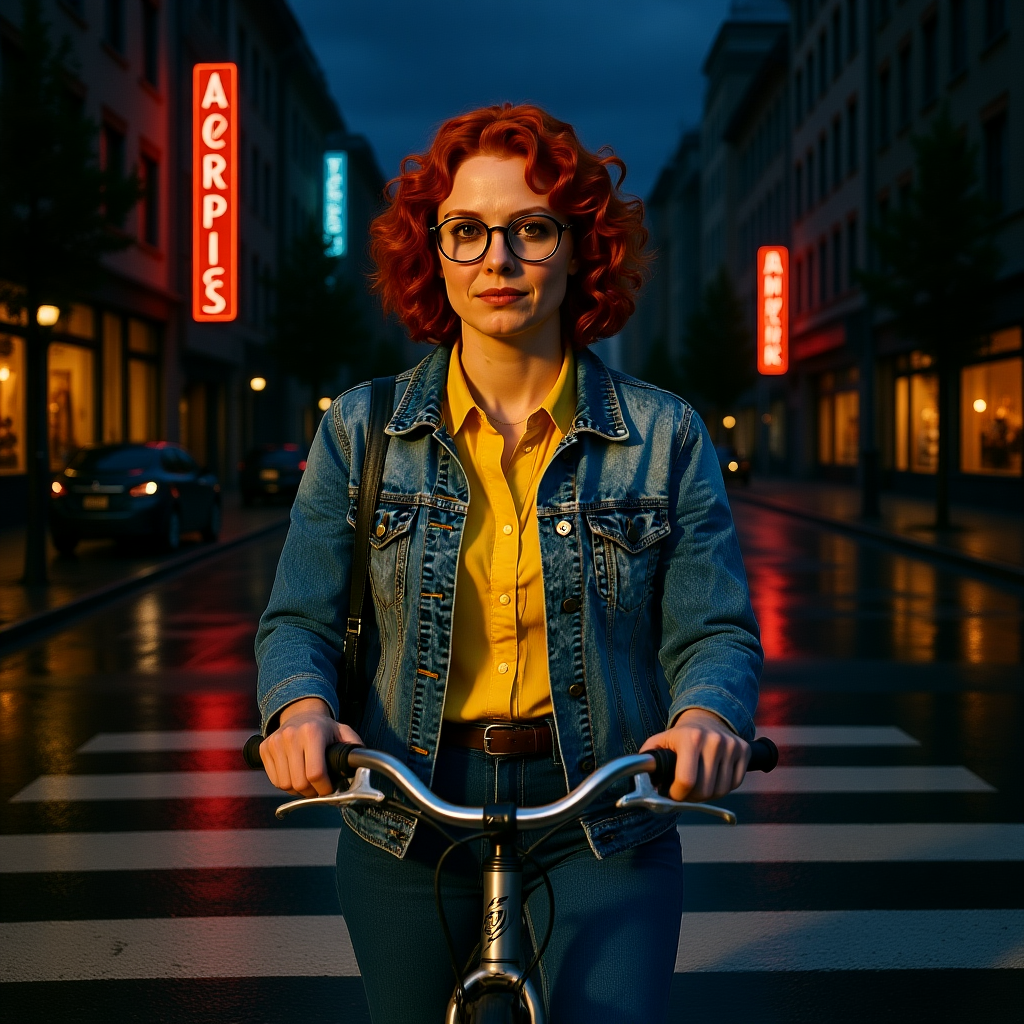
Generated on PixelDojo with Flux Edit Kontext (dev). Produced by PixelDojo's generation pipeline.
Flux Edit Kontext costs 1 credit per image on the dev and pro variants and 2 credits on max, with dev the default. Our dev run on August 26, 2026 took about 8 minutes to return, far longer than the 15 to 41 second range we saw across the separate Flux 2 tier edits that same day, a reminder that queue load can swing turnaround a lot while the credit price stays fixed. This page covers the three variant prices, what the dev result actually looked like, and how it compares with editing through the Flux 2 family instead.
The 1 credit dev result, framed tighter than we asked for
Every example below was produced on PixelDojo. Hover to see the prompt.
Place this exact woman on a bicycle crossing a rainy city crosswalk at dusk, neon shop signs reflecting in puddles, cinematic wide shot, keep her face, glasses, red curly hair, denim jacket and yellow shirt identical
Flux Edit Kontext (dev)
What dev, pro and max actually change
What we asked it to do
The same instruction as the Flux 2 tier tests: place the reference woman on a bicycle crossing a rainy city crosswalk at dusk, keeping her face, glasses, hair and outfit identical.
What we saw in the output
A tighter, waist up crop rather than the wide full bicycle shot the Flux 2 tiers produced on the identical prompt. The sky read as full night rather than dusk, with only two vertical neon signs visible behind her instead of the busier signage clusters the Flux 2 family generated. Her face, glasses, red curly hair, denim jacket and yellow shirt all matched the reference, but the instruction to frame it as a wide shot was not followed; dev delivered a closer portrait instead.
Three variants, two prices
dev and pro both cost 1 credit; only max costs more, at 2 credits, and only max and pro accept a second reference image. Dev is single reference only.
The wait varied a lot
Our dev request took about 8 minutes against the 15 to 41 second range we measured across the five Flux 2 tier edits run the same day on the same prompt. Nothing about the request changed; the queue did.
Twelve aspect ratio options
1:1, 16:9, 9:16, 21:9, 9:21, 3:2, 2:3, 4:5, 5:4, 3:4, 4:3 and match_input_image, the default, which keeps the source photo's own shape.
Same request shape
POST to /api/v1/models/flux-edit/run with prompt, input_image_1, and model set to dev, pro or max.
1 credit for dev or pro, 2 for max. Our dev run took about 8 minutes, well outside the 15 to 41 second range the Flux 2 tiers posted that same day.
Why Choose Pixel Dojo for Flux Edit Kontext
Professional-quality results with cutting-edge AI technology
1 credit for dev or pro
The same price for two different quality tiers. Max costs 2 credits and is the only variant that supports a second reference image.
Single image input on dev
Dev takes one reference image. Pro and max accept a second reference to bias the edit with extra context.
About 8 minutes on our run, measured
Far outside the normal range we saw elsewhere in the Flux family that day. The credit charge stayed at 1 regardless of the wait.
How It Works
How we ran the dev variant, so you can repeat it:
Pick the variant before you send the request
model defaults to dev at 1 credit. Set it to pro for the same price with a second reference slot, or max for 2 credits and the top quality pass.
Send one clear reference and instruction
We used a saved character photo and named every detail that had to survive: face, glasses, hair color, both garments.
Poll if it runs long
POST to /api/v1/models/flux-edit/run, then check the job id if the response does not arrive in the 30 second sync window, as ours did not.
Loved by creators on PixelDojo
Real feedback from people using PixelDojo, pulled from our in-product surveys.
All the tools needed in one dashboard
Very fair and very broad in tools.
Accurate results
Great site and so much fun to use!
very useful set of tools for image creation, upscaling and enhancement
ease of use, variety of tools, high quality trainings, and a well-maintained discord channel
Explore more AI tools on PixelDojo
AI Tools
Compare & Switch
- Best AI Image Generators
- Best AI Video Generators
- Midjourney Alternatives
- Civitai Alternatives
- Runway Alternatives
- Leonardo Alternatives
- Pika Alternatives
- Luma Alternatives
- Magnific Alternatives
- Veo Alternatives
- Flux Alternatives
- Freepik Alternatives
- Seedance Alternatives
- Seedream Alternatives
- Pixverse Alternatives
- GPT Image Alternatives
- Synthesia Alternatives
- Playground Alternatives
- NightCafe Alternatives
- Canva AI Alternatives
- ElevenLabs Alternatives
- ComfyUI Alternatives
- Fal Alternatives
- Replicate Alternatives
Common Questions
Everything you need to know about Flux Edit Kontext
What does Flux Edit Kontext cost?
1 credit per image on the dev and pro variants, 2 credits on max. Dev is the default if you do not set model explicitly.
How fast is it?
Our dev run on August 26, 2026 took about 8 minutes, well outside the 15 to 41 second range we saw across the separate Flux 2 tier edits that same day on the identical prompt. The price does not move with the wait.
How is this different from editing through Flux 2 Flex or Pro?
Flux Edit Kontext is a dedicated editing model with its own three price tiers, while the Flux 2 family's variants add editing as one mode alongside text to image. On our identical scene placement prompt, the Flux 2 tiers delivered a wide full bicycle shot; Kontext dev cropped in to a waist up portrait instead.
Should I use dev, pro or max?
Dev is the cheapest and single reference only. Pro costs the same 1 credit as dev but accepts a second reference image. Max is the only tier that costs more, at 2 credits, for the highest quality pass.
How do I call it from the API?
POST to /api/v1/models/flux-edit/run with your API key, a prompt, input_image_1, and model set to dev, pro or max.
Does it keep my original image's aspect ratio?
Yes by default. match_input_image is the default aspect_ratio value, so an edit keeps the source photo's shape unless you set a different ratio.