P-Image
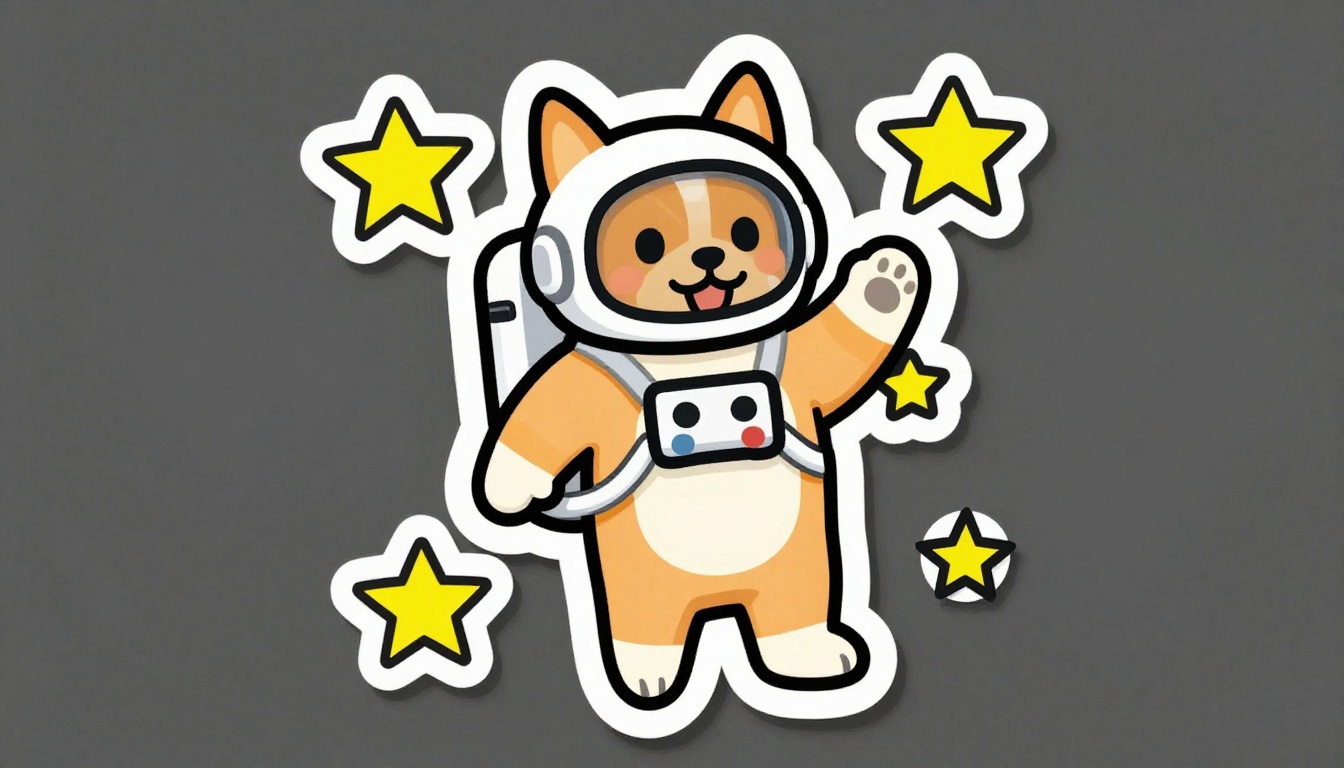
Generated on PixelDojo with P-Image. Produced by PixelDojo's generation pipeline.
P-Image costs a flat 0.1 credit per image, one of the cheapest generation prices in the catalog, and our test came back in about 15 seconds end to end on August 26, 2026. The catalog describes the model itself as sub-second, which refers to the model's own inference time, not the full round trip once network and queueing are counted. We ran one sticker prompt and kept the first result.
The 0.1 credit sticker, first result kept
Every example below was produced on PixelDojo. Hover to see the prompt.
A cheerful sticker design of a corgi astronaut floating among stars, bold outlines, flat colors, die-cut style
P-Image
The rest of the P-Image family
Switch models without switching tools. Each one runs in the same PixelDojo studio.
What 0.1 credit actually buys
What the sticker prompt returned
A corgi in a white astronaut suit, waving one paw, tongue out, helmet visor showing its face clearly. A thick white die-cut outline wraps the whole figure, four yellow stars are scattered around it, and the flat colors and bold black linework match a sticker rather than a photo.
We did not set an aspect ratio, and it showed
The schema documents 1:1 as the default when the field is left out, but our unset request came back at 1344x768, a 16:9 shape. If a guaranteed square output matters, set aspect_ratio explicitly rather than relying on the default.
No batching, one image per call
Some models take a count field and return several images for a proportional price. P-Image does not: the schema generates exactly one image, so exploring five compositions is five separate 0.1 credit calls.
It has a dedicated edit sibling
P-Image Edit takes an existing image plus an instruction for 0.25 credit. Generating with P-Image then refining with P-Image Edit is a 0.35 credit round trip, still cheap against most single-model generations elsewhere in the catalog.
One endpoint, one required field
POST to /api/v1/models/p-image/run with a prompt. Aspect ratio, width, height and seed are all optional.
One prompt, first result. 0.1 credit, about 15 seconds end to end.
Why Choose Pixel Dojo for P-Image
Professional-quality results with cutting-edge AI technology
0.1 credit, flat
No resolution tiers, no batch discount to chase because there is no batch: one image per call, always 0.1 credit.
About 15 seconds, end to end
Timed on August 26, 2026 from request to finished file. The model's own inference is faster than that; the difference is network and queue time.
Seven aspect ratio presets
1:1, 2:3, 3:2, 3:4, 4:3, 9:16 and 16:9. Set one explicitly if the shape of the output matters, since we left it unset and did not get a square result.
How It Works
Reproduce the sticker test:
Write for style words, not just the subject
Our prompt named bold outlines, flat colors and die-cut style alongside the corgi astronaut, and all three showed up in the result.
Set an aspect ratio if the shape matters
We left it unset and got a 16:9 result instead of a square one. Pick one of the seven presets explicitly if you need a guaranteed shape.
Send the prompt and time it yourself
From the tool page or a POST to /api/v1/models/p-image/run. Ours charged 0.1 credit and took about 15 seconds end to end.
Loved by creators on PixelDojo
Real feedback from people using PixelDojo, pulled from our in-product surveys.
Very easy to use, and they have fast wan 2.2 video generation with custom loras available.
The overall quality of the site and it's amazing variety of tools. The continued updates of the UI. The unbelievable level of tech support.
THIS IS SO DOPE !
I have already recommended it to friends
All the tools, plus the guidance
Excellent tools. Ease of use. Well thought out interface. Wide variety of AI tools and features which are up to date with more added each month
Explore more AI tools on PixelDojo
AI Tools
Compare & Switch
- Best AI Image Generators
- Best AI Video Generators
- Midjourney Alternatives
- Civitai Alternatives
- Runway Alternatives
- Leonardo Alternatives
- Pika Alternatives
- Luma Alternatives
- Magnific Alternatives
- Veo Alternatives
- Flux Alternatives
- Freepik Alternatives
- Seedance Alternatives
- Seedream Alternatives
- Pixverse Alternatives
- GPT Image Alternatives
- Synthesia Alternatives
- Playground Alternatives
- NightCafe Alternatives
- Canva AI Alternatives
- ElevenLabs Alternatives
- ComfyUI Alternatives
- Fal Alternatives
- Replicate Alternatives
Common Questions
Everything you need to know about P-Image
How much does P-Image cost?
A flat 0.1 credit per image, with no resolution tiers and no batching. That is one of the cheapest generation prices in the PixelDojo catalog.
How fast is P-Image?
About 15 seconds end to end in our August 26, 2026 test. The model's own inference is sub-second on the provider's side; the rest of the time is network transit and queueing.
Do I need to set an aspect ratio?
Set one if the output shape matters. Our request left the field unset and came back at 1344x768 rather than a square, so do not assume the documented 1:1 default without testing it yourself.
What is the difference between P-Image and P-Image Edit?
P-Image generates from a text prompt alone at 0.1 credit. P-Image Edit takes one to five reference images plus an instruction at 0.25 credit, for when something in the frame needs to match an existing photo.
Can P-Image generate more than one image per call?
No. The schema returns exactly one image per request, so a batch of five costs five separate 0.1 credit calls rather than one discounted call.
How do I call P-Image from the API?
POST to /api/v1/models/p-image/run with your API key and a prompt. Same key and endpoint shape as every other model in the catalog.