Qwen Image 2 Edit
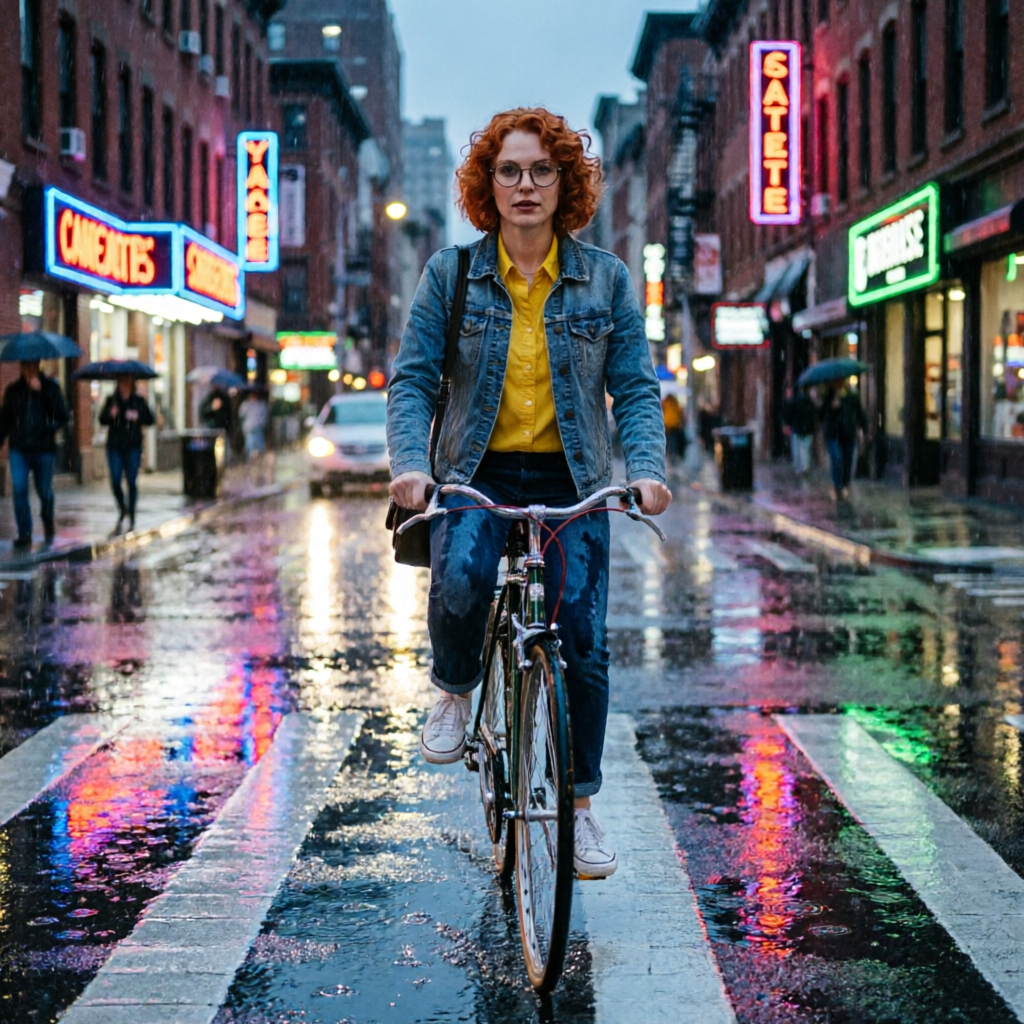
Generated on PixelDojo with Qwen Image 2 Edit. Produced by PixelDojo's generation pipeline.
Qwen Image 2 Edit costs 1 credit per image on PixelDojo and took about 22 seconds to place a character from a reference sheet into a brand new scene on August 26, 2026. We sent it one image and one instruction, not a blank prompt, since editing an existing photo is the entire point of this tool. This page covers what came back, what the credit includes, and how it differs from the legacy Qwen Image Edit and from QWEN Image Max.
The 1 credit scene swap, character sheet in, new scene out
Every example below was produced on PixelDojo. Hover to see the prompt.
Place this exact woman on a bicycle crossing a rainy city crosswalk at dusk, neon shop signs reflecting in puddles, cinematic wide shot, keep her face, glasses, red curly hair, denim jacket and yellow shirt identical
Qwen Image 2 Edit
What the edit actually did
One instruction, one to three images
The image field takes one to three reference URLs in a single request. We sent one, a character sheet, plus a scene instruction, and it composed the two into a new image.
What we saw
The woman kept her face, round glasses, red curly hair and the denim jacket over a yellow shirt. She is riding a bicycle across a rain-slicked crosswalk at dusk, with pedestrians under umbrellas and neon storefronts behind her. The signage lettering itself did not render as clean readable text.
Matched the input's aspect ratio
We did not set a size value, and the output came back 1024 by 1024, the same square shape as the character sheet we fed it. Set size explicitly to change that.
Two model tiers behind one endpoint
The model field switches between qwen-image-2.0 at 1 credit and qwen-image-2.0-pro at 2 credits for sharper detail on harder composites.
Up to six outputs per call
The n field goes to 6, so you can generate several scene variations from the same reference set in one request, each billed per image.
A dated snapshot option
Pin to a specific dated model string if you need the exact same behavior on a future date, instead of the rolling name that updates underneath you.
One reference image, one instruction, 1 credit, about 22 seconds. Measured August 26, 2026.
Why Choose Pixel Dojo for Qwen Image 2 Edit
Professional-quality results with cutting-edge AI technology
1 credit per edit
Flat price per output image, whether you send one reference or three.
About 22 seconds, measured
Timed August 26, 2026 from request to finished file, one reference image, one instruction.
Identity held across the scene change
Face, glasses, hair color and outfit all carried over from the character sheet into a completely different setting.
How It Works
How we ran it:
Start from a real reference
We used a saved character sheet image as the input instead of a blank prompt. That reference is what the edit works from.
Write the change, not a full scene description
The instruction named the new setting and repeated the details to preserve: face, glasses, hair, jacket, shirt. That repetition is what kept identity intact.
Run it in the app or over the API
Generate from the tool page, or POST to /api/v1/models/qwen-image-2-edit/run with the image and prompt. Ours took about 22 seconds and charged 1 credit.
Loved by creators on PixelDojo
Real feedback from people using PixelDojo, pulled from our in-product surveys.
Amazing performance!
Excellent website for creating all types of media
Very eay to use, works well to train SDXL loras.
The amazing tools
Top notch quality and strong prompt adherence.
A well resourced sunscription with attention to updates.
Explore more AI tools on PixelDojo
AI Tools
Compare & Switch
- Best AI Image Generators
- Best AI Video Generators
- Midjourney Alternatives
- Civitai Alternatives
- Runway Alternatives
- Leonardo Alternatives
- Pika Alternatives
- Luma Alternatives
- Magnific Alternatives
- Veo Alternatives
- Flux Alternatives
- Freepik Alternatives
- Seedance Alternatives
- Seedream Alternatives
- Pixverse Alternatives
- GPT Image Alternatives
- Synthesia Alternatives
- Playground Alternatives
- NightCafe Alternatives
- Canva AI Alternatives
- ElevenLabs Alternatives
- ComfyUI Alternatives
- Fal Alternatives
- Replicate Alternatives
Common Questions
Everything you need to know about Qwen Image 2 Edit
What does Qwen Image 2 Edit cost?
1 credit per image on the qwen-image-2.0 model. Switching to the qwen-image-2.0-pro variant raises it to 2 credits. The n field allows up to 6 outputs per call, each billed at that per-image rate.
How fast is Qwen Image 2 Edit?
About 22 seconds in our August 26, 2026 run, one reference image, one instruction, from submission to finished file.
Does it keep the character's identity?
In our run, yes. Face, round glasses, red curly hair and the denim jacket over a yellow shirt all carried into a new rainy street scene we described in the instruction.
How many reference images can I send?
One to three. Order matters, since later images can define environment or lighting layered on top of an earlier one, and the output aspect ratio matches the last image when size is left unset.
How does it differ from Qwen Image Edit?
Qwen Image Edit is the older DashScope edit line, also 1 credit on its default Plus tier. Qwen Image 2 Edit is the newer model family and is the one we would reach for first. Both take the same one to three image input shape.
How do I call it from the API?
POST to /api/v1/models/qwen-image-2-edit/run with an image URL or array plus a prompt describing the change.