wan image generator
Generated on PixelDojo. Produced by PixelDojo's generation pipeline.
Imagine turning a simple idea into a breathtaking cinematic image that looks like it came from a high-budget film or a professional photoshoot. With PixelDojo’s WAN image generator, you get photorealistic portraits, product visuals, atmospheric landscapes, and marketing assets that capture lighting, texture, and emotion perfectly. You no longer wait days for designers or struggle with generic results. Instead, you describe what you want and receive studio-quality images in seconds, complete with readable text, consistent characters across shots, and the cinematic depth that makes your work stand out. Whether you need e-commerce hero images, social content, storyboards, or branded campaigns, WAN 2.7, WAN 2.6, and WAN Image on PixelDojo deliver the professional outcomes you need without the traditional cost or delay. Thousands of creators already use these tools daily to produce work that wins clients and grows audiences. You can do the same starting today.
Real video examples generated on PixelDojo
Every example below was produced on PixelDojo. Hover to see the prompt.
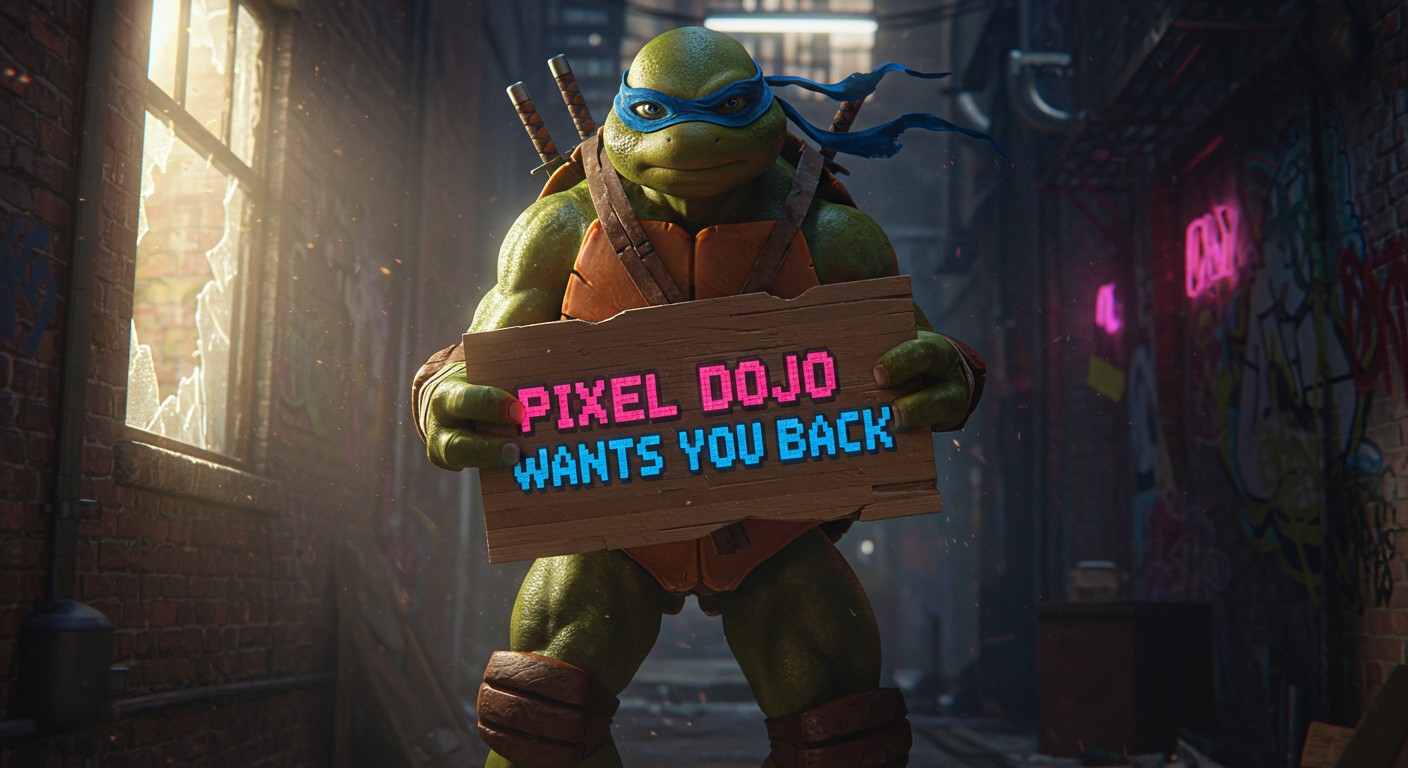
Generate an image of a ninja turtle holding a sign that says "Pixel Dojo Wants You Back"
imagen
Image from library
flux-studio
She hold out the ice cream cone out and offers it to the viewer
image-to-video
Laughing
image-to-video
The young ensign tells spock she is from 80 years from the future!
image-to-video
OmniHuman 1
image-to-video
Models you can run on PixelDojo for wan image generator
Switch models without switching tools. Each one runs in the same PixelDojo studio.
What you can do with wan image generator on PixelDojo
Prompt to Wan Video
We generate short clips from your text with Wan so you can test scenes, motion, and mood before a full shoot.
Stills Into Motion
Upload an image and we apply Wan motion so characters, cameras, and environments can move while keeping the original look.
Length and Frame Control
You set duration, aspect ratio, and framing so Wan outputs fit social, ads, or longer edits without extra crop work.
Iterate in One Workspace
We keep prompts, takes, and downloads together so you can refine Wan videos and move the keepers into your editor.
Loved by thousands of creators worldwide. 40+ cutting-edge AI tools. Commercial-use license included. Cancel anytime.
Why Choose Pixel Dojo for wan image generator
Professional-quality results with cutting-edge AI technology
Cinematic Atmosphere From Sparse Prompts
You get painterly lighting, photographic depth, and film-like composition automatically. Your product shots, portraits, and scenes feel expensive and intentional without extra prompting effort.
Readable Text and Character Consistency
You produce images with print-quality typography in multiple languages and keep the same face, outfit, or product looking identical across an entire series. Perfect for ads, packaging, and storyboards.
Professional Results Without the Studio
You skip photoshoots, retouching hours, and expensive talent. Generate 4K-ready visuals, then refine them instantly with PixelDojo’s editing suite so you can publish or sell faster.
How It Works
Creating stunning WAN images on PixelDojo takes three simple steps. You stay in control while the models handle lighting, texture, and composition.
Step 1: Choose Your Tool
Open Generate Images and select WAN 2.7 for hero-quality cinematic shots, WAN Image for fast iteration, or WAN 2.6 when you need a proven workhorse. Pick the aspect ratio that matches your final use (social, print, or web).
Step 2: Enter Your Prompt
Describe the scene, lighting, mood, and any text you need. Upload up to nine reference images for identity lock or style match. WAN 2.7 understands long, detailed instructions and even plans composition before generating.
Step 3: Customize & Download
Review the results, then use Image to Image, Inpainting, Style Transfer, or Reality Polisher to perfect details. Upscale with P-Image Upscale or Magnific Upscaler if you need extra resolution, then download commercial-ready files.
The Pixel Dojo Advantage
Why PixelDojo outperforms other options for WAN image generation
| Others | Pixel Dojo |
|---|---|
| Traditional photography and design | You skip location scouting, models, lighting setups, and retouching. Generate unlimited variations in minutes instead of days and still keep full commercial rights. |
| Generic AI tools | You access the full WAN family plus complementary editors, upscalers, and character tools in one place. Same prompt language works across stills and video so your brand stays consistent. |
| Manual photo editing | You start with already-cinematic, text-perfect images instead of fixing lighting and artifacts for hours. Built-in inpainting and style transfer let you iterate without starting over. |
Loved by creators on PixelDojo
Real feedback from people using PixelDojo, pulled from our in-product surveys.
I really like how the site is kept up to date, and the leaderboard (where I'm currently #11 most popular artist)
This is the best image generator I've used so far. Well done!
es facil de comprender asi uno no sea programador
amazing web site
phenomenal site. would highly recommend
Amazing features, easy to use, privacy
Explore more AI tools on PixelDojo
AI Tools
Compare & Switch
- Best AI Image Generators
- Best AI Video Generators
- Midjourney Alternatives
- Civitai Alternatives
- Runway Alternatives
- Leonardo Alternatives
- Pika Alternatives
- Luma Alternatives
- Magnific Alternatives
- Veo Alternatives
- Flux Alternatives
- Freepik Alternatives
- Seedance Alternatives
- Seedream Alternatives
- Pixverse Alternatives
- GPT Image Alternatives
- Synthesia Alternatives
- Playground Alternatives
- NightCafe Alternatives
- Canva AI Alternatives
- ElevenLabs Alternatives
- ComfyUI Alternatives
- Fal Alternatives
- Replicate Alternatives
Common Questions
Everything you need to know about wan image generator
What is the best WAN image generator for cinematic product photos?
PixelDojo’s WAN 2.7 (especially the Pro tier) delivers the most cinematic product shots with accurate materials, lighting, and readable packaging text. Pair it with Image to Image or Reality Polisher for final polish. You get commercial-ready files in seconds.
How do I keep the same character consistent with a WAN image generator?
Upload up to nine reference photos when using WAN 2.7 or WAN Image. The models lock identity, clothing, and even lighting across multiple generations. You can then expand the set with Character Sheets or Consistent Characters tools for complete campaigns.
Can a WAN image generator render readable text and logos?
Yes. WAN 2.7 handles long, complex typography in multiple languages at print quality. Describe the exact wording, font style, and placement in your prompt and you receive clean, usable text instead of garbled letters.
Is WAN 2.7 better than WAN Image for high-end work?
WAN 2.7 (Pro) is ideal for hero shots that need extra skin texture, fabric detail, or 4K output. WAN Image is faster and cheaper for iteration and volume. Most creators use both: WAN Image to explore, WAN 2.7 to finalize.
Can I edit WAN-generated images without starting over?
Absolutely. Use Inpainting, Change Camera Angle, Style Transfer, Magic Lighting, or Background Remover right after generation. You keep the original cinematic quality while making precise changes.
Do I need technical skills to use the WAN image generator on PixelDojo?
No. You simply choose WAN 2.7, WAN 2.6, or WAN Image, type a natural-language description, and generate. Optional references and one-click editors handle the rest. Thousands of non-designers already produce professional results daily.