Z Image Turbo
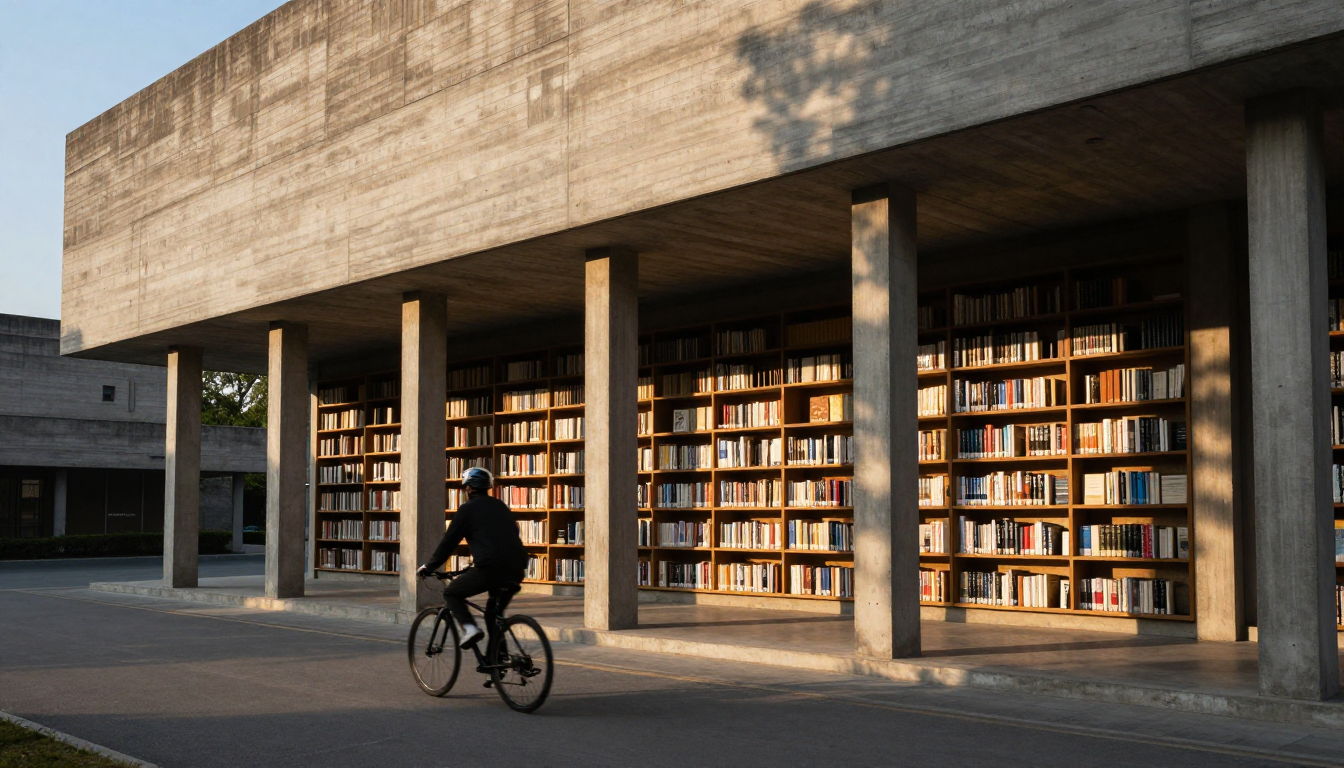
Generated on PixelDojo with Z Image Turbo. Produced by PixelDojo's generation pipeline.
Z Image Turbo costs 0.5 credits per image and returned our architecture test in about 15 seconds on August 26, 2026. That is two images for the price of one on most of the catalog's 1 credit tier, in roughly the time it takes to read this sentence. We sent it a brutalist library scene with a moving subject in the foreground, a genuinely hard composition, and kept the first result. This page covers what that run actually looked like, what the model is built for, and where a slower, pricier sibling earns its keep instead.
The 0.5 credit result, first generation kept
Every example below was produced on PixelDojo. Hover to see the prompt.
Brutalist concrete library at golden hour, long dramatic shadows, a cyclist passing in the foreground, architectural photography
Z Image Turbo
What the 0.5 credit run actually returned
What we saw in the output
A cantilevered concrete building lit warm gold from the side, its underside supported by a row of evenly spaced concrete columns. Behind the columns, wall to wall wooden shelving packed with books in mixed spine colors, open to the outdoor colonnade rather than boxed into a room. A cyclist in a helmet and dark clothing rides the paved path in the foreground, moving toward the building. A tree's shadow falls across the concrete facade on the right, and the pavement below sits in cooler shade against the warm wall. The composition reads as a real architectural photograph, not a render.
It followed the brief literally
Every named element landed: brutalist concrete, golden hour side light, a long dramatic shadow, a cyclist passing through the frame, and a library rendered as visible shelving rather than an abstract facade. Nothing in the prompt was dropped or substituted.
The default output size
We requested 16:9 and the file came back at 1344 by 768 pixels. Z Image Turbo also offers 1:1, 9:16, 4:3, and 3:4, each with its own fixed pixel dimensions rather than a free custom size.
One image per call, priced flat
The schema generates a single image per request, at 0.5 credits regardless of aspect ratio. There is no per-resolution surcharge and no multi-image discount to calculate, because there is no multi-image option.
It takes LoRA weights
lora_weights and lora_scales accept up to three LoRAs in one request, string or array, so a fine-tuned style can ride on top of the base model without changing the credit price.
8 inference steps, tunable down
num_inference_steps defaults to 8 and accepts 1 to 8. Fewer steps trade a little quality for a faster return, on a model that is already fast at the default.
Why Choose Pixel Dojo for Z Image Turbo
Professional-quality results with cutting-edge AI technology
0.5 credits per image
Flat, regardless of aspect ratio or LoRA use. Two images cost the same as one image on most of the catalog's 1 credit models.
About 15 seconds, measured
Timed on August 26, 2026 from request to finished file, on a five-element architectural prompt with a moving subject.
A hard composition landed on the first try
Concrete texture, backlit shadow, visible book detail, and a correctly posed cyclist all showed up together without a retry.
How It Works
How we ran it, so you can repeat it:
Name every element you want kept
Our prompt named the material, the light, the shadow, a moving subject, and a photography style. All five landed in the first generation.
Pick an aspect ratio for the scene
We chose 16:9 for a wide architectural frame. It returned at 1344x768, close to the preset's 1280x720 but not identical, since the model's native output can round differently than the labeled preset.
Generate in the app or over the API
Run it from the tool page, or POST the prompt to /api/v1/models/z-image-turbo/run. Ours took about 15 seconds and charged 0.5 credits.
Loved by creators on PixelDojo
Real feedback from people using PixelDojo, pulled from our in-product surveys.
I really like the schedule of AI work performed!
The best tools for IA on the web !
The guy that operates the website is constantly updating it
I’ve been using PixelDojo for around 8 months now and it’s always worked wonderfully while constantly adding features.
The site is easy to navigate and use.
All the tools, readily available and easy to understand
Explore more AI tools on PixelDojo
AI Tools
Compare & Switch
- Best AI Image Generators
- Best AI Video Generators
- Midjourney Alternatives
- Civitai Alternatives
- Runway Alternatives
- Leonardo Alternatives
- Pika Alternatives
- Luma Alternatives
- Magnific Alternatives
- Veo Alternatives
- Flux Alternatives
- Freepik Alternatives
- Seedance Alternatives
- Seedream Alternatives
- Pixverse Alternatives
- GPT Image Alternatives
- Synthesia Alternatives
- Playground Alternatives
- NightCafe Alternatives
- Canva AI Alternatives
- ElevenLabs Alternatives
- ComfyUI Alternatives
- Fal Alternatives
- Replicate Alternatives
Common Questions
Everything you need to know about Z Image Turbo
What does Z Image Turbo cost?
0.5 credits per image, flat. Aspect ratio, LoRA use, and inference step count do not change the price. It is one image per request, so there is no multi-image discount to factor in.
How fast is Z Image Turbo?
About 15 seconds in our August 26, 2026 run, measured from request to finished file on a five-element architectural prompt. Real turnaround moves with queue load, so treat that as a typical figure rather than a guarantee.
What resolution does it output?
Each of the five aspect ratio presets has a fixed pixel size: 1:1 at 1024x1024, 16:9 at 1280x720 (our run returned 1344x768), 9:16 at 720x1280, 4:3 at 1408x1056, and 3:4 at 1056x1408. There is no custom width and height field.
Does Z Image Turbo support LoRA styles?
Yes. Pass up to three LoRA weight URLs with matching scale values and the price stays at 0.5 credits per image.
When should I pay more than 0.5 credits for an image?
When the shot needs a wider composed scene with a lot happening in the background at once, a full-price model with more parameters tends to hold that together better. For a subject-led or single-scene shot like this one, the 0.5 credit tier already delivered a clean, literal result.
How do I call it from the API?
POST to /api/v1/models/z-image-turbo/run with your API key and a prompt. It is the same key and request shape as every other model in the catalog, and the response returns the image directly rather than a job to poll.