Renovation Before And After Visuals AI Generator
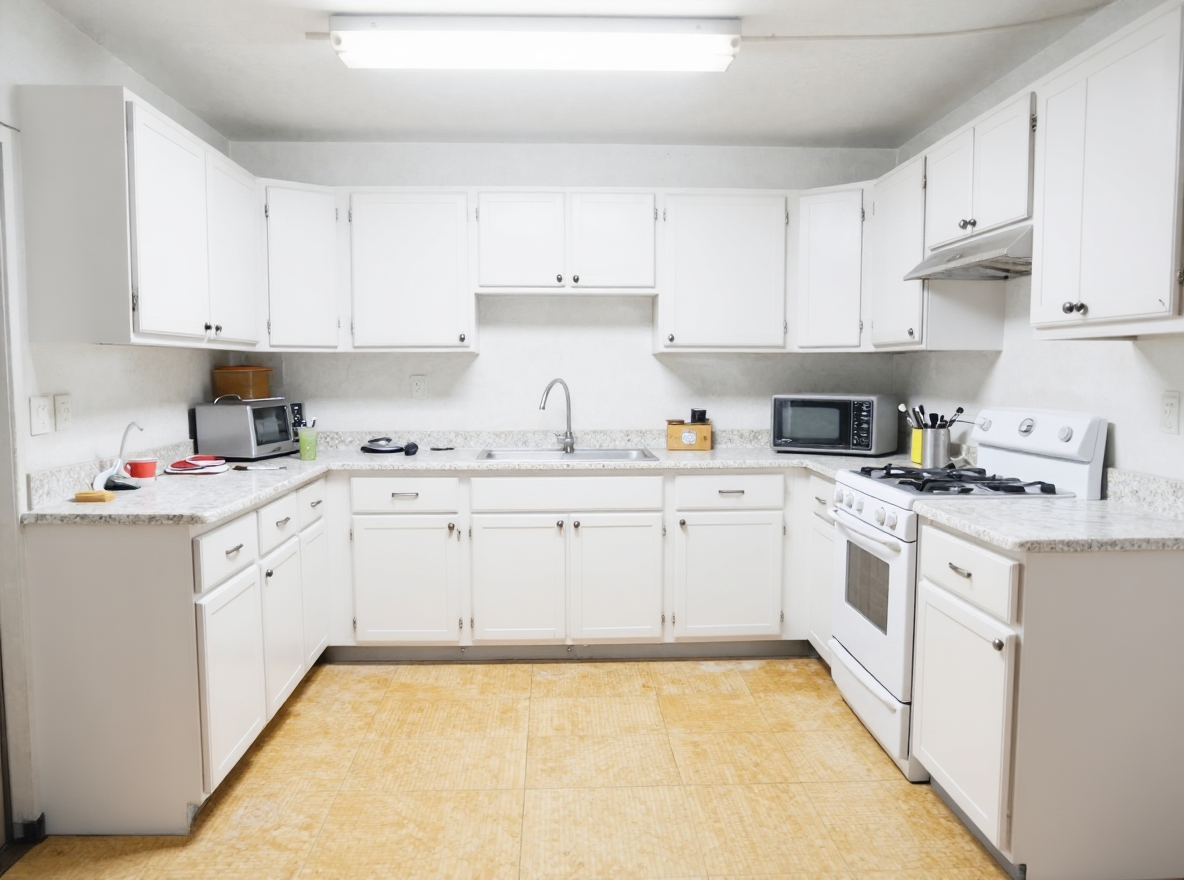
Generated on PixelDojo with Flux Edit (Kontext). Produced by PixelDojo's generation pipeline.
You can produce a renovation before and after pair with two AI image calls: one to generate or accept the before photo, one to edit it into an after. We ran both live on August 26, 2026: a dated 1990s kitchen from Z-Image Turbo for 0.5 credits, then a renovation edit through Flux Edit for 1 credit, 1.5 credits total. The edit kept the room's exact camera angle and layout, updated the cabinets and countertops, and left the floor and lighting fixture untouched, which is the honest result of a single edit pass and worth knowing before you run one.
The before and after, 1.5 credits total, first result kept on both
Every example below was produced on PixelDojo. Hover to see the prompt.
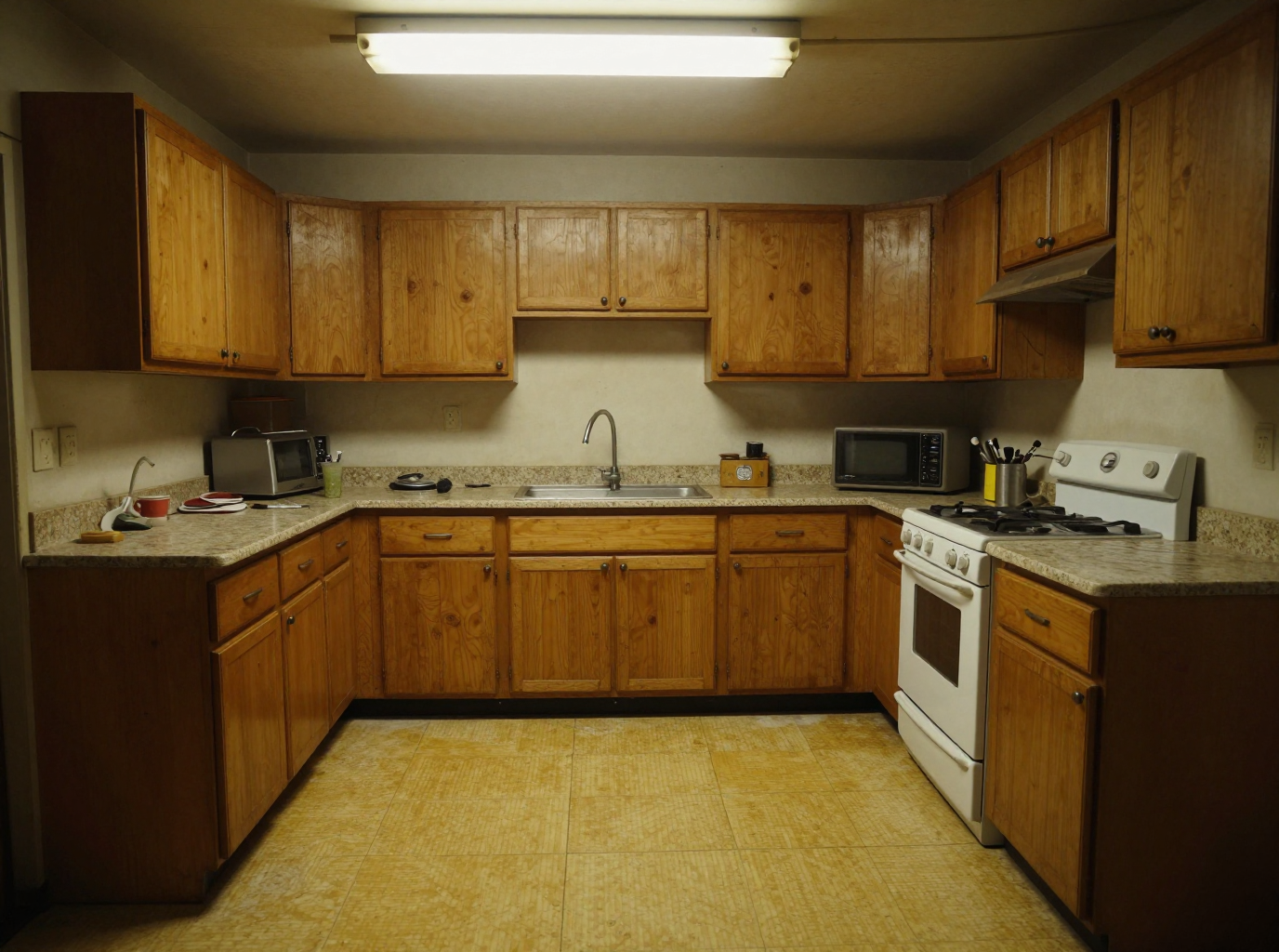
A dated 1990s kitchen interior, worn oak cabinets, yellowed linoleum floor, dim fluorescent light, cluttered laminate countertop, straight-on eye level view, documentary photography style
Z-Image Turbo
Renovate this kitchen into a bright modern space with white shaker cabinets, white quartz countertops, black hardware, a farmhouse sink, pendant lighting, and light wood flooring, keep the same camera angle and room layout
Flux Edit (Kontext)
Two calls, one pair, on August 26, 2026. 0.5 credits for the before photo, 1 credit for the after edit, 1.5 credits total.
How It Works
How we produced the pair, so you can repeat it with your own photo:
Start from a real before photo
Use the actual room photo you have, or generate a stand-in the way we did: a dated 1990s kitchen interior, worn oak cabinets, yellowed linoleum floor, dim fluorescent light, cluttered laminate countertop, straight-on eye level view, documentary photography style. Z-Image Turbo returned it for 0.5 credits in about 23 seconds.
Write the after as an edit instruction, not a new scene
Flux Edit works from the source image plus a change instruction. Ours read: renovate this kitchen into a bright modern space with white shaker cabinets, white quartz countertops, black hardware, a farmhouse sink, pendant lighting, and light wood flooring, keep the same camera angle and room layout. It cost 1 credit and returned in about 22 seconds.
Check what actually changed, then run a second pass if needed
Our edit repainted the cabinets white and lightened the countertops, keeping the exact camera angle, but left the floor, sink, and light fixture as they were in the before photo. A single edit pass tends to prioritize the most prominent surfaces. Feed the result back into Flux Edit with a second, narrower instruction, like just the flooring and lighting, to catch the rest.
Loved by creators on PixelDojo
Real feedback from people using PixelDojo, pulled from our in-product surveys.
easiest workflow to get best output image or video
awesome functionality, UX, constant flood of improvements, discord interactivity
Awesome site with so many features
Love how I can almost create anything
The Flux Pro Ultra is just amazing!
Very easy to use, and they have fast wan 2.2 video generation with custom loras available.
Explore more AI tools on PixelDojo
AI Tools
Compare & Switch
- Best AI Image Generators
- Best AI Video Generators
- Midjourney Alternatives
- Civitai Alternatives
- Runway Alternatives
- Leonardo Alternatives
- Pika Alternatives
- Luma Alternatives
- Magnific Alternatives
- Veo Alternatives
- Flux Alternatives
- Freepik Alternatives
- Seedance Alternatives
- Seedream Alternatives
- Pixverse Alternatives
- GPT Image Alternatives
- Synthesia Alternatives
- Playground Alternatives
- NightCafe Alternatives
- Canva AI Alternatives
- ElevenLabs Alternatives
- ComfyUI Alternatives
- Fal Alternatives
- Replicate Alternatives
Common Questions
Everything you need to know about Renovation Before And After Visuals
What does it cost to make a renovation before and after with AI?
1 credit for the edit itself on Flux Edit's default dev model, using a photo you already have. Our full example, including generating a stand-in before photo on Z-Image Turbo, cost 1.5 credits total.
How fast is it?
About 22 seconds for the Flux Edit renovation pass in our August 26, 2026 run, plus about 23 seconds for the before photo when there isn't already a real one to start from.
Does the edit change the whole room, or just parts of it?
In our run it changed the cabinets and countertops but left the floor, sink, and light fixture from the original photo. Pack fewer changes into one instruction, or run a second edit pass targeting what got missed, for a more complete result.
Does the camera angle stay the same?
Yes. Our after image kept the identical straight-on eye level framing and room layout from the before photo, which is what makes the pair read as a real before and after instead of two different rooms.
Can I use a real photo of my own room instead of a generated one?
Yes, that is the normal use case. Upload your own before photo as the input image and skip the generation step entirely.
How do I call it from the API?
POST to /api/v1/models/flux-edit/run with your API key, a prompt describing the change, and input_image_1 set to your before photo's URL.