Flux 1.1 Pro vs Flux 2 Pro
Generated on PixelDojo. Produced by PixelDojo's generation pipeline.
Flux 1.1 Pro costs 1 credit per image and returned our landscape test in about 18 seconds. Flux 2 Pro costs 1.5 credits at its 1 megapixel default and took about 29 seconds on the same prompt. Flux 1.1 Pro is the cheaper, faster text-to-image option. Flux 2 Pro costs more but is the only one of the two that can edit an existing image from a reference. We sent the same storm-light rice valley prompt to both on August 26, 2026 and kept the first result from each.
Same storm valley prompt, two Flux generations
Every example below was produced on PixelDojo. Hover to see the prompt.
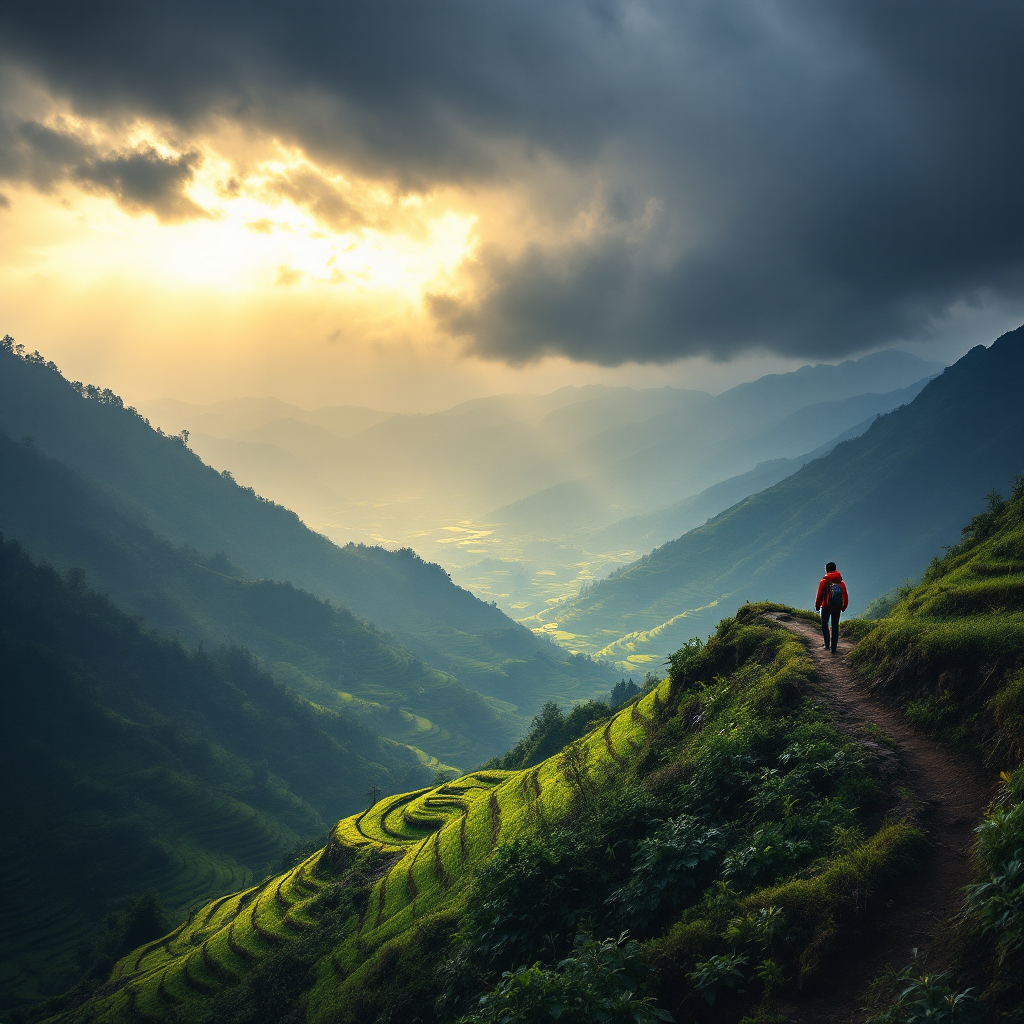
Storm light over a terraced rice valley after rain, low clouds drifting through, a hiker in a red jacket on the ridge path, epic scale
Flux 1.1 Pro
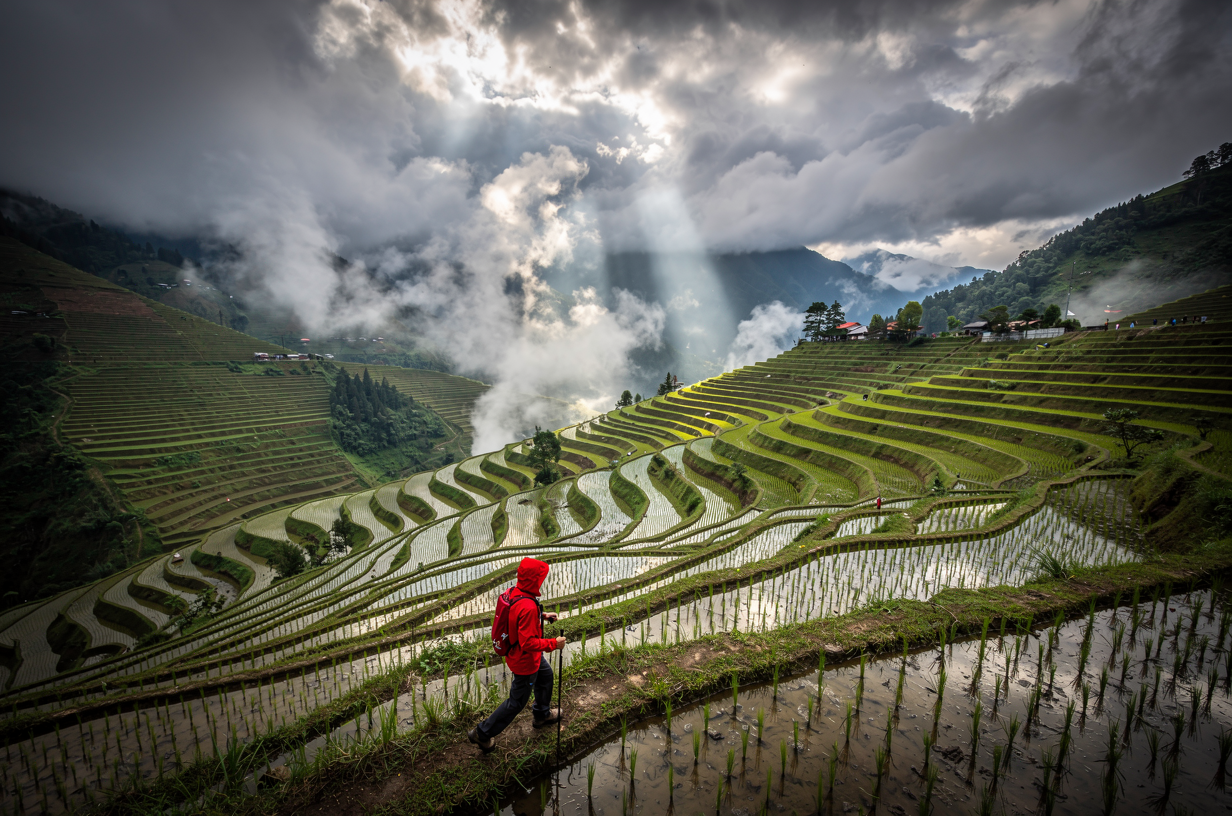
Storm light over a terraced rice valley after rain, low clouds drifting through, a hiker in a red jacket on the ridge path, epic scale
Flux 2 Pro
Price, speed, and what each one actually rendered
Price
Flux 1.1 Pro is a flat 1 credit per image. Flux 2 Pro is 1.5 credits at its 1 megapixel default, but drops to 1 credit at its 0.5 megapixel tier, which matches Flux 1.1 Pro's price at a smaller size.
Measured speed
Flux 1.1 Pro finished in about 18 seconds. Flux 2 Pro took about 29 seconds on the identical prompt, roughly 60 percent longer. Both numbers move with queue load.
Only one of them edits an existing image
Flux 2 Pro accepts up to 10 reference image URLs alongside the prompt for multi-image editing, restyling, or compositing. Flux 1.1 Pro is text-to-image only and has no reference-image input at all. If the job starts from a photo you already have, Flux 1.1 Pro is not an option.
What Flux 1.1 Pro's output looked like
A wide establishing shot: terraced rice fields dropping away into a misty valley, dramatic storm clouds with sunbeams breaking through, and a hiker in a red jacket rendered small and distant on a ridge trail in the upper right of the frame. The scale read as epic but the hiker himself carried little detail.
What Flux 2 Pro's output looked like
The same storm light and sunbeams, but the hiker sat much closer in frame: visible hiking pole, backpack, and a red rain jacket with the hood up, walking directly along a flooded terrace edge with the water reflecting the sky. A small village was visible in the distance. The extra proximity gave the shot more usable subject detail for the same brief.
Resolution control
Flux 2 Pro exposes four resolution tiers, 0.5 through 4 megapixels, each priced separately. Flux 1.1 Pro has no separate resolution setting; output size follows the aspect ratio you pick from its 9 presets.
One prompt, two Flux tiers, same day. Flux 1.1 Pro: 1 credit, about 18 seconds. Flux 2 Pro: 1.5 credits, about 29 seconds.
How It Works
How we ran the comparison, so you can repeat it:
Send the identical prompt to both
We used the same storm-light rice valley prompt, word for word, on Flux 1.1 Pro and Flux 2 Pro at their default settings, on August 26, 2026.
Keep the first result from each
No retries, no reroll. Flux 1.1 Pro returned in about 18 seconds for 1 credit. Flux 2 Pro returned in about 29 seconds for 1.5 credits.
Decide on editing, not just price
If the job only ever starts from a text prompt, Flux 1.1 Pro is cheaper and faster. If it needs to work from a reference photo, Flux 2 Pro is the only one that can.
Loved by creators on PixelDojo
Real feedback from people using PixelDojo, pulled from our in-product surveys.
Ease of use, friendliness and support of the owner, continued innovation.
it is an amazing site to create a pics and vids for those who don't have the hardware themselves
good tools in one place
Prompt updates, strong features, and a community that is always willing to help and hear/act on professional feedback. I've never had a better experience.
user friendly all in one thing
I really like the schedule of AI work performed!
Explore more AI tools on PixelDojo
AI Tools
Compare & Switch
- Best AI Image Generators
- Best AI Video Generators
- Midjourney Alternatives
- Civitai Alternatives
- Runway Alternatives
- Leonardo Alternatives
- Pika Alternatives
- Luma Alternatives
- Magnific Alternatives
- Veo Alternatives
- Flux Alternatives
- Freepik Alternatives
- Seedance Alternatives
- Seedream Alternatives
- Pixverse Alternatives
- GPT Image Alternatives
- Synthesia Alternatives
- Playground Alternatives
- NightCafe Alternatives
- Canva AI Alternatives
- ElevenLabs Alternatives
- ComfyUI Alternatives
- Fal Alternatives
- Replicate Alternatives
Common Questions
Everything you need to know about Flux 1.1 Pro vs Flux 2 Pro
Which is cheaper, Flux 1.1 Pro or Flux 2 Pro?
Flux 1.1 Pro, at a flat 1 credit per image. Flux 2 Pro is 1.5 credits at its default 1 megapixel tier, though it matches Flux 1.1 Pro's price at its 0.5 megapixel tier.
Which one is faster?
Flux 1.1 Pro. Our run finished in about 18 seconds against about 29 seconds for Flux 2 Pro on the identical landscape prompt, timed the same day.
Can either one edit an image I already have?
Only Flux 2 Pro. It takes up to 10 reference image URLs alongside your prompt for multi-image editing. Flux 1.1 Pro generates from a prompt only, with no reference-image input.
What's the visual difference on a landscape shot?
On our storm valley prompt, Flux 1.1 Pro kept the hiker small and distant against a wide, epic vista. Flux 2 Pro brought the hiker much closer with visible gear and a flooded terrace reflecting the sky, giving the same brief more subject detail.
What resolutions does each support?
Flux 2 Pro has four priced tiers from 0.5 to 4 megapixels. Flux 1.1 Pro has no separate resolution control; its output size follows whichever of its 9 aspect ratio presets you choose.
How do I call these from the API?
POST to /api/v1/models/flux-1.1-pro/run or /api/v1/models/flux-2-pro/run with the same API key and the same request shape, just a different apiId in the path.