Google Nano Banana Pro vs Qwen Image 2 Edit
Generated on PixelDojo. Produced by PixelDojo's generation pipeline.
Google Nano Banana Pro costs 3 credits and Qwen Image 2 Edit costs 1, but they are not built to do the same job on a bare text prompt: Nano Banana Pro generates straight from a description, while Qwen Image 2 Edit requires a source photo before it will run. On August 26, 2026 we gave Nano Banana Pro our portrait prompt with no image at all, and fed Qwen Image 2 Edit an existing fisherman photo with the same prompt as the edit instruction. Nano Banana Pro built a full new scene in about 41 seconds for 3 credits. Qwen Image 2 Edit reworked the photo it was given in about 20 seconds for 1 credit. Here is what each one actually returned.
Same prompt, one from text, one from a photo
Every example below was produced on PixelDojo. Hover to see the prompt.
Portrait of a middle-aged fisherman mending a net at golden hour, weathered hands in focus, shallow depth of field, natural skin texture, documentary photography style
Google Nano Banana Pro
Portrait of a middle-aged fisherman mending a net at golden hour, weathered hands in focus, shallow depth of field, natural skin texture, documentary photography style
Qwen Image 2 Edit
One generates, one edits: what that means in practice
Why we ran them differently
Qwen Image 2 Edit's schema requires an image field, one to three reference URLs, and will not accept a bare text prompt. Nano Banana Pro has no such requirement; it generates from the prompt alone. We gave both models the identical prompt text and let each work the way it is built to work.
What Nano Banana Pro returned
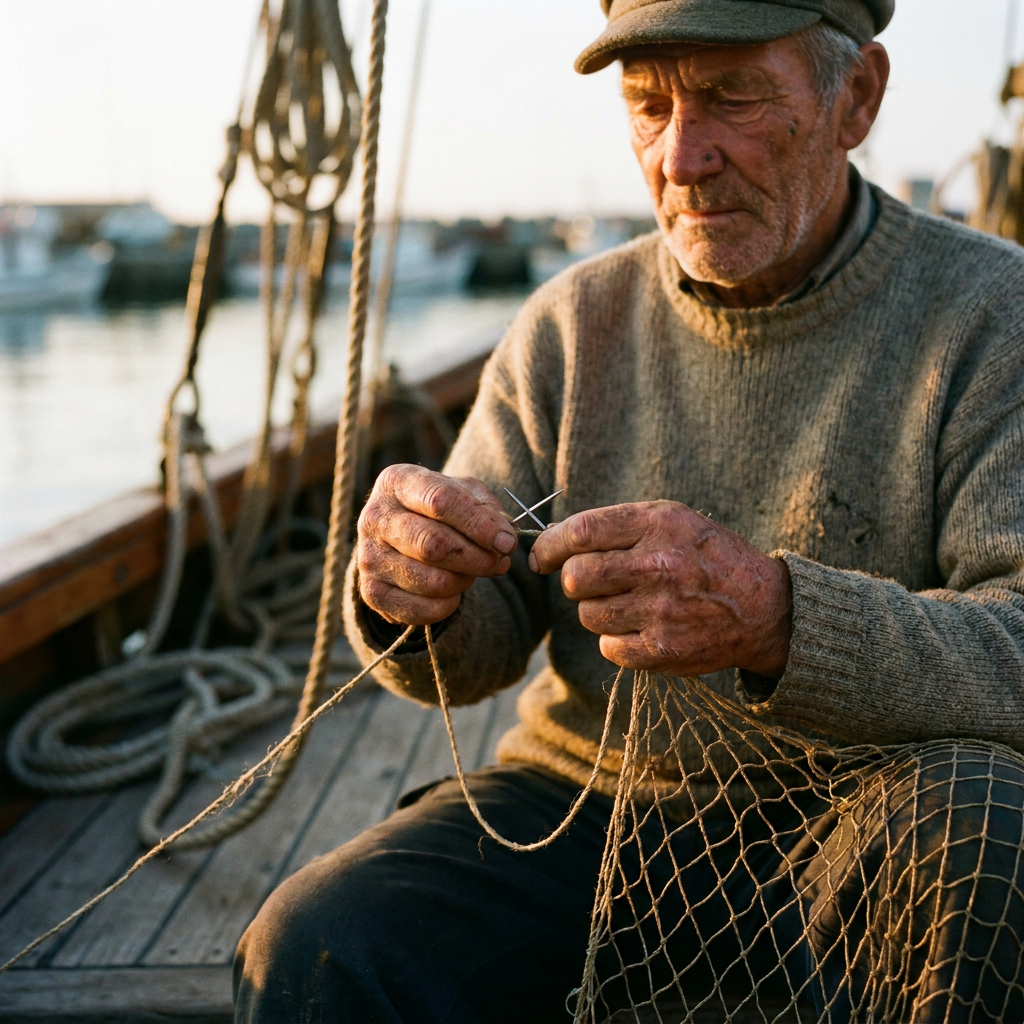
A full new scene from text alone: an older fisherman in a flat cap and grey wool sweater, sitting on a wooden boat deck, harbor and boats blurred behind him in warm golden light, both hands correctly threading a needle through a net. Deep wrinkles and skin texture held up at full size.
What Qwen Image 2 Edit returned
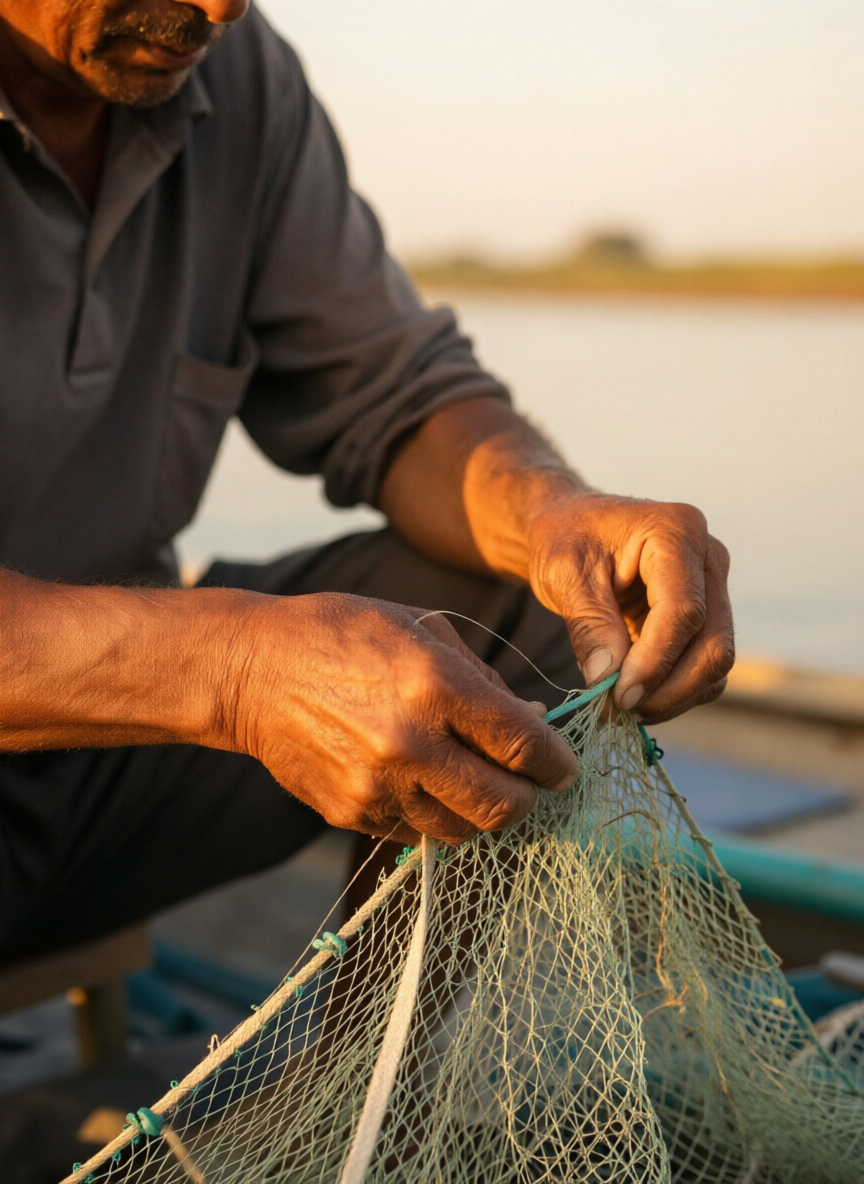
Given our existing fisherman photo plus the same prompt as an instruction, it recomposed the shot rather than lightly touching it up: a tighter crop on the forearms and hands working a pale green net, the man's grey polo replacing the source photo's sweater, the harbor and boat dropped for a plain waterline, and most of the face cropped out of frame.
The real choice is generate vs edit
If you are starting from nothing, Nano Banana Pro is the only one of the two that can do the job. If you already have a photo and want the model to work from it, Qwen Image 2 Edit is built for exactly that, at a third of the price.
Why Choose Pixel Dojo for Google Nano Banana Pro vs Qwen Image 2 Edit
Professional-quality results with cutting-edge AI technology
Qwen Image 2 Edit is a third of the price
1 credit against Nano Banana Pro's 3, provided you already have a source image to hand it.
Nano Banana Pro needs nothing but text
No reference image required. It built a full harbor scene, a wardrobe, and a pose from the prompt alone.
Both followed the hands instruction
The prompt asked for weathered hands in focus. Both models put working hands front and center, just at very different crop distances.
How It Works
How we ran the comparison, so you can repeat it:
Check whether the model needs a source image
Qwen Image 2 Edit's schema requires 1 to 3 image URLs. Google Nano Banana Pro does not require one at all.
Give both the same prompt text
We used the identical portrait description for Nano Banana Pro's text-to-image call and as the edit instruction on Qwen Image 2 Edit's source photo.
Compare what came back, not just the price
Nano Banana Pro cost 3 credits and built a new scene. Qwen Image 2 Edit cost 1 credit and reworked the photo it was given.
The Pixel Dojo Advantage
Same prompt text, run the way each model actually works, on the same day.
| Others | Pixel Dojo |
|---|---|
| Google Nano Banana Pro: 3 credits at 1K or 2K, 6 credits at 4K, about 41 seconds, no source image required | Qwen Image 2 Edit: 1 credit at the default model tier, about 20 seconds, requires 1 to 3 source images |
| Google Nano Banana Pro: built a full harbor scene, cap, sweater and pose from the prompt alone | Qwen Image 2 Edit: reworked our source photo into a tighter hands-and-forearms crop, dropping most of the face and the background |
| Google Nano Banana Pro: 10 aspect ratios, up to 14 optional reference images for style guidance | Qwen Image 2 Edit: up to 6 outputs per call (n 1-6), size auto-matches the input image when left unset |
Loved by creators on PixelDojo
Real feedback from people using PixelDojo, pulled from our in-product surveys.
Excellent website for creating all types of media
Very eay to use, works well to train SDXL loras.
The amazing tools
Top notch quality and strong prompt adherence.
A well resourced sunscription with attention to updates.
Easy to use and there's lots of options.
Explore more AI tools on PixelDojo
AI Tools
Compare & Switch
- Best AI Image Generators
- Best AI Video Generators
- Midjourney Alternatives
- Civitai Alternatives
- Runway Alternatives
- Leonardo Alternatives
- Pika Alternatives
- Luma Alternatives
- Magnific Alternatives
- Veo Alternatives
- Flux Alternatives
- Freepik Alternatives
- Seedance Alternatives
- Seedream Alternatives
- Pixverse Alternatives
- GPT Image Alternatives
- Synthesia Alternatives
- Playground Alternatives
- NightCafe Alternatives
- Canva AI Alternatives
- ElevenLabs Alternatives
- ComfyUI Alternatives
- Fal Alternatives
- Replicate Alternatives
Common Questions
Everything you need to know about Google Nano Banana Pro vs Qwen Image 2 Edit
Which is cheaper, Google Nano Banana Pro or Qwen Image 2 Edit?
Qwen Image 2 Edit, at 1 credit against Nano Banana Pro's 3 at the same 1K or 2K tier. Qwen Image 2 Edit only makes sense as a comparison once you already have a photo, since it requires one.
Can Qwen Image 2 Edit generate an image from text alone?
No. Its schema requires an image field with 1 to 3 source URLs. We fed it an existing fisherman photo and used the portrait prompt as the edit instruction rather than a blank-page generation.
Which one is faster?
Qwen Image 2 Edit, in our test: about 20 seconds against about 41 seconds for Google Nano Banana Pro, timed on August 26, 2026.
Does Qwen Image 2 Edit keep the source photo mostly intact?
Not necessarily. Given our fisherman photo and a prompt describing the same general scene, it recropped tighter on the hands, changed the shirt, and dropped the harbor background rather than making a light touch-up.
What resolutions do they support?
Google Nano Banana Pro offers 1K and 2K at 3 credits each and 4K at 6 credits. Qwen Image 2 Edit takes an explicit size from 512 squared up to 2048 squared, or matches the input image's aspect ratio when size is left unset.
How do I call them from the API?
POST to /api/v1/models/nano-banana-pro/run with a prompt for text-to-image, or /api/v1/models/qwen-image-2-edit/run with a prompt plus an image array for an edit.