Grok Image Edit
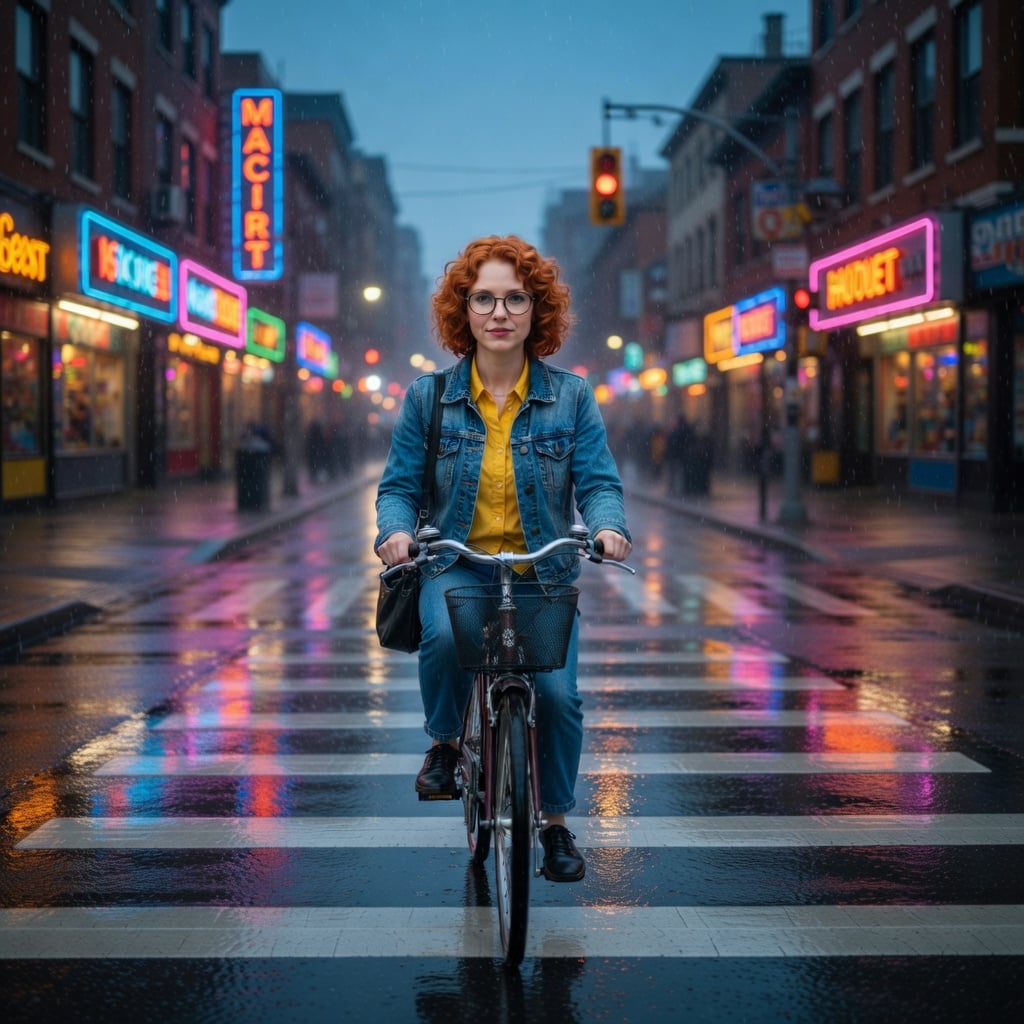
Generated on PixelDojo with Grok Image Edit. Produced by PixelDojo's generation pipeline.
Grok Image Edit costs 1 credit per edit on its fast tier, the same as generating fresh with Grok Image, and it returns synchronously with no job polling. Our test on August 26, 2026 took an existing character portrait, moved her into a completely new rainy street scene, and came back in about 128 seconds while keeping her face, hair, glasses, and outfit intact. This page covers what the request needs, what actually changed and held between input and output, and the pricier tiers above fast.
The 1 credit scene swap we kept
Every example below was produced on PixelDojo. Hover to see the prompt.
Place this exact woman on a bicycle crossing a rainy city crosswalk at dusk, neon shop signs reflecting in puddles, cinematic wide shot, keep her face, glasses, red curly hair, denim jacket and yellow shirt identical
Grok Image Edit
Where editing fits next to the rest of Grok
Switch models without switching tools. Each one runs in the same PixelDojo studio.
What an edit actually needs, and what came back
Fast: 1 credit, synchronous
No job id, no polling. The edited image comes back in the same response.
Quality: 2 credits at 1k, 3 at 2k
A resolution field only applies on this tier, for sharper detail and stronger text on the edit.
Imagine 2: a flat 2 credits, keeps source dimensions
Resolution is ignored here since Imagine 2 edits match the source image's own size automatically.
What held up in our test
The subject's short curly red hair, round glasses, denim jacket, and yellow shirt all carried through from the source character portrait into a brand new rainy, neon-lit crosswalk scene on a bicycle, which is the harder editing task: not just a filter, a full scene replacement around a fixed subject.
Where it fell short
The neon shop signage we asked for rendered as garbled, non-word shapes rather than legible letters. That is a known weak spot for text inside a generated or edited scene, not specific to this one request.
Fast tier output is a fixed square
The resolution field is ignored on the fast tier, and our edit came back at 1024 by 1024 regardless of the source image's own aspect ratio.
1 credit, fast tier, synchronous. Our scene-swap test: about 128 seconds, identity held, background completely rebuilt.
Why Choose Pixel Dojo for Grok Image Edit
Professional-quality results with cutting-edge AI technology
1 credit, same as generating fresh
Editing costs no more than a new fast-tier image on Grok Image.
Synchronous, no polling
The fast tier returns the finished edit in the same request, about 128 seconds in our test.
Identity survived a full scene change
Face, hair, glasses, and outfit all carried over into an entirely different setting.
How It Works
How we ran the 1 credit scene swap:
Start from an existing image
We used a character portrait generated earlier in this same test batch as the image_url input.
Name what to keep as clearly as what to change
Our prompt spelled out the face, glasses, hair, and outfit to preserve alongside the new bicycle and street scene, and every named detail carried through.
Edit in the app or over the API
From the tool page, or POST to /api/v1/models/xai-image-edit/run. Ours charged 1 credit and returned in about 128 seconds.
Loved by creators on PixelDojo
Real feedback from people using PixelDojo, pulled from our in-product surveys.
phenomenal site. would highly recommend
Amazing features, easy to use, privacy
the number of options, and especially the quick response to questions on Discord
Love you guys!!
Trained my Lora super fast. Still working out how to creat content wit it, but I love it so far.
I love this app
Explore more AI tools on PixelDojo
AI Tools
Compare & Switch
- Best AI Image Generators
- Best AI Video Generators
- Midjourney Alternatives
- Civitai Alternatives
- Runway Alternatives
- Leonardo Alternatives
- Pika Alternatives
- Luma Alternatives
- Magnific Alternatives
- Veo Alternatives
- Flux Alternatives
- Freepik Alternatives
- Seedance Alternatives
- Seedream Alternatives
- Pixverse Alternatives
- GPT Image Alternatives
- Synthesia Alternatives
- Playground Alternatives
- NightCafe Alternatives
- Canva AI Alternatives
- ElevenLabs Alternatives
- ComfyUI Alternatives
- Fal Alternatives
- Replicate Alternatives
Common Questions
Everything you need to know about Grok Image Edit
How much does Grok Image Edit cost?
1 credit on the fast tier, the default. Quality is 2 credits at 1k or 3 at 2k, and Imagine 2 is a flat 2 credits, keeping the source image's own size.
How fast is Grok Image Edit?
About 128 seconds in our August 26, 2026 test on the fast tier. It is a synchronous tool, so the edited image returns in the same response with no job polling.
Does it preserve a subject's identity through a full scene change?
In our test, yes. We moved a character from a plain studio background into a rainy neon street scene on a bicycle, and her face, glasses, hair color, and outfit all carried through unchanged.
Does it render text well?
Not reliably. Our test asked for readable neon shop signs and got garbled, non-word shapes instead. Treat any text inside a scene as decorative rather than legible.
How does Grok Image Edit compare with generating fresh via Grok Image?
Both cost 1 credit on the fast tier. Grok Image starts from a blank prompt; Grok Image Edit starts from an image you already have and keeps its subject while changing the rest, which is what our test showed.
How do I call Grok Image Edit from the API?
POST to /api/v1/models/xai-image-edit/run with your API key, a prompt, and an image_url. Same key as every other model in the catalog.