xAI's Grok Imagine, with sharp 2K detail
Grok Imagine AI Image Generator: 2K Photos and Posters
Turn a few lines of description into a magazine ready 2K image, with texture you can see at full size, from the wool of a cobalt coat to the hammered copper of a watch dial.
Make fashion editorials, product ads, interiors, food shots, concept art and travel posters with xAI's image model, from 1 credit an image on Fast to 2 credits for a 2K image on Imagine 2, the Imagine Image 2.0 model behind Quality mode in the Grok app. We made every example below on Pixel Dojo, and each one shows the exact prompt behind it, so you can start from any of them. Every top model, six studios and Sensei, the AI director, share one plan on Pixel Dojo. Credits roll over while you are subscribed, and commercial use is included on every plan.
1 credit ($0.06) per image at 2K. Included in every plan, from $10/month.
Already a member? Sign in
By Brian Lovett · Updated
Grok Imagine image examples and the prompts behind them
We made all six on Imagine 2 at 2K, one per style: a fashion editorial, a splash product shot, an interior, a food ad, a travel poster and a piece of concept art. Tap Use this prompt on any tile to start from it.
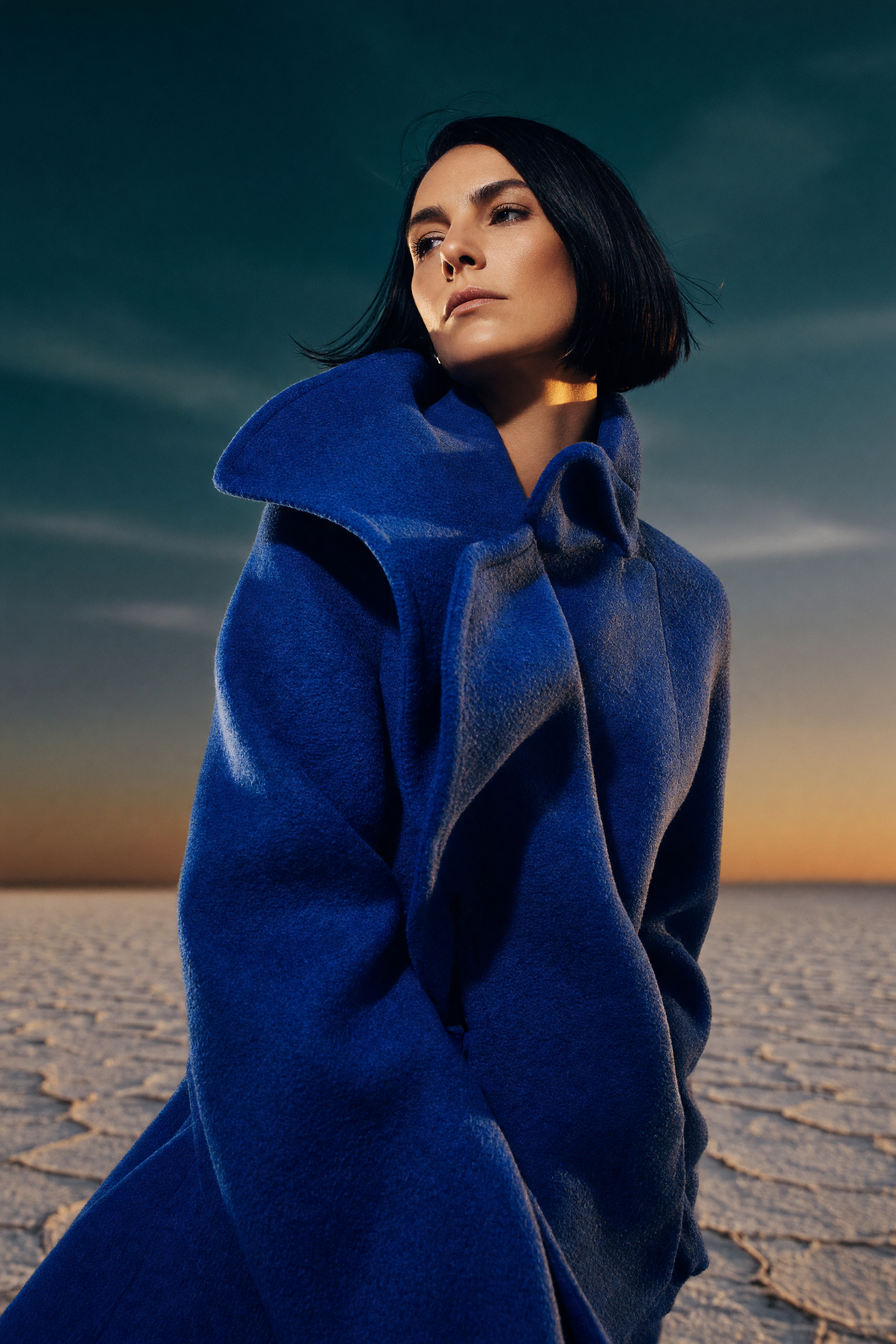
Imagine 2 at 2K. A magazine cover fashion portrait: a sculptural cobalt coat with its collar lifting in the wind, a sleek black bob and a teal dusk sky over cracked salt. Zoom in and the wool fibers and loose strands of hair stay crisp. Start from this prompt for your own editorial.
Low angle fashion editorial portrait. A tall woman in her thirties with a sleek black bob stands on a cracked white salt flat at dusk, wrapped in a sculptural cobalt blue wool coat whose oversized collar lifts in the wind. Hard low sun rakes across the fabric and her cheekbones, deep teal sky behind her, 85mm lens, shallow depth of field, fine film grain, magazine cover quality.
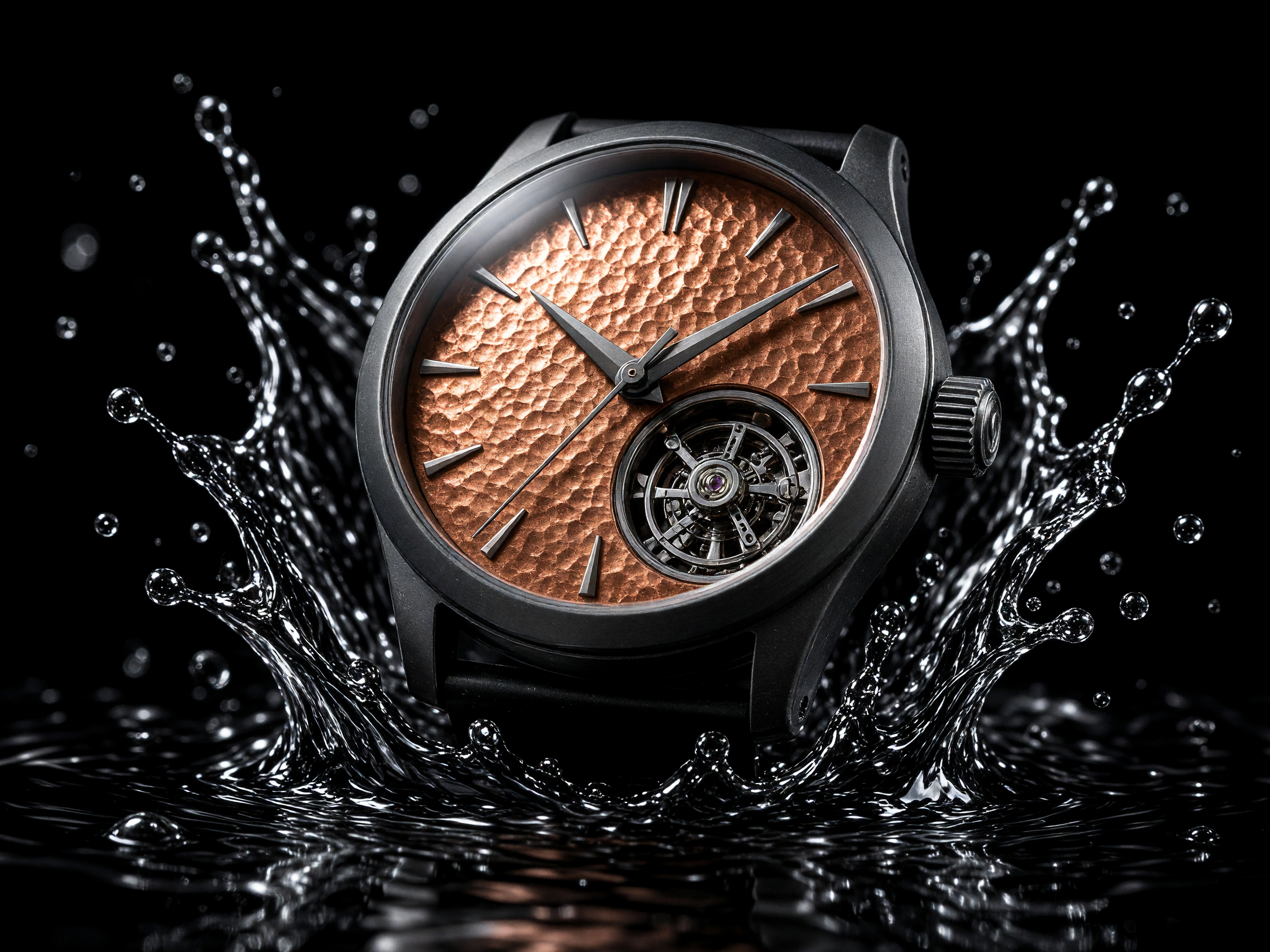
A premium watch ad: a hammered copper dial with an open tourbillon, a matte black case and a crown of black water splashing up on both sides, with crisp rim light on a pure black ground. Swap in your own product and keep the lighting.
Macro product hero shot of an invented matte black mechanical wristwatch with a hammered copper dial and no logo, suspended above a pool of black water as a crown of droplets splashes up around it. Hard rim light from behind, one soft top light, pure black background, 100mm macro lens, crisp specular highlights on the crystal, premium commercial photography.
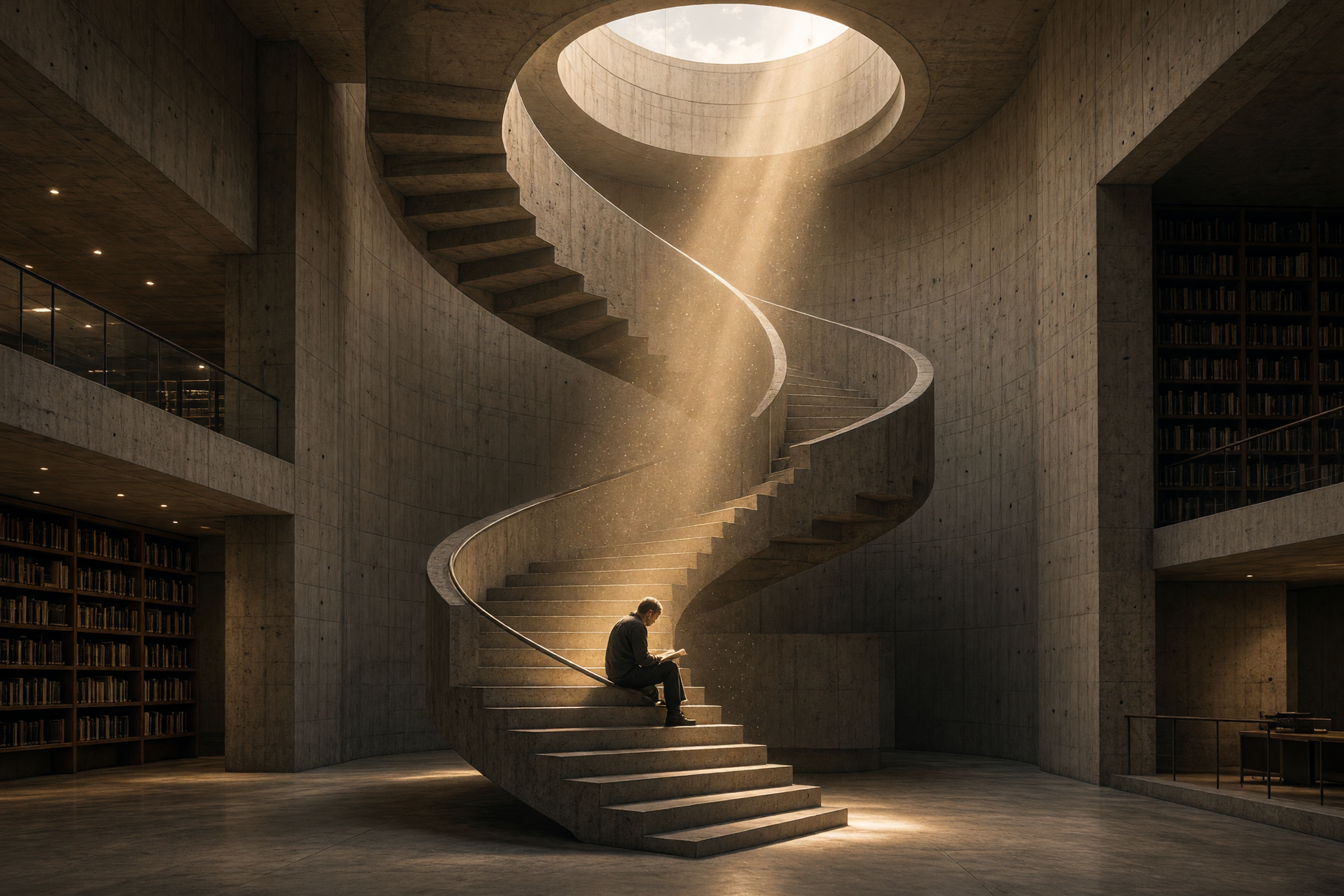
Architectural photography with atmosphere: a sweeping concrete staircase curls up to a round skylight, one golden shaft of light fills with dust beside a lone reader, and the verticals stay level. Start from this prompt for interiors and spaces.
Wide architectural photograph of a brutalist concrete library interior, a spiral staircase climbing through the center under a round skylight. A single shaft of late afternoon sun cuts through dust in the air and lands on one reader sitting on the steps. 24mm tilt shift lens, level verticals, warm grey and honey palette, quiet and monumental.
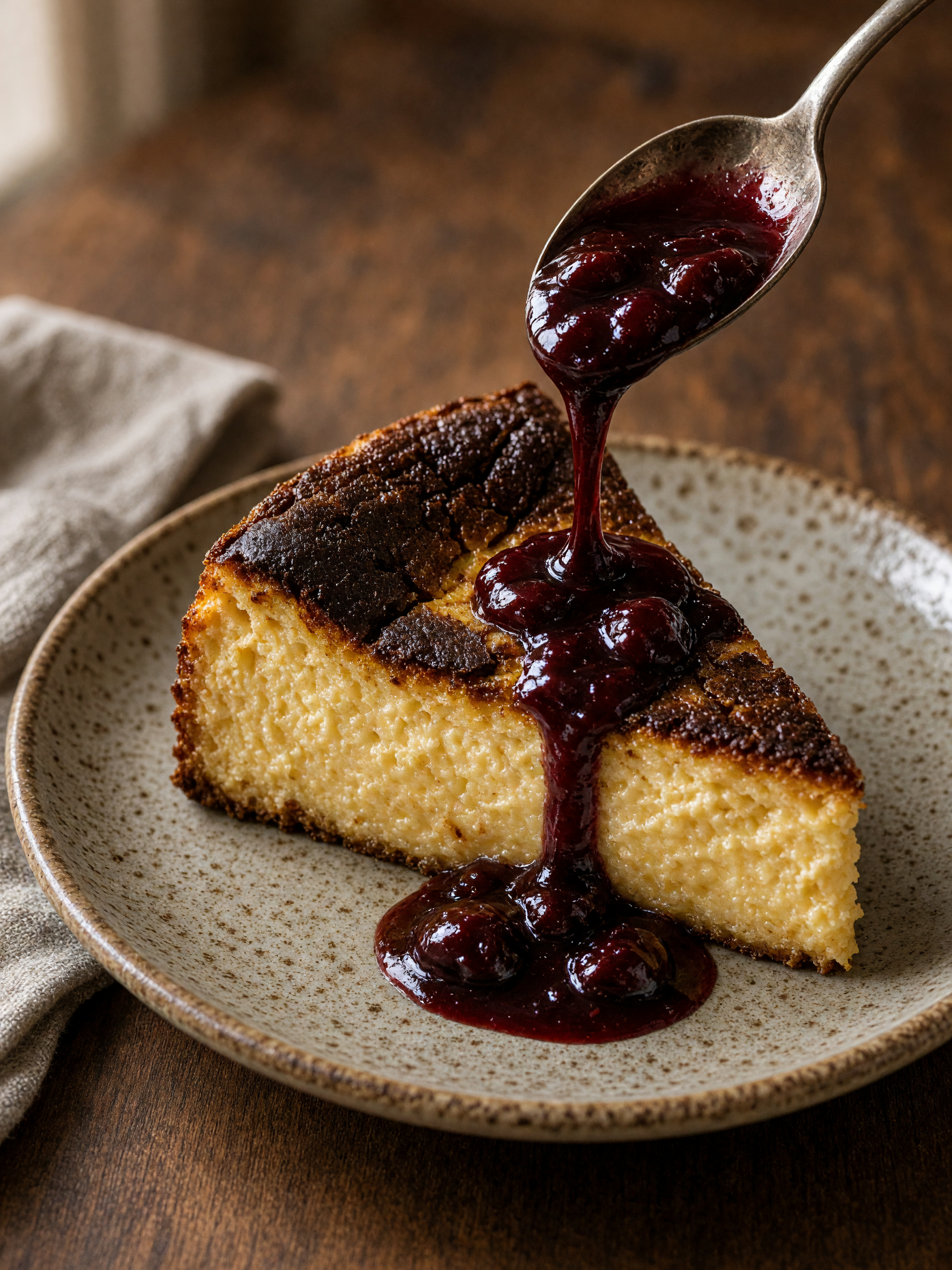
A food ad you can almost taste: a glossy ribbon of dark cherry sauce runs from the spoon onto a slice with a deeply caramelized top, on a speckled plate in soft window light. Swap in your own dish.
Forty five degree food photograph of a slice of burnt Basque cheesecake on a speckled ceramic plate, the caramelized top cracked, a spoon pouring a glossy ribbon of dark cherry sauce over the edge. Dark walnut table, soft window light from the left, a folded linen napkin, 50mm lens, shallow depth of field, rich warm tones.
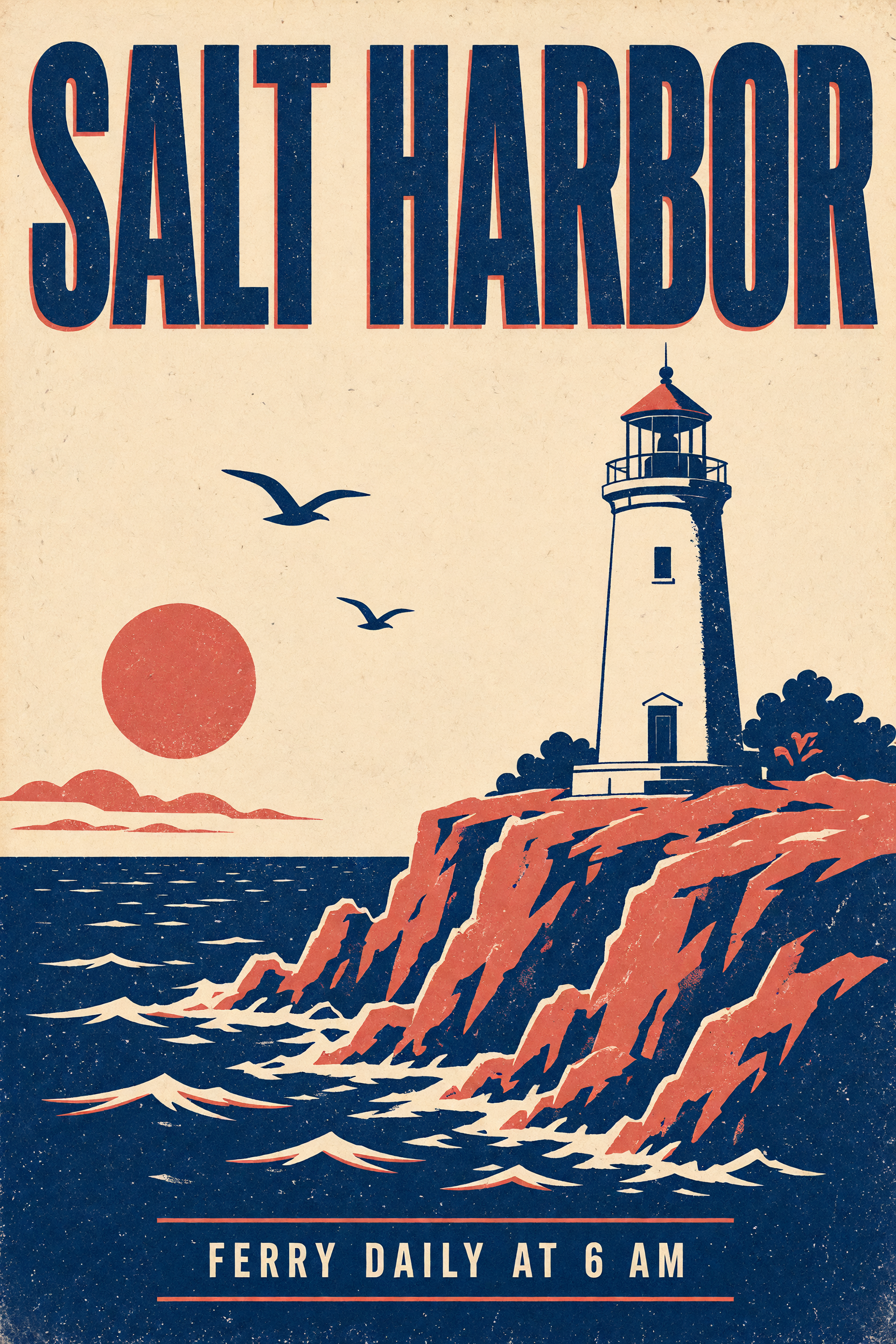
A vintage travel poster with both quoted lines spelled right, SALT HARBOR across the top and FERRY DAILY AT 6 AM below, in three flat inks with paper grain and a coral offset behind the navy headline. Put your own words in quotes.
Vintage screen printed travel poster for an invented island town. A bold condensed headline at the top reads "SALT HARBOR" and a small line at the bottom reads "FERRY DAILY AT 6 AM". A white lighthouse on red cliffs above a navy sea, two gulls, a low coral sun. Three flat inks only: navy, coral and cream, visible paper grain and slight ink misregistration.
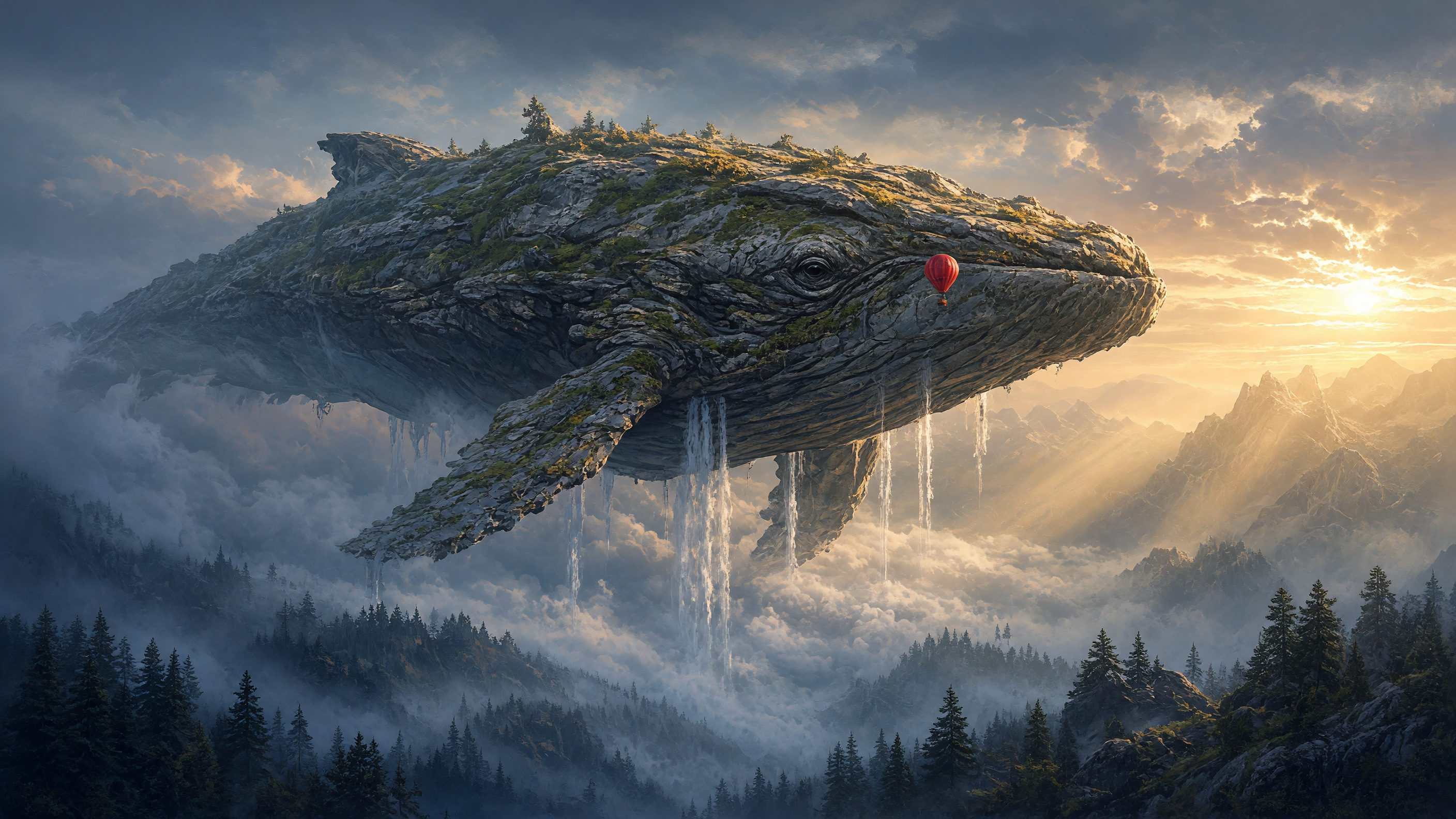
Epic concept art: a moss covered stone whale drifts over a misty pine valley, waterfalls pour from its belly into the clouds, and a tiny red balloon beside its eye sells the scale, with warm sunrise light against cool blue shadow.
Epic wide concept art. A colossal moss covered stone whale drifts above a misty pine valley at sunrise, waterfalls pouring from its belly into the clouds, a tiny red hot air balloon floating beside its eye for scale. Volumetric god rays, painterly matte painting, cool blue shadows against warm gold light.
How to use Grok Imagine on Pixel Dojo
- 1
Pick a tier
Fast is 1 credit an image and great for trying ideas and layouts. Quality brings bold, rich color at 1.5 credits at 1K or 2 credits at 2K. Imagine 2, xAI's newest image model, is 2 credits at either size and gives the finest texture; we made every example above on it.
- 2
Describe the shot
Open with the shot type, then one subject with named materials and colors, one moment, then light, lens and finish. Our portrait prompt names the cobalt wool coat, the lifted collar, the black bob and the teal dusk sky, and every one of them is in the image.
- 3
Put your words in quotes
Wrap each line of text in double quotes and say where it sits. Our poster asked for a headline at the top and a small line at the bottom, and every Grok Imagine tier spelled both right, the 1 credit Fast tier included.
- 4
Choose the shape and size
Pick the aspect ratio before you write: 2:3 for posters and portraits, 3:2 for interiors, 4:3 for product shots and 16:9 for concept art and banners. Choose 2K for anything you plan to crop, print or use as a banner.
- 5
Start from an example
Tap Use this prompt on any tile, then set Model tier to Imagine 2 and match the tile's aspect ratio and resolution. Every run is a fresh image, so the same prompt gives you a new design each time.
What each Grok Imagine tier brings to your image
We ran three of the example prompts again to show the range you get. Fast turns the Salt Harbor poster into a bold flat design for 1 credit, Quality paints the sky whale in rich sunset color, and a second Imagine 2 image of the watch prompt gives you a whole new design.
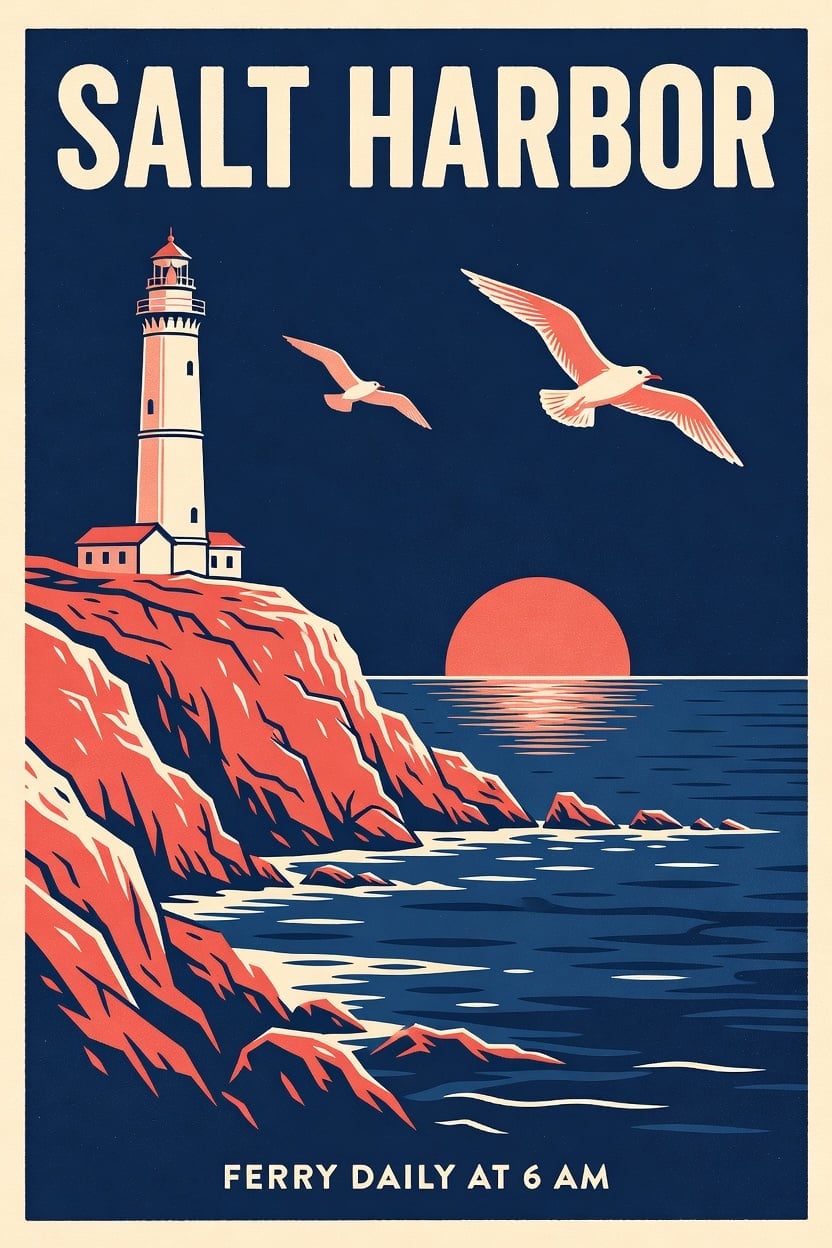
Fast, 1 credit. A bold flat design poster with a cream headline on navy, coral cliffs and two gulls, and both quoted lines spelled right. A quick way to try layouts and wording.
Vintage screen printed travel poster for an invented island town. A bold condensed headline at the top reads "SALT HARBOR" and a small line at the bottom reads "FERRY DAILY AT 6 AM". A white lighthouse on red cliffs above a navy sea, two gulls, a low coral sun. Three flat inks only: navy, coral and cream, visible paper grain and slight ink misregistration.
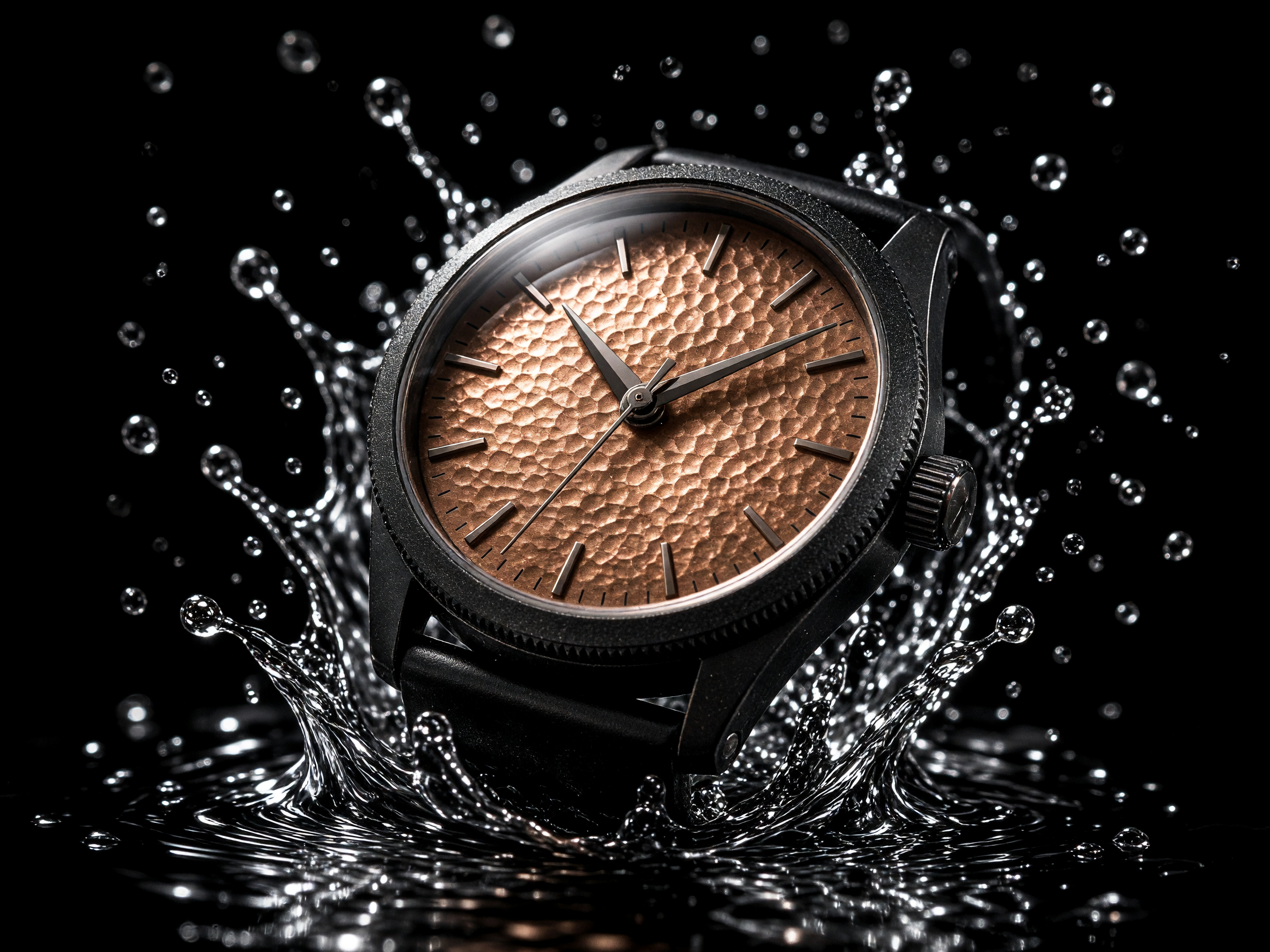
Imagine 2 at 2K. The same watch prompt as the example above, a new design: a knurled bezel, clean baton markers and droplets frozen in a halo around the case.
Macro product hero shot of an invented matte black mechanical wristwatch with a hammered copper dial and no logo, suspended above a pool of black water as a crown of droplets splashes up around it. Hard rim light from behind, one soft top light, pure black background, 100mm macro lens, crisp specular highlights on the crystal, premium commercial photography.
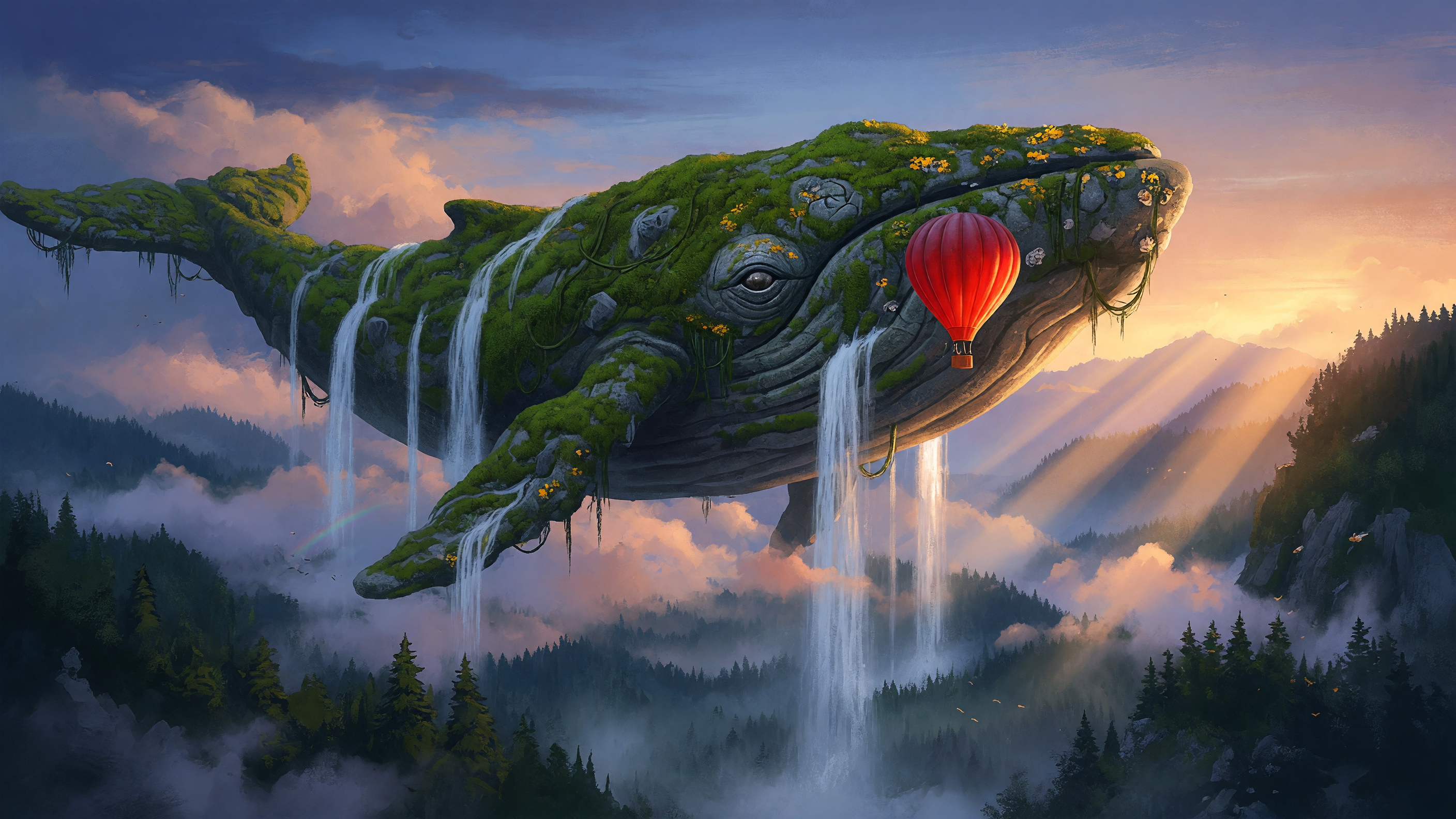
Quality at 2K. The sky whale in saturated sunset color, with golden flowers in the moss, waterfalls pouring off its back and long sunbeams across the hills.
Epic wide concept art. A colossal moss covered stone whale drifts above a misty pine valley at sunrise, waterfalls pouring from its belly into the clouds, a tiny red hot air balloon floating beside its eye for scale. Volumetric god rays, painterly matte painting, cool blue shadows against warm gold light.
- Fast is the quickest way to try an idea: 1 credit an image, and it still spells short quoted text right.
- Quality leans into bold, saturated color, which suits concept art, fantasy scenes and social graphics.
- Imagine 2 brings the most detail and texture, from wool fibers and hammered metal to water droplets and dust in a sunbeam. Use it for portraits, product shots and anything you plan to print.
- Every run is a new image, so the same prompt gives you fresh designs to choose from. Ask for up to 10 images in one job to compare them side by side.
- At 2K a 2:3 image measures 1664 by 2496 pixels, a 3:2 image 2496 by 1664, a 4:3 image 2368 by 1776 and a 16:9 image 2816 by 1584: room for posters, banners and crops.
Grok Imagine vs Seedream 5: one travel poster, two styles
We gave the Salt Harbor poster prompt to Grok Imagine Quality at 2K and to Seedream 5 at 2:3. Both spelled both quoted lines right and both delivered a 1664 by 2496 poster. Grok Imagine went for a textured, hand printed look with an offset outline on the headline for 2 credits, and Seedream 5 went for a clean framed layout for 2.5 credits. For a crisp layout with that offset ink look, see the Imagine 2 poster in the examples above.
Same prompt: Vintage screen printed travel poster for an invented island town. A bold condensed headline at the top reads "SALT HARBOR" and a small line at the bottom reads "FERRY DAILY AT 6 AM". A white lighthouse on red cliffs above a navy sea, two gulls, a low coral sun. Three flat inks only: navy, coral and cream, visible paper grain and slight ink misregistration.
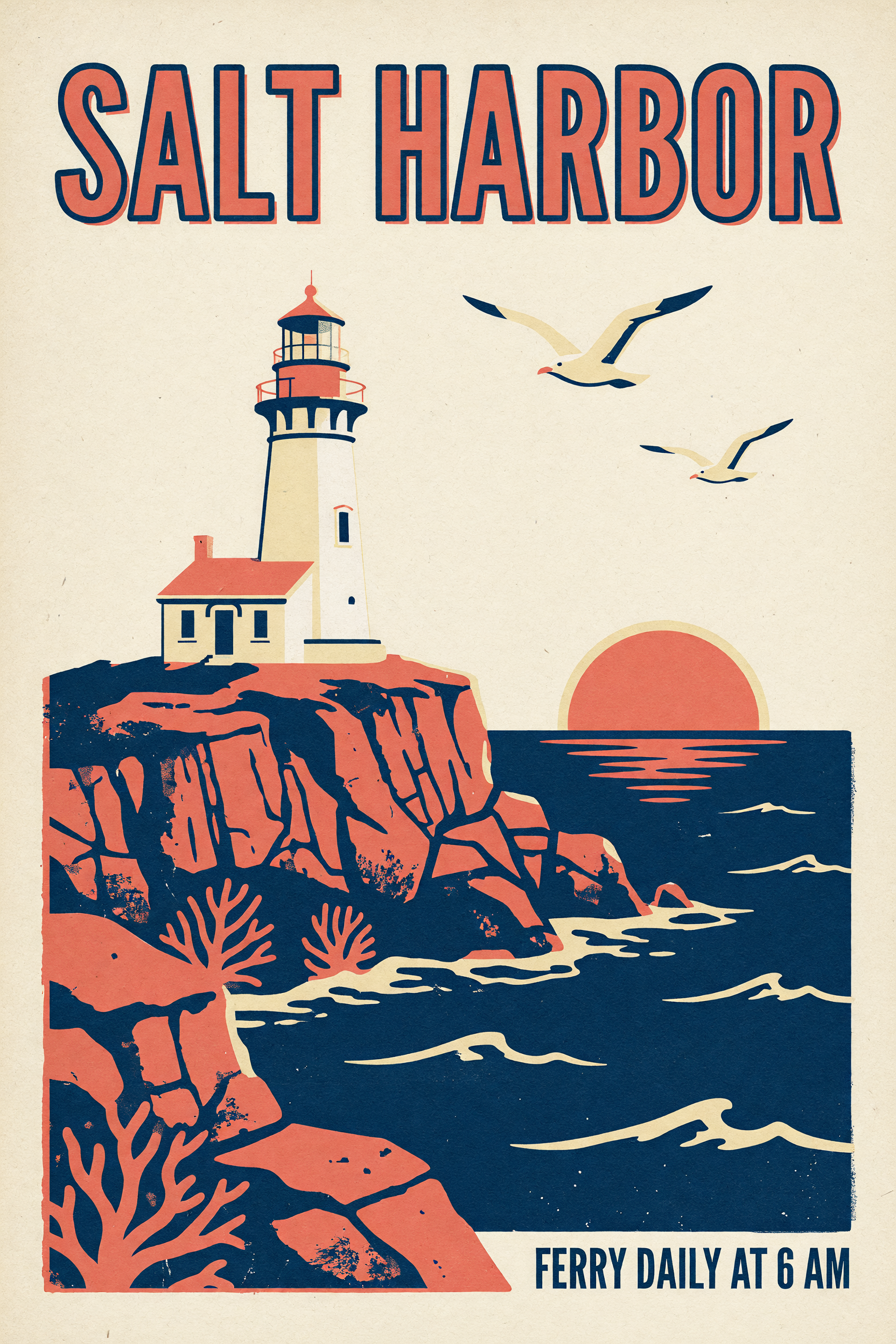 Grok Imagine
Grok Imagine Quality at 2K, 2 credits. A hand printed feel with distressed ink on the cliffs and sea, a coral headline with a navy offset outline, and a cottage beside the lighthouse.
Vintage screen printed travel poster for an invented island town. A bold condensed headline at the top reads "SALT HARBOR" and a small line at the bottom reads "FERRY DAILY AT 6 AM". A white lighthouse on red cliffs above a navy sea, two gulls, a low coral sun. Three flat inks only: navy, coral and cream, visible paper grain and slight ink misregistration.
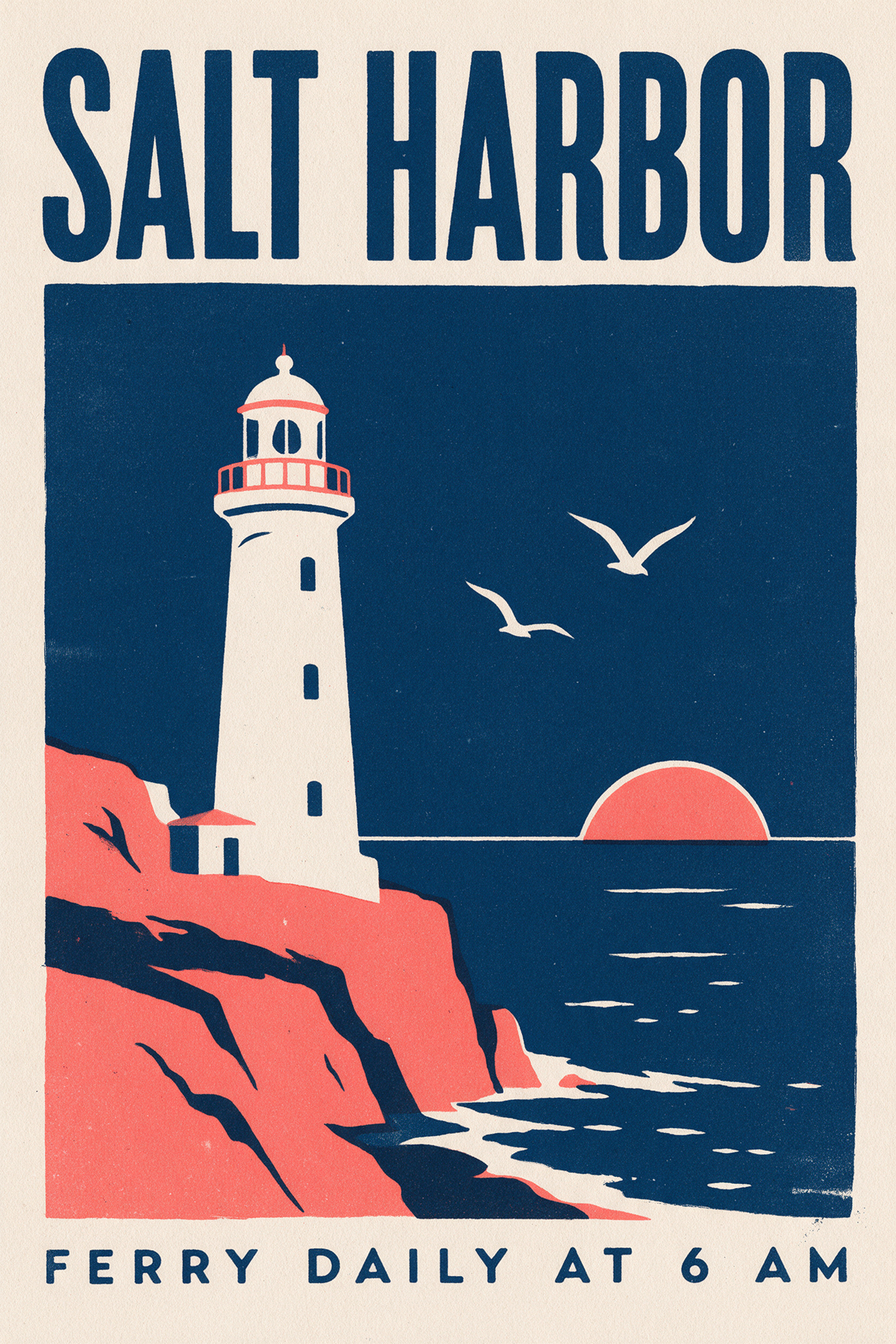 Seedream 5
Seedream 5 at 2:3, 2.5 credits. A calm, framed layout: a full width navy headline, a white lighthouse on coral cliffs and a widely spaced line along the bottom.
Vintage screen printed travel poster for an invented island town. A bold condensed headline at the top reads "SALT HARBOR" and a small line at the bottom reads "FERRY DAILY AT 6 AM". A white lighthouse on red cliffs above a navy sea, two gulls, a low coral sun. Three flat inks only: navy, coral and cream, visible paper grain and slight ink misregistration.
| Grok Imagine | Seedream 5 | |
|---|---|---|
| Style | Textured and hand printed, with distressed ink on the cliffs and sea | Clean and framed, with even paper grain |
| Headline | Coral letters with a navy offset outline | Full width navy letters |
| Quoted text | Both lines spelled right | Both lines spelled right |
| Great for | Vintage prints, merch and retro social posts | Minimal posters and clean layouts |
| Cost | 2 credits | 2.5 credits |
Grok Imagine settings and how to use each one
The tool has one prompt box and four controls, and the public API takes the same settings.
- Model tierFast · Quality · Imagine 2
- Fast is 1 credit for quick ideas. Quality is 1.5 credits at 1K and 2 credits at 2K, with bold color. Imagine 2 is 2 credits at either size and is the Imagine Image 2.0 model behind Quality mode in the Grok app; pick it for the finest texture.
- Resolution1K · 2K
- Used by Quality and Imagine 2. 1K suits phone screens and quick posts; a Quality 1K image at 9:16 measures 720 by 1280. Pick 2K for anything you plan to crop, print or use as a banner.
- Aspect ratio1:1 · 16:9 · 9:16 · 4:3 · 3:4 · 3:2 · 2:3
- Seven shapes from square to tall. We use 2:3 for posters and portraits, 3:2 for interiors, 4:3 for product shots and 16:9 for concept art and banners.
- Number of images1 to 10 per job
- Ask for several images at once to compare designs side by side. Each image uses its own credits.
Grok Imagine pricing: included in every plan
Grok Imagine is included in every Pixel Dojo plan, with plans from $10/month, and credits roll over while you are subscribed. Each image uses credits from your plan: 1 credit on Fast, 1.5 credits on Quality at 1K, 2 credits on Quality at 2K and 2 credits on Imagine 2 at 1K or 2K.
Every example at the top of this page was made on Imagine 2 at 2K for 2 credits. Ask for several images in one job and each image uses its own credits. The Pixel Dojo API charges the same credits per image.
Grok Imagine questions
What is Grok Imagine?
Grok Imagine is xAI's image and video generator family. On Pixel Dojo the image tool has three tiers: Fast for quick ideas, Quality for bold color and Grok Imagine 2, xAI's Imagine Image 2.0, released August 7, 2026.
Is Grok Imagine 2 the same as Quality mode in the Grok app?
Yes. Grok Imagine 2 on Pixel Dojo is xAI's Imagine Image 2.0, the model the Grok app runs as Quality mode. The tier named Quality on Pixel Dojo is an earlier xAI model with its own bold, saturated look.
What is Grok Imagine good at?
Photoreal images with rich texture: fashion editorials, product shots with splashes and rim light, food, interiors with dramatic light and painterly concept art. It also spells short quoted text right, which makes it handy for posters and social graphics.
Can I use Grok Imagine images commercially?
Yes. You own what you make, on every plan.
Is Grok Imagine free?
A free account gets 3 free effects every day to try Pixel Dojo. Grok Imagine is included in every plan from $10/month, and credits roll over while you are subscribed. Fast is 1 credit per image and Imagine 2 is 2 credits.
Can Grok Imagine put text in an image?
Yes. Put each line in double quotes and say where it goes. Every Grok Imagine tier spelled both lines of our travel poster right, from the SALT HARBOR headline to the ferry line at the bottom, the 1 credit Fast tier included.
Does Grok Imagine make videos too?
Yes, in a separate tool. Grok Imagine video turns a prompt or a still image into a short clip, and image to video on the 1.5 model adds native sound.
Make your first Grok Imagine image
Write a prompt above or start from any example on this page. One plan covers every top model, six studios and Sensei, and your credits roll over.
Start with Grok Imagine