Pony NAI AI Generator
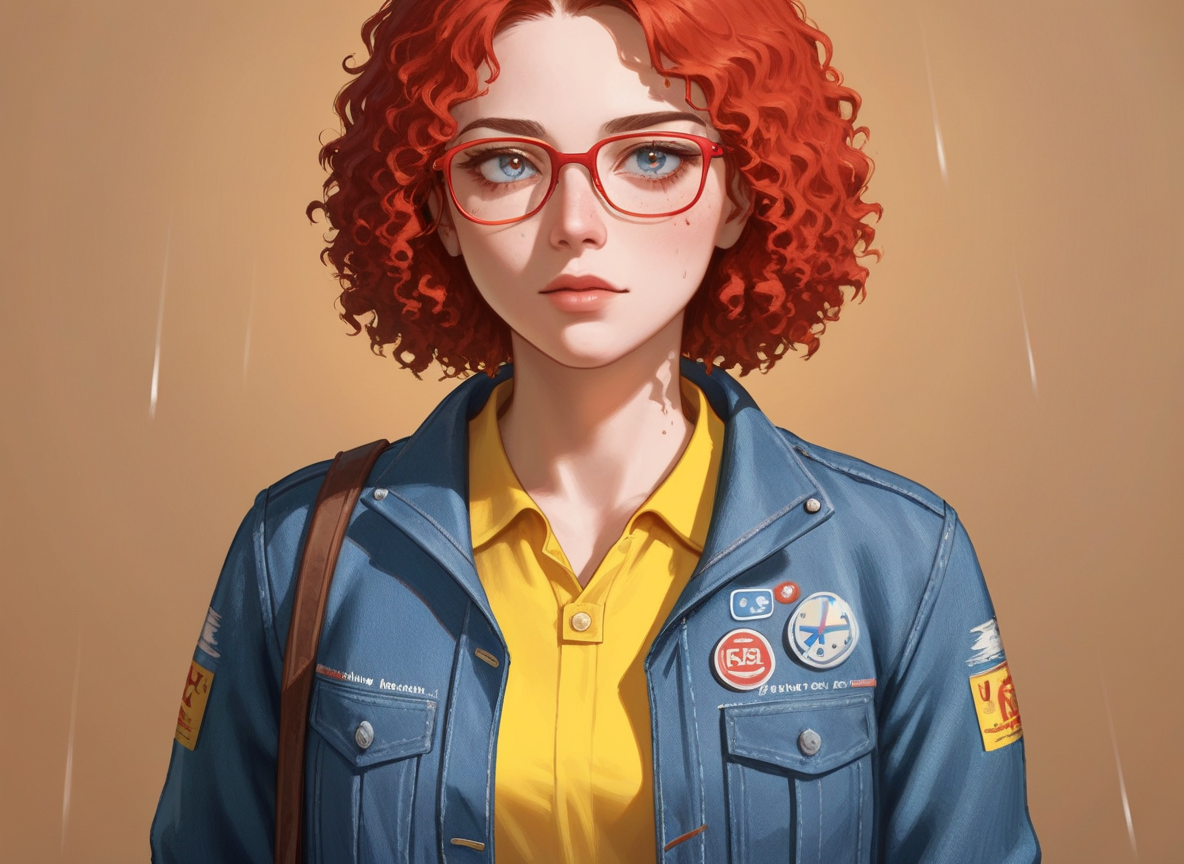
Generated on PixelDojo with Pony NAI. Produced by PixelDojo's generation pipeline.
Pony NAI costs 1 credit per image, the same flat price as its sibling checkpoint Pony Realism on the same tool. We ran it against the identical reference photo and scene instruction on August 26, 2026 to see how the two checkpoints differ. The render took about 7 minutes and came back as a painterly illustration rather than a photo.
The same test, a different checkpoint
Every example below was produced on PixelDojo. Hover to see the prompt.
Place this exact woman on a bicycle crossing a rainy city crosswalk at dusk, neon shop signs reflecting in puddles, cinematic wide shot, keep her face, glasses, red curly hair, denim jacket and yellow shirt identical
Pony NAI
What the side-by-side test showed
What actually changed from Pony Realism
Same reference image, same instruction, same 1 credit price. The result is a painterly illustration with visible brushwork rather than a photographic crop, and the eye color shifted from the reference's original color to blue. This is a different SDXL checkpoint on the same underlying tool, not a different feature set.
The scene instruction was ignored here too
We asked for a bicycle, a rainy crosswalk, and neon signage at dusk. Neither this checkpoint nor Pony Realism placed the subject into that scene. Both kept a plain background and focused on the subject's face and torso instead. This appears to be a property of how this tool applies a reference image, not something specific to one checkpoint.
Extra details were added, not requested
The denim jacket in the result carries painted badge-like patches and lettering that were not in the reference photo or the prompt, similar to how Pony Realism added an unrequested star patch and pin on the same input.
About 7 minutes for this run
Faster than the Pony Realism run on the identical prompt, which took about 8 minutes 30 seconds, but still far outside what most generations on the platform take. Both look like a slow, infrequently used checkpoint rather than a stable baseline speed.
Same reference, same prompt, same 1 credit. Pony NAI: about 7 minutes, painterly illustration style. Pony Realism: about 8.5 minutes, photoreal style.
Why Choose Pixel Dojo for Pony NAI
Professional-quality results with cutting-edge AI technology
1 credit per image, flat
The same price as Pony Realism and every other checkpoint variant on this tool, regardless of the width, height, or step settings you send.
A clearly different look from the same input
Fed the exact reference photo and instruction we used on Pony Realism, this checkpoint produced a hand-painted, illustrated look rather than a photographic one.
The core identity traits still carried over
Red curly hair, glasses, and a yellow top under a denim jacket all appear in the result, in a stylized form.
How It Works
How we ran this comparison test:
Reuse the exact same reference and prompt
We sent the identical character reference photo and scene instruction used for the Pony Realism test, changing only the checkpoint.
Time the run and note anything unusual
This run took about 7 minutes, faster than Pony Realism's 8 minutes 30 seconds but still slow for the platform, which we flag rather than smooth over.
Read the result against both inputs
We checked the output against the reference photo (identity traits carried over loosely) and the prompt (the scene instruction was not followed) rather than just describing the picture in isolation.
Loved by creators on PixelDojo
Real feedback from people using PixelDojo, pulled from our in-product surveys.
it is an amazing site to create a pics and vids for those who don't have the hardware themselves
good tools in one place
Prompt updates, strong features, and a community that is always willing to help and hear/act on professional feedback. I've never had a better experience.
user friendly all in one thing
I really like the schedule of AI work performed!
The best tools for IA on the web !
Explore more AI tools on PixelDojo
AI Tools
Compare & Switch
- Best AI Image Generators
- Best AI Video Generators
- Midjourney Alternatives
- Civitai Alternatives
- Runway Alternatives
- Leonardo Alternatives
- Pika Alternatives
- Luma Alternatives
- Magnific Alternatives
- Veo Alternatives
- Flux Alternatives
- Freepik Alternatives
- Seedance Alternatives
- Seedream Alternatives
- Pixverse Alternatives
- GPT Image Alternatives
- Synthesia Alternatives
- Playground Alternatives
- NightCafe Alternatives
- Canva AI Alternatives
- ElevenLabs Alternatives
- ComfyUI Alternatives
- Fal Alternatives
- Replicate Alternatives
Common Questions
Everything you need to know about Pony NAI
How much does Pony NAI cost?
1 credit per image, the same fixed price as Pony Realism and the other checkpoint variants on this tool.
How fast is Pony NAI?
About 7 minutes in our August 26, 2026 run. That is well outside the speed most models on the platform return at, and looks tied to this specific checkpoint rather than a typical figure.
What is the actual difference between Pony NAI and Pony Realism?
On an identical reference photo and prompt, Pony NAI returned a painterly illustration with the eye color changed, and Pony Realism returned a photoreal crop. Same price, same input handling, different trained checkpoint and therefore a different visual style.
Does it follow a scene instruction given with a reference image?
Not in our test. It kept general identity traits, hair color, glasses, and clothing colors, but did not place the subject into the requested bicycle-and-crosswalk scene, matching what we saw on Pony Realism with the same input.
Can I use Pony NAI for plain text-to-image generation?
Yes, that is the documented primary mode for this tool. We specifically tested it with a reference image to see how the checkpoint handles one.
How do I call it from the API?
POST to /api/v1/models/ponyxl-tponynai3-v7/run with your API key and a prompt. Same key and request shape as every other model in the catalog.