Footsteps, ambience, a distant bell
Sound in every clip
Describe what you hear next to what you see. The clip arrives with the sound already in it, so there is nothing to add later.
P-Video 2 Pro Prompting Guide
P-Video 2 Pro makes 5 to 15 second clips with sound built in. Start from a prompt, a start image or both a start and an end image. Add reference photos, clips or audio to keep a person and a look. Add a video to change one thing in it. A 5 second clip is 5 credits. This guide shows the prompts that work, with the clip each one made.
P-Video 2 Pro is one page with three ways to work. Type a prompt or add a start image and it makes a new clip. Attach a reference photo, clip or audio and it switches to Reference. Add a video and it switches to Edit. You never pick a mode by hand. The page changes with what you add.
Every clip comes with sound. Footsteps, room noise and a spoken line in quotes all come out in the same render. Clips are 24 frames per second at 480p or 768p, in seven shapes from 16:9 to 9:16.
It is also cheap. A 5 second 768p clip in Speed is 5 credits, and Lowest cost is the same price. Every clip on this page was made with the prompt shown beside it.
5 to 15 s
Clip length
5 credits
A 5 second 768p clip
3 ways
New clip, Reference, Edit
Describe what you hear next to what you see. The clip arrives with the sound already in it, so there is nothing to add later.
Write what the person says inside quotes. They say it to camera with their mouth moving to the words.
Add a start image and describe only the motion. The still already holds the person, the clothes and the light.
Add your own video and name the single change. The people, the place and the original sound stay as they were.
Each example shows the exact prompt that produced the result. Copy any prompt with one click.
768p · 16:9 · 5 s · Speed · Turbo prompt upsampler · 5 credits · sound on
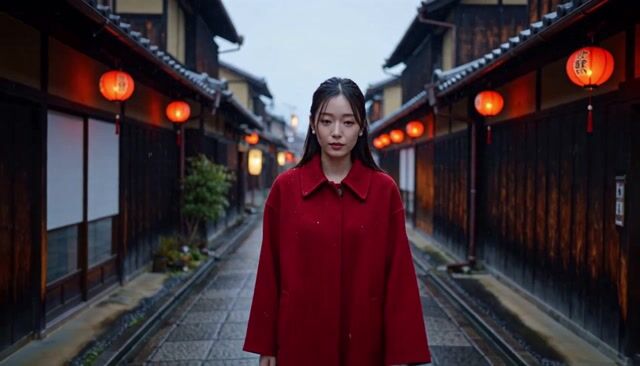
A beautiful woman in a long red wool coat walks slowly down a narrow Kyoto street at dusk as snow falls. Paper lanterns glow warm on both sides. She looks up at the snow and smiles. The camera tracks backward in front of her at walking pace. Soft footsteps on snow and a distant temple bell.
One person, one action, one camera move. The last sentence is the sound: footsteps and a bell. Say what the camera does in plain words, such as tracks backward at walking pace.
768p · 16:9 · 5 s · Speed · Turbo prompt upsampler · 5 credits · sound on
Medium shot inside a bright modern coffee shop. A handsome barista with curly brown hair and a denim apron slides a latte across the wooden counter, looks at the camera and says "Here you go. Best one I have made all day." He grins. Espresso machine hiss and soft cafe chatter in the background. Static camera, shallow depth of field.
Put the line in double quotes and say who speaks and where they look. Keep it short enough to say in a few seconds. Then describe the room sound so the background fills in around the voice.
768p · 9:16 · 5 s · Speed · 5 credits · start image
She turns to face the camera and smiles as the wind moves her jacket. The camera pushes in slowly. City hum far below.
The start image was a 9:16 photo of a woman in a green suit on a rooftop at sunset. The prompt never describes her again. It only says what moves, what the camera does and what you hear.
768p · 3:4 · 5 s · Speed · 5 credits · start image
The mist drifts slowly across the wet stone. The beam of light sweeps gently over the glass bottle and the gold cap glints. The camera orbits a few degrees to the right. Soft airy ambience.
The start image was a perfume bottle on dark stone. Small moves look best on a product: mist, a light sweep and a few degrees of orbit. Name the shape in the Aspect menu so it matches your image.
Reference · 1 reference photo · 768p · 16:9 · 5 s · Speed · 6.25 credits · sound on
The woman from the reference image walks along a sunny beach boardwalk at golden hour, hair moving in the breeze. She looks toward the sea, then glances at the camera and smiles. The camera tracks beside her at walking pace. Soft waves and distant gulls.
The reference was one full-length studio photo of a woman with auburn hair, a white tank top and jeans. She keeps her face, hair and outfit in a new place. The prompt points to her as "the woman from the reference image" and then only says what she does.
Edit mode · Standard · Keep audio · 12 credits for a clip billed at 6 seconds
Change the latte into a tall iced matcha latte in a clear glass with a straw. Keep the barista, the counter and everything else the same.
The input was the barista clip above. One sentence names the change and a second says what to keep. Only the drink changed. The barista, the counter and the voice carried over.
End the prompt with what you hear: footsteps on snow, a coffee machine hiss, city hum far below. Sound is part of the render, so a line about it costs nothing extra.
Put spoken words in double quotes and say who says them. Keep each line short. One speaker per clip is the cleanest.
The image already shows the person, the outfit and the light. Repeating them can pull the clip away from your picture. Say what moves, how the camera moves and what we hear.
A 5 second clip has room for one thing happening. Pick one action and one move, such as a slow push in or a tracking shot at walking pace.
Write the single change first, then add "Keep the people, the place and everything else the same." Several changes in one prompt blur each other.
In Reference, describe each photo by what is in it, such as "the woman in the emerald coat". Your prompt then says what she does.
Run an idea at 480p or Lowest cost first. When the clip is right, run it again at 768p. In an edit, Draft is half the price of Standard.
The beach clip above shows it. One photo of a woman went in, and she came out walking in a new place with the same face, hair and outfit.
Press the plus button on the composer and choose a photo, a video or audio. The page switches to Reference on its own. You can add up to 9 images in all, start and end images included, up to 3 reference videos and up to 3 reference audio tracks. Reference clips run 2 to 15 seconds each, 15 seconds combined.
Use photos to keep a face or a product, a clip to borrow motion and camera, and audio for a voice or a song. With exactly one audio track you can tick Use as soundtrack (lip sync), and the person sings or speaks to it. Reference works with a start and an end image. Its modes are Lowest cost and Speed.
Reference costs 1.25 credits per second of output. The first 5 images are included and each extra image adds 0.25 credits. Reference video adds 1.5 credits per second. Audio is free. A 5 second clip with up to 5 images is 6.25 credits.
Add a video to the composer, or open the page with the edit option from the menu. The page switches to Edit. The clip can be 1 to 15 seconds and up to 100 MB. You can add up to 4 reference images to show a new outfit, object or look.
Choose Standard or Draft. Choose Keep audio to carry the original sound over, or Mute for a silent clip. Standard is 2 credits per second and Draft is 1 credit per second.
Clips often run a little over their nominal length. Edits bill whole seconds of your clip, rounded up. The 5 second barista clip above was billed as 6 seconds, so the edit was 12 credits. Draft would have been 6.
P-Video 2 Pro can also swap the person in a video for someone from a picture. That tool lives on the Video Face Swap page at /character-swap, not on this page. The guide at /guides/face-and-character-swap-guide shows how to set it up.
The original P-Video makes 720p or 1080p clips of 1 to 20 seconds and can build a clip around your own audio file. On its P-Video 2 option it costs 0.75 credits per second at 720p. Choose it for longer clips or for audio you already have. Choose P-Video 2 Pro for the lowest price per clip, reference photos and clip edits. See the P-Video guide.
Seedance 2.5 Flash makes 4 to 30 second clips at 480p or 720p for 2 and 4 credits per second. It takes up to 10 reference images. Choose it for longer scenes. A 5 second 720p clip is 20 credits there and 5 credits here.
MiniMax H3 Turbo makes 5 to 15 second clips at 480p or 720p for 0.75 and 1.5 credits per second. It takes up to 9 reference images. A 5 second 720p clip is 7.5 credits there. P-Video 2 Pro has a 768p size, an Edit mode and a Quality tier when you want more motion and detail.
| Setting | Values | Notes |
|---|---|---|
| Duration | 5 to 15 seconds | Whole seconds. The default is 5. |
| Resolution | 480p (cheapest, quickest) · 768p (sharper detail) | The default is 768p. |
| Mode | Lowest cost · Speed · Quality | Speed is the default. Quality gives the best motion and detail. Reference has Lowest cost and Speed only. |
| Aspect ratio | 16:9 · 9:16 · 4:3 · 3:4 · 3:2 · 2:3 · 1:1 | Reference also offers Adaptive. |
| Prompt upsampler | Off · Turbo · Max | Adds detail to your prompt. Turbo is the default. |
| Credits per second | 480p: 1 (Lowest cost and Speed), 2 (Quality) · 768p: 1 (Lowest cost and Speed), 3 (Quality) | A 5 second 768p clip in Speed is 5 credits. A 15 second 768p clip in Quality is 45. |
| Reference | Up to 9 images · 3 videos · 3 audio tracks | 1.25 credits per second, plus 0.25 per image past 5 and 1.5 per reference video second. |
| Edit | Clip of 1 to 15 seconds · up to 4 images · Standard or Draft · Keep audio or Mute | Standard 2 credits per second. Draft 1 credit per second. Whole seconds, rounded up. |
P-Video 2 Pro is a video model that makes 5 to 15 second clips with sound. It works from a prompt, a start image, reference photos, clips or audio, and it can edit a video you add.
A 5 second 768p clip in Speed or Lowest cost is 5 credits. Quality is 3 credits per second at 768p. Reference is 1.25 credits per second. Edit is 2 credits per second in Standard and 1 in Draft.
Yes. Every clip has sound. Describe the sounds in your prompt and put any spoken words in double quotes.
You do not. Add a reference photo, clip or audio and the page runs Reference. Add a video and it runs Edit.
Clips often run a little over their nominal length. Edits bill whole seconds of the clip, rounded up, so a clip a fraction over 5 seconds is billed as 6.
Yes. Add a start image and an end image and the clip moves from one to the other. Both work together with reference photos too.
P-Video is the original model with 720p and 1080p sizes, clips up to 20 seconds and audio-driven clips. P-Video 2 Pro adds Reference, Edit, start and end images and the Lowest cost, Speed and Quality tiers.