Video technique
Direct the camera in Seedance 2.5.
Send a grey 3D clip. Get a real shot.
Words alone get you "an orbit, somewhere". A rough 3D clip gives the model the exact move, speed and framing. Here is the method, four real results and the full prompts.
The idea in one line
A reference video tells Seedance two things: where the camera goes and how bodies move. It copies both. So send a clip with a real camera move and no real body to copy.
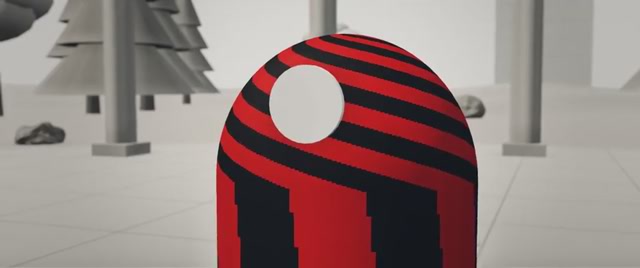
Every person in the clip is a tall striped capsule. It shows where they stand, how big they are in frame and which way they face. A white dot marks where their eyes point. The prompt says who they really are.
The clip decides the camera, the framing and the timing. Your words decide everything else.
This method comes from ai-filmmaking-camera-control-seedance-2-5, an open-source project by Sirio Berati on GitHub (MIT licence). It has 137 camera moves built in three.js, each with its grey clip and the prompts that were sent. The four clips on this page come from that project.
Four moves: the clip and the result
Each pair shows the grey clip we sent and what came back. All four ran at 720p and 21:9 with no face photo. The orbit and the product spin are first tries on Seedance 2.5 Flash. The dolly zoom and the FPV chase are on Seedance 2.5, after Flash left the capsule in the shot (see below). Each prompt is below its pair, word for word.
Orbit around one person
The capsule stands still while the camera swings about 120 degrees round its left side and rises behind it. The result keeps that path and that stop. Mara, the plaza, the pines and the light all come from the words.
【Generation Goal】
Generate a live-action orbit in one take around Mara, a woman standing at the centre of an old stone plaza at golden hour at the moment she makes a decision.

【Reference Asset Roles】
@video1 is a coarse-blockout reference: a grey clay set in which the person is replaced by a tall rounded capsule with loud red and black diagonal stripes, as tall as she is, standing exactly where she stands, with a round white dot on the side she faces, at eye height. Use it only for the camera: positions, movement, lens feel, framing, shot size and timing, and for where the person stands, how large they are in frame and which way they face. The capsule carries no body or pose, so every pose, gesture and expression comes from this description. Never show a capsule: the capsule becomes the person. Do not adopt its grey clay set or its stand-in shapes.
The set in @video1 is only a layout of crude placeholders: rebuild every tree, wall, column, bench and prop as a real, fully detailed object of the same size in the same place, with real materials, textures, wear and dirt. Cone-shaped trees become real pines, ball-shaped trees become real broadleaf trees, plain blocks become real stone, wood or metal. No cone, sphere, plain box or untextured surface appears in the final video.
The capsule's red and black stripes are only a label for where the person is: no clothing, skin, prop or surface takes those colours or stripes, and no striped capsule appears at any moment.

【Subjects and Relationships】
The red-and-black striped capsule in @video1 is Mara, alone at the centre of the arc. The grey columns, cone-shaped trees, round trees, bench and rocks in @video1 are weathered limestone columns, tall umbrella pines, plane trees, an old iron bench and sandstone boulders. Mara is in her late twenties, with long dark brown hair loose over her shoulders and striking hazel eyes. She wears a long camel wool coat over a cream turtleneck.

【Camera and Event Script】
One continuous shot. The camera has a 35 mm lens feel and starts at shoulder height, framing Mara from the waist up on a front three-quarter view, her face turned toward frame left. It travels in one smooth arc of about 120 degrees around her left side: slow at first, faster through the middle as it passes her shoulder, then easing to a stop behind her, rising a little and tilting down so the paving fills the background. It settles on a view over her back and shoulders with a slow drift.
Mara has been putting off this choice for weeks. Her weight is on one hip, her breath slow and deep so her shoulders rise and fall, her eyes lowered. As the camera passes her shoulder she lifts her chin and her fingers close into her coat sleeves. By the time the camera is behind her, her shoulders are square: she has decided.
Every action is performed with natural, realistic human motion: real weight and balance, momentum carried through each movement, loose, believable arms and shoulders. The person is a real human being with natural skin, hair and clothing; no mannequin, clay figure, capsule or doll appears anywhere, at any moment.
She keeps her mouth closed; no narration, no on-screen text. The sound is only a light breeze, distant pigeons and footsteps far across the square. There is no music.
The final visuals are live-action and photographic: photoreal cinema shot on a large-format digital cinema camera with anamorphic lenses, natural film grain, soft halation on the lights, shallow depth of field, motivated light and real atmospheric haze. Warm low sun rakes across the stone, long shadows, gold haze between the pines.

【Maintain Consistency】
Keep Mara's face, hair and clothing, her fixed place at the centre of the arc, the direction of the orbit and the plaza layout consistent with @video1. Keep the lighting and time of day constant from start to end.
Dolly zoom
The camera pulls back while the lens zooms in, so the person stays the same size and the background swells behind them. This move is hard to get from words alone. With the clip, the model only has to copy it.
【Generation Goal】
Generate a live-action dolly zoom in one take on Theo, a man in a sunlit park plaza who has just heard something that changes everything.

【Reference Asset Roles】
@video1 is a coarse-blockout reference: a grey clay set in which the person is replaced by a tall rounded capsule with loud red and black diagonal stripes, as tall as he is, standing exactly where he stands, with a round white dot on the side he faces, at eye height. Use it only for the camera: positions, movement, lens feel, framing, shot size and timing, and for where the person stands, how large they are in frame and which way they face. The capsule carries no body or pose, so every pose, gesture and expression comes from this description. Never show a capsule: the capsule becomes the person. Do not adopt its grey clay set or its stand-in shapes.
The set in @video1 is only a layout of crude placeholders: rebuild every tree, wall, column, bench and prop as a real, fully detailed object of the same size in the same place, with real materials, textures, wear and dirt. Cone-shaped trees become real pines, ball-shaped trees become real broadleaf trees, plain blocks become real stone, wood or metal. No cone, sphere, plain box or untextured surface appears in the final video.
The capsule's red and black stripes are only a label for where the person is: no clothing, skin, prop or surface takes those colours or stripes, and no striped capsule appears at any moment.

【Subjects and Relationships】
The red-and-black striped capsule in @video1 is Theo, facing the camera dead centre. The grey columns, trees, boulder and wall behind him are stone columns, pines, plane trees, a mossy boulder and a pale plaster wall. The capsule is large in @video1 only because Theo is that close to the lens: Theo's head and shoulders take its exact place and size, and nothing striped stands behind him. Theo is in his early thirties, with short dark wavy hair, a trimmed beard and sharp green eyes. He wears a navy overshirt over a white T-shirt.

【Camera and Event Script】
One continuous shot at Theo's eye level, front-on, a medium close-up from the chest up. Dolly zoom: the camera travels straight back while the lens zooms in from about 32 mm to about 90 mm in exact proportion, so Theo's head and shoulders keep the same size and place in frame from start to end. Only the background changes: at first wide and deep, then swelling and rushing up behind him until the columns are thick blurred pillars and the space feels flat and close. The move starts gently, makes most of its change in the middle, then eases to a stop and holds on the compressed frame.
Theo has just read a message he cannot take back. His eyes stay fixed just past the lens. As the background lurches his breath catches, his jaw tightens, he swallows once and his brows lift slightly. Through the hold he breathes shallowly, shoulders tense.
Every action is performed with natural, realistic human motion: real weight and balance, momentum carried through each movement, loose, believable arms and shoulders. The person is a real human being with natural skin, hair and clothing; no mannequin, clay figure, capsule or doll appears anywhere, at any moment.
He keeps his mouth closed; no narration, no on-screen text. The sound is a soft park ambience that drains away into a low hum. There is no music.
The final visuals are live-action and photographic: photoreal cinema shot on a large-format digital cinema camera with anamorphic lenses, natural film grain, soft halation on the lights, shallow depth of field, motivated light and real atmospheric haze. Flat, even late-afternoon light, so only the space seems to move.

【Maintain Consistency】
Keep Theo's face, hair and clothing, his size and place in the frame and the plaza layout consistent with @video1. Keep the lighting and time of day constant from start to end.
FPV drone chase
The drone follows the capsule on a curving route past a stair and between columns, banking into each turn. The route and the speed come from the clip. The runner, his clothes and his effort come from the words.
【Generation Goal】
Generate a live-action FPV drone shot in one take: the camera chases Kai from close behind on a fast, winding sprint across a stone plaza, past a wide stair and between columns.

【Reference Asset Roles】
@video1 is a coarse-blockout reference: a grey clay set in which the person is replaced by a tall rounded capsule with loud red and black diagonal stripes, as tall as he is, standing exactly where he stands, with a round white dot on the side he faces, at eye height. Use it only for the camera: positions, movement, lens feel, framing, shot size and timing, and for where the person stands, how large they are in frame and which way they face. The capsule carries no body or pose, so every pose, gesture and expression comes from this description. Never show a capsule: the capsule becomes the person. Do not adopt its grey clay set or its stand-in shapes.
The set in @video1 is only a layout of crude placeholders: rebuild every tree, wall, column, bench and prop as a real, fully detailed object of the same size in the same place, with real materials, textures, wear and dirt. Cone-shaped trees become real pines, ball-shaped trees become real broadleaf trees, plain blocks become real stone, wood or metal. No cone, sphere, plain box or untextured surface appears in the final video.
The capsule's red and black stripes are only a label for where the person is: no clothing, skin, prop or surface takes those colours or stripes, and no striped capsule appears at any moment.

【Subjects and Relationships】
The red-and-black striped capsule in @video1 is Kai, running away from the camera the whole time. The route starts beside a wide stone stair on the left, crosses open paving between stone columns and bends right toward crates, a barrel, a low wall and benches, with pines and plane trees behind. Kai is a real running man who takes the capsule's exact place, size and path in every frame; the capsule itself never appears, and the grey plaza is rebuilt as real worn stone. Kai is in his mid twenties, athletic, with short black hair, wearing a black hoodie, black track pants and white running shoes.

【Camera and Event Script】
One continuous shot with no cuts. An FPV drone with an 18 mm ultra-wide lens feel and deep focus flies two to three metres behind Kai at head height, looking forward and slightly down, Kai small in the centre of the frame. It holds his running speed along the same curving path, never falling back and never overtaking, banking into each turn so the horizon rolls several degrees, then levelling. Columns whip past the frame edges close enough to blur and the paving lines stream under the lens. Fast and fluid, never jerky.
Kai is already sprinting at the first frame because he is late for something he cannot miss: arms pumping, torso leaning forward, feet striking on the balls and pushing off hard, his shadow racing beside him. Into each bend he leans toward the inside of the curve.
Every action is performed with natural, realistic human motion: real weight and balance, momentum carried through each movement, loose, believable arms and shoulders. The person is a real human being with natural skin, hair and clothing; no mannequin, clay figure, capsule or doll appears anywhere, at any moment.
No narration, no on-screen text. The sound is rushing air, fast footsteps on stone and heavy breathing. There is no music.
The final visuals are live-action and photographic: photoreal cinema shot on a large-format digital cinema camera with anamorphic lenses, natural film grain, soft halation on the lights, shallow depth of field, motivated light and real atmospheric haze. A real Mediterranean plaza of worn limestone in crisp late-morning sun.

【Maintain Consistency】
Keep Kai's face and clothing, the winding route, the drone's place close behind him and the plaza layout consistent with @video1. Keep the lighting and time of day constant from start to end.
Product spin on a turntable
Products work too. A grey block car spins on a turntable and brakes to a stop on a three-quarter view. The prompt turns the block into a green grand tourer and sets the studio light.
【Generation Goal】
Generate a live-action product spin in one take: a car on a studio turntable arrives spinning fast and brakes to a stop on its best angle.

【Reference Asset Roles】
@video1 is a coarse-blockout reference: a grey clay set with simple stand-in shapes. Use it only for the camera: position, movement, lens feel, framing and timing, and for where the car sits and when it turns. The slate-blue block car is only a stand-in that marks size and position: take the car's shape, materials and look only from this description. Do not adopt its clay set or its stand-in shapes. No plain box or untextured surface appears in the final video.

【Subjects and Relationships】
The slate-blue car in @video1 is the only car, parked at the centre of a large, low round turntable in a dark photo studio. It is a sleek modern grand tourer in deep metallic emerald green, with slim LED headlights, a long low bonnet and polished dark alloy wheels. No badges or logos.

【Camera and Event Script】
One continuous shot from a low dolly with a 40 mm lens feel, the lens just below the roofline, the whole car and the turntable rim in frame. It opens with the turntable already spinning fast: side, rear, other side and front pass the lens in quick succession, reflections streaking along the paint. The turntable then brakes smoothly, each pass slower than the last, and the car comes to rest on a three-quarter front view, nose toward frame left, the front wheel nearest the camera. Through the braking the camera creeps slowly forward and slightly lower, then the final frame holds steady.
The car never drives and its wheels never steer; only the turntable turns it.
No narration, no on-screen text. The sound is a turntable motor winding down to silence and quiet studio room tone. There is no music.
The final visuals are live-action and photographic, a high-end car commercial: a matte black turntable, a seamless dark backdrop, one large soft key light from the upper left whose highlight slides over the paint while it spins and rests in one clean line along the flank when it stops. Natural film grain, real haze, rich contrast.

【Maintain Consistency】
Keep the car's shape, colour and single count, the turntable and its direction of turn, the timing of the brake and the studio consistent with @video1. Keep the lighting constant from start to end.
When the capsule shows up
Sometimes the model copies the clip too literally. Here is our first FPV try on Flash. The camera move is right, but the striped capsule ran the whole route and the set stayed grey.
Two of our four Flash tries did this. The fix that worked: one more sentence saying the person takes the capsule's exact place and the capsule never appears, then a run on Seedance 2.5. Both came out right on the first try.
Kai is a real running man who takes the capsule's exact place, size and path in every frame; the capsule itself never appears, and the grey plaza is rebuilt as real worn stone.
If you see the capsule, add that sentence first. If it still shows, move up to Seedance 2.5.
How to do it on Pixel Dojo
- Get a grey clip. Download one from the project's templates folder, or build your own move with its three.js engine.
- Make sure the clip is at least 1280 pixels wide. Smaller clips are turned away. Our first try with the 960 pixel gallery copies was refused and not charged. We scaled them up to 1280 by 536 and they worked.
- Open Seedance 2.5 or Seedance 2.5 Flash and add the clip as a video. It becomes @video1 in your prompt.
- Want a real person's face? Add a photo too. It becomes @image1. Tell the prompt to use it for the face only.
- Pick 21:9 to match the clip, and set the length to the clip's length.
- Paste a prompt built like the ones above. Try it at 480p first. Change the words, not the clip, until it looks right.
How to build the prompt
Every prompt on this page uses the same five parts, in this order.
| Part | What goes in it |
|---|---|
| Generation Goal | One or two sentences. The move, the person, the place and what the moment is about. |
| Reference Asset Roles | What @video1 is for. Rebuild the set as real. The stripes are only labels. What @image1 is for, if you sent one. |
| Subjects and Relationships | Which capsule is which person. What each grey shape really is. Clothes, hair and face in plain words. |
| Camera and Event Script | The camera in numbers, then what the person does and why, then sound and look. |
| Maintain Consistency | What must not change: face, clothes, place, light and the camera path. |
If someone speaks, add a block near the top with the exact lines. Say the video holds those lines and no other words.
The sentences to keep
These lines do the heavy lifting. Keep them in every prompt and swap in your own names and colours.
@video1 is a coarse-blockout reference: a grey clay set in which the person is replaced by a tall rounded capsule with loud red and black diagonal stripes, as tall as she is, standing exactly where she stands, with a round white dot on the side she faces, at eye height. Use it only for the camera: positions, movement, lens feel, framing, shot size and timing, and for where the person stands, how large they are in frame and which way they face. Never show a capsule: the capsule becomes the person.

The set in @video1 is only a layout of crude placeholders: rebuild every tree, wall, column, bench and prop as a real, fully detailed object of the same size in the same place. No cone, sphere, plain box or untextured surface appears in the final video.

The capsule's red and black stripes are only a label for where the person is: no clothing, skin, prop or surface takes those colours or stripes.
Write the camera in numbers
The clip carries the move, but the words should agree with it. Vague words like "orbits a half circle" can leave you with a camera that barely moves. Spell it out.
- The lens feel in millimetres, for example "a 35 mm lens feel".
- Where it starts: height and distance, for example "at shoulder height, framing her from the waist up".
- Which way it goes, and how fast: "slow at first, faster as it passes her shoulder".
- Where it stops and what the last frame shows.
Words to avoid
| If you write | What happens | Write this instead |
|---|---|---|
| "stands still", "motionless", "frozen" | The person turns into a statue. | Slow breathing and a small weight shift. |
| A time inside the action, like "at 2.4 seconds" | It is ignored. The clip sets the timing. | Let the clip time it. |
| "tripod" | A tripod shows up in the shot. | "locked off". |
| "no crane or gear is visible" | Naming gear can put it in the picture. | Leave gear out of the prompt. |
| "eyes wide", "trembling", "jaw hanging" | The acting comes out over the top. | Small, specific cues with a reason behind them. |
| Film titles or famous costumes | The video is refused. | Describe the look in your own words. |
The rules that matter most
- Name every stand-in, and say no capsule ever appears.
- Rebuild the set in words. Without it, grey cones and boxes leak into the result.
- Keep the camera moving. Clips with a locked camera came back stiff.
- Hold every shot for at least 2 seconds.
- Describe hands, feet and props in words. The capsule has none.
- A rerun is a new take, even with the same words. Keep the one you like.
What it costs
The seconds of your reference clip are billed like output seconds. So a 7 second clip that makes a 7 second video counts as 14 seconds.
| 7 second shot from a 7 second clip | Credits |
|---|---|
| Seedance 2.5 Flash, 720p | 56 |
| Seedance 2.5, 1080p | 224 |
Test the words on Flash at 480p or 720p. If Flash keeps the capsule, or once the take is right, render on Seedance 2.5 at 1080p with the same clip and prompt.
What it cannot do
- The capsule has no arms or legs, so poses and gestures come from your words only.
- Spoken lines can be doubled or dropped, and often start a second or two early.
- Some fight scenes are refused. Change the setting, clothes and names, then try once more.
- The model can still invent signs and text in the background.