Bold caps, the spoken word lights up
Pop captions
The default style. Big capital letters with the word being said in your highlight color. It is the classic short video look.
Captions and Brand Overlays Guide
Video Autocaption adds word by word captions to any clip for 5 credits. Brand Overlays adds a hook title, offer badge, review card and branded end card for 2 credits. Use one or both to turn a raw clip into a social ad. This guide shows every style and field, with real results.
Captions come first. Add a video and pick a style and a highlight color. The captions appear word by word as people speak, in a spot that stays clear of the buttons on TikTok, Reels and Shorts.
Overlays come second. Add a clip, type the words you want and pick a brand color. Your words appear exactly as typed. You can add a logo to the end card.
Both tools charge a flat price. Captions are 5 credits and overlays are 2 credits, whatever the clip length. Run captions first and overlays on the result, or the other way round.
5 credits
Captions, flat price
2 credits
Brand Overlays, flat price
3 styles
Pop, Highlighter and Clean
The default style. Big capital letters with the word being said in your highlight color. It is the classic short video look.
The word being said sits on a block of your color, like a marker swipe. It stands out on busy footage.
Sentence case text on a dark box. It is calm and easy to read, good for talking clips.
Add a hook title in the first seconds, an offer callout, a progress bar and an end card with a button and a web address. Everything is in your brand color.
Each example shows the exact prompt that produced the result. Copy any prompt with one click.
Video Autocaption · Pop · yellow · 5 credits
No prompt needed. Pick the Pop style and the yellow swatch, then add the video.
The input was a vertical clip of a man showing a speaker in his kitchen. The word being said turns yellow. Pop is the best first choice for talking clips.
Video Autocaption · Highlighter · orange #FF7A00 · 5 credits
No prompt needed. Pick the Highlighter style and an orange color, then add the video.
The input was a clip of a mountain bike coach on a trail. The block of orange follows each spoken word and keeps its place over the forest. Pick a color that does not match the footage.
Video Autocaption · Clean · 5 credits
No prompt needed. Pick the Clean style, then add the video.
The input was a clip of a woman talking in an olive grove. The dark box keeps the words easy to read on a bright background.
Brand Overlays · color #C9A227 · 2 credits
Hook title: The scent everyone asks about. Offer: 20% OFF. Small line: This week only. End card headline: Amber No. 5. Button: Shop now. Web address: ambernoir.example. Brand color: #C9A227.
The input was a five second perfume clip. The hook opens the clip, the offer badge follows and the end card closes it. Gold keeps the look premium.
Brand Overlays · progress bar on · 2 credits
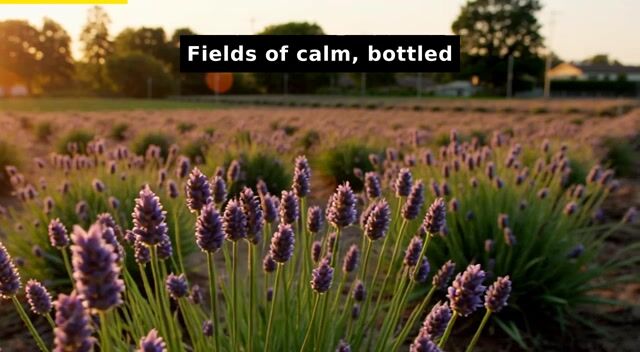
Hook title: Fields of calm, bottled. Offer: 30% OFF. Small line: This week only. Progress bar: on. End card headline: Lavender Lane. Button: Shop now. Web address: lavenderlane.example.
The input was a wide clip of a lavender field. The progress bar runs along the top and the end card closes the clip.
Pop is the default for a reason. It reads fast on a phone and works on almost any footage. Try Highlighter on busy scenes and Clean on calm talking clips.
There are 10 swatches: yellow, green, red, blue, purple, pink, orange, cyan, white and black. Pick one that is not already the main color of the clip.
Captions follow the spoken words. A clean voice with little background music gives the best timing.
Hook title is 60 characters at most. Offer is 24. Headline on the end card is 40. Short lines read better on a phone.
Your words appear exactly as typed. Check spelling and capital letters before you run it.
In one test the price tag and the review card sat on top of each other and hid the words. Pick one of them.
Pick one brand color and let it carry the hook, the badge and the end card. Use the hex box to match your brand exactly.
A PNG with a see-through background works best. A JPG also works.
Hook title. Up to 60 characters. It shows in the first 2.5 seconds. Aim for five to eight words.
Lower third. A title of up to 32 characters and a small line of up to 40. The style is Label for a brand box or Classic for an accent bar. With Classic the two fields are a name and a role. Set the second it appears at.
Review card. A quote of up to 90 characters, a name of up to 30 and a star rating. Set the second it appears at.
Countdown. A start time like 23:59:59 that ticks down, with up to 16 characters of words above it, such as Ends in.
Price tag. A price of up to 12 characters, an optional old price that is struck through and an optional small line of up to 16.
Progress bar. Switch it on and a bar fills along the clip.
Offer callout. An offer of up to 24 characters and a small line of up to 40. Place it at the top or the bottom and set the second it appears at.
End card. A headline of up to 40 characters, an optional button of up to 24 and an optional web address of up to 40. You can add a logo. The end card needs a headline.
Brand color. Pick a swatch or type a hex code. The default is #FFE500. Add at least one layout before you run it.
Start with a raw clip, such as a product shot or a person talking. If someone speaks, run Video Autocaption first so the words are burned in. Then add the clip to Brand Overlays and write a hook, an offer and an end card.
For a silent product clip, skip the captions and go straight to overlays. The hook does the talking.
The total is 7 credits for both tools, whatever the length of the clip.
| Setting | Values | Notes |
|---|---|---|
| Captions input | One video up to 100 MB | Spoken words are timed word by word. |
| Caption style | Pop · Highlighter · Clean | Pop is the default. |
| Highlight color | 10 swatches | Yellow is the default. White and black are included. |
| Captions price | 5 credits | Flat, for every clip. |
| Overlays input | One video up to 100 MB | Add at least one layout. A logo is optional. |
| Hook title | Up to 60 characters | Shows in the first 2.5 seconds. |
| Lower third | Title 32 · small line 40 | Label or Classic style. |
| Review card | Quote 90 · name 30 | Star rating from 1 to 5. |
| Price tag | Price 12 · old price 12 · small line 16 | The old price is struck through. |
| Offer callout | Offer 24 · small line 40 | Top or bottom. |
| End card | Headline 40 · button 24 · web address 40 | Headline is needed to add the card. |
| Brand color | Swatch or hex | Default #FFE500. |
| Overlays price | 2 credits | Flat, for every clip. |
Captions are 5 credits for every clip. The price does not change with the clip length.
Brand Overlays are 2 credits for every run, however many layouts you add.
Pop for most clips. Highlighter when the footage is busy. Clean for calm talking clips. You can run the same clip again with another style.
They are placed clear of the buttons on TikTok, Reels and Shorts, so the words stay visible.
Yes. Run captions first, then add the captioned clip to Brand Overlays. That is 7 credits in total.
No. Your words appear exactly as typed.
No. A logo is optional and only appears on the end card.