Higgsfield Katana alternative
Higgsfield Katana alternative: recreate any edit with your own cast
Kata on Pixel Dojo rebuilds an edit you love with your own people and products, cuts it at the original's exact times, shows the whole price before anything is made and runs on a page, in Sensei, in Claude, in ChatGPT and over an API.
Higgsfield launched Katana on October 8, 2026, a Claude skill that rebuilds a reference edit with your photos. We read its launch post, changelog and help pages on October 31, 2026. Pixel Dojo's answer is Kata, so we rebuilt one shot of a trend edit the way Kata does it, from a cast portrait to a finished clip.
30 credits ($1.88) per 5 s clip at 720p with audio. Included in every plan, from $10/month.
Already a member? Sign in
By Brian Lovett · Updated
One shot from each kind of edit
Higgsfield sorts its Katana presets into personalized edits, style transfer and motion transfer. Kata's ready-made edits sit in the same three groups. We made one shot of each kind on Pixel Dojo, and the prompts and costs are on every tile.

The product still for a Product Drop style edit, made on Nano Banana 2.1 with soft side light.
Clean product photograph of a fluted jade green glass bottle of body oil with a matte gold cap and a plain cream label with no writing, standing on a pale travertine block, soft side light, gentle shadow, shallow depth of field, no logos, no text.
The same bottle on Seedance 2.5: a light sweep and a slow push in, the kind of hero shot a product drop is cut from.
A bright band of light sweeps slowly across the fluted green glass, the gold cap flashes once, a single bead of oil slides down the bottle and the camera eases in a few centimeters. Sound: a soft glassy chime and quiet room tone.
The source clip for a motion transfer, made on Seedance 2.5 with sound.
Full body shot of a woman in her thirties in a grey hooded sweatshirt, wide leg jeans and white sneakers dancing a simple rhythmic routine in the middle of an empty outdoor basketball court at golden hour, a clean slide step, a spin and a clap, steady locked camera, long warm shadows across the court, sneaker squeaks and a muffled beat from a speaker.
Motion transfer on Character Swap: the slide step, the spin and the clap carry over, and the court and golden light stay put.
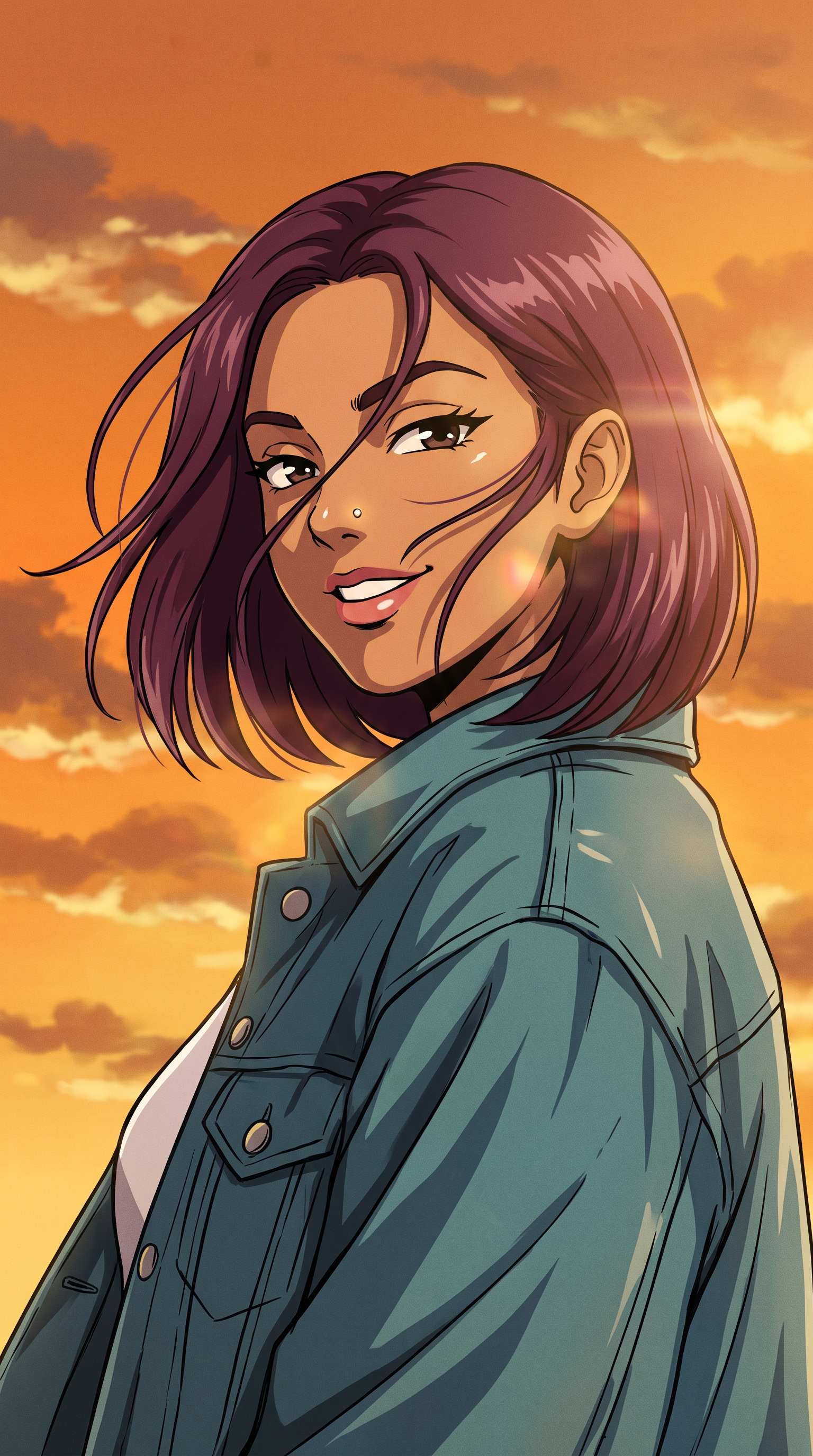
Style transfer on Nano Banana 2.1, the look Kata's Anime Opening edit gives every shot.
Use the reference image as the identity reference: keep the same woman, her chin length plum bob, small silver nose stud and teal denim jacket. Redraw her as a hand drawn 90s anime opening key frame: bold ink outlines, flat cel colors, a painted orange sunset sky with streaky clouds, wind pushing her hair sideways, she glances back over her shoulder with a confident grin, dramatic low angle.
One shot, rebuilt the way Kata builds it
- 1
Cast your lead
Nano Banana 2.1 made Noor, an original character, from one portrait prompt. In Kata you pick a saved Character Studio character or add a photo of anyone who agreed to be in it.
- 2
Rebuild the shot
With Noor as the reference, Nano Banana 2.1 drew shot two of the Main Character edit: a sunny street, a white T-shirt and sunglasses held at the eyes.
- 3
Make it move
Seedance 2.5 turned that frame into a five second clip with a slow push in.
- 4
Cut it to the original
Kata runs these two steps for every new shot, then cuts the clips at the reference's exact times, adds new music at the reference's tempo and sets your captions in the original's style. In our full run of the Main Character edit, that made eight shots of Noor, from a street portrait to an awards stage, under captions.
From cast portrait to finished shot
We made the portrait first, then asked for shot two of the Main Character edit with Noor in it, then animated that frame. Nothing was trained and nothing was retouched. Prompts and costs are on each tile.
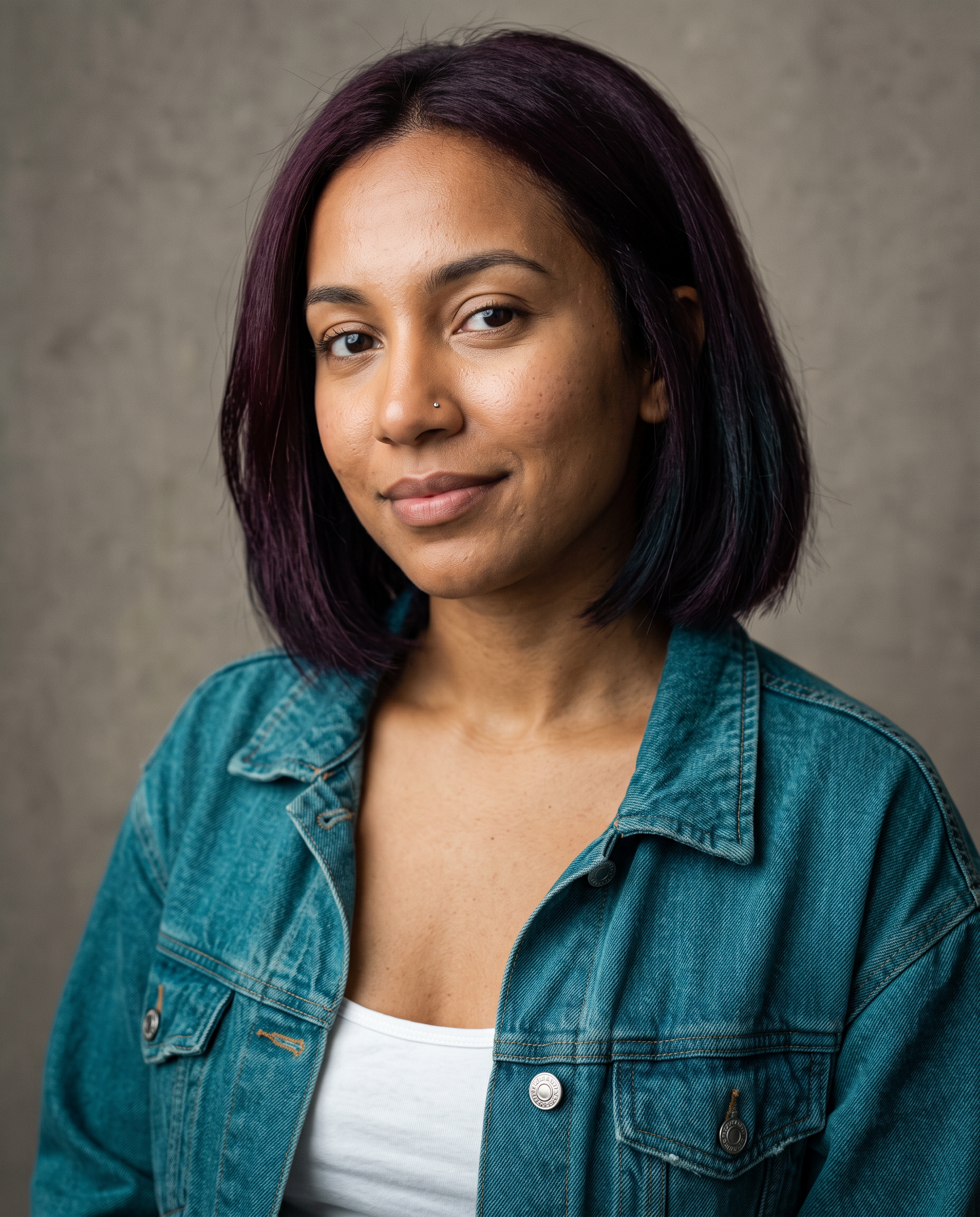
Studio portrait of an original character: a woman in her late twenties with a sleek chin length bob dyed deep plum, a small silver nose stud, warm brown skin, a teal denim jacket over a white tank top, relaxed half smile, plain warm grey backdrop, soft window key light, sharp natural skin texture.
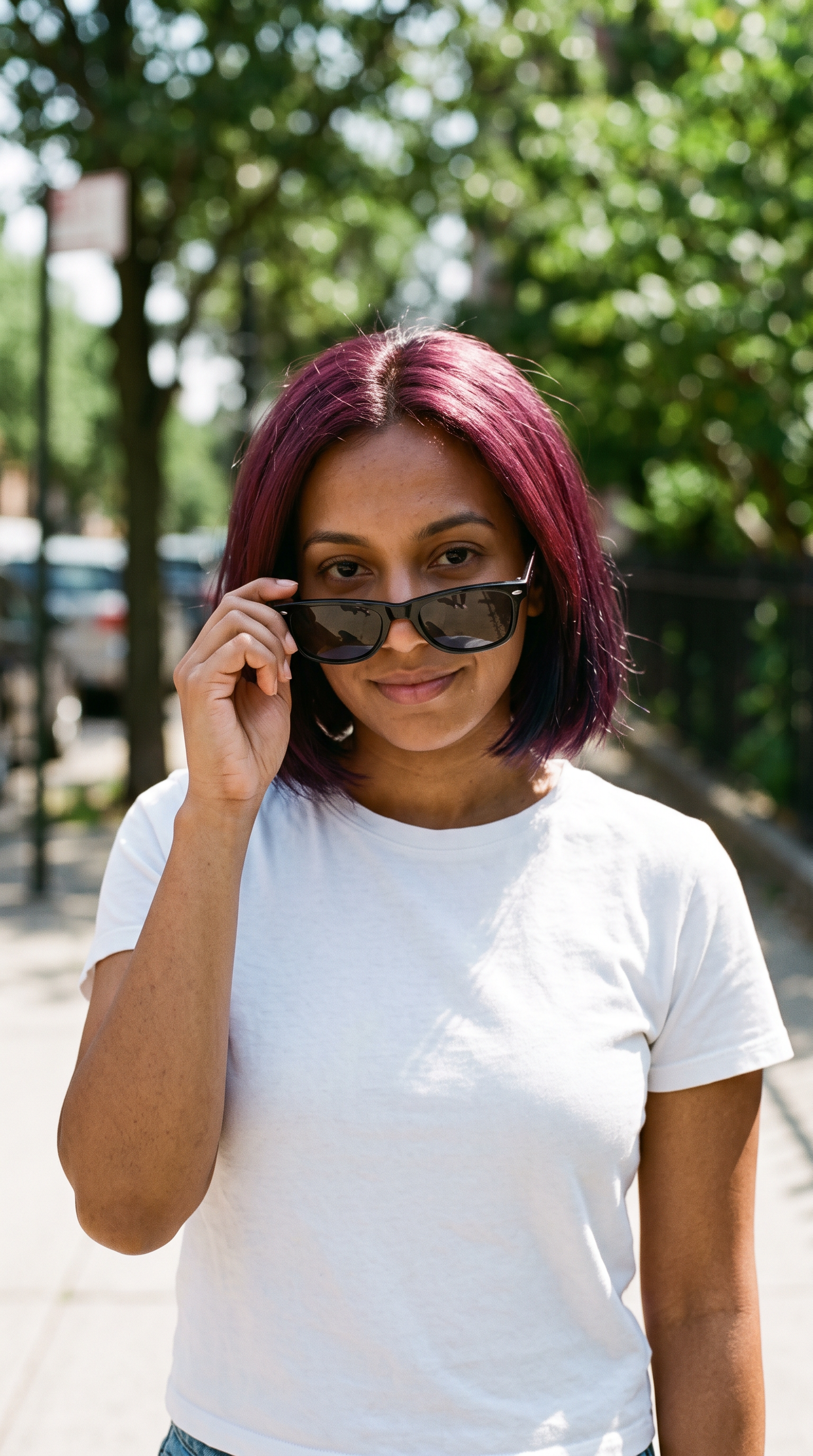
Use the reference image as the identity reference: keep the same woman, her chin length plum bob, small silver nose stud and warm brown skin. Vertical frontal waist up portrait on a sunny sidewalk lined with trees, she wears a plain white T-shirt and holds a pair of black sunglasses just below her eyes with one hand, looking straight into the lens with a slight smile, eye level, shallow green foliage bokeh, bright direct sunlight with crisp shadows, 35mm photograph.
She slides the sunglasses up onto her nose with one hand, tilts her chin down a little and gives the lens a small confident smile, the camera creeping in slowly, leaves swaying in the breeze behind her. Sound: birdsong, a distant bicycle bell and soft traffic.
- Her plum bob and her face carried from the studio portrait into a new street scene with a new outfit and hard daylight.
- Seedance 2.5 held the frame steady through the whole push in: face, sunglasses and white T-shirt stayed the same from the first frame to the last.
- The clip came back with its own audio track, so a shot is ready to cut straight into the edit.
- The cost of each step is on its tile, and Kata runs the same two steps for every new shot in the edit.
Higgsfield Katana plans vs Pixel Dojo
Higgsfield facts come from its Katana launch post, changelog, pricing page, pricing explainer and help center, read October 31, 2026.
| At a glance | Higgsfield Katana | Pixel Dojo Kata |
|---|---|---|
| Price before you commit | Claude shows the credit cost on a card before each generation, and the launch post gives no per-edit price | Planning is free and the quote lists every line, including a flat 8 credit Kata fee, before anything is made |
| Where it runs | Inside Claude through the Higgsfield connector, started from a Katana page that sends your brief to Claude | The Kata page, Sensei, Claude and ChatGPT through our MCP server, and the REST API |
| Your content in one edit | Up to five photos of characters, products or clothing | Up to three people and four product or place photos |
| Length of the edit to recreate | Community presets take a 3 to 30 second video | Any reference from 4 to 60 seconds |
| Ready-made edits | A preset library from Higgsfield and the community in three groups: personalized edits, style transfer and motion transfer | 31 ready-made edits in the same three groups, and you can share your own |
| Paid plans | Starter $19 a month billed annually for 270 credits, Plus $59 a month or $47 billed annually, Ultra $129 a month or $99 billed annually, on its pricing page read October 31, 2026 | Lite $10, Pro $25, Pro Max $50 a month |
| Seedance 2.5 | Available on Plus and Ultra, and Starter cannot run it | On every plan, Lite included |
| Subscription credits | Unused credits do not roll over, and credit packs expire 90 days after purchase | Credits roll over while you stay subscribed |
What Kata keeps from the edit you love
Every cut, to the frame
Kata reads the reference's exact cut list, and the remake cuts at the same times.
Transitions and camera moves
Hard cuts, flashes, dips and zooms come back where the original had them, and each new shot copies the original's camera move.
Caption style
Words on screen keep the original's style, plain captions, boxed, bold or subtle, set in your own words.
Tempo
Kata scores the remake with new music made at the original's tempo, never the original's own audio.
Three kinds of edit
Personalized edits drop your cast and products into a finished edit. Motion transfer has your character repeat the original's moves. Style transfer redraws the whole edit in a new look, such as anime or claymation.
Why Higgsfield users switch to Pixel Dojo
Unlimited on every plan
On every paid plan, Relax runs Qwen Image 2.1, FLUX 3 Image Klein and MiniMax H3 Turbo, plus every video and photo effect, unlimited with no credits spent.
Sensei, the AI director
Describe a project and Sensei plans it, prices it, waits for your approval and reviews every take.
Video Studio
Generate, edit and extend a clip in one place, on whichever top video engine suits the shot.
One click video effects
300+ one-click video effects turn a photo into a trend clip, from AI Hug to AI Inflate, with no prompt to write, and 3 are free every day.
One job AI tools
35 single purpose tools each do one edit from an upload: remove a watermark, an object or text, restore and colorize an old photo, swap a background, retouch a portrait or make a thumbnail.
Credits that roll over
Your credits roll over while you stay subscribed, so nothing you pay for disappears at the end of the month.
Every top model, plus an API
More than 80 image and 60 video models in one account, with a public API and a hosted MCP server for your own apps and AI assistants.
What a Kata costs on Pixel Dojo
Plans are Lite $10 a month for 160 credits, Pro $25 for 500 credits, Pro Max $50 for 1,100 credits. Kata plans your remake for free and shows a line by line quote of keyframes, clips and music plus the Kata fee, and each clip is charged at its own model price. Credits roll over while you stay subscribed.
Under our refund policy, a first purchase can be refunded within 7 days, in full if under 20% of the credits are used and pro-rated after that, with no processing fee.
Our unlimited Relax mode covers Qwen Image 2.1, FLUX 3 Image Klein, MiniMax H3 Turbo and every video and photo effect; a Kata is quoted up front and you approve the price.
Higgsfield questions
What is a good Higgsfield Katana alternative?
Kata on Pixel Dojo recreates an edit with your own cast and products, cuts at the original's exact times, shows a free quote first and runs on a page, in Sensei, in Claude and ChatGPT, and over an API.
What does Higgsfield Katana do?
Higgsfield says Katana is a skill for Claude. It takes a reference edit and up to five photos of your characters, products or clothing and rebuilds the video with the reference's shot order, pacing and cut placement.
How much does Katana cost?
Higgsfield's launch post says Katana uses your plan credits and that Claude shows the cost before each generation. It gives no per-edit price. On Pixel Dojo a Kata's plan and quote cost nothing, and you approve the price before anything is made.
Does a Higgsfield unlimited plan cover Katana?
Higgsfield's help center says everything generated through MCP deducts credits and that unlimited access applies only on higgsfield.ai. Katana runs through its MCP connector, and its launch post says it uses plan credits.
Can I recreate an edit with my own photos on Pixel Dojo?
Yes. Pick a ready-made edit or add your own video, choose a Character Studio character or a photo of someone who agreed to appear, add any product photos and read the free plan. Then approve the price to make it.
Can I run Kata from Claude or from code?
Yes. The same Kata runs as the pixeldojo_kata tool in Claude and ChatGPT, inside Sensei, and on the API at /api/v1/kata.
Video Effects New
Your first video is free. One photo, one click.
310 ready-made effects, from AI Hug and Earth Zoom In to product spins and listing walkthroughs. Upload a photo and press Generate. No prompt to write, and a free account gets 3 a day.

Switch from Higgsfield to Pixel Dojo today
Write a prompt above or start from any example on this page. One plan covers every top model, six studios and Sensei, and your credits roll over.
Start with Seedance 2.5Sources
Facts about Higgsfield come from these public pages, checked on Oct 31, 2026. Prices and plans change; check the source before you buy.
- Higgsfield blog: "Higgsfield Meets Katana: What It Is and How it Works" (inputs, preset groups, output, credits)
- Higgsfield changelog: Katana entry, October 8, 2026 (community preset limits)
- Higgsfield pricing page (plans, Seedance 2.5 access, rollover), read October 31, 2026
- Higgsfield blog: pricing explained, published October 24, 2026 (Seedance 2.5 access, rollover)
- Higgsfield help center: how credit packs work (90 day expiry)
- Higgsfield help center: what is Higgsfield MCP (credits on MCP, unlimited only on higgsfield.ai)