Adobe Firefly alternative
Adobe Firefly alternative for marketers who want every model
Pixel Dojo puts Recraft, Seedream, Qwen, Nano Banana, GPT Image, Veo and Kling behind one credit balance, shows each price before you generate and includes commercial use on every plan.
Most people pick Firefly because it is called commercially safe. We read Adobe's own plans page and found that promise covers Adobe's models, not the partner models Firefly also sells. So we ran one campaign brief on four engines to show what choosing the model yourself looks like.
1 credit ($0.06) per image. Included in every plan, from $10/month.
Already a member? Sign in
By Brian Lovett · Updated

More campaign work we made on Pixel Dojo
Every image and clip below came from the prompt shown on its tile. Tap one to start from the same prompt.

Ideogram 4.5 set the headline and date exactly and added a small venue line of its own. Our pick for invites and event posters.
Letterpress style invitation poster with the headline "HARVEST SUPPER CLUB" in tall serif capitals, a long farm table under string lights in an orchard drawn in fine ink lines, deep plum and gold on cream paper, the line "SEPTEMBER 27" below.
A four second food spot on Veo 3.1 Fast with sound. The drip folds onto the toast in one clean take.
Macro slow motion shot of golden honey spiraling off a wooden dipper onto a slice of buttered sourdough toast, morning sun backlighting the drip, crumbs on a blue ceramic plate, a soft drip and a quiet kitchen hum.
A product reveal on Kling 3.0: the camera slides along the plank until the candle enters, with surf and gulls on the track.
Product reveal: a slow dolly along a sun warmed driftwood plank to an unlabeled amber glass jar candle, its flame flickering in a light sea breeze, sea grass swaying behind, waves breaking on a sandy beach out of focus, gentle surf and gull calls.

A packaging flat lay on GPT Image 2.5 with clean blank labels, ready for your own artwork.
Overhead packaging flat lay of three matte tins of loose leaf herbal blends in sage, saffron and dusty rose, plain labels with simple botanical line drawings and no words, dried chamomile and mint scattered on pale linen, soft daylight.
The usual advice: pick Firefly because it is commercially safe
Adobe's product page says its Firefly models are trained on licensed Adobe Stock content and public domain content, and calls them commercially safe.
Read the plans page FAQ, though. It says you are responsible for deciding whether content made with partner models suits your project. Firefly now sells Nano Banana, GPT Image, FLUX, Runway, Kling and Luma next to its own models.
So once you use a partner model on Firefly, you are making the same call you would make anywhere else. At that point the better question is where you get the widest bench of models and a clear price for each run. We think that is Pixel Dojo.
One spring campaign brief on four image engines
We wrote one garden shop brief with a request for open space on the right for a headline, and ran it unchanged on Recraft V4.1, Seedream 5, Qwen Image 2.1 and Nano Banana 2.1. Each tile shows what it cost.
Spring campaign photograph for a garden shop: unglazed clay pots of basil, thyme and rosemary on a weathered wooden potting bench, a straw sun hat and a ball of twine beside them, a linen apron hanging on a nail, soft morning light through greenhouse glass, empty space on the right for a headline.

Spring campaign photograph for a garden shop: unglazed clay pots of basil, thyme and rosemary on a weathered wooden potting bench, a straw sun hat and a ball of twine beside them, a linen apron hanging on a nail, soft morning light through greenhouse glass, empty space on the right for a headline.

Spring campaign photograph for a garden shop: unglazed clay pots of basil, thyme and rosemary on a weathered wooden potting bench, a straw sun hat and a ball of twine beside them, a linen apron hanging on a nail, soft morning light through greenhouse glass, empty space on the right for a headline.
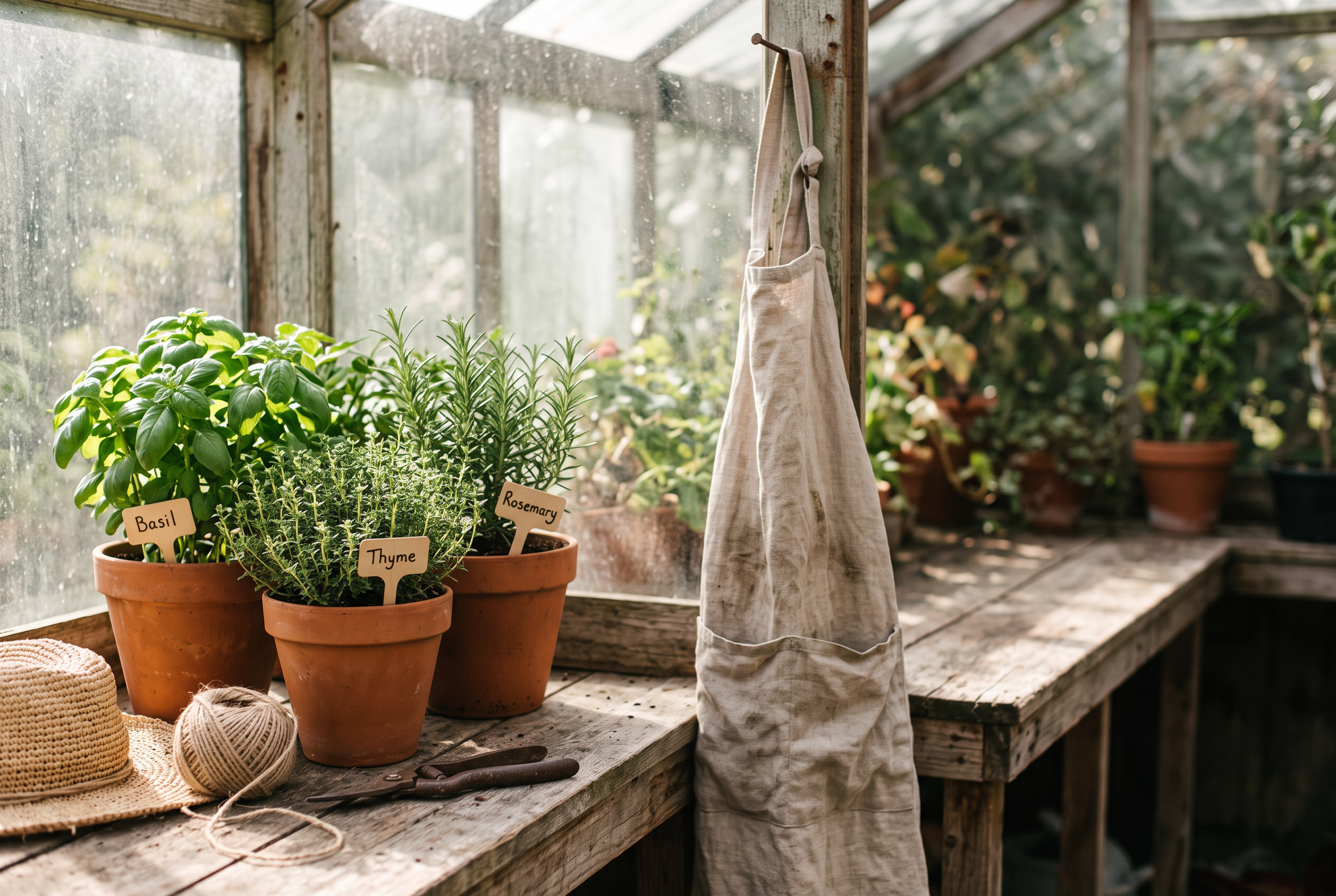
Spring campaign photograph for a garden shop: unglazed clay pots of basil, thyme and rosemary on a weathered wooden potting bench, a straw sun hat and a ball of twine beside them, a linen apron hanging on a nail, soft morning light through greenhouse glass, empty space on the right for a headline.
- Recraft V4.1 followed the layout note best: the pots sit on the left and the bench runs clear on the right, ready for a headline.
- Nano Banana 2.1 added small wooden markers reading Basil, Thyme and Rosemary, spelled right and matched to the right plants.
- Seedream 5 gave the softest light of the four, with the apron hanging on the right and a bright greenhouse wall behind.
- Qwen Image 2.1 framed tightest and filled the right side with the apron, the version to pick for a square crop.
Where Pixel Dojo fits a campaign team
If you want the newest models from every lab, a price on every run and tools for whole projects such as Sensei, Film Studio and LoRA training, Pixel Dojo is the better fit.
Adobe Firefly plans vs Pixel Dojo
Adobe Firefly figures come from Adobe's plans and product pages (listed under Sources), read on October 15, 2026, at monthly prices for individuals.
| At a glance | Adobe Firefly | Pixel Dojo |
|---|---|---|
| Paid plans | Standard $9.99, Pro $19.99, Pro Plus $49.99, Premium $199.99 a month | Lite $10 a month for 160 credits, Pro $25 for 500 credits, Pro Max $50 for 1,100 credits |
| Monthly allowance | 2,000, 4,000, 10,000 or 50,000 generative credits | 160, 500 or 1,100 credits |
| Video | Up to 20 five second videos on Standard, up to 100 on Pro Plus; unlimited Firefly Video Model on Premium | Veo 3.1, Kling 3.0, Seedance 2.5, WAN 3.0 and more on every plan |
| Partner models | Nano Banana, GPT Image, FLUX.2 [pro], Runway, Kling, Luma, Topaz and ElevenLabs | Nano Banana 2.1, GPT Image 2.5, FLUX 3, Seedream 5, Qwen Image 2.1, Recraft, Ideogram and more |
| Commercial use | Firefly model outputs called commercially safe; partner model outputs are your call | Commercial use included on every plan |
| Price per run | Shown as an allowance per plan | Every model page shows its credit price before you generate |
How we would run a campaign on Pixel Dojo
Cast the model per asset
Recraft for layouts with room for copy, Ideogram 4.5 for exact headlines, Nano Banana 2.1 for small readable details, Veo 3.1 or Kling 3.0 for the motion version.
Lock the product once
Train a LoRA on your product or save a face in Character Studio, then call it by name in every prompt.
Hand Sensei the whole brief
Sensei plans the stills and clips, prices the plan, waits for your approval and reviews every take before you see it.
Why Adobe Firefly users switch to Pixel Dojo
Unlimited on every plan
On every paid plan, Relax runs Qwen Image 2.1, FLUX 3 Image Klein and MiniMax H3 Turbo, plus every video and photo effect, unlimited with no credits spent.
Sensei, the AI director
Describe a project and Sensei plans it, prices it, waits for your approval and reviews every take.
Marketing Studio
Paste a product link and get a video ad with a voiceover, in UGC, unboxing, try on or commercial styles, with every take priced first.
One job AI tools
35 single purpose tools each do one edit from an upload: remove a watermark, an object or text, restore and colorize an old photo, swap a background, retouch a portrait or make a thumbnail.
Character Studio
Save a face once and call it by @name in any prompt, so the same person shows up in every image and clip.
Start from a genre
Pick a format such as a UGC ad, a micro drama, a movie trailer or an explainer, and the matching studio opens with the settings and a sample idea filled in.
Star in any video
Upload a short clip, pick a saved character or a photo, and Character Swap puts your star in the lead while the scene, camera moves and sound stay the same.
Credits that roll over
Your credits roll over while you stay subscribed, so nothing you pay for disappears at the end of the month.
Every top model, plus an API
More than 80 image and 60 video models in one account, with a public API and a hosted MCP server for your own apps and AI assistants.
What a campaign costs on Pixel Dojo
Plans are Lite $10 a month for 160 credits, Pro $25 for 500 credits, Pro Max $50 for 1,100 credits. Commercial use is included on every plan. Credits roll over while you stay subscribed.
The four images in our test each show their credit price on the tile, so a full four engine comparison fits in any plan. A first purchase gets a first purchase can be refunded within 7 days, in full if under 20% of the credits are used and pro-rated after that.
Adobe Firefly questions
What is a good Adobe Firefly alternative?
Pixel Dojo runs Recraft, Seedream 5, Qwen Image 2.1, Nano Banana 2.1, GPT Image 2.5, Veo 3.1, Kling 3.0 and more under one credit balance, with each price shown before you generate and commercial use on every plan.
Is Adobe Firefly commercially safe?
Adobe says outputs from its own Firefly models are safe for commercial use. Its plans page FAQ also says you are responsible for deciding whether content from partner models is right for your project.
How much does Adobe Firefly cost?
On October 15, 2026 Adobe listed Firefly Standard at $9.99, Pro at $19.99, Pro Plus at $49.99 and Premium at $199.99 a month, with 2,000 to 50,000 generative credits.
Does Adobe Firefly have a free plan?
Adobe's plans page lists free daily generations across image, video and audio, with limits that refresh each day.
Can I use Nano Banana without Adobe Firefly?
Yes. Pixel Dojo runs Nano Banana 2.1 on its own tool page and through the public API, with the credit price shown up front.
Switch from Adobe Firefly to Pixel Dojo today
Write a prompt above or start from any example on this page. One plan covers every top model, six studios and Sensei, and your credits roll over.
Start with Recraft V4.1Sources
Facts about Adobe Firefly come from these public pages, checked on Oct 15, 2026. Prices and plans change; check the source before you buy.