Lexica alternative
Lexica alternative: six things to check, four models we tested
Pixel Dojo puts Qwen Image 2.1, FLUX 3 Image, Seedream 5, Z-Image Turbo and the other top image models on one plan, with commercial use on every plan and each credit price shown before you generate.
Lexica pairs a search for AI images with its own Aperture generator. We read its plan page and terms, then sent one photographic prompt to four models we carry, so you can see what a choice of engines buys you.
1.5 credits ($0.09) per image at 2K. Included in every plan, from $10/month.
Already a member? Sign in
By Brian Lovett · Updated

Six things to check before you replace Lexica
1. How many engines you get
Lexica centers on its own Aperture model. One house model gives one house look. We ran our test prompt through four engines and got four different takes on the same scene, from bright and tidy to dark and painterly.
2. Who can see your images
Lexica's terms say images made on Free, Starter and Pro plans appear in Lexica search and may be used by other users, and only Max plan images are private. Read this line before you put client work into any image site.
3. What the license lets you do
Lexica requires a paid plan for commercial use and splits it by team size, from a personal commercial license on Starter to full licenses on Pro and Max. On Pixel Dojo, commercial use comes with every plan.
4. What one prompt really costs
Lexica counts fast generations, and each prompt uses 4 of them. We show a credit price per model before you generate. In our test the four images cost 1.5, 1, 2.5 and 0.25 credits.
5. What comes after the still
An image is often step one. On Pixel Dojo you can animate a still on Seedance 2.5, Kling 3.0 or Veo 3.1, upscale it, or save a person in Character Studio and call them by @name in any prompt.
6. Whether you can automate it
Every model here runs through the same public API, with docs generated from each model's own spec, a hosted MCP server for agents and API credit packs from $5.
Four more styles, four more engines
We made each image below on Pixel Dojo with the prompt shown. Tap one to start from the same prompt.

Fantasy concept art on Kling Image for 1 credit.
Fantasy concept art of a vast library built inside a giant spiral seashell, shelves following the curve of the shell, warm hanging lamps, a reader on a rolling ladder, pearly light, painterly detail.

Ideogram 4.5 set the title, added a clean subtitle line and kept every mushroom unlabeled, as asked.
Vintage field guide poster titled "WILD MUSHROOMS" in an elegant serif, six unlabeled watercolor mushrooms arranged in a neat grid, cream paper, sepia and moss green ink.
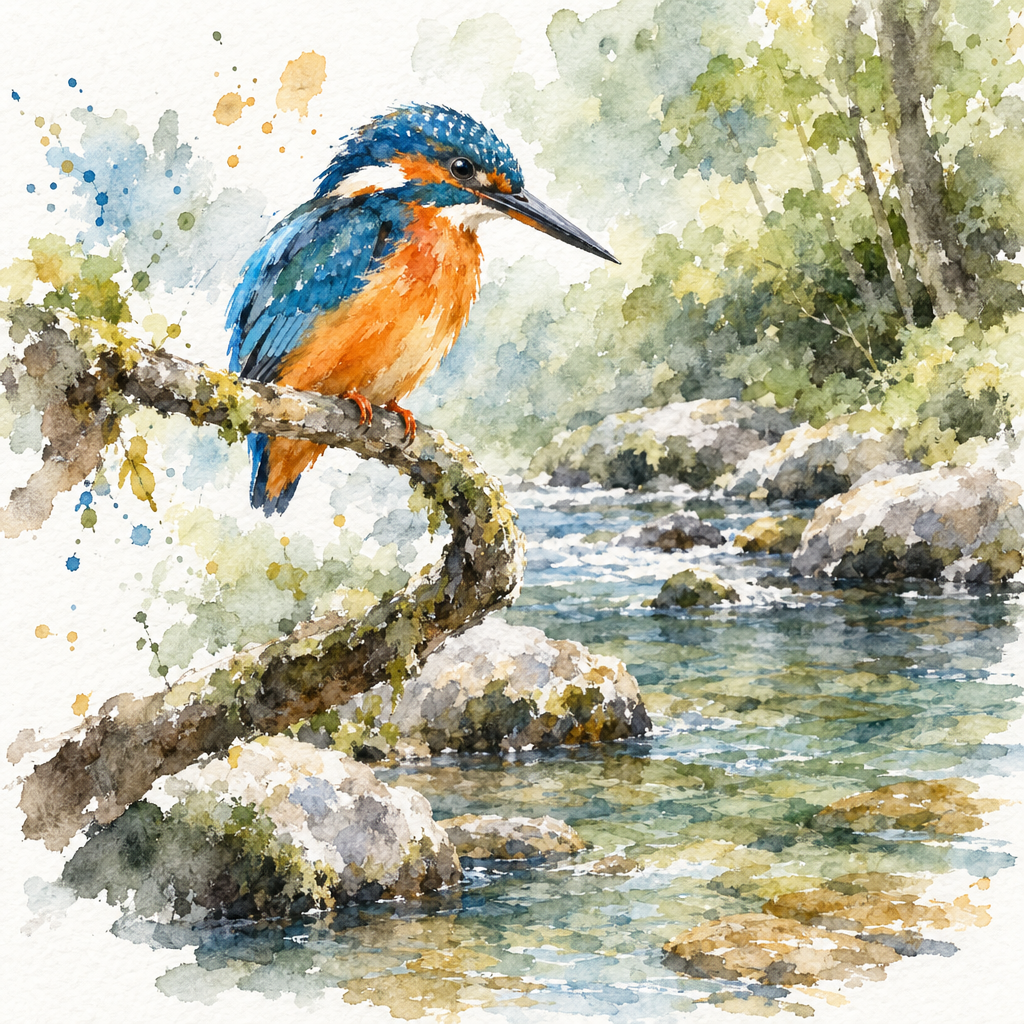
Watercolor on GPT Image 2.5, with soft wet edges and paper showing through.
Loose watercolor painting of a kingfisher perched on a bent branch over a clear stream, bright orange and blue feathers, soft wet edges, white paper showing through, a few splatters.

Isometric 3D on Recraft V4.1, a style we use for icons and explainer art.
Isometric 3D illustration of a tiny bicycle repair shop on a street corner, open roller door, tools on a pegboard, a bike up on a stand, a potted plant by the door, soft pastel palette, clean shapes.
One luthier prompt on four image engines
We asked for a moody photograph of a luthier in his sixties carving the neck of a mandolin by window light, and sent the same words to four models. Each tile shows the settings and credits it used.
Moody photograph of a luthier in his sixties carving the neck of a mandolin at a cluttered workbench, curls of spruce shavings around his hands, a single window light from the left, dust in the air, 85mm lens, shallow depth of field.

Moody photograph of a luthier in his sixties carving the neck of a mandolin at a cluttered workbench, curls of spruce shavings around his hands, a single window light from the left, dust in the air, 85mm lens, shallow depth of field.

Moody photograph of a luthier in his sixties carving the neck of a mandolin at a cluttered workbench, curls of spruce shavings around his hands, a single window light from the left, dust in the air, 85mm lens, shallow depth of field.
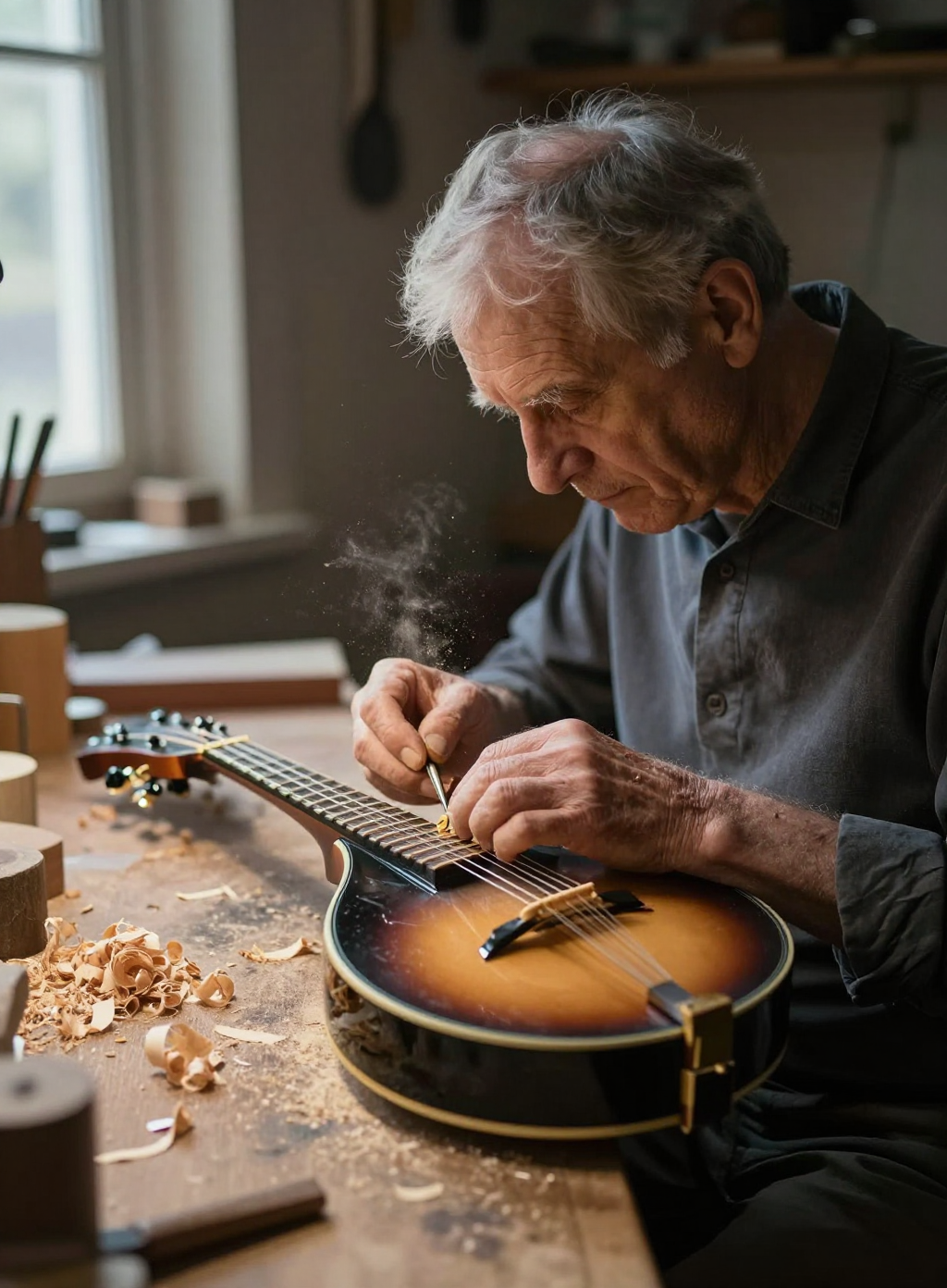
Moody photograph of a luthier in his sixties carving the neck of a mandolin at a cluttered workbench, curls of spruce shavings around his hands, a single window light from the left, dust in the air, 85mm lens, shallow depth of field.
- Qwen Image 2.1 drew the most believable mandolin, a carved scroll body, and filled the bench with shavings and tools.
- Seedream 5 matched the mood we asked for best: deep shadows, one window, dust and a craftsman in glasses.
- FLUX 3 Image gave the brightest, cleanest workshop, the one we would pick for a website header.
- Z-Image Turbo cost 0.25 credits and still came back with a convincing mandolin and soft window light.
Lexica plans vs Pixel Dojo
Everything in the Lexica column comes from its account page and terms, read on October 15, 2026. Lexica shows its plan prices billed annually.
| At a glance | Lexica | Pixel Dojo |
|---|---|---|
| Plans | Starter $8 a month for 1,000 fast generations, Pro $24 for 3,000, Max $48 for 7,000, billed annually | Lite $10 a month for 160 credits, Pro $25 for 500 credits, Pro Max $50 for 1,100 credits |
| How usage is counted | Fast generations; each prompt uses 4 | Credits, with each model's price shown before you generate |
| Extra usage | $0.05 per extra fast generation, usable only with an active plan | API credit packs from $5 |
| Commercial use | Paid plan required; Starter gives a personal commercial license, Pro and Max full licenses | Commercial use on every plan |
| Image models | Aperture, Lexica's own generator | Qwen Image 2.1, FLUX 3 Image, Seedream 5, Z-Image Turbo, Nano Banana 2.1, GPT Image 2.5, Ideogram 4.5 and more |
| Beyond still images | Search, history and likes for images | Video models, upscalers, Character Studio, LoRA trainers and Sensei |
Why Lexica users switch to Pixel Dojo
Unlimited on every plan
On every paid plan, Relax runs Qwen Image 2.1, FLUX 3 Image Klein and MiniMax H3 Turbo, plus every video and photo effect, unlimited with no credits spent.
Sensei, the AI director
Describe a project and Sensei plans it, prices it, waits for your approval and reviews every take.
Photo effects
45+ photo effects restyle a picture in one click, from a hand painted anime still to a boxed action figure or a magazine cover, and every one starts from your own upload.
One job AI tools
35 single purpose tools each do one edit from an upload: remove a watermark, an object or text, restore and colorize an old photo, swap a background, retouch a portrait or make a thumbnail.
Character Studio
Save a face once and call it by @name in any prompt, so the same person shows up in every image and clip.
Start from a genre
Pick a format such as a UGC ad, a micro drama, a movie trailer or an explainer, and the matching studio opens with the settings and a sample idea filled in.
Credits that roll over
Your credits roll over while you stay subscribed, so nothing you pay for disappears at the end of the month.
Every top model, plus an API
More than 80 image and 60 video models in one account, with a public API and a hosted MCP server for your own apps and AI assistants.
Pixel Dojo pricing for Lexica users
Plans are Lite $10 a month for 160 credits, Pro $25 for 500 credits, Pro Max $50 for 1,100 credits. Every plan includes every model and commercial use. Credits roll over while you stay subscribed.
Each image on this page lists its own credit price, from 0.25 credits on Z-Image Turbo to 2.5 credits on Seedream 5.
Under our refund policy, a first purchase can be refunded within 7 days, in full if under 20% of the credits are used and pro-rated after that.
Lexica questions
What is a good alternative to Lexica?
Pixel Dojo runs Qwen Image 2.1, FLUX 3 Image, Seedream 5, Z-Image Turbo and other top image models on one plan, with commercial use on every plan and video, upscaling and character tools alongside.
How much does Lexica cost?
Lexica's account page lists Starter at $8 a month, Pro at $24 and Max at $48, billed annually, with 1,000, 3,000 and 7,000 fast generations. It says there is currently no free plan.
Are Lexica images public?
Lexica's terms say images made on Free, Starter and Pro plans appear in Lexica search and may be used by other users. Only images made on the Max plan are private.
Can I use Lexica images commercially?
Lexica's terms require a paid plan for commercial use. Starter covers individual creators, while Pro and Max carry full commercial licenses for teams.
Which model is closest to Lexica Aperture for photoreal images?
For moody photographic scenes we liked Seedream 5 and Qwen Image 2.1 in our luthier test. For bright, clean commercial looks, FLUX 3 Image. Try your own prompt on two or three.
Switch from Lexica to Pixel Dojo today
Write a prompt above or start from any example on this page. One plan covers every top model, six studios and Sensei, and your credits roll over.
Start with Qwen Image 2.1Sources
Facts about Lexica come from these public pages, checked on Oct 15, 2026. Prices and plans change; check the source before you buy.