Kuaishou's Kling Image 3.0: cinematic light for 1 credit
Kling AI Image Generator: Kling Image 3.0 Film Stills
Turn a prompt into a cinematic film still, with moody light, rich color grades and natural faces and hands, for 1 credit per 2K image.
Make movie style stills, editorial portraits, product splashes, travel posters, food shots and concept art with Kling Image 3.0, Kling AI's image model, from the team behind Kling video. Render at 1K or 2K in eight aspect ratios, from 21:9 widescreen to 9:16 stories. On Pixel Dojo it comes with every top image model in one plan, six studios, Sensei the AI director and commercial use on every plan. We made every example below here, and each one comes with the exact prompt behind it, so you can start from any of them.
1 credit ($0.06) per image at 1K. Included in every plan, from $10/month.
Already a member? Sign in
By Brian Lovett · Updated
Kling Image 3.0 at a glance: seven things to make
Every idea below is on this page with its exact prompt. We made each one at 2K for 1 credit.
| What to make | Aspect ratio | Resolution | Credits | What you get |
|---|---|---|---|---|
| Cinematic film still | 21:9 | 2K | 1 | Lantern light, a lighthouse beam and storm spray in one widescreen frame |
| Editorial portrait | 3:4 | 2K | 1 | Warm window light, corduroy texture and lifelike skin and hands |
| Product splash | 1:1 | 2K | 1 | Droplets, fruit and ice frozen in mid air around a clean bottle |
| Travel poster with text | 2:3 | 2K | 1 | Two quoted lines spelled exactly in screen print style |
| Food close up | 4:3 | 2K | 1 | A blue torch flame, bubbling caramel and a curl of smoke |
| Concept art | 16:9 | 2K | 1 | Towers above a sea of clouds with golden rim light and haze |
| Street candid | 3:2 | 2K | 1 | Red lanterns and warm bulbs reflected in wet cobblestones |
What you can create with Kling Image 3.0
We made all six of these on Pixel Dojo at 2K, each for 1 credit. Each tile shows its settings and credit cost. Tap Use this prompt on any tile to open the tool with that prompt ready to edit.
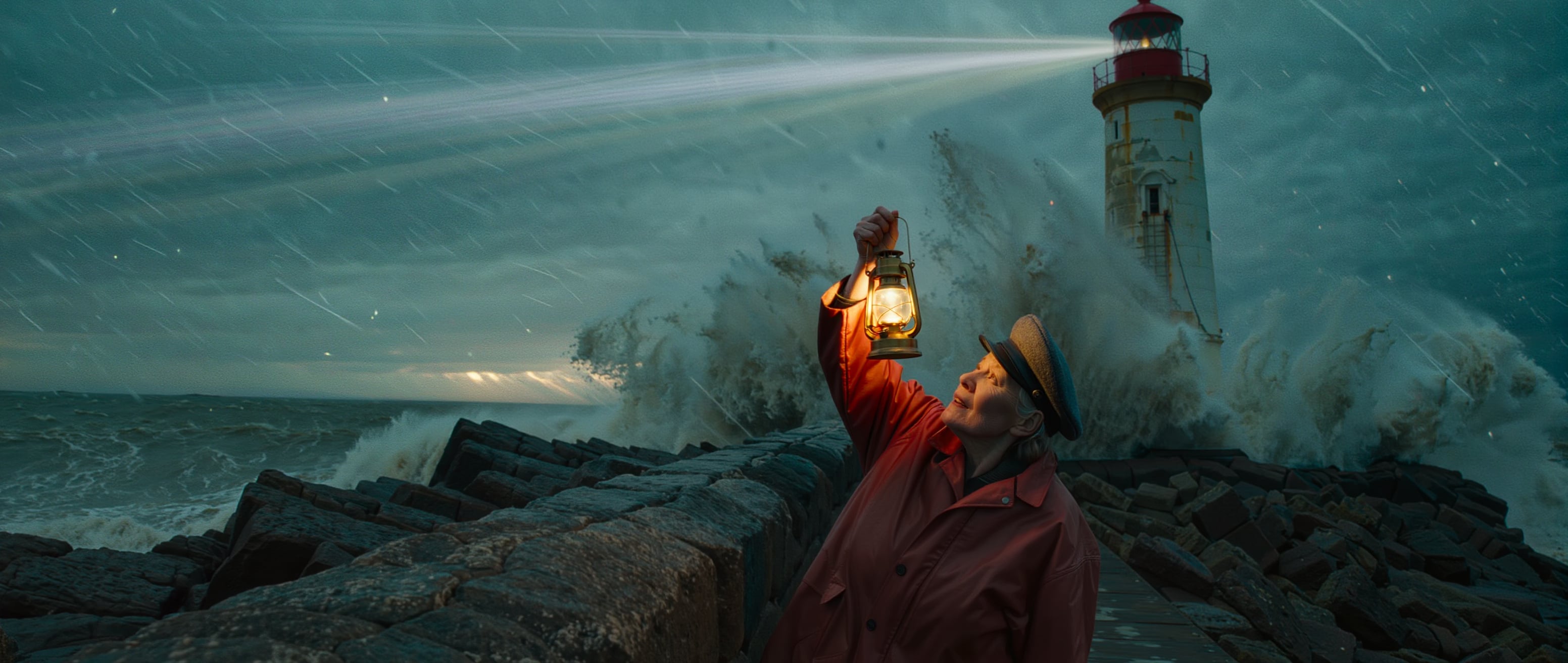
A storm film still in 21:9 widescreen: warm lantern light on her face, a lighthouse beam slicing the rain and a wave exploding into spray. Start from this prompt for your own cinematic key art.
Cinematic film still, wide anamorphic frame from a low angle. A lighthouse keeper in her fifties wearing a crimson oilskin coat and a grey wool cap leans into the wind on a black basalt jetty, one hand raising a glowing brass storm lantern, as a huge storm wave explodes into white spray behind her. The lighthouse beam slices through driving rain overhead. Cold teal dusk with a single warm pool of lantern light on her face, 40mm anamorphic lens with horizontal flares, fine film grain, moody blockbuster color grade.
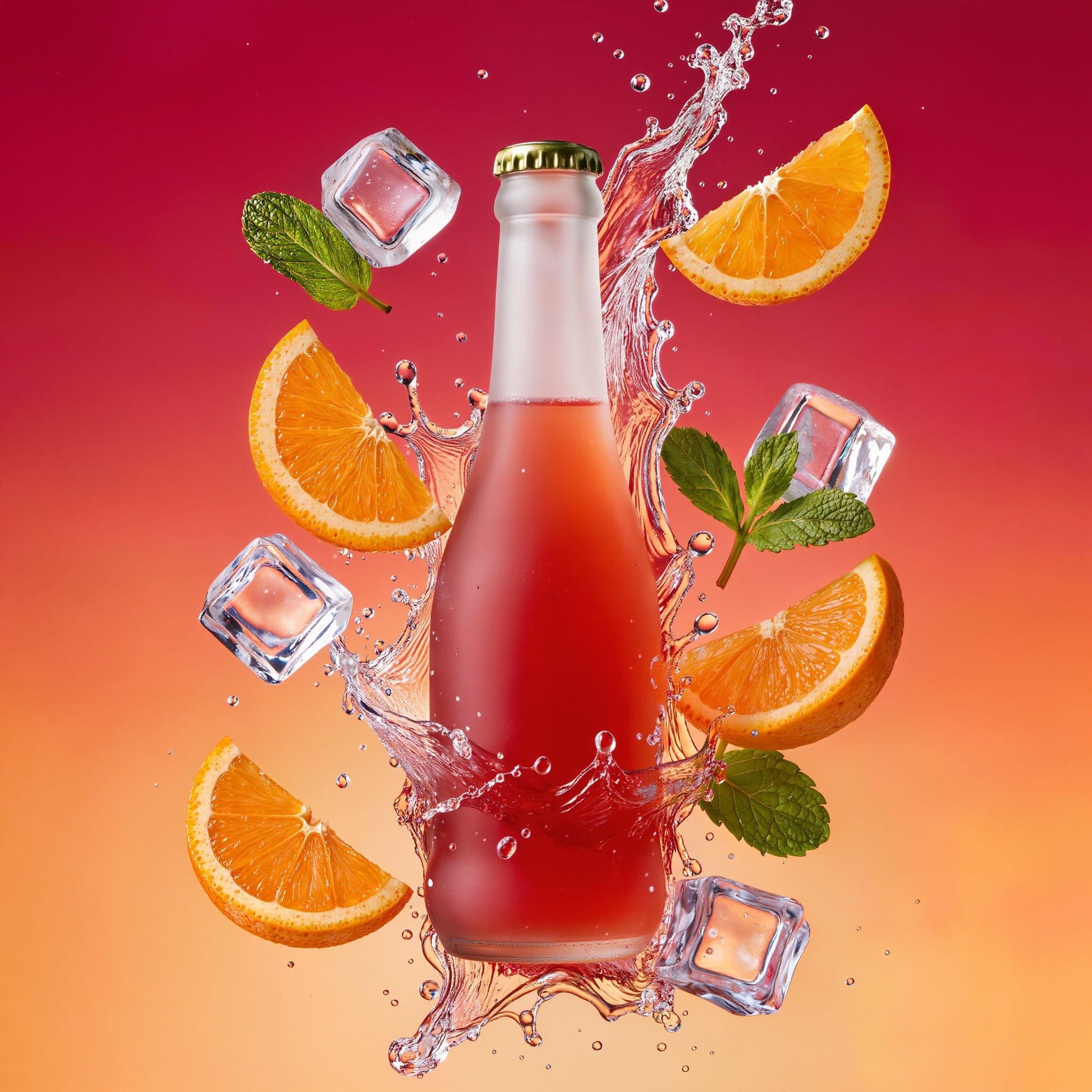
A high speed product splash with every droplet, orange slice and ice cube frozen in mid air, and a clean unlabeled bottle ready for your own brand. Swap in your drink.
High speed studio product photograph, 100mm macro lens. A frosted glass bottle of blood orange sparkling soda bursts upward through a crown of splashing water, orange slices, mint leaves and ice cubes frozen in mid air around it, every droplet sharp as a glass bead. Saturated tangerine to magenta gradient backdrop, hard rim light from behind making the liquid glow, glossy commercial finish, plain unlabeled bottle with no text.
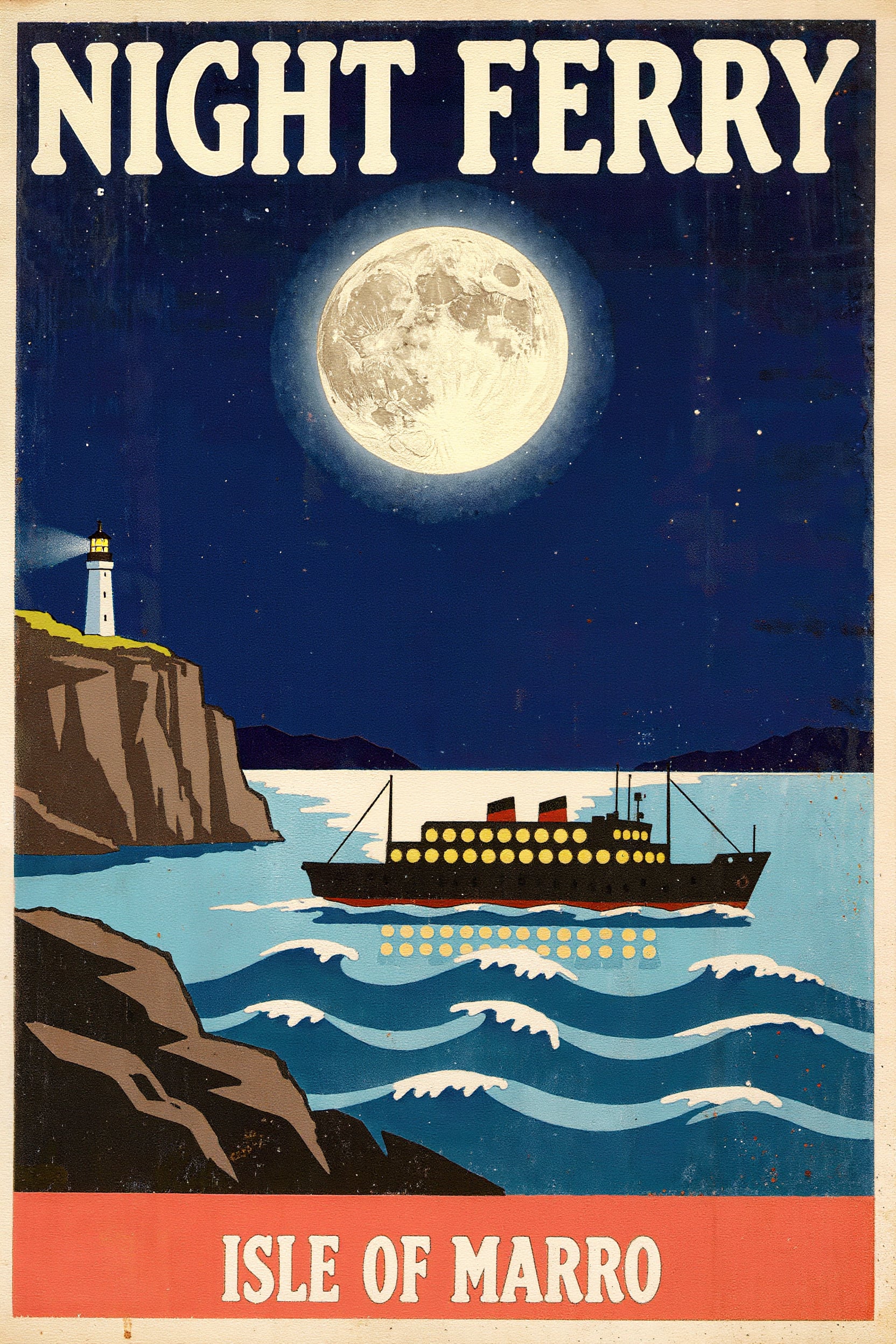
A mid century travel poster with NIGHT FERRY and ISLE OF MARRO spelled exactly, glowing portholes and a full moon in flat screen print color. Change the words in quotes to make your own.
Mid century travel poster, flat screen print illustration with visible paper grain and slight ink misregistration. A night ferry with rows of glowing portholes crosses a deep indigo bay beneath a huge pale moon, stylized waves in three shades of blue, a small white lighthouse on a cliff at the left. Bold cream serif lettering across the top reads "NIGHT FERRY" and a smaller line along the bottom reads "ISLE OF MARRO". Limited palette of indigo, cream and coral. No other text, numbers or signatures anywhere on the poster. The whole poster, including both lines of lettering, sits inside a cream border with a wide margin below "ISLE OF MARRO", and the bottom line is clearly smaller than the headline.
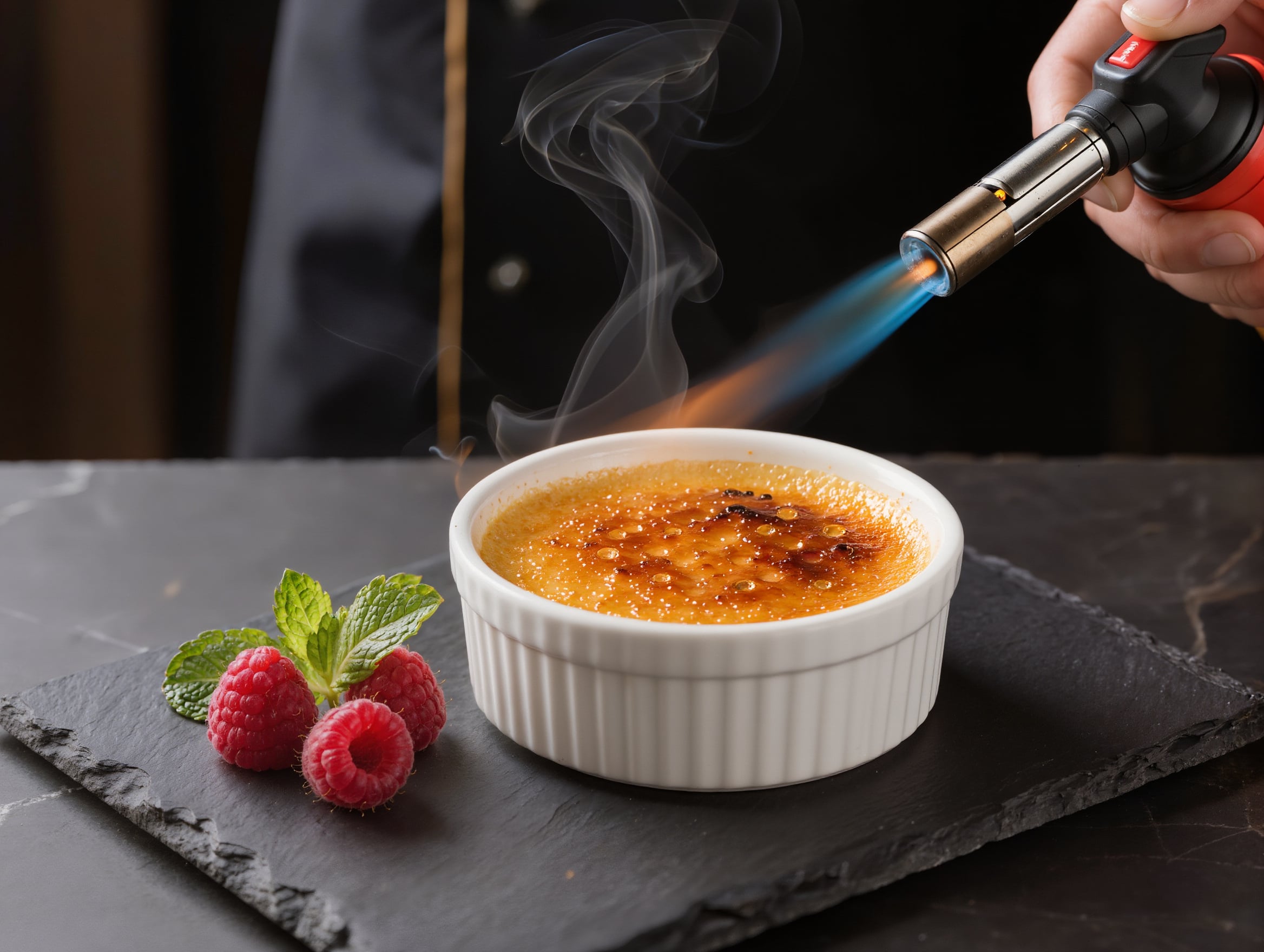
A cookbook style close up: a blue torch flame turning sugar into bubbling amber glass, a curl of smoke and raspberries on dark slate. Start from this prompt for your menu or food blog.
Close up food photograph, 60mm lens, shallow depth of field. A chef torches the sugar crust of a creme brulee in a white fluted ramekin, a blue flame turning the top into bubbling amber glass, a thin wisp of smoke rising, three raspberries and a sprig of mint beside it on a dark slate board. Warm tungsten kitchen light against a deep charcoal background, glossy caramel texture, editorial cookbook style.
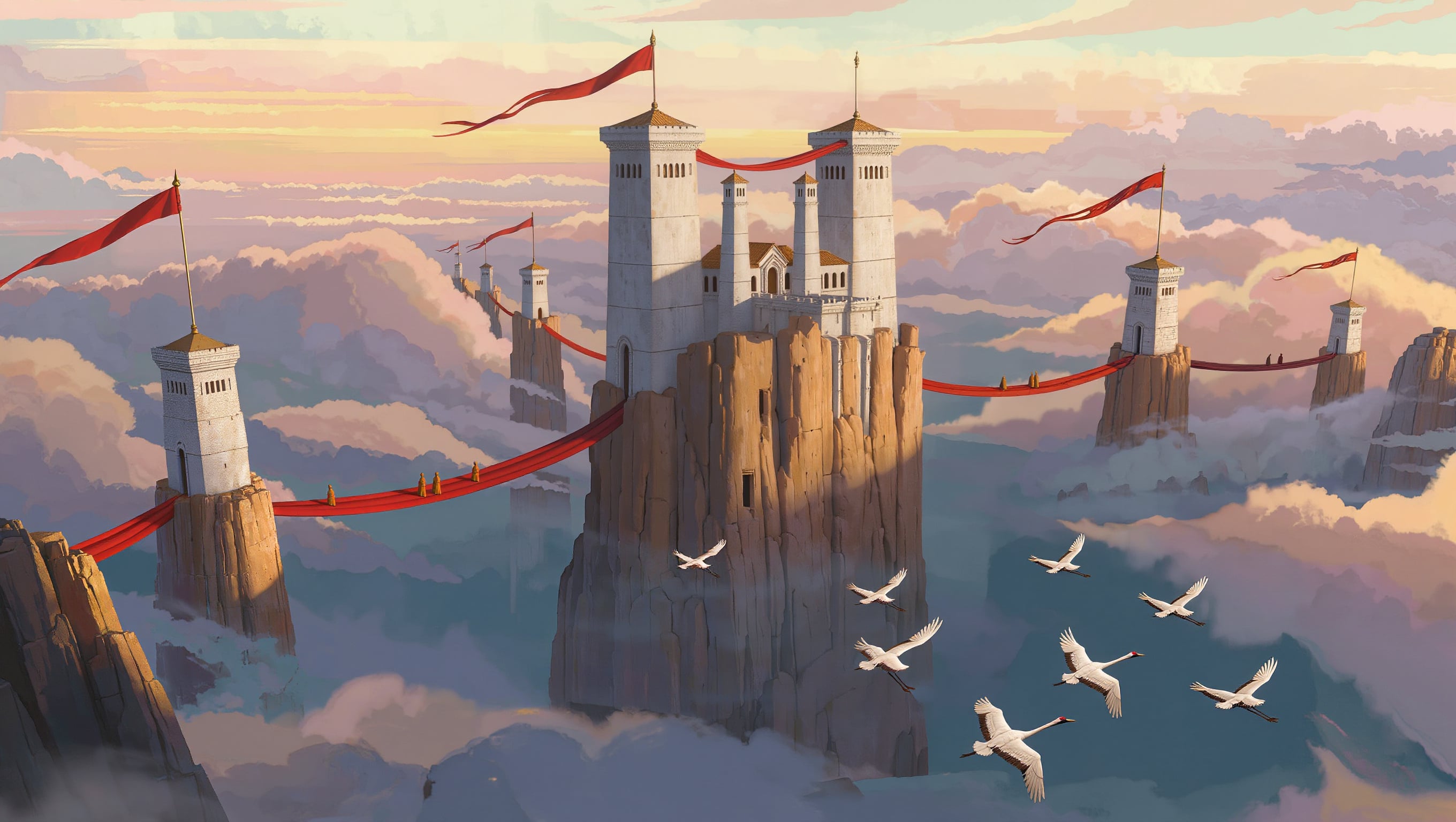
Epic concept art at sunrise: cliff towers above a sea of clouds, red walkways with tiny robed figures for scale and white cranes gliding past. Great for game worlds and book covers.
Epic concept art, extreme wide shot at sunrise. A cliff monastery of white stone towers joined by red lacquered rope bridges clings to a sheer sandstone pillar rising out of a sea of clouds, long pennants streaming between the towers, a flock of white cranes crossing the foreground, tiny figures in saffron robes on the bridges for scale. Golden rim light on the stone, layered atmospheric haze, painterly matte painting detail, widescreen composition.
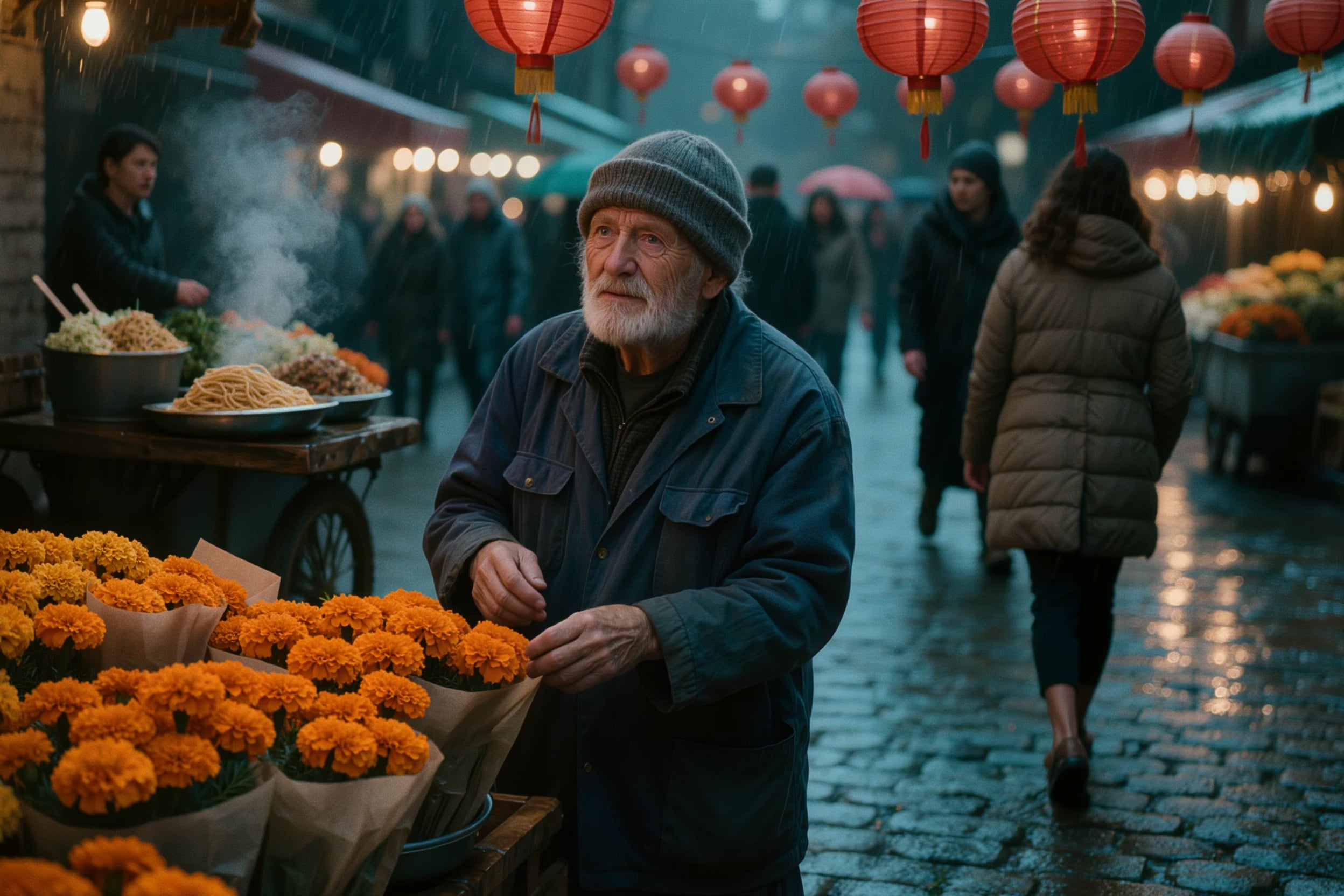
A photoreal street candid on a rainy night: red paper lanterns and warm bulbs glowing on wet cobblestones, steam from a noodle cart and a flower seller among bright marigolds.
Photoreal street candid on a 35mm lens at night just after rain. A flower seller in his sixties wearing a navy work jacket and a grey knit beanie wraps a bunch of orange marigolds in brown paper at his market stall, steam drifting from a noodle cart behind him, wet cobblestones reflecting red paper lanterns and bare warm bulbs. Shallow depth of field, slight motion blur on passersby, natural skin texture, cinematic teal and amber grade, fine film grain.
Where Kling Image 3.0 shines: light, texture and detail
Two more images we made on Pixel Dojo, and the tips that get results like these from Kling Image 3.0.
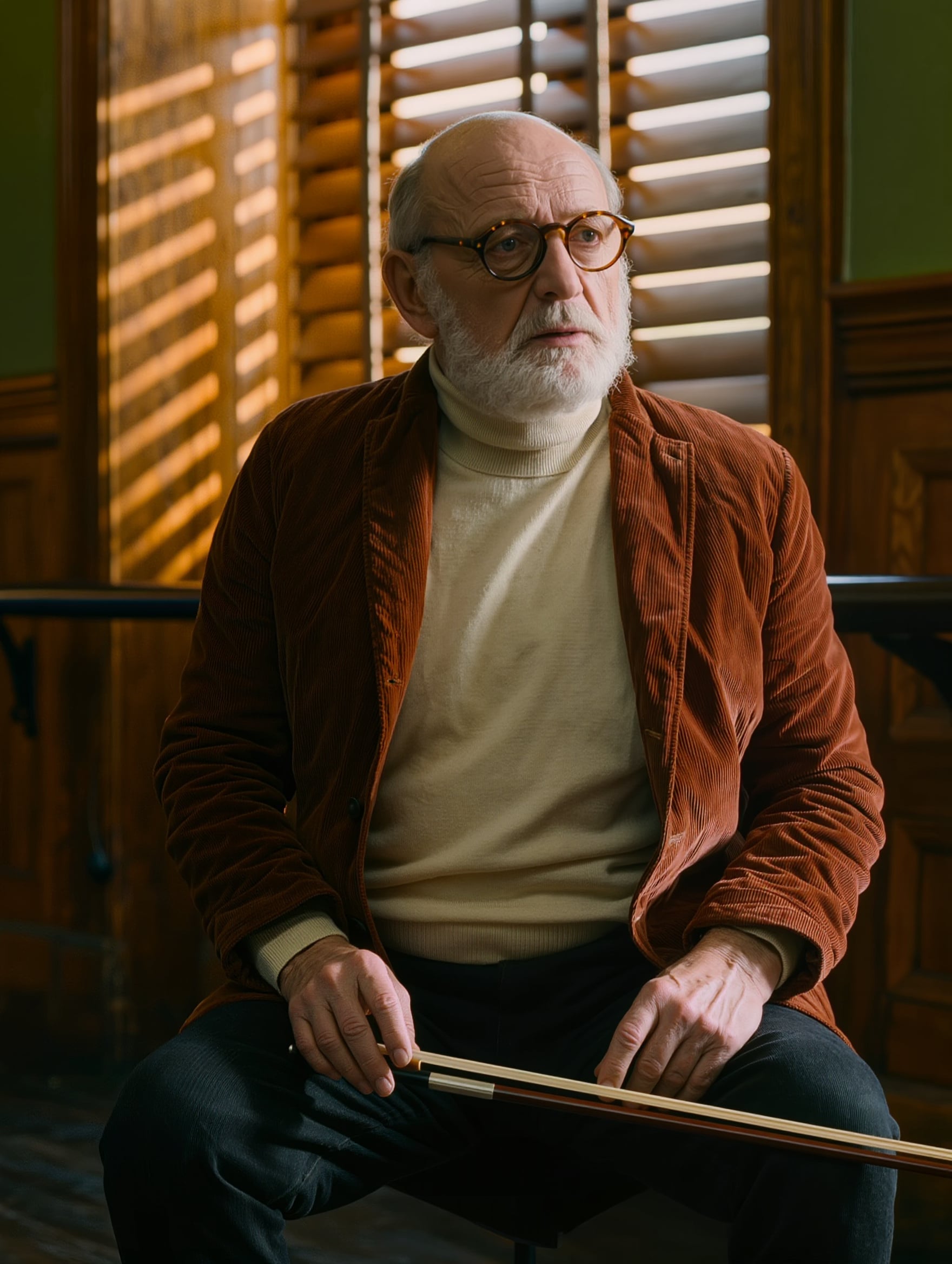
An editorial portrait with warm light pouring through the blinds, crisp corduroy wale and a natural grip on the cello bow.
Editorial portrait on an 85mm lens at f/1.8, hard afternoon window light cut into stripes by venetian blinds. A man in his seventies with a neat white beard and round tortoiseshell glasses, wearing a rust corduroy jacket over a cream turtleneck, rests a cello bow across his knees in a wood paneled rehearsal room and looks just past the camera. Bars of warm light fall across his face, deep amber and forest green palette, natural skin texture with visible pores and fine wrinkles, soft color negative film grain.
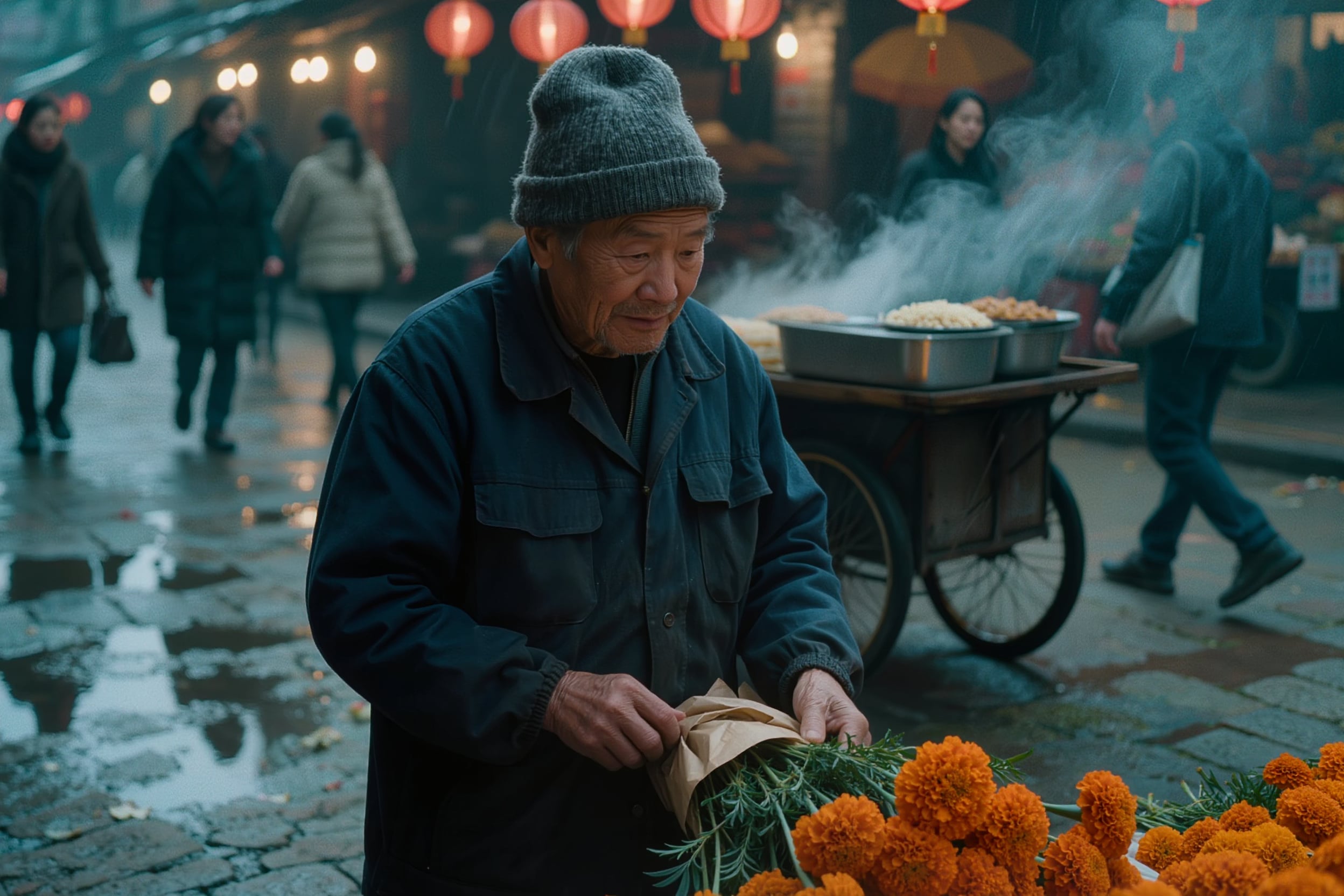
A documentary style moment: the flower seller wraps marigolds in brown paper while steam drifts from the noodle cart behind him.
Photoreal street candid on a 35mm lens at night just after rain. A flower seller in his sixties wearing a navy work jacket and a grey knit beanie wraps a bunch of orange marigolds in brown paper at his market stall, steam drifting from a noodle cart behind him, wet cobblestones reflecting red paper lanterns and bare warm bulbs. Shallow depth of field, slight motion blur on passersby, natural skin texture, cinematic teal and amber grade, fine film grain.
- Cinematic light is its signature. Name one key light and a color grade, like warm lantern light against cold teal dusk, and Kling builds the whole frame around it.
- Texture stays crisp at 2K. Corduroy wale, beard hair, glossy caramel and water droplets are sharp when you zoom in on our images.
- Hands look natural. The hand on the torch, the hands on the cello bow and the flower seller's hands all read cleanly.
- Short text lands exactly. Put each line in double quotes, say where it goes and add a line ruling out any other text, the way we wrote the NIGHT FERRY poster.
- Give the subject one clear action, like wrapping flowers or raising a lantern, and describe the wardrobe down to the hat and fabric.
- Every image is 1 credit at 1K or 2K, so render at 2K and explore a few directions from the same prompt.
Kling Image 3.0 vs Seedream 5 on the same portrait prompt
We sent the identical cellist prompt to both models in a 3:4 portrait frame. Both nailed the white beard, tortoiseshell glasses, rust corduroy and cello bow. Kling Image 3.0 gave it a warm amber film grade in a wood paneled room for 1 credit, and Seedream 5 threw crisp stripes of window light across his face for 2.5 credits. Pick Kling for rich, moody portraits at a lower price.
Same prompt: Editorial portrait on an 85mm lens at f/1.8, hard afternoon window light cut into stripes by venetian blinds. A man in his seventies with a neat white beard and round tortoiseshell glasses, wearing a rust corduroy jacket over a cream turtleneck, rests a cello bow across his knees in a wood paneled rehearsal room and looks just past the camera. Bars of warm light fall across his face, deep amber and forest green palette, natural skin texture with visible pores and fine wrinkles, soft color negative film grain.
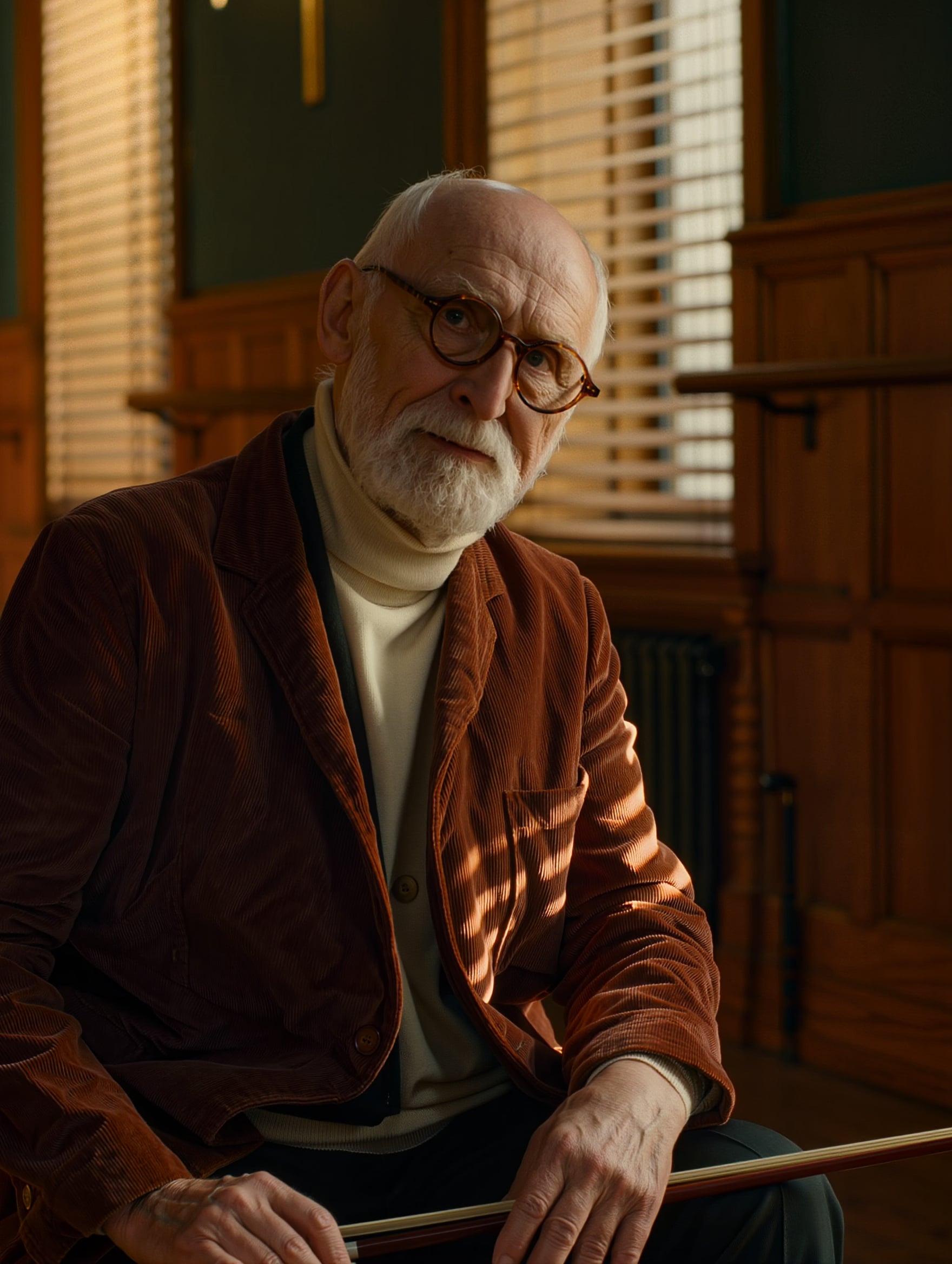 Kling Image 3.0
Kling Image 3.0 at 2K: a warm amber film still with glowing blinds, rich corduroy texture and stripes of window light across his jacket.
Editorial portrait on an 85mm lens at f/1.8, hard afternoon window light cut into stripes by venetian blinds. A man in his seventies with a neat white beard and round tortoiseshell glasses, wearing a rust corduroy jacket over a cream turtleneck, rests a cello bow across his knees in a wood paneled rehearsal room and looks just past the camera. Bars of warm light fall across his face, deep amber and forest green palette, natural skin texture with visible pores and fine wrinkles, soft color negative film grain.
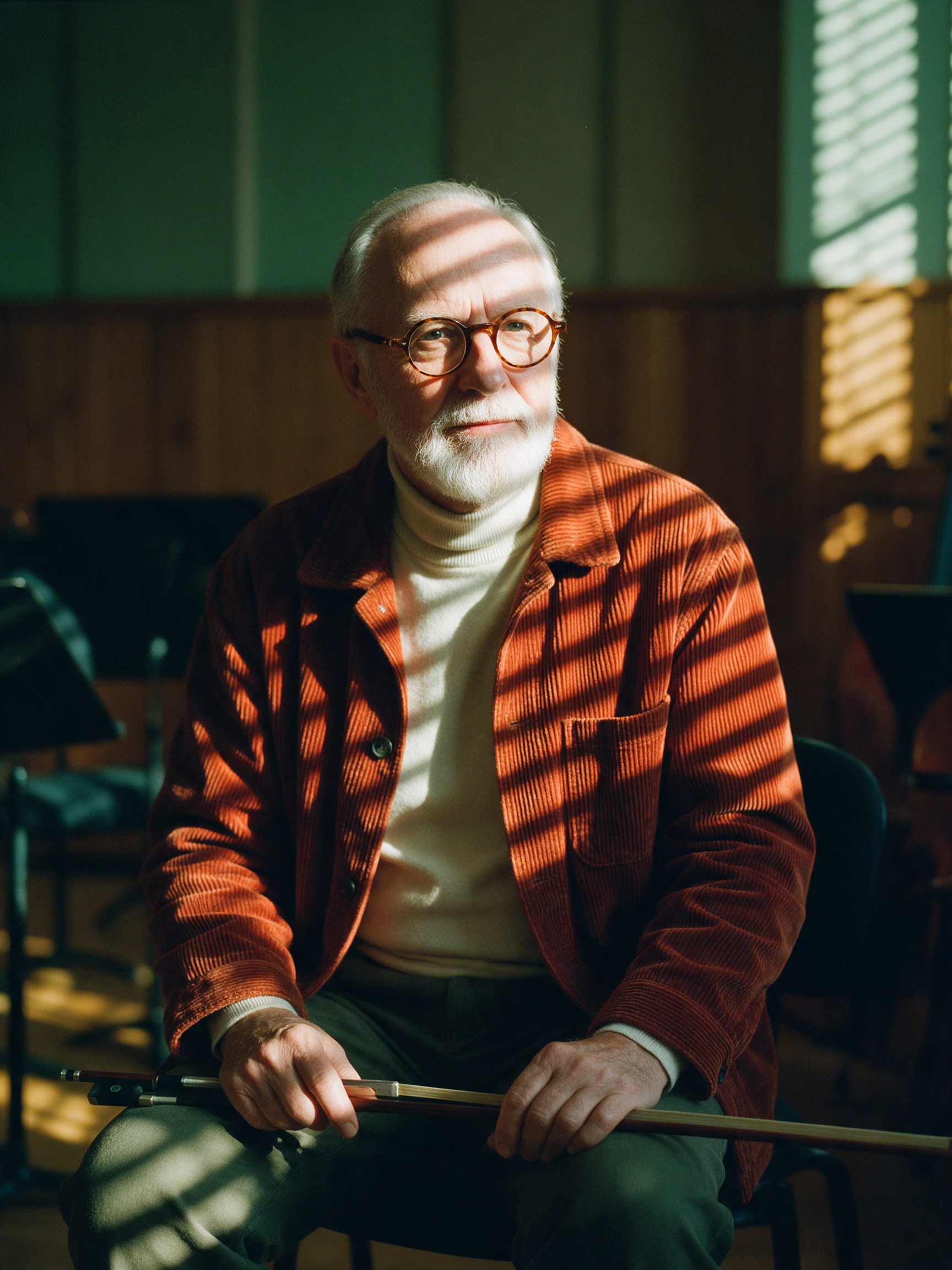 Seedream 5
Seedream 5: crisp stripes of window light across his face and jacket in a green rehearsal room with music stands.
Editorial portrait on an 85mm lens at f/1.8, hard afternoon window light cut into stripes by venetian blinds. A man in his seventies with a neat white beard and round tortoiseshell glasses, wearing a rust corduroy jacket over a cream turtleneck, rests a cello bow across his knees in a wood paneled rehearsal room and looks just past the camera. Bars of warm light fall across his face, deep amber and forest green palette, natural skin texture with visible pores and fine wrinkles, soft color negative film grain.
| Kling Image 3.0 | Seedream 5 | |
|---|---|---|
| Look | Warm amber film still with wood paneling and glowing blinds | Bright daylight in a green rehearsal room with music stands |
| Light | Warm glow through the blinds, striped across his corduroy jacket | Striped across his face and jacket |
| Settings | 2K, 3:4 | Portrait 3:4 |
| Credits | 1 | 2.5 |
Kling Image 3.0 settings and how we use them
The tool and the API share the same inputs. Here is what each one does, with the output sizes of the files we made.
- Resolution1K, 2K
- Both cost 1 credit, so we render at 2K. Our 2K files measured 3104 x 1312 at 21:9, 2048 x 2048 at 1:1 and 1760 x 2336 at 3:4, sized for banners, product pages and social posts.
- Aspect ratio16:9, 9:16, 1:1, 4:3, 3:4, 3:2, 2:3, 21:9
- Pick the frame for where the image will live: 21:9 for cinematic banners, 2:3 for posters, 1:1 for product shots and 9:16 for stories. We used six of the eight on this page.
- Number of images1 to 9 per request
- Ask for several at once to compare compositions side by side. Each image uses 1 credit.
- Output formatPNG, JPEG, WebP
- PNG is the default. JPEG keeps files light for the web, and every Kling image on this page is a JPEG.
- ExclusionsWritten into the prompt
- Kling Image 3.0 reads exclusions from the prompt itself, so add a plain line like "No other text anywhere on the poster" or "plain unlabeled bottle with no text".
How to use Kling Image 3.0 on Pixel Dojo
- 1
Open the tool and set 2K
Type a prompt in the box on this page or tap Use this prompt on any example. The tool opens at 1K and 1:1, so switch Resolution to 2K and pick your aspect ratio. 2K costs the same 1 credit.
- 2
Write the prompt as a shot note
Start with the shot and lens ("Cinematic film still, wide anamorphic frame from a low angle"), then one specific subject with wardrobe, one action, the light and the color grade. Every prompt on our page follows that order.
- 3
Name the light and the grade
Kling answers to light: a warm pool of lantern light against cold teal dusk, hard rim light behind a bottle, red lanterns on wet cobblestones. Give each prompt one key light and one color grade.
- 4
Quote the words you want printed
Put each exact string in double quotes and say where it goes. Add a line that rules out any other text and ask for a border with a wide margin, and the lettering sits cleanly inside the design, as on our NIGHT FERRY poster.
- 5
Make variations and refine
Set Number of images to see several compositions from one prompt, then pick a finished image and switch to edit mode to refine it.
Kling Image 3.0 pricing: 1 credit per image
Kling Image 3.0 is included in every Pixel Dojo plan, with plans from $10/month. Every image is 1 credit, at 1K or 2K and in any aspect ratio.
Ask for several images in one request and each one uses 1 credit, up to 9 images. The Pixel Dojo API charges the same 1 credit per image.
The same portrait prompt used 2.5 credits on Seedream 5, so Kling Image 3.0 makes more images from the same plan.
Kling Image 3.0 questions
What is Kling Image 3.0?
Kling Image 3.0 is the text to image model from Kuaishou, the maker of the Kling AI video generator. On Pixel Dojo it renders 1K or 2K images in eight aspect ratios, from 21:9 to 9:16, and it also runs through the Pixel Dojo API as kling-image.
What is the Kling AI image generator best at?
Cinematic images. It gives prompts film still lighting and color grades, natural skin and hands, glossy product splashes, painterly concept art and short poster text spelled exactly. We made every example on this page at 2K.
How much does Kling Image 3.0 cost?
Kling Image 3.0 is included in every Pixel Dojo plan, with plans from $10/month. Each image uses 1 credit at 1K or 2K, and a request for several images uses 1 credit per image.
Can Kling Image 3.0 put text on an image?
Yes, short text works well. Our travel poster spelled NIGHT FERRY and ISLE OF MARRO exactly. Put each line in double quotes, say where it goes and add a line ruling out any other text.
Should I use Kling Image 3.0 or Seedream 5?
Pick Kling Image 3.0 for warm, cinematic stills, portraits and product shots at 1 credit per image. On our shared portrait prompt Seedream 5 striped the window light across the face for 2.5 credits, so reach for it when you want that exact lighting.
Is Kling Image 3.0 free?
A free account gets 3 free effects every day to try Pixel Dojo. Kling Image 3.0 is included in every plan from $10/mo, and your credits roll over while you stay subscribed.
Can I use Kling Image 3.0 images and videos commercially?
Yes. You own what you make, on every plan.
Make your first Kling Image 3.0 image
Write a prompt above or start from any example on this page. One plan covers every top model, six studios and Sensei, and your credits roll over.
Start with Kling Image 3.0