MindVideo alternative
MindVideo alternative: bring your photos to life on current models
Pixel Dojo animates a photo on Kling 3.0, WAN 3.0 and Veo 3.1 side by side, shows each credit price before you start, includes commercial use on every plan, and gives a first purchase 7 days for a pro-rated refund.
MindVideo AI turns text and photos into short videos with a long list of models and effects. We took the job it is best known for, animating a still, and ran one workshop photo through three current video engines to see what you get.
20 credits ($1.25) per 5 s clip with audio. Included in every plan, from $10/month.
Already a member? Sign in
By Brian Lovett · Updated
More clips and images in the styles MindVideo users ask for
Every clip and image below was made on Pixel Dojo with the prompt shown. Tap any of them to start from the same prompt.
Hand painted anime motion on WAN 3.0 for 10 credits, with rain and temple bells.
Hand painted anime style: a woman in her thirties with a red umbrella climbs mossy stone steps toward a small hilltop shrine in summer rain, hydrangeas along the path, the camera rises behind her, soft cel shading. Sound: rain on the umbrella and distant temple bells.
A pet moment on MiniMax H3, every droplet lit by the morning sun.
A black labrador climbs out of a calm lake onto a wooden dock and shakes the water off in slow motion, droplets flying in the low morning sun, the camera at dog height, pine trees behind.

Paper craft on GPT Image 2.5 for 2 credits, ready to animate as a start frame.
A layered paper cut diorama of a stormy sea with a small red and white lighthouse on a cliff, curling card stock waves in five shades of blue, a tiny glowing window, warm backlight through the paper, macro photo.
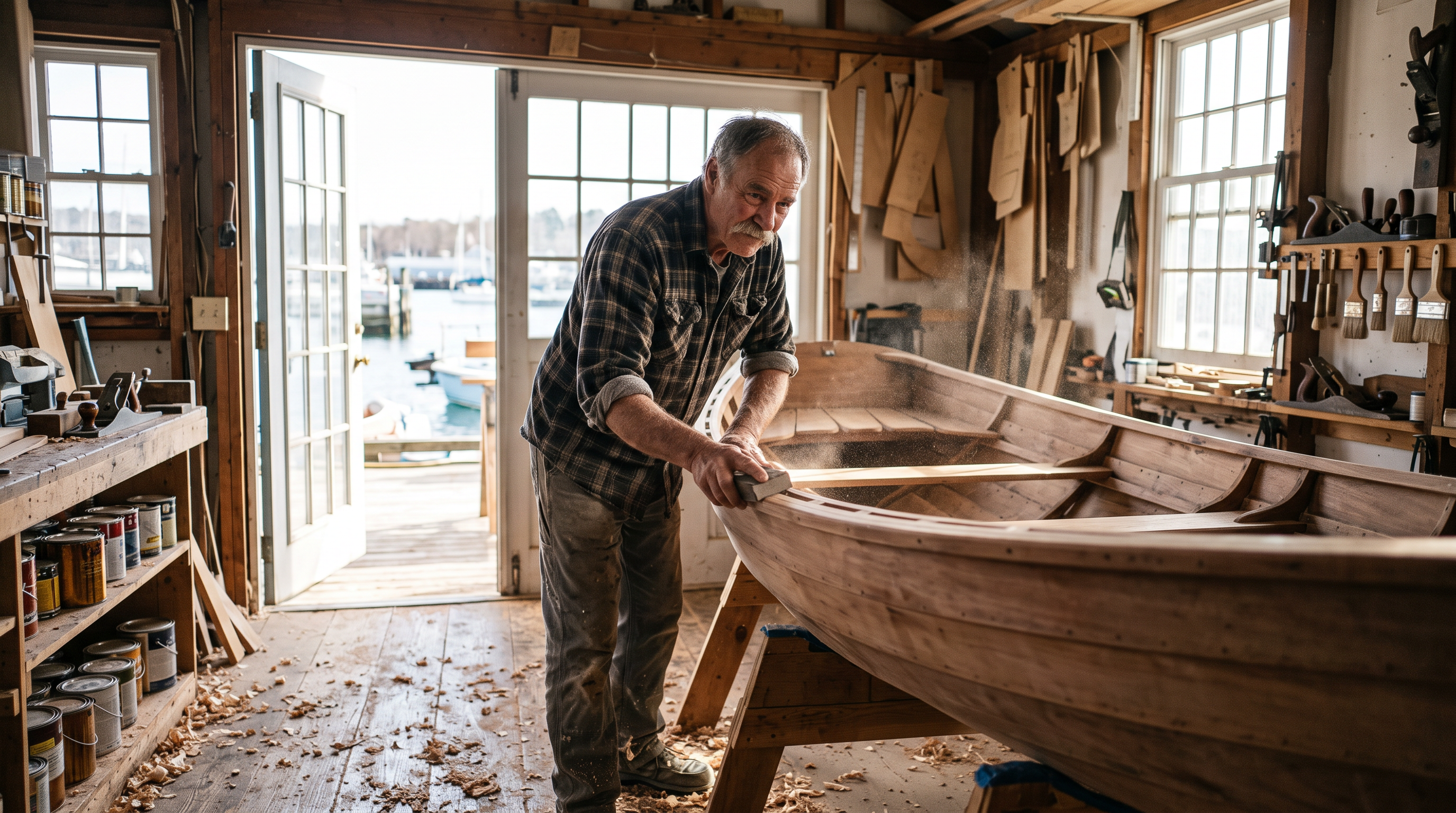
The start frame for our test, made on Nano Banana 2.1 for 1.5 credits.
Photo of a boatbuilder in his sixties with a grey mustache and rolled flannel sleeves sanding the curved hull of a wooden rowing boat in a sunlit workshop by the water, sawdust in the light, 35mm photo, shallow depth of field.
Where MindVideo leaves you short
MindVideo AI's home page lists many video models, among them Kling 2.6, Wan 2.6, Veo 3.1, PixVerse V5, Seedance 1.0 Pro, Kling 2.1 Master and Sora 2, plus effects such as AI dance, hug and photo to anime. Several of those are earlier versions of engines that have newer releases.
The fine print matters too. MindVideo's home page says commercial rights are for paid users only. Its terms say purchases cannot be refunded once the service has been used, monthly plans can be refunded within 24 hours and annual plans within 72 hours, outside the EU and Turkey, with processor fees taken off.
So we asked a plain question: what does a photo look like when it is animated on the current versions?
One workshop photo, three current video engines
We made a 16:9 still of a boatbuilder in his sixties sanding a wooden rowing boat, then gave the same photo and the same motion prompt to each engine: he stops, runs his palm along the hull, looks toward the door and smiles. Each tile shows its settings and credits.
He stops sanding, runs his palm along the smooth hull, then looks up toward the open door and smiles as sawdust drifts through the sunlight, slow push in. Sound: sandpaper on wood, gulls and water outside.
He stops sanding, runs his palm along the smooth hull, then looks up toward the open door and smiles as sawdust drifts through the sunlight, slow push in. Sound: sandpaper on wood, gulls and water outside.
He stops sanding, runs his palm along the smooth hull, then looks up toward the open door and smiles as sawdust drifts through the sunlight, slow push in. Sound: sandpaper on wood, gulls and water outside.
- All three kept his face, the boat and the workshop exactly as they were in the photo, the thing a photo animation has to get right first.
- Kling 3.0 played the action as written, stopping the work and looking up toward the door, for 20 credits.
- WAN 3.0 gave the warmest ending, a turn and a smile to camera, for 10 credits.
- Veo 3.1 Fast spent its 4 seconds on the craft itself, sanding on with dust in the light, a fine B-roll shot for 18 credits.
Our verdict on the workshop test
Pick Kling 3.0 when the motion has to follow your words. Pick WAN 3.0 when you want a lot of clips for little, and Veo 3.1 for texture and sound. Having all three on one balance is the point: one photo, three reads, and you keep the one that fits.
All three clips came back with sound built in. When a project needs more than one shot, Sensei plans the shots, prices them, waits for your approval and reviews every take.
MindVideo vs Pixel Dojo
MindVideo facts come from its home page and terms of service, read on October 15, 2026.
| Compared on | MindVideo AI | Pixel Dojo |
|---|---|---|
| Video models | Kling 2.6, Wan 2.6, Veo 3.1, PixVerse V5, Seedance 1.0 Pro, Kling 2.1 Master, Sora 2 and more | Kling 3.0, WAN 3.0, Veo 3.1, Seedance 2.5, MiniMax H3, PixVerse V6 and more |
| Image models | GPT Image 2, Nano Banana Pro and Nano Banana | GPT Image 2.5, Nano Banana 2.1, Seedream 5, FLUX 3 Image and more |
| Commercial use | Paid users only; free users may use creations for personal purposes | Commercial use on every plan |
| Refunds | None once the service is used; monthly plans within 24 hours, annual within 72 hours (14 days in the EU and Turkey), less processor fees | A first purchase can be refunded within 7 days, in full if under 20% of the credits are used and pro-rated after that |
| Price per clip | Credit based, with free credits on sign up and from daily check ins | Every model page shows its credit price before you generate |
Why Pixel Dojo animates photos better
Pixel Dojo is the better place to animate your photos when you want the newest engines, the price before you generate and commercial use on every plan.
Why MindVideo users switch to Pixel Dojo
Unlimited on every plan
On every paid plan, Relax runs Qwen Image 2.1, FLUX 3 Image Klein and MiniMax H3 Turbo, plus every video and photo effect, unlimited with no credits spent.
Sensei, the AI director
Describe a project and Sensei plans it, prices it, waits for your approval and reviews every take.
One click video effects
300+ one-click video effects turn a photo into a trend clip, from AI Hug to AI Inflate, with no prompt to write, and 3 are free every day.
Video Studio
Generate, edit and extend a clip in one place, on whichever top video engine suits the shot.
Photo effects
45+ photo effects restyle a picture in one click, from a hand painted anime still to a boxed action figure or a magazine cover, and every one starts from your own upload.
Star in any video
Upload a short clip, pick a saved character or a photo, and Character Swap puts your star in the lead while the scene, camera moves and sound stay the same.
Credits that roll over
Your credits roll over while you stay subscribed, so nothing you pay for disappears at the end of the month.
Every top model, plus an API
More than 80 image and 60 video models in one account, with a public API and a hosted MCP server for your own apps and AI assistants.
What the workshop test cost
Plans are Lite $10 a month for 160 credits, Pro $25 for 500 credits, Pro Max $50 for 1,100 credits. Every plan includes every model and commercial use. Credits roll over while you stay subscribed.
The start photo cost 1.5 credits. The three clips cost 20, 10 and 18 credits, and every tile shows its own price.
Under our refund policy, a first purchase can be refunded within 7 days, in full if under 20% of the credits are used and pro-rated after that.
MindVideo questions
What is a good MindVideo alternative?
Pixel Dojo animates photos and prompts on Kling 3.0, WAN 3.0, Veo 3.1, Seedance 2.5 and more, shows every price first and includes commercial use on every plan.
Can I get a refund from MindVideo?
MindVideo's terms say purchases cannot be refunded once the service has been used. Otherwise monthly plans can be refunded within 24 hours and annual plans within 72 hours, or 14 days in the EU and Turkey, less processor fees.
Can I use MindVideo videos commercially?
MindVideo's home page says commercial rights are available to paid users only, and free users may use their creations for personal purposes.
Which model is best for animating a photo?
In our test Kling 3.0 followed the motion prompt most closely, WAN 3.0 gave the warmest result for 10 credits, and Veo 3.1 Fast was best for texture and sound.
Does Pixel Dojo have anime and pet video styles?
Yes. The anime shrine clip and the labrador clip above were both made from a single prompt, on WAN 3.0 and MiniMax H3.
Video Effects New
Your first video is free. One photo, one click.
310 ready-made effects, from AI Hug and Earth Zoom In to product spins and listing walkthroughs. Upload a photo and press Generate. No prompt to write, and a free account gets 3 a day.






Switch from MindVideo to Pixel Dojo today
Write a prompt above or start from any example on this page. One plan covers every top model, six studios and Sensei, and your credits roll over.
Start with Kling 3.0Sources
Facts about MindVideo come from these public pages, checked on Oct 15, 2026. Prices and plans change; check the source before you buy.