Anijam alternative
Anijam alternative for animated characters that talk
Pixel Dojo takes you from an original anime character to a speaking, captioned shot in three steps, on Seedream 5, Seedance 2.5 and auto captions, with Kling 3.0, Veo 3.1 and WAN 3.0 for every other animation style.
Anijam pitches itself as an AI video agent for animated stories. We built one shot of our own story step by step: design the character, make her speak as a storm rolls in, then caption the line.
30 credits ($1.88) per 5 s clip at 720p with audio. Included in every plan, from $10/month.
Already a member? Sign in
By Brian Lovett · Updated
Four more animation styles, one prompt each
Every clip below was made on Pixel Dojo with the prompt shown.
Claymation on Kling 3.0, thumbprints and all.
Claymation style, a plasticine walrus barber in a striped vest trims the bushy whiskers of a sleepy clay sea lion in a tiny seaside barbershop, little tufts of fluff float down, visible thumbprints in the clay, warm lamp light, scissor snips and a cheerful whistle.
Paper cutout stop motion on Kling 3.0.
Paper cutout stop motion animation: a little red paper steam train chugs across layered paper mountains under a felt moon, its smoke puffs are tiny cotton balls, paper pine trees wobble as it passes, warm side light with soft shadows between the layers, a toy whistle and a gentle chugging rhythm.
Flat 2D cartoon on Veo 3.1 Fast, comic BOING lettering included.
Flat 2D cartoon style: a grumpy potted cactus on a sunny windowsill squints at a watering can, folds its arms and says, "One drop. Not a splash more." Bold outlines, bright flat colors, a comic boing sound.
Watercolor anime on WAN 3.0 for 10 credits.
Watercolor anime style, a striped hot air balloon drifts over patchwork farmland at golden hour, a pilot in a flight jacket leans over the basket rail and waves to fields below, painted clouds sliding past, wind and the burner roaring.
From character sheet to captioned scene in three steps
- 1
Design the character
Seedream 5 drew our original lighthouse mechanic: a woman in her late twenties with a teal bob, oil stained overalls and a red scarf, on a pier at sunset.
- 2
Make her act and speak
Seedance 2.5 used that still as the first frame, darkened the sky into a storm, switched on the lighthouse lamp and gave her the spoken line.
- 3
Caption the line
Auto captions transcribed her two sentences and burned them in, so the shot works with the sound off.
Every step, exactly as we ran it
The actual output of each step. Each tile shows its settings and credits.
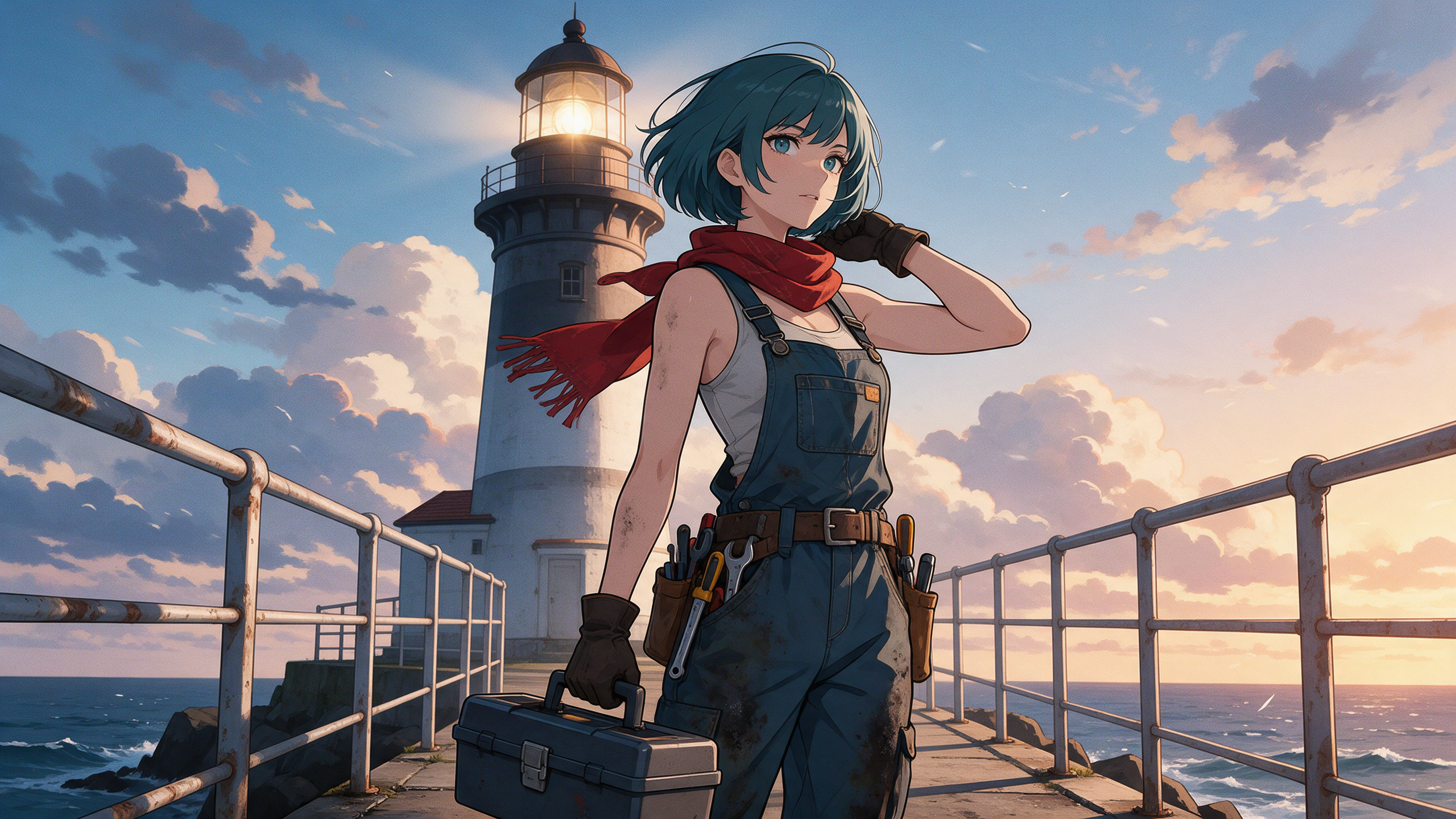
Anime key art of an original character: a lighthouse mechanic, a woman in her late twenties with a short teal bob, oil stained overalls and a red scarf, standing on a windy seaside pier at sunset with a toolbox, the lighthouse behind her, clean cel shading, painted clouds.
Anime style. The wind tugs at her red scarf as she sets the toolbox down, turns to the camera and says, "Storm is coming in. Let's get that light working." The lighthouse lamp flickers on behind her. Sound: waves, gusting wind and a metal clank.
- Seedream 5 nailed the look in one go: teal bob, red scarf, overalls, tool belt and a lighthouse behind her, for 2.5 credits.
- Seedance 2.5 kept her face, hair and outfit from the still while the sunset turned to storm clouds around her.
- Auto captions read both sentences correctly, "Storm is coming in" and "Let's get that light working", for 5 credits.
Anijam plans vs Pixel Dojo
Anijam figures from its pricing page, read on October 15, 2026. The plan prices shown there are billed yearly.
| Compared on | Anijam | Pixel Dojo |
|---|---|---|
| Plans | Beginner $16 a month ($192 a year), Creator $26 ($312), Master $58 ($696), Master Pro $166 ($1,992) | Lite $10 a month for 160 credits, Pro $25 for 500 credits, Pro Max $50 for 1,100 credits |
| Monthly credits | 3,000, 6,000, 16,000 or 50,000; plan credits do not roll over | 160, 500 or 1,100 |
| Video models | Seedance 2.0, Kling 3.0 Motion, Wan 3.0, Hailuo H3 and more; Beginner gets the basic set | Seedance 2.5, Kling 3.0, Veo 3.1, WAN 3.0 and more on every plan |
| Consistent characters | 10 on Creator, 60 on Master, 120 on Master Pro, none on Beginner | Character Studio on every plan, plus LoRA trainers |
| Free use | Free plan outputs are watermarked and for non-commercial use only | Commercial use on every plan |
Why Pixel Dojo for animated stories
Pixel Dojo has an agent that plans a whole animated episode. Sensei plans a project, prices it, waits for your approval and reviews every take, and Film Studio turns a script and a cast into an edited film.
The difference is the engines: here every plan gets Seedance 2.5, Veo 3.1 and Kling 3.0, and you see each shot's price before you make it.
Why Anijam users switch to Pixel Dojo
Unlimited on every plan
On every paid plan, Relax runs Qwen Image 2.1, FLUX 3 Image Klein and MiniMax H3 Turbo, plus every video and photo effect, unlimited with no credits spent.
Sensei, the AI director
Describe a project and Sensei plans it, prices it, waits for your approval and reviews every take.
Character Studio
Save a face once and call it by @name in any prompt, so the same person shows up in every image and clip.
Film Studio
An idea becomes a finished film: script, cast, storyboard, clips and an editor pass that trims every shot, with each step priced before it runs.
One click video effects
300+ one-click video effects turn a photo into a trend clip, from AI Hug to AI Inflate, with no prompt to write, and 3 are free every day.
Star in any video
Upload a short clip, pick a saved character or a photo, and Character Swap puts your star in the lead while the scene, camera moves and sound stay the same.
Credits that roll over
Your credits roll over while you stay subscribed, so nothing you pay for disappears at the end of the month.
Every top model, plus an API
More than 80 image and 60 video models in one account, with a public API and a hosted MCP server for your own apps and AI assistants.
What an animated scene costs on Pixel Dojo
Plans are Lite $10 a month for 160 credits, Pro $25 for 500 credits, Pro Max $50 for 1,100 credits. Every plan includes every model and commercial use. Credits roll over while you stay subscribed.
Our three step scene cost 2.5 credits for the character, 30 for the speaking shot and 5 for the captions. The showcase clips cost 10 to 27.5 credits each.
Under our refund policy, a first purchase can be refunded within 7 days, in full if under 20% of the credits are used and pro-rated after that.
Anijam questions
What is a good alternative to Anijam?
Pixel Dojo lets you design an anime character on Seedream 5 or Nano Banana 2.1, animate it with speech on Seedance 2.5, Kling 3.0 or Veo 3.1, and caption it, with every price shown first.
How much does Anijam cost?
Anijam's pricing page lists Beginner at $16 a month ($192 a year), Creator at $26 ($312), Master at $58 ($696) and Master Pro at $166 ($1,992), with 3,000 to 50,000 credits a month.
Can I use Anijam for free commercially?
Anijam's pricing page says free plan outputs carry a watermark and are for non-commercial use only.
Can my anime character speak on Pixel Dojo?
Yes. Put the line in quotes in a Seedance 2.5, Kling 3.0 or Veo 3.1 prompt and the model generates the voice with the shot, as our lighthouse mechanic does above.
How do I keep a character consistent across shots?
Save the character in Character Studio and call it by @name in any prompt, or use your best still as the first frame of each new shot.
Video Effects New
Your first video is free. One photo, one click.
310 ready-made effects, from AI Hug and Earth Zoom In to product spins and listing walkthroughs. Upload a photo and press Generate. No prompt to write, and a free account gets 3 a day.






Switch from Anijam to Pixel Dojo today
Write a prompt above or start from any example on this page. One plan covers every top model, six studios and Sensei, and your credits roll over.
Start with Seedance 2.5Sources
Facts about Anijam come from these public pages, checked on Oct 15, 2026. Prices and plans change; check the source before you buy.