Revid AI alternative
Revid AI alternative: from one photo to a captioned short
Pixel Dojo builds a short in three priced steps, a still, a talking clip with sound and burned in captions, on the same top models Revid uses, and you see the credits for each step before you run it.
Revid AI turns a prompt, link or script into a short social video and can post it for you. We wanted to see the same job step by step, so we made a 9:16 travel tip about night trains, from the first photo to the captioned clip.
30 credits ($1.88) per 5 s clip at 720p with audio. Included in every plan, from $10/month.
Already a member? Sign in
By Brian Lovett · Updated
More vertical shorts for the same feed
Each 9:16 clip below came from one prompt on Pixel Dojo, shown on its tile.
A nature facts clip on Kling 3.0 with sound built in.
Vertical macro shot: a panther chameleon on a mossy branch rolls one eye toward the camera and slowly shifts its skin from green to bright orange, rainforest light, soft insect buzz and dripping water.
A history channel opener on WAN 3.0 for 10 credits.
Vertical slow drone rise over the ruins of a hilltop stone fortress at sunset, swallows circling the broken towers, long golden shadows across the walls, wind and distant church bells.
A recipe short on Seedance 2.5 with the grinding sounds built in.
Vertical top down shot: hands grind fresh basil, pine nuts and garlic in a stone mortar and pestle, a drizzle of olive oil falls in, a pinch of grated cheese, warm kitchen light, grinding and crunching sounds.
A talking hook on Veo 3.1 Fast with his voice built in.
Vertical medium shot of a man in his thirties in a grey hoodie at a cluttered home desk lit by a warm lamp, he leans toward the camera and says, "Stay for the last one. It is the best." Quiet room tone.
How we built a travel tip short in three steps
- 1
Make the opening frame
Nano Banana 2.1 made a vertical photo of a traveler with a straw hat and a paper ticket on a station platform, a night train behind her, for 1.5 credits.
- 2
Make her talk
Seedance 2.5 used the photo as its first frame. She lifts the ticket and delivers our line about night trains, with platform sound built in.
- 3
Burn in the captions
Video Autocaption transcribed her line and burned the captions into the vertical clip, ready for TikTok, Reels or Shorts.
Every step of the night train short, as we ran it
These are the outputs exactly as the models returned them. Each tile shows the prompt, settings and credits it used.
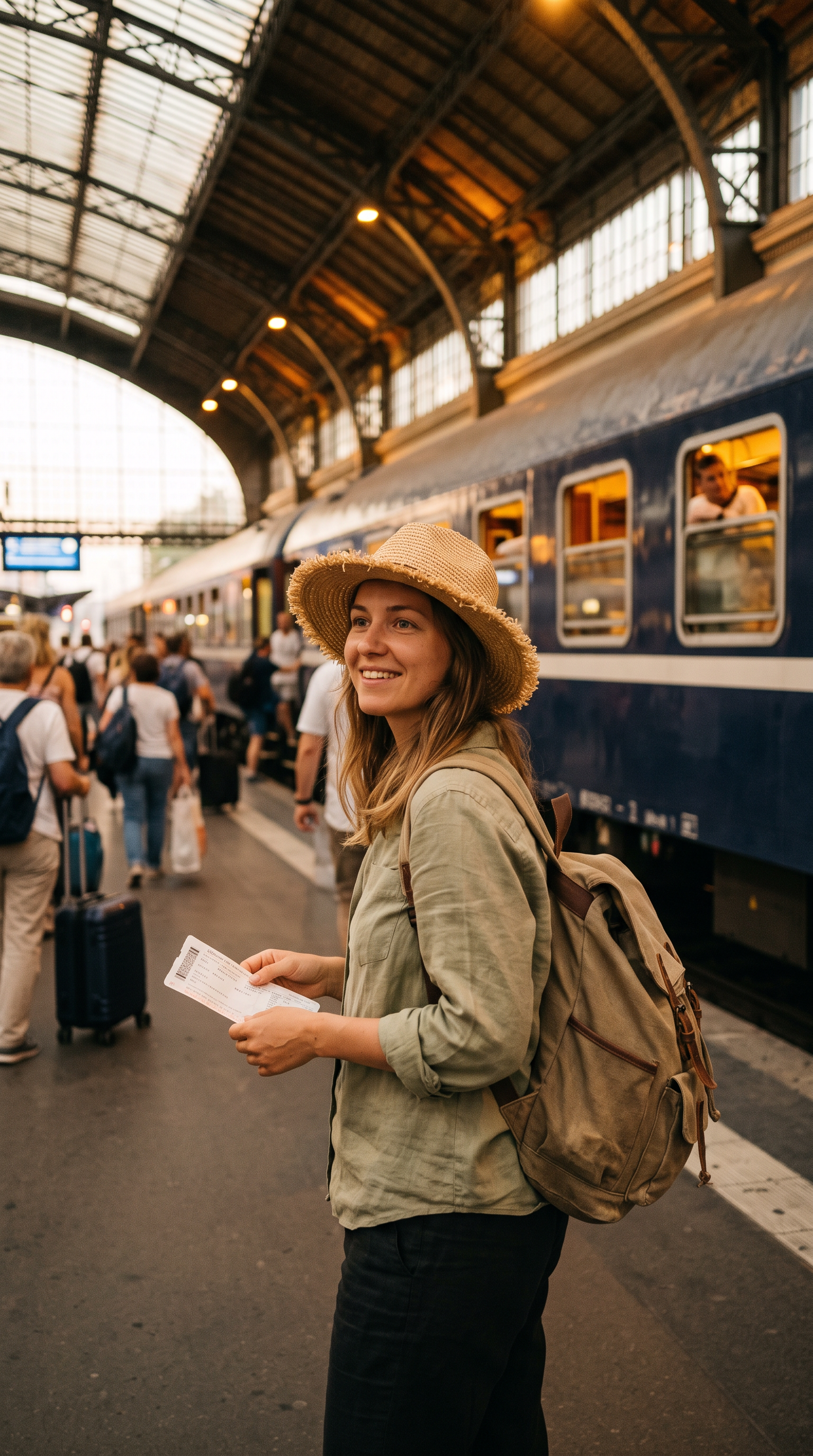
Vertical candid photograph of a woman in her late twenties with a straw sun hat and a canvas backpack on a busy European train platform, holding a paper ticket and smiling, a night train with sleeper cars behind her, warm evening light, 35mm look.
She looks into the camera, lifts the paper ticket and says, "Book the night train and you save a hotel and a whole day." She smiles as travelers pass behind her. Sound: platform chatter and a soft station chime.
- Seedance 2.5 kept her face, hat, backpack and the blue train from the still, so the clip opens exactly on the frame we chose.
- The line came out in her voice with platform chatter under it, so the short needed no separate voiceover.
- Video Autocaption needed no prompt. It read the speech and set bold captions that light up each word as she says it.
- The still cost 1.5 credits and the talking clip 30. Each tile lists its own price.
Revid AI plans vs Pixel Dojo
Everything in the Revid AI column comes from its pricing page and home page, read on October 15, 2026.
| Question | Revid AI | Pixel Dojo |
|---|---|---|
| What does a plan cost? | Growth $39 a month for 2,000 AI credits, or $32 a month billed yearly; Ultra $199 a month for 12,000 credits | Lite $10 a month for 160 credits, Pro $25 for 500 credits, Pro Max $50 for 1,100 credits |
| What does one video use? | About 40 to 80 credits for a typical 30 second video, by Revid's own estimate | Each model page shows its credit price before you generate |
| Which video models? | AI video models including Seedance 2.5, on Growth and up | Seedance 2.5, Kling 3.0, Veo 3.1, WAN 3.0 and more on every plan |
| Developer access | API, MCP and CLI on Growth | Public API, a hosted MCP server and docs generated from each model's spec |
Why Revid AI users switch to Pixel Dojo
Unlimited on every plan
On every paid plan, Relax runs Qwen Image 2.1, FLUX 3 Image Klein and MiniMax H3 Turbo, plus every video and photo effect, unlimited with no credits spent.
Sensei, the AI director
Describe a project and Sensei plans it, prices it, waits for your approval and reviews every take.
Faceless Studio
Type a topic and get a narrated episode: script, AI voiceover, a picture for every scene, captions and music, in 16:9 or 9:16.
Film Studio
An idea becomes a finished film: script, cast, storyboard, clips and an editor pass that trims every shot, with each step priced before it runs.
One click video effects
300+ one-click video effects turn a photo into a trend clip, from AI Hug to AI Inflate, with no prompt to write, and 3 are free every day.
Start from a genre
Pick a format such as a UGC ad, a micro drama, a movie trailer or an explainer, and the matching studio opens with the settings and a sample idea filled in.
Credits that roll over
Your credits roll over while you stay subscribed, so nothing you pay for disappears at the end of the month.
Every top model, plus an API
More than 80 image and 60 video models in one account, with a public API and a hosted MCP server for your own apps and AI assistants.
What our short cost on Pixel Dojo
Plans are Lite $10 a month for 160 credits, Pro $25 for 500 credits, Pro Max $50 for 1,100 credits. Commercial use is included on every plan. Credits roll over while you stay subscribed.
The opening still cost 1.5 credits and the talking clip 30. The showcase clips below cost between 10 and 30 credits each, listed on every tile.
Under our refund policy, a first purchase can be refunded within 7 days, in full if under 20% of the credits are used and pro-rated after that.
Revid AI questions
What is a good alternative to Revid AI?
Pixel Dojo makes vertical shorts on Seedance 2.5, Kling 3.0, Veo 3.1 and WAN 3.0, adds captions with Video Autocaption, and shows the price of every step before you generate.
How much does Revid AI cost?
Revid AI lists Growth at $39 a month for 2,000 AI credits, $32 a month billed yearly, and Ultra at $199 a month for 12,000 credits, with larger Ultra tiers above that.
Do Revid AI credits roll over?
Revid AI says plan credits reset at each renewal and do not carry over. Its Credit Boost packs are one time purchases that do not expire.
Can I make a talking short from one photo?
Yes. Use the photo as the first frame on Seedance 2.5 and write the line in quotes. Our night train clip above was made that way, then captioned with Video Autocaption.
Is there a faceless option?
Yes. The faceless video generator takes a topic to a narrated vertical video, and every clip on this page can be made without anyone on camera.
Video Effects New
Your first video is free. One photo, one click.
310 ready-made effects, from AI Hug and Earth Zoom In to product spins and listing walkthroughs. Upload a photo and press Generate. No prompt to write, and a free account gets 3 a day.


Switch from Revid AI to Pixel Dojo today
Write a prompt above or start from any example on this page. One plan covers every top model, six studios and Sensei, and your credits roll over.
Start with Seedance 2.5Sources
Facts about Revid AI come from these public pages, checked on Oct 15, 2026. Prices and plans change; check the source before you buy.