Biteable alternative
Biteable alternative for team videos with a real presenter and real footage
Pixel Dojo builds the presenter, the voice, the captions and the b-roll from a prompt, on the newest video models, with every credit price shown before you click.
Biteable is built around templates, stock and avatar clips. We wanted to see how far a prompt gets instead, so we made a short office announcement from scratch: a presenter photo, a talking update, burned in captions and a cutaway shot, all on one plan.
30 credits ($1.88) per 5 s clip at 720p with audio. Included in every plan, from $10/month.
Already a member? Sign in
By Brian Lovett · Updated
Explainers, ads and invites from the same studio
We made every clip below on Pixel Dojo with the prompt shown. Tap one to start from it.
An explainer style motion graphic on WAN 3.0 with sound, for the moments a template would cover.
Flat 2D motion graphics animation in a clean explainer style: a white paper plane carrying a small orange parcel glides over a city of pastel blocks, dotted route lines draw themselves behind it, the parcel drops gently onto a doorstep with a green check mark pop. Soft shadows, smooth easing. Sound: light whoosh and a cheerful pop.
A product ad on Kling 3.0 with a click and a chime built in.
Macro product shot: a matte black wireless earbud case clicks open on a dark slate surface, the two earbuds lift slightly as a soft blue charging light pulses, studio rim light, slow push in, shallow focus. Sound: a crisp click and a soft chime.
A hiring clip on Veo 3.1 Lite, the cheapest video on this page.
Medium shot in a sunny plant nursery greenhouse, a gardener in a green apron and canvas gloves sets down a tray of seedlings, turns to the camera with a smile and says: "We are hiring for spring. Come grow with us." Warm diffused light through the glass roof, handheld feel, soft birdsong and a sprinkler hiss in the background.
An event invite backdrop on Seedance 2 Mini. Add your date and venue in any editor.
Overhead shot of a long wooden table being set for a community supper in a courtyard, hands place ceramic plates and linen napkins, someone lights a row of tea lights, string lights glow on above, warm evening light, gentle time lapse feel.
How we built a team announcement in four steps
- 1
Make the presenter
Nano Banana 2.1 made a portrait of a friendly facilities manager in an office lobby, with a bike rack behind him.
- 2
Give him the script
P-Video Avatar turned that one photo and a three sentence script into a talking clip with a male voice we picked from the list.
- 3
Burn in captions
Auto captions transcribed his lines and set them on screen, so the update works on mute in a chat feed.
- 4
Cut to the real thing
Seedance 2.5 made the cutaway: a commuter wheeling a bike into the new room and hanging it up, with sound.
The four outputs, exactly as they came back
Each tile is the real output of one step above, with its settings and credit cost. Drop them on a timeline in any editor to finish.
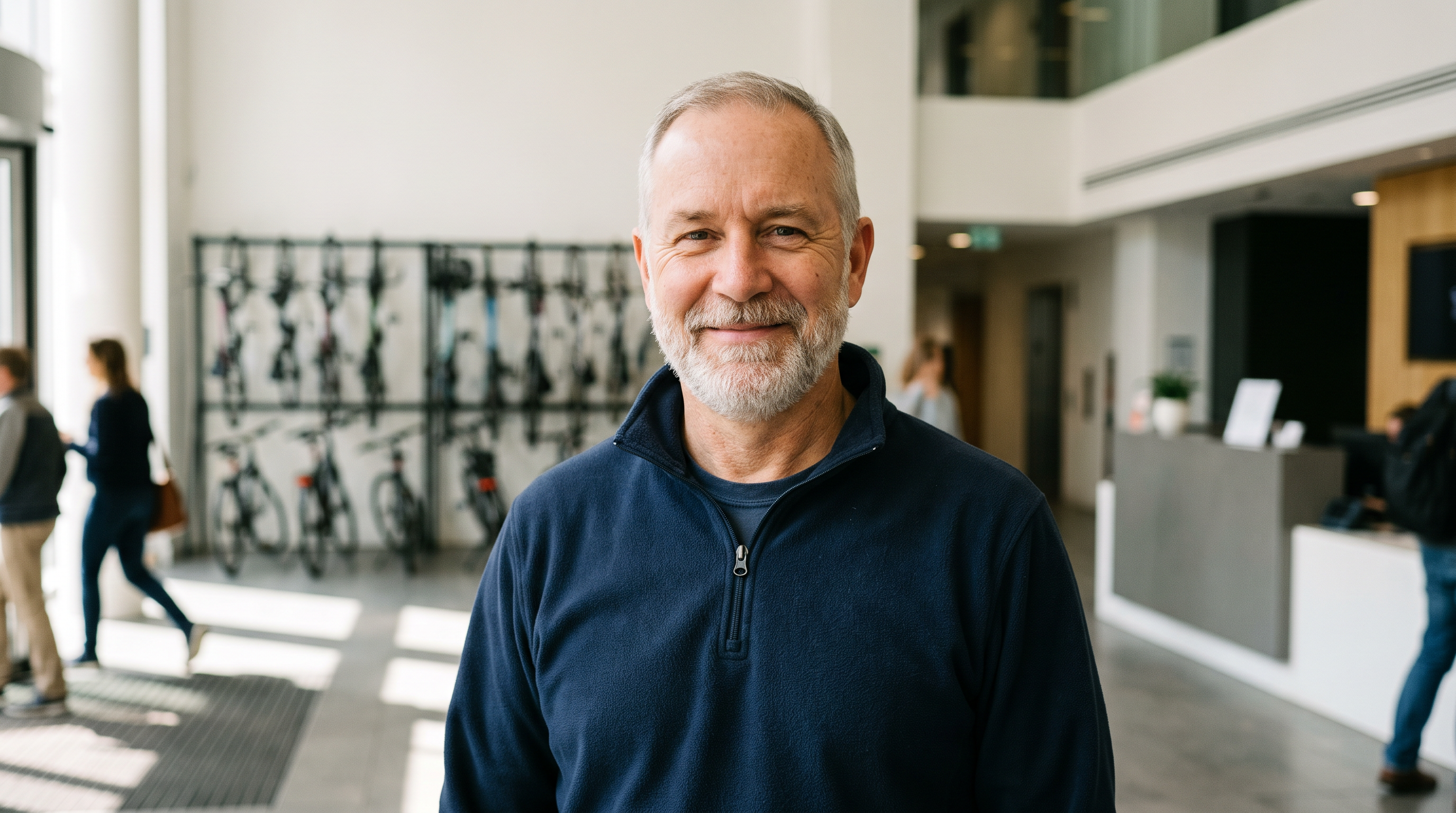
Chest up portrait of a cheerful facilities manager in his fifties with a short gray beard and a navy quarter zip fleece, standing in a bright modern office lobby, a wall rack of commuter bicycles softly blurred behind him, soft window light from the left, looking straight into the lens, 35mm lens, natural color.
Tracking shot following a commuter in a yellow rain shell as she wheels a city bicycle through a glass door into a bright new bike room, hangs it on a wall hook beside a row of others and clips the helmet to the handlebar, cool morning light through frosted windows. Sound: ticking freewheel, a door swinging shut, a soft metal clunk.
- Nano Banana 2.1 gave us a believable presenter for 1.5 credits, with the bike rack behind him that sets up the story.
- P-Video Avatar kept his face, fleece and lobby intact through the whole take, smiling as he speaks.
- Auto captions got every word right and wrote level two as the numeral 2, in bold pop style with the spoken word in yellow.
- Seedance 2.5 gave the cutaway a real sense of place: the commuter crosses a lit floor, then hangs her bike beside a row of hooks.
Biteable plans vs Pixel Dojo
Biteable figures from its pricing and home pages, read on October 15, 2026.
| At a glance | Biteable | Pixel Dojo |
|---|---|---|
| Plans | Pro $29 a month or $15 a month billed yearly; Premium $99 a month or $49 a month billed yearly; Business by quote | Lite $10 a month for 160 credits, Pro $25 for 500 credits, Pro Max $50 for 1,100 credits |
| AI presenters | 20 avatar clips a month on Pro (up to 10 minutes), 40 on Premium (up to 20 minutes) | Make any presenter from a prompt or your own photo, then animate it with P-Video Avatar, Kling Avatar or OmniHuman |
| Voiceover | 100 AI text to speech clips a month on Pro, unlimited on Premium | Text to speech priced per clip, plus voices built into Veo 3.1, Seedance 2.5 and Kling 3.0 |
| Captions | Automatic closed captions on Premium | Auto captions burned into any clip, on every plan |
| Footage | Millions of stock clips through Storyblocks and Pexels | Original footage from Seedance 2.5, Veo 3.1, Kling 3.0 and WAN 3.0, made to your prompt |
| Editing | A full template editor with brand profiles | Clips drop straight into the editor you already use |
Habits that keep a presenter video cheap
Lock the face first
Get the presenter photo right as a still for about a credit, then animate it. Rerolling a whole talking clip costs more.
Write for the ear
Two short sentences read better than one long one. Our announcement script was 24 words in three sentences.
Cut away early
Three seconds of a talking head, then show the thing. B-roll keeps people watching, and it hides any stiffness.
Caption last
Run auto captions on the final talking clip, not a draft, so you only pay for it once.
Why Pixel Dojo for team video
With Pixel Dojo the footage itself is new, made to your brief on the newest video models, and the clips drop straight into whatever editor you already use.
Why Biteable users switch to Pixel Dojo
Unlimited on every plan
On every paid plan, Relax runs Qwen Image 2.1, FLUX 3 Image Klein and MiniMax H3 Turbo, plus every video and photo effect, unlimited with no credits spent.
Sensei, the AI director
Describe a project and Sensei plans it, prices it, waits for your approval and reviews every take.
Marketing Studio
Paste a product link and get a video ad with a voiceover, in UGC, unboxing, try on or commercial styles, with every take priced first.
One click video effects
300+ one-click video effects turn a photo into a trend clip, from AI Hug to AI Inflate, with no prompt to write, and 3 are free every day.
Character Studio
Save a face once and call it by @name in any prompt, so the same person shows up in every image and clip.
Start from a genre
Pick a format such as a UGC ad, a micro drama, a movie trailer or an explainer, and the matching studio opens with the settings and a sample idea filled in.
Star in any video
Upload a short clip, pick a saved character or a photo, and Character Swap puts your star in the lead while the scene, camera moves and sound stay the same.
Credits that roll over
Your credits roll over while you stay subscribed, so nothing you pay for disappears at the end of the month.
Every top model, plus an API
More than 80 image and 60 video models in one account, with a public API and a hosted MCP server for your own apps and AI assistants.
Pixel Dojo pricing for team and marketing video
Plans are Lite $10 a month for 160 credits, Pro $25 for 500 credits, Pro Max $50 for 1,100 credits. Every plan includes every model and commercial use. Credits roll over while you stay subscribed.
The talking clip cost 10 credits, the captions 5 and the cutaway 30, and every tile above lists its own price.
Under our refund policy, a first purchase can be refunded within 7 days, in full if under 20% of the credits are used and pro-rated after that.
Biteable questions
What is a good Biteable alternative?
Pixel Dojo makes the presenter, voice, captions and b-roll from prompts on models like Seedance 2.5, Veo 3.1 and Kling 3.0, with each credit price shown first. Edit the clips in any timeline editor.
How much does Biteable cost?
Biteable lists Pro at $29 a month or $15 a month billed yearly, Premium at $99 a month or $49 a month billed yearly, and Business by quote.
Can I make an AI presenter from my own photo?
Yes. Give P-Video Avatar, Kling Avatar or OmniHuman a portrait and a script or an audio file, and it returns a talking clip. Only use photos of people who agreed to it.
Does Pixel Dojo add captions?
Yes. Auto captions transcribe the speech in a clip and burn the words in, as in step 3 above.
Does Pixel Dojo have templates like Biteable?
Pixel Dojo generates original images and clips from prompts instead of filling templates. Sensei, our AI director, can plan a whole video, price it and wait for your approval before it starts.
Video Effects New
Your first video is free. One photo, one click.
310 ready-made effects, from AI Hug and Earth Zoom In to product spins and listing walkthroughs. Upload a photo and press Generate. No prompt to write, and a free account gets 3 a day.






Switch from Biteable to Pixel Dojo today
Write a prompt above or start from any example on this page. One plan covers every top model, six studios and Sensei, and your credits roll over.
Start with Seedance 2.5Sources
Facts about Biteable come from these public pages, checked on Oct 15, 2026. Prices and plans change; check the source before you buy.