LitVideo alternative
LitVideo alternative: from one photo to a captioned clip
LitVideo turns photos and templates into quick social clips on your phone. Pixel Dojo does the same job with your choice of top video models, then adds burned in captions and a second aspect ratio, with every step priced before you run it.
We made a short promo for an imaginary street food cart. One still photo became a talking clip, then a captioned vertical cut, then a widescreen version. Every step ran on Pixel Dojo and every tile shows what it cost.
30 credits ($1.88) per 5 s clip at 720p with audio. Included in every plan, from $10/month.
Already a member? Sign in
By Brian Lovett · Updated
More vertical clips made from a single prompt
No template needed. Tap any clip to start from the same prompt.
A market moment on WAN 3.0 with sizzling and cheering built in, for 10 credits.
Vertical medium shot of a cook in his forties in a striped apron at a busy market stall flipping a thin crepe high out of a black pan, it spins in the air and lands back perfectly, he grins, warm morning light, sizzling butter and a cheer from the crowd.
Paper craft animation on Kling 3.0, the kind of clip effect apps sell as a template.
Vertical paper craft animation: a flat paper city skyline folds up out of an open book page by page, tiny paper cars start driving and paper clouds drift by, warm desk lamp light, paper rustling and a soft whoosh.
Slow motion pets on Veo 3.1 Lite, 6 seconds for 9 credits.
Vertical slow motion shot of a shaggy grey sheepdog shaking off water on a lake shore at sunset, droplets spraying in a golden backlit halo, ears flapping, splashes and a happy bark.
A playful office loop on WAN 3.0.
Vertical shot: a red paper airplane glides through a sunny open plan office, loops over desks and plants while coworkers look up and smile, it lands neatly in a coffee cup, light paper swoosh and soft laughter.
One street cart promo, built step by step
Step one made the photo on Nano Banana 2.1. Step two animated it on Seedance 2.5 with a spoken line. Step three burned in captions. Step four reframed the same clip to 16:9 for YouTube.
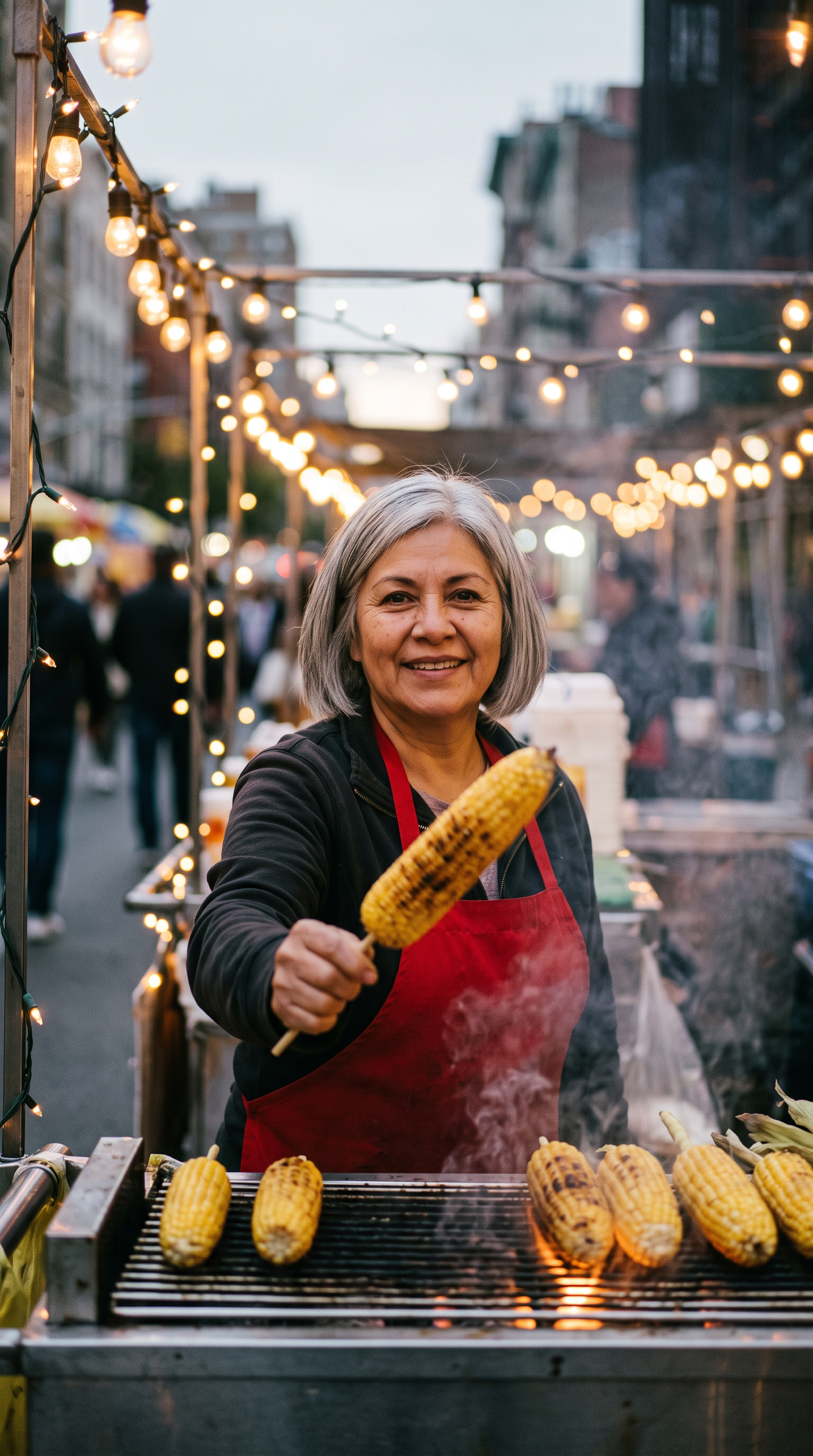
Vertical street photo of a cheerful street vendor in her fifties with a silver bob and a red apron at a grilled corn cart under string lights at dusk, holding a charred corn cob on a stick toward the camera, smoke drifting, warm bokeh, 35mm film look.
She lifts the grilled corn toward the camera, smiles and says, "Hot off the grill, every Friday night." Smoke drifts from the grill, string lights twinkle, sizzling corn and market chatter.
- Nano Banana 2.1 made the start photo for 1.5 credits, smoke, string lights and all.
- Seedance 2.5 kept her face from the photo and spoke the line with market sound underneath.
- Autocaption heard the line correctly and set it word by word, the current word lit in the orange we picked.
- Video Reframe widened the scene to 16:9, adding market umbrellas and more string lights on both sides instead of cropping her out.
LitVideo plans vs Pixel Dojo
LitVideo figures come from its subscription page and App Store listing, read on October 15, 2026.
| Item | LitVideo | Pixel Dojo |
|---|---|---|
| Plans | Basic $14.99 a month for 600 credits; Standard $89.99 a year for 1,000 credits a month; Pro $399.99 a year for 6,000 credits a month | Lite $10 a month for 160 credits, Pro $25 for 500 credits, Pro Max $50 for 1,100 credits |
| Lifetime option | First payment $133.27, then 400 credits a month | Every model page shows its credit price |
| Refunds | A 30 day money back guarantee advertised on the subscription page | A first purchase can be refunded within 7 days, in full if under 20% of the credits are used and pro-rated after that |
| Templates and effects | 300+ AI effect templates | Prompt any shot on Seedance 2.5, Kling 3.0, Veo 3.1 or WAN 3.0 |
| Where it runs | iOS, Android and Chrome on one purchase | Any browser, plus a public API and hosted MCP server |
Make your own promo this way
Start from a still
Generate the photo first, or upload your own. A good still fixes the face, the light and the setting before you pay for video.
Write the line in quotes
Seedance 2.5, Kling 3.0 and Veo 3.1 speak a quoted line with matching room sound.
Caption it
Video Autocaption burns the words in and lights each one as it is spoken.
Reframe for the next platform
One clip, two shapes: vertical for Reels and Shorts, widescreen for YouTube.
Hand the brief to Sensei
Describe the promo and Sensei plans each shot, prices it and waits for your approval before it starts.
Why Pixel Dojo fits creators who write their own shots
Pixel Dojo is a better fit when you write your own shots, want to pick the model for each one, and need captions and a second format without leaving the browser. We built the cart promo above that way.
Why LitVideo users switch to Pixel Dojo
Unlimited on every plan
On every paid plan, Relax runs Qwen Image 2.1, FLUX 3 Image Klein and MiniMax H3 Turbo, plus every video and photo effect, unlimited with no credits spent.
Sensei, the AI director
Describe a project and Sensei plans it, prices it, waits for your approval and reviews every take.
One click video effects
300+ one-click video effects turn a photo into a trend clip, from AI Hug to AI Inflate, with no prompt to write, and 3 are free every day.
Video Studio
Generate, edit and extend a clip in one place, on whichever top video engine suits the shot.
Photo effects
45+ photo effects restyle a picture in one click, from a hand painted anime still to a boxed action figure or a magazine cover, and every one starts from your own upload.
Star in any video
Upload a short clip, pick a saved character or a photo, and Character Swap puts your star in the lead while the scene, camera moves and sound stay the same.
Credits that roll over
Your credits roll over while you stay subscribed, so nothing you pay for disappears at the end of the month.
Every top model, plus an API
More than 80 image and 60 video models in one account, with a public API and a hosted MCP server for your own apps and AI assistants.
What each step cost on Pixel Dojo
Plans are Lite $10 a month for 160 credits, Pro $25 for 500 credits, Pro Max $50 for 1,100 credits. Commercial use is included on every plan. Credits roll over while you stay subscribed.
The photo cost 1.5 credits, the talking clip 30, the captions 5 and the reframe 8. Each tile shows its own price, and so does every model page before you generate.
Under our refund policy, a first purchase can be refunded within 7 days, in full if under 20% of the credits are used and pro-rated after that.
LitVideo questions
What is a good alternative to LitVideo?
Pixel Dojo turns a photo or a prompt into a clip on Seedance 2.5, Kling 3.0, Veo 3.1 or WAN 3.0, then adds captions and a second aspect ratio, all priced per step.
How much does LitVideo cost?
LitVideo's subscription page lists Basic at $14.99 a month for 600 credits, Standard at $89.99 a year for 1,000 credits a month and Pro at $399.99 a year for 6,000 credits a month.
Who makes LitVideo?
The App Store lists LitVideo: AI Video Generator from BoRui Software Limited, with its terms hosted on litmedia.ai.
Can Pixel Dojo animate my own photo?
Yes. Upload the photo as the start frame on Seedance 2.5, Kling 3.0 or WAN 3.0 and describe the motion, as we did with the corn cart.
Can I add captions to a video I already have?
Yes. Video Autocaption burns word by word captions into any clip with speech.
Video Effects New
Your first video is free. One photo, one click.
310 ready-made effects, from AI Hug and Earth Zoom In to product spins and listing walkthroughs. Upload a photo and press Generate. No prompt to write, and a free account gets 3 a day.






Switch from LitVideo to Pixel Dojo today
Write a prompt above or start from any example on this page. One plan covers every top model, six studios and Sensei, and your credits roll over.
Start with Seedance 2.5Sources
Facts about LitVideo come from these public pages, checked on Oct 15, 2026. Prices and plans change; check the source before you buy.