Pollo AI alternative
Pollo AI alternative with the same top models and fairer terms
Pixel Dojo runs the video engines people go to Pollo AI for, shows the credit price of every model before you generate, and gives a first purchase 7 days for a pro-rated refund.
We read Pollo AI's pricing page, refund policy, API docs and reviews, then ran one brief through four engines both sites carry. This page puts the terms side by side and shows our clips, so you can switch with your eyes open.
30 credits ($1.88) per 5 s clip at 720p with audio. Included in every plan, from $10/month.
Already a member? Sign in
By Brian Lovett · Updated
What our members make on the models Pollo AI also sells
We made every clip and image below on Pixel Dojo with the prompt shown. Tap any of them to start from the same prompt.
A vertical product spot with sound on Seedance 2.5: slow motion drop, crisp reflection, a thud on impact. Swap in your own product.
Macro product commercial: a white running shoe drops onto wet black asphalt in slow motion, water bursts outward in a crown, a light sweep rolls across the mesh, deep blue night, crisp reflections, the thud of impact and a low synth swell.
Cel shaded anime on Kling 3.0 with wind and a distant train horn built in.
Hand drawn anime style, wide shot of a young woman courier in a yellow raincoat leaping between rooftops at dusk, coat flaring, city lights far below, cel shading with painted clouds, rushing wind and a distant train horn.
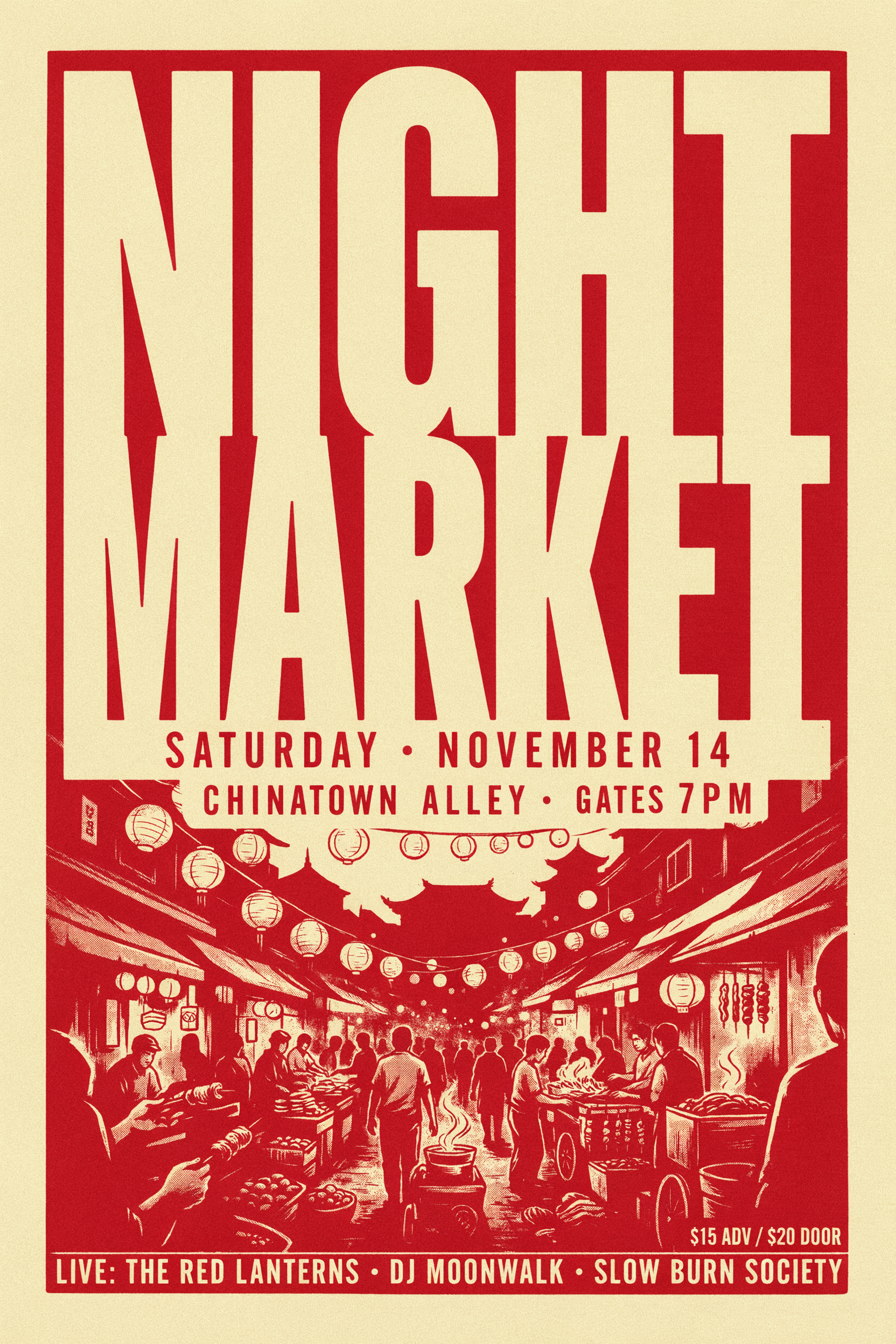
Ideogram 4.5 set the NIGHT MARKET headline and filled in a believable event line up on its own. We use it for posters and covers.
Screen printed concert poster with the headline "NIGHT MARKET" in tall condensed letters, paper lanterns strung over a crowded street, two color red and cream palette, visible paper grain and slight ink misregistration.

An editorial portrait on Nano Banana 2.1. Good for menus, profiles and team pages.
Editorial portrait of a silver haired chef in a crisp white jacket leaning on a steel pass in a busy kitchen, steam drifting behind him, warm tungsten light, shallow depth of field, medium format film look.
Pollo AI vs Pixel Dojo: the terms that decide it
Everything in the Pollo AI column comes from Pollo's own pages (listed under Sources), read on October 15, 2026.
| At a glance | Pollo AI | Pixel Dojo |
|---|---|---|
| Monthly plans | Lite $15 for 400 credits, Pro $29 for 800, Ultra $129 for 5,000 | Lite $10 a month for 160 credits, Pro $25 for 500 credits, Pro Max $50 for 1,100 credits |
| Refund window | 3 days, subscription credits only; no refund once more than 50 credits are used; a processing fee of up to 6% | A first purchase can be refunded within 7 days, in full if under 20% of the credits are used and pro-rated after that; no processing fee |
| "Unlimited" | Per model and time boxed: 10 day terms on Kling 3.0, WAN 3.0 and MiniMax H3 on Ultra, run on a separate queue that can slow at peak, and it ends with the subscription | Unlimited Relax mode on our self-hosted models; every other model shows its credit price before you press generate |
| Per model prices | Not listed on the public pricing page or model pages | Listed live on every model page and in the public API catalog |
| API | Top ups start at $80; the docs landing page still names Kling 1.0 to 2.0 and Veo 2 as its models | Credit packs from $5; every model doc is generated from the same spec that runs the model |
| Agent | Agent and Director tabs | Sensei: plans the project, prices it, waits for your approval and reviews every take |
| Custom model training | No trainer in the site navigation | LoRA trainers for FLUX, Qwen, WAN and Z-Image |
One brief on four engines that Pollo AI also sells
We ran the same ceramicist prompt through Seedance 2.5, Kling 3.0, Veo 3.1 Fast and WAN 3.0 on Pixel Dojo. Each tile shows the settings and credits it actually cost.
Slow push-in on a ceramicist at a spinning wheel in a sunlit studio, wet clay rising between her hands, dust in the window light, 35mm film texture, the hum of the wheel and a radio playing softly.
Slow push-in on a ceramicist at a spinning wheel in a sunlit studio, wet clay rising between her hands, dust in the window light, 35mm film texture, the hum of the wheel and a radio playing softly.
Slow push-in on a ceramicist at a spinning wheel in a sunlit studio, wet clay rising between her hands, dust in the window light, 35mm film texture, the hum of the wheel and a radio playing softly.
Slow push-in on a ceramicist at a spinning wheel in a sunlit studio, wet clay rising between her hands, dust in the window light, 35mm film texture, the hum of the wheel and a radio playing softly.
- Kling 3.0 pushed in from a wide view of the studio to her hands and kept the radio on the shelf in frame.
- Seedance 2.5 leaned into warm window light and long shadows, the moodiest of the four.
- Veo 3.1 Fast went straight to a tight close-up of the hands, with dust drifting through the light.
- WAN 3.0 showed the clay rising the most, from a low mound to a tall cylinder within the clip, for the fewest credits.
The Pixel Dojo terms Pollo AI users notice first
Prices before you click
Every model page and the API catalog show the credit cost at the settings you pick. You never learn the price from your balance.
A refund window you can use
Seven days from a first purchase, pro-rated by the credits left, with no processing fee. Testing a few prompts does not cost you the refund.
Sensei plans and checks the work
Describe a project and Sensei writes a shot plan with a price, waits for your approval, generates, then reviews every take before it reaches you.
Film Studio for whole films
Script, cast, storyboard, clips and an editor pass that trims every shot and suggests a whole film cut you can apply in one click.
Train your own LoRA
Teach FLUX, Qwen, WAN or Z-Image your face, product or style, then call it by name from any prompt.
An API that matches the site
Each model's API page is generated from the same spec the site runs, and contract tests fail the build if they drift. There is also a hosted MCP server for agents.
Why Pollo AI users switch to Pixel Dojo
Unlimited on every plan
On every paid plan, Relax runs Qwen Image 2.1, FLUX 3 Image Klein and MiniMax H3 Turbo, plus every video and photo effect, unlimited with no credits spent.
Sensei, the AI director
Describe a project and Sensei plans it, prices it, waits for your approval and reviews every take.
One click video effects
300+ one-click video effects turn a photo into a trend clip, from AI Hug to AI Inflate, with no prompt to write, and 3 are free every day.
Video Studio
Generate, edit and extend a clip in one place, on whichever top video engine suits the shot.
Photo effects
45+ photo effects restyle a picture in one click, from a hand painted anime still to a boxed action figure or a magazine cover, and every one starts from your own upload.
Star in any video
Upload a short clip, pick a saved character or a photo, and Character Swap puts your star in the lead while the scene, camera moves and sound stay the same.
Credits that roll over
Your credits roll over while you stay subscribed, so nothing you pay for disappears at the end of the month.
Every top model, plus an API
More than 80 image and 60 video models in one account, with a public API and a hosted MCP server for your own apps and AI assistants.
Pixel Dojo pricing for Pollo AI users
Pixel Dojo has three monthly plans: Lite $10 a month for 160 credits, Pro $25 for 500 credits, Pro Max $50 for 1,100 credits. Every plan includes every model; bigger plans get cheaper credits. Credits roll over while you stay subscribed.
Each clip on this page lists the credits it cost. A 5 second Seedance 2.5 clip at 720p with sound is 30 credits at list price.
API users can skip the subscription and buy credit packs from $5.
Pollo AI questions
What is the best Pollo AI alternative?
Pixel Dojo runs the same leading video models Pollo AI is known for, including Seedance 2.5, Kling 3.0, Veo 3.1 and WAN 3.0, and adds an AI director agent, Film Studio, LoRA training and a public API, with every credit price shown up front.
What is Pollo AI's refund policy?
Pollo AI's refund policy allows refund requests for subscription credits within 3 days of purchase, refuses them once more than 50 subscription credits are used, never refunds add-on credits, and may deduct a processing fee of up to 6%.
Is Pollo AI unlimited really unlimited?
Pollo AI's own declaration says unlimited rights cover specific models and settings for a set number of days, run on a separate queue that can slow at peak, cap parallel tasks, and end immediately if the subscription ends or is downgraded.
How do I move from Pollo AI to Pixel Dojo?
Pick a plan, then paste your favorite Pollo prompts into the same model on Pixel Dojo. Reference images and start frames work the same way, and Character Studio lets you save a face once and call it by name in any prompt.
Does Pixel Dojo have an API like Pollo AI?
Yes. Every model runs through one public endpoint, with docs generated from the model's own spec, credit packs from $5 and a hosted MCP server for AI agents.
Video Effects New
Your first video is free. One photo, one click.
310 ready-made effects, from AI Hug and Earth Zoom In to product spins and listing walkthroughs. Upload a photo and press Generate. No prompt to write, and a free account gets 3 a day.






Switch from Pollo AI to Pixel Dojo today
Write a prompt above or start from any example on this page. One plan covers every top model, six studios and Sensei, and your credits roll over.
Start with Seedance 2.5Sources
Facts about Pollo AI come from these public pages, checked on Oct 15, 2026. Prices and plans change; check the source before you buy.
- Pollo AI pricing page (monthly plans, Unlimited Model Usage Rights Declaration)
- Pollo AI refund policy
- Pollo API documentation landing page
- Pollo API top up pricing
- Pollo AI home page navigation (Agent, Director, Marketing Studio, MCP, apps, video effects)
- Pollo AI reviews on Trustpilot (rating, star split, one star reviews)