Uizard alternative
Uizard alternative for mockups that look finished on the first pass
Uizard builds editable prototypes. Pixel Dojo renders polished, presentation ready app and web mockups on the image models that set text best, so you can pitch, test and decide before anyone opens a design file.
We wrote one brief for a three screen plant care app, with real labels and a real layout, and ran it on four image models. Then we turned a marker sketch into a finished screen and put a mockup in a hand.
2 credits ($0.13) per image at 1024x1024. Included in every plan, from $10/month.
Already a member? Sign in
By Brian Lovett · Updated
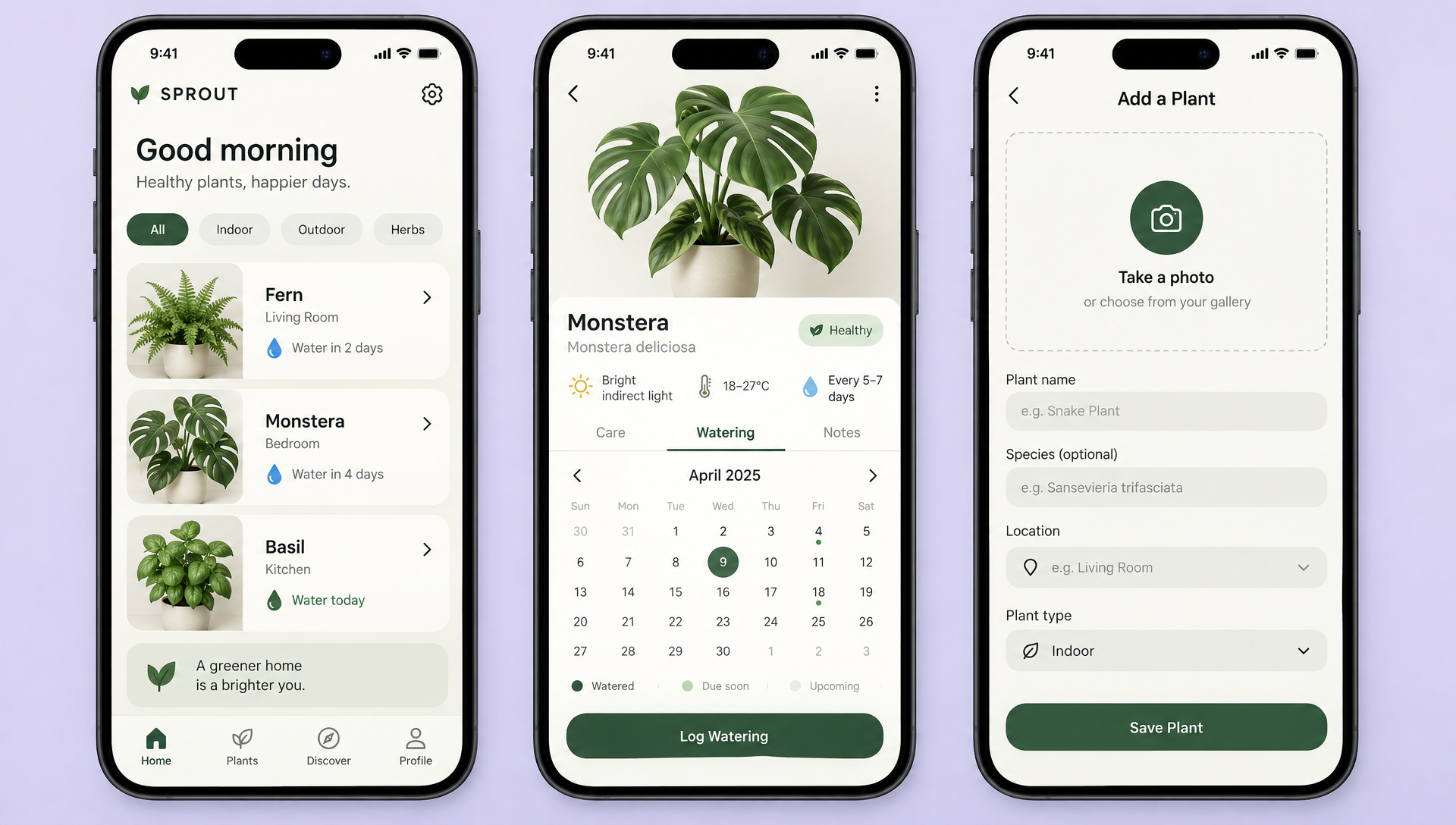
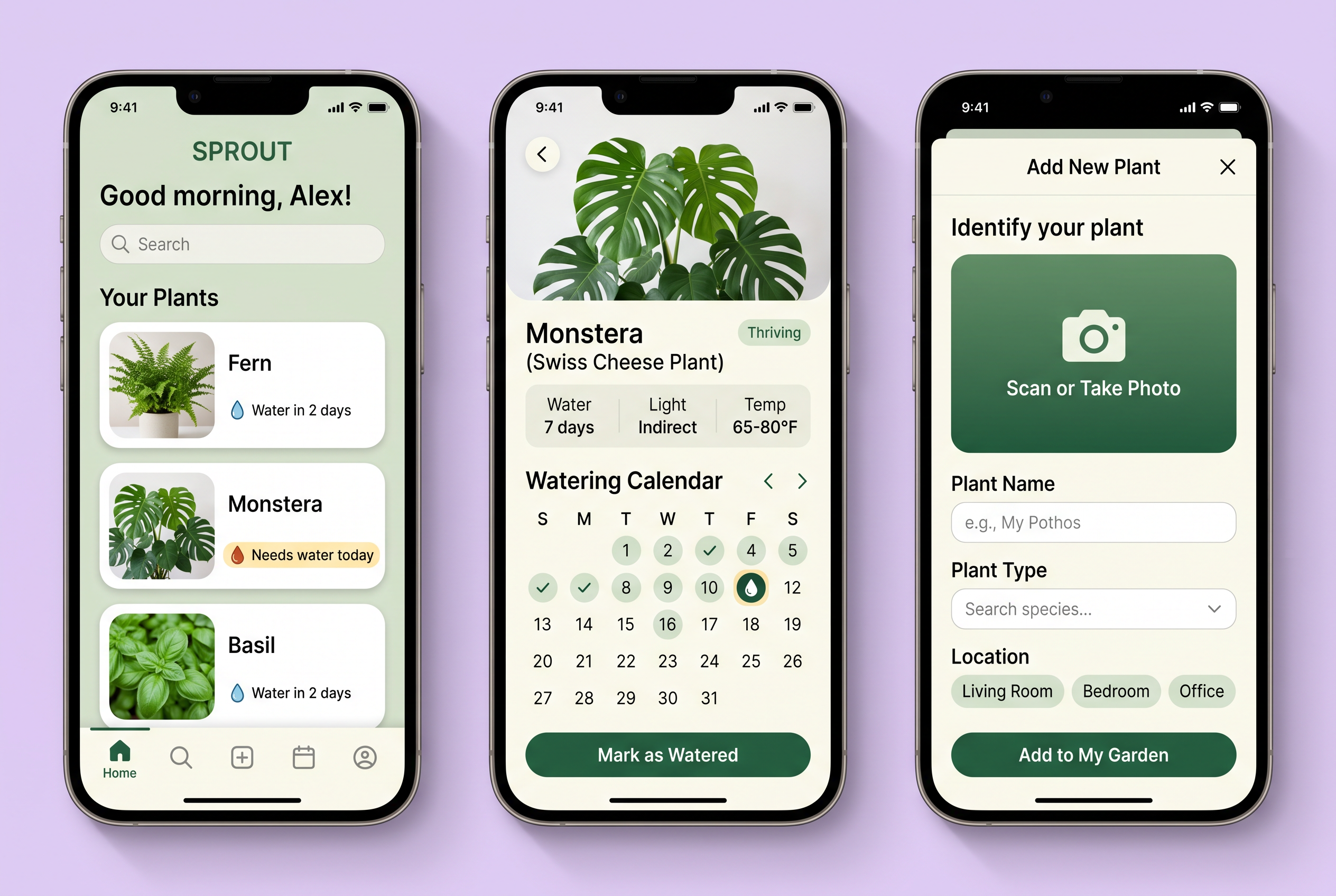
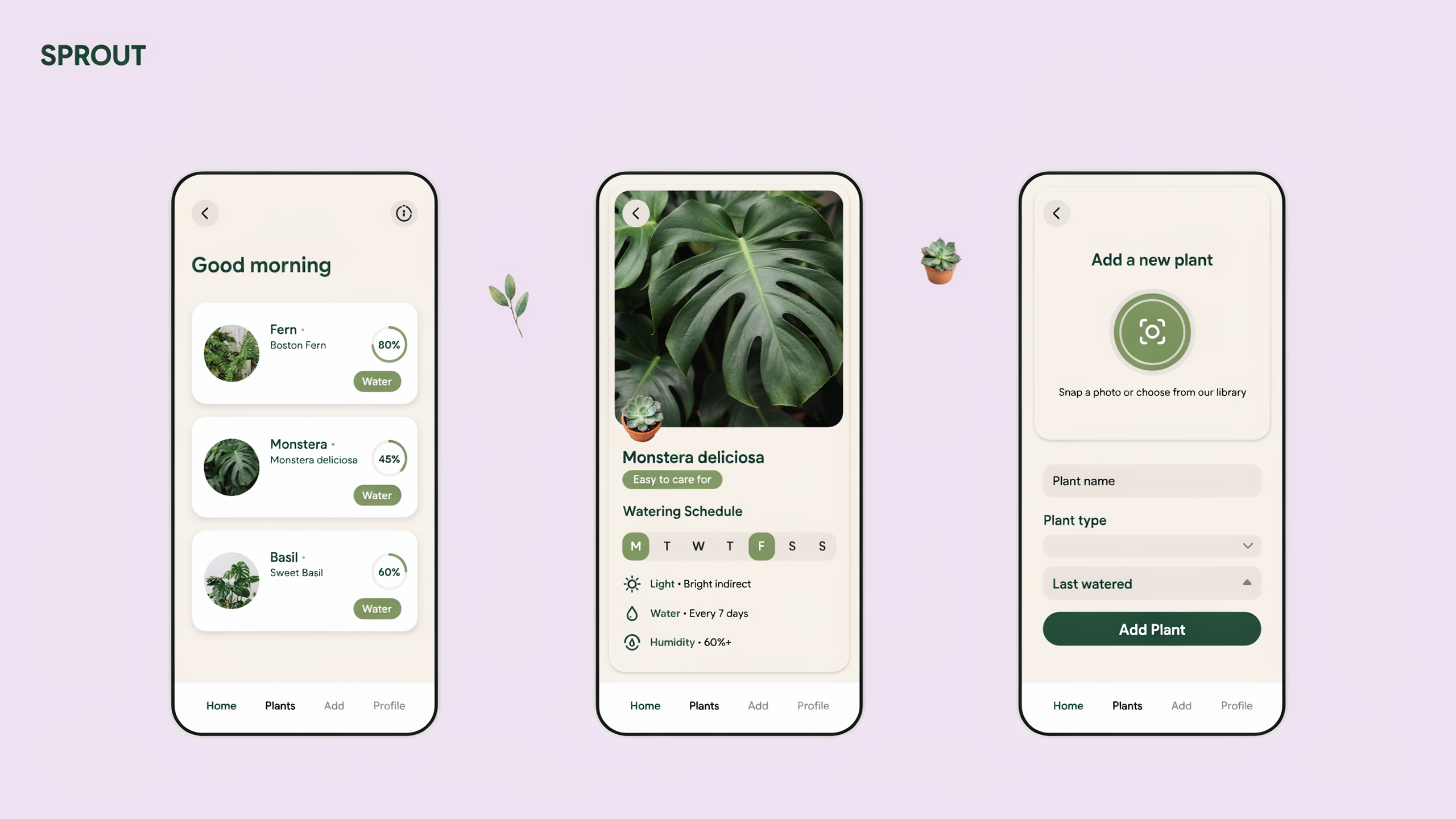
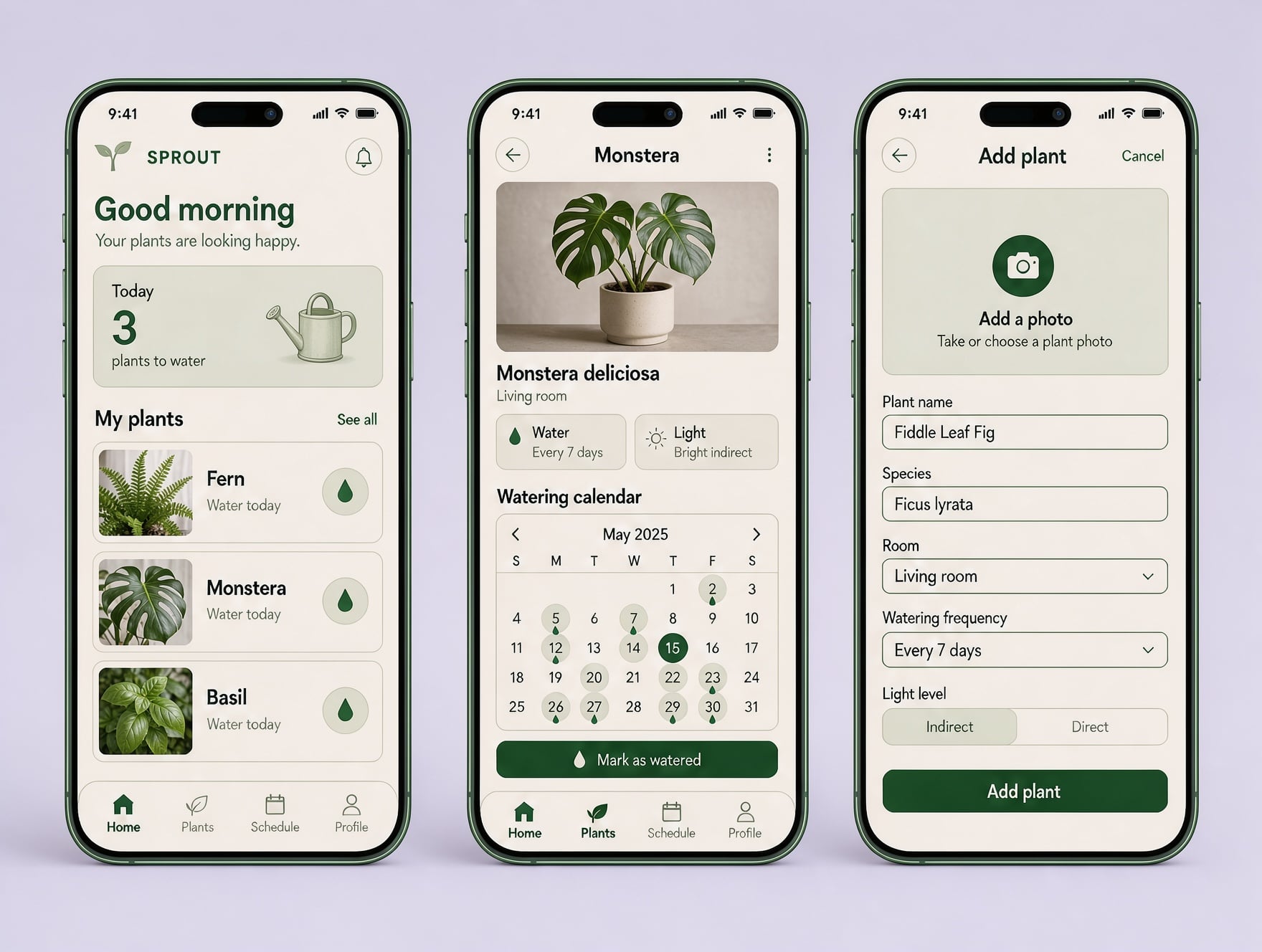
One three screen app brief, four image models
Each model got the same brief: a SPROUT plant care app with a dashboard naming Fern, Monstera and Basil, a watering calendar and an add plant form. Each tile shows its settings and credits.
High fidelity mobile app UI mockup: three smartphone screens side by side on a soft lavender background for a plant care app called SPROUT. Screen one is a home dashboard with the greeting "Good morning" and cards for Fern, Monstera and Basil with water drop icons. Screen two is a plant detail page with a watering calendar. Screen three is an add plant form with a camera button. Rounded cards, green and cream palette, clean sans serif type, realistic UI spacing.
High fidelity mobile app UI mockup: three smartphone screens side by side on a soft lavender background for a plant care app called SPROUT. Screen one is a home dashboard with the greeting "Good morning" and cards for Fern, Monstera and Basil with water drop icons. Screen two is a plant detail page with a watering calendar. Screen three is an add plant form with a camera button. Rounded cards, green and cream palette, clean sans serif type, realistic UI spacing.
High fidelity mobile app UI mockup: three smartphone screens side by side on a soft lavender background for a plant care app called SPROUT. Screen one is a home dashboard with the greeting "Good morning" and cards for Fern, Monstera and Basil with water drop icons. Screen two is a plant detail page with a watering calendar. Screen three is an add plant form with a camera button. Rounded cards, green and cream palette, clean sans serif type, realistic UI spacing.
High fidelity mobile app UI mockup: three smartphone screens side by side on a soft lavender background for a plant care app called SPROUT. Screen one is a home dashboard with the greeting "Good morning" and cards for Fern, Monstera and Basil with water drop icons. Screen two is a plant detail page with a watering calendar. Screen three is an add plant form with a camera button. Rounded cards, green and cream palette, clean sans serif type, realistic UI spacing.
- GPT Image 2.5 produced the most complete product: tabs, care stats, a full April calendar, form hints and a bottom navigation bar, all spelled right.
- Nano Banana 2.1 added its own copy, like Needs water today and Add to My Garden, and every word held up.
- Ideogram 4.5 went flat and airy with progress rings on each plant, a clean style for an early concept.
- FLUX 3 Image filled the add plant form with a real example, Fiddle Leaf Fig, and was the cheapest of the four at 1 credit.
More UI work you can make the same afternoon
Every image below was made on Pixel Dojo with the prompt shown.
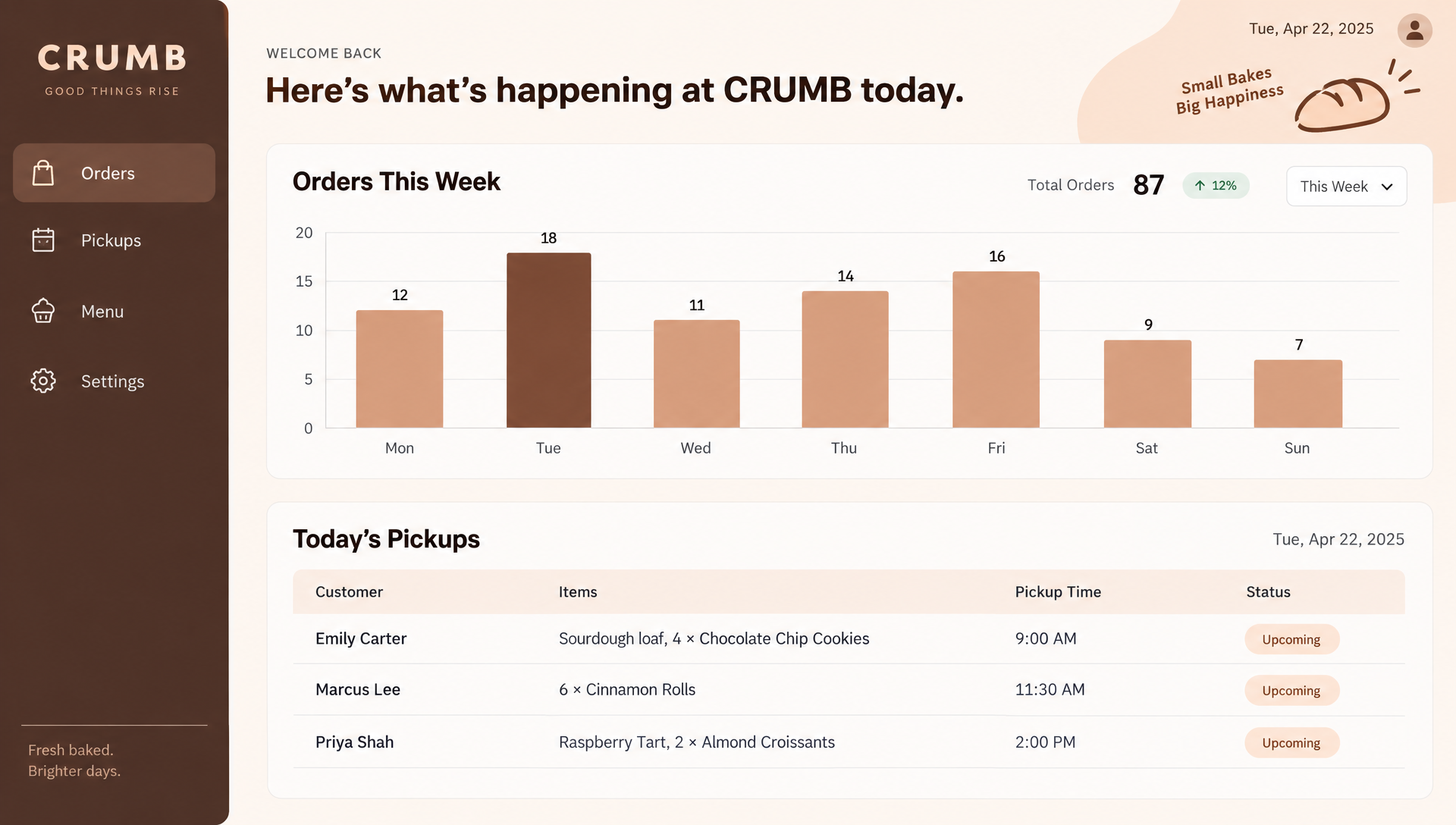
A desktop dashboard on GPT Image 2.5. Every label, number and customer row came out clean.
Desktop web app dashboard UI mockup for a small bakery order tracker named CRUMB: a left sidebar with Orders, Pickups, Menu and Settings, a bar chart of orders for Monday to Sunday, and a table of today's pickups with three customer names and times, warm peach and cocoa brown palette, light mode, clean sans serif type
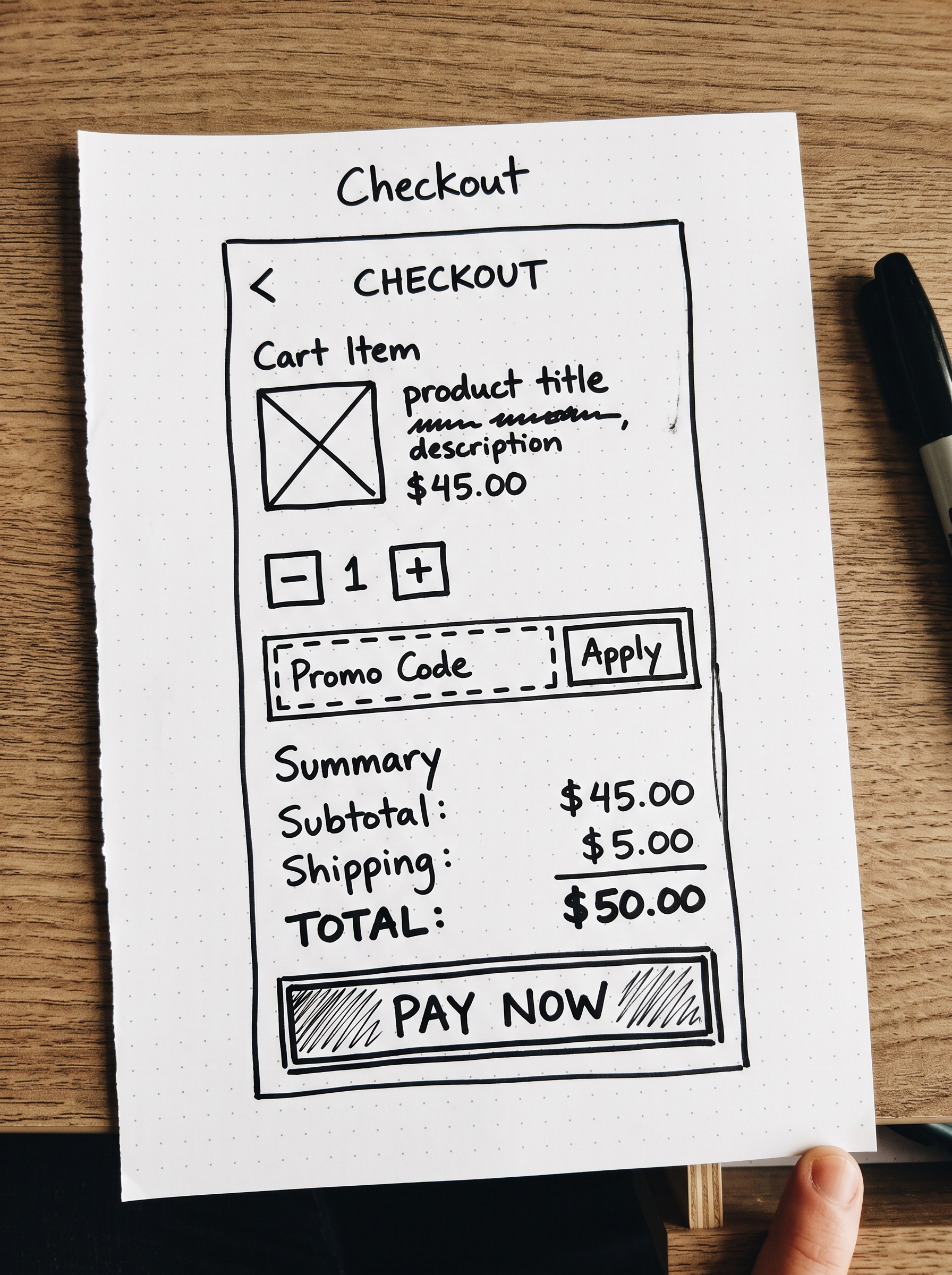
Step one of a sketch to screen flow: the wireframe itself, drawn on Nano Banana 2.1.
A rough hand drawn wireframe sketch in black marker on white dot grid paper of a mobile checkout screen: a back arrow, a cart item row with a square image placeholder, a quantity stepper, a promo code box, a total line and a wide Pay button, quick handwritten labels, photographed flat from above
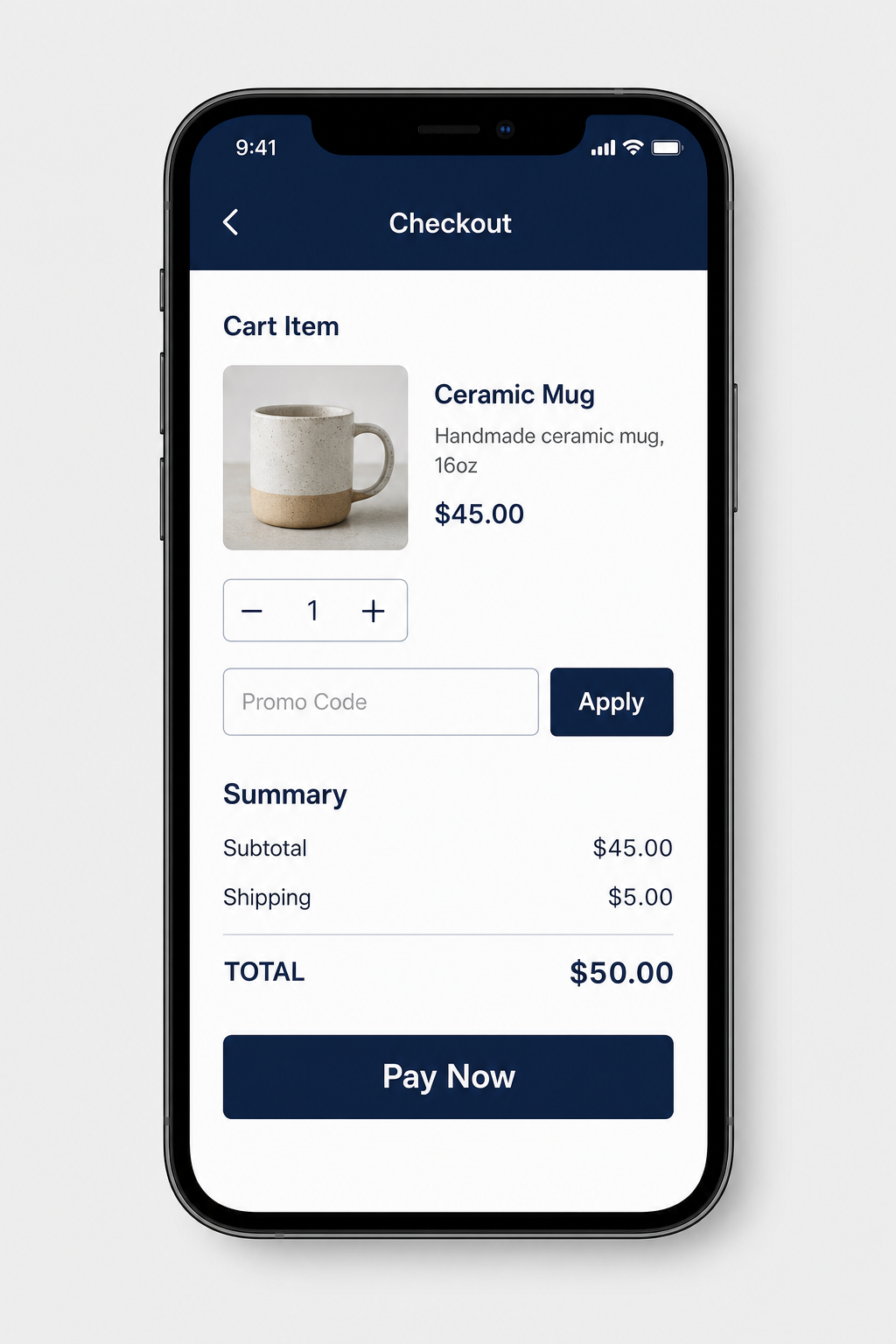
Step two: GPT Image 2 Edit kept the sketch's layout and turned it into a finished screen.
Turn this hand drawn wireframe into a polished high fidelity mobile checkout screen shown on a single smartphone on a plain light grey background. Keep the same layout and order: back arrow and title Checkout, one cart item row with a product photo of a ceramic mug, a quantity stepper, a promo code field with an Apply button, the summary with Subtotal $45.00, Shipping $5.00 and Total $50.00, and a wide Pay Now button. Navy and white palette, clean sans serif type.
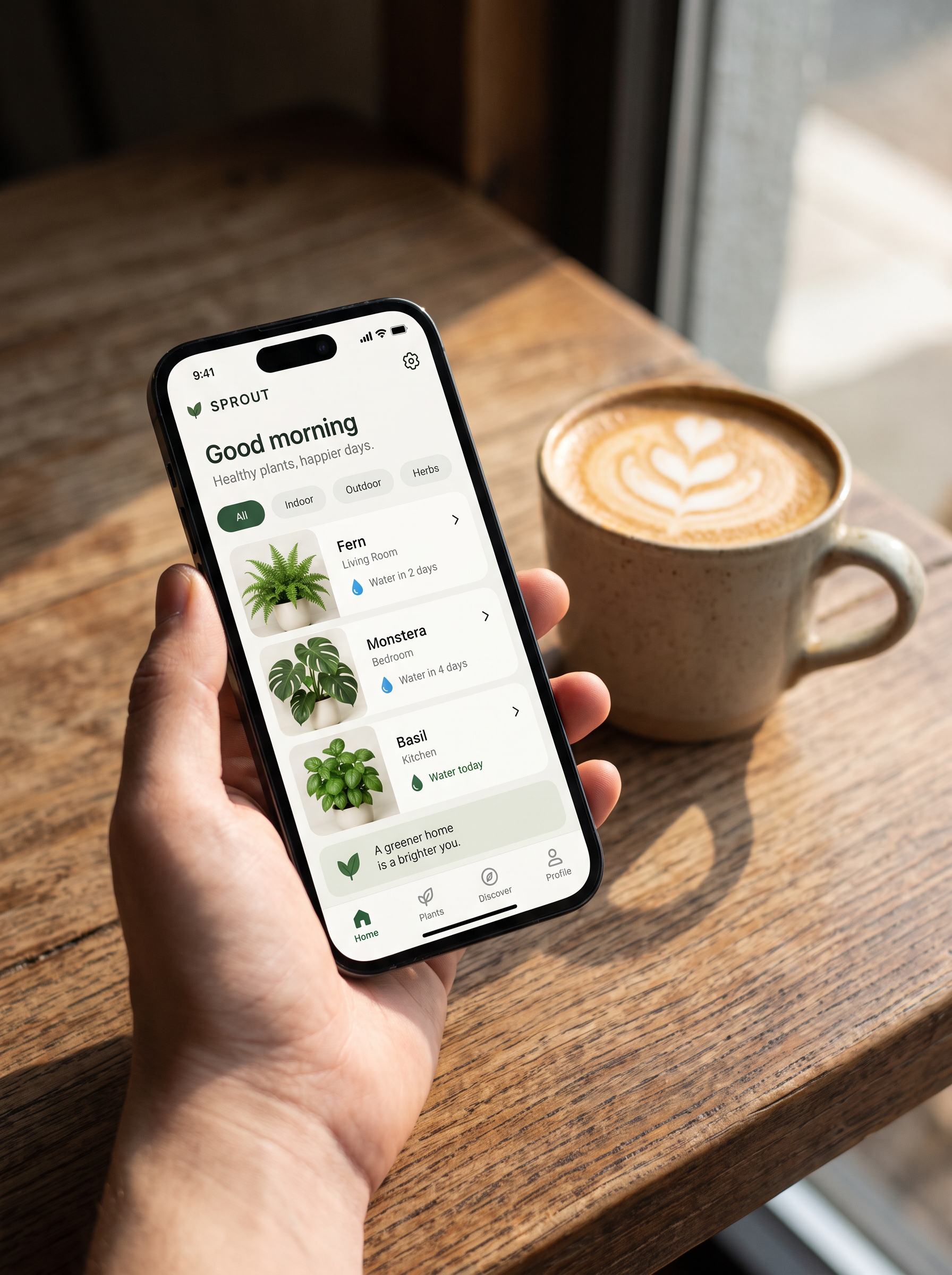
Nano Banana Edit put our dashboard on a phone in a real scene, ready for a pitch deck.
Show only the first screen of this mockup, the home dashboard with Good morning and the Fern, Monstera and Basil cards, on a single smartphone held in a hand above a wooden cafe table with a latte, natural window light, shallow depth of field. Keep the screen text, colors and layout exactly as designed.
Five ways to use AI mockups without a design tool
1. Pitch the idea before it exists
A finished looking three screen set, like SPROUT above, tells investors and teammates what you mean faster than a wireframe.
2. Turn a napkin sketch into a screen
Photograph a marker wireframe and ask an edit model to keep the layout and finish it. Our checkout screen kept every block from the sketch.
3. Test two directions in minutes
Run the same brief on two or three models and you get distinct visual directions to show users, each priced on the model page before you run it.
4. Make store and deck visuals
Put a screen on a phone in a real scene for a launch post, an app store image or a slide.
5. Hand it to a designer
Use the mockup as the brief. A designer can rebuild it in a design file with components.
Uizard plans vs Pixel Dojo
Everything in the Uizard column comes from its pricing and Autodesigner pages, read on October 15, 2026.
| At a glance | Uizard | Pixel Dojo |
|---|---|---|
| Plans | Free; Pro $12 a month and Business $39 a month, both billed annually; Enterprise custom | Lite $10 a month for 160 credits, Pro $25 for 500 credits, Pro Max $50 for 1,100 credits |
| AI generations | 3 a month on Free, 500 on Pro, 5,000 on Business | Pay per image in credits; each model page shows the price first |
| What you get | Editable multi screen prototypes from text, with a drag and drop editor | Finished mockup images from GPT Image 2.5, Nano Banana 2.1, Ideogram 4.5, FLUX 3 Image and more |
| Sketch to screen | Scans screenshots, wireframes and scribbles, counted against the same AI limits | Image edit models restyle a photographed sketch into a finished screen |
| Projects | Up to 2 on Free, 100 on Pro, unlimited on Business | Your library of saved work |
| Exports | jpg, png and pdf | Full resolution image files, plus a public API |
Why Pixel Dojo for mockups
Pixel Dojo gives you finished, presentation ready mockups on the image models that set text best, in minutes, so you can pitch and decide before anyone opens a design file.
Why Uizard users switch to Pixel Dojo
Unlimited on every plan
On every paid plan, Relax runs Qwen Image 2.1, FLUX 3 Image Klein and MiniMax H3 Turbo, plus every video and photo effect, unlimited with no credits spent.
Sensei, the AI director
Describe a project and Sensei plans it, prices it, waits for your approval and reviews every take.
One job AI tools
35 single purpose tools each do one edit from an upload: remove a watermark, an object or text, restore and colorize an old photo, swap a background, retouch a portrait or make a thumbnail.
Photo effects
45+ photo effects restyle a picture in one click, from a hand painted anime still to a boxed action figure or a magazine cover, and every one starts from your own upload.
Character Studio
Save a face once and call it by @name in any prompt, so the same person shows up in every image and clip.
Credits that roll over
Your credits roll over while you stay subscribed, so nothing you pay for disappears at the end of the month.
Every top model, plus an API
More than 80 image and 60 video models in one account, with a public API and a hosted MCP server for your own apps and AI assistants.
What our mockups cost
Plans are Lite $10 a month for 160 credits, Pro $25 for 500 credits, Pro Max $50 for 1,100 credits. Commercial use is included on every plan. Credits roll over while you stay subscribed.
The four test images cost between 1 and 2 credits each, and every tile lists its own price.
Under our refund policy, a first purchase can be refunded within 7 days, in full if under 20% of the credits are used and pro-rated after that.
Uizard questions
What is a good alternative to Uizard?
For polished app and web mockup images, Pixel Dojo runs GPT Image 2.5, Nano Banana 2.1, Ideogram 4.5 and FLUX 3 Image.
How much does Uizard cost?
Uizard's pricing page lists a free plan, Pro at $12 a month and Business at $39 a month, both billed annually, and custom Enterprise pricing.
How many AI generations does Uizard include?
Uizard lists 3 Autodesigner generations a month on Free, 500 on Pro and 5,000 on Business, with screenshot and wireframe scans counted against the same limits.
Which AI model is best for UI mockups?
In our test GPT Image 2.5 gave the most complete screens with every label spelled right, and Nano Banana 2.1 was close behind.
Can AI turn my wireframe sketch into a design?
Yes. We made a marker wireframe of a checkout screen, and GPT Image 2 Edit kept its layout while finishing it, as the showcase above shows. A photo of your own sketch works the same way.
Switch from Uizard to Pixel Dojo today
Write a prompt above or start from any example on this page. One plan covers every top model, six studios and Sensei, and your credits roll over.
Start with GPT Image 2.5Sources
Facts about Uizard come from these public pages, checked on Oct 15, 2026. Prices and plans change; check the source before you buy.