Picwand alternative
Picwand alternative: restore, upscale and animate one photo
Picwand bundles a photo restorer, an upscaler and a video generator under one VIP plan. Pixel Dojo runs the same three steps on Qwen Image 2 Edit, Clarity Pro and Seedance 2.5, each priced before you click, with commercial use on every plan.
We made a faded, creased seventies style snapshot of a man with a prize pumpkin, then took it through the restore, upscale and animate chain that Picwand sells. Every step used the output of the one before it.
30 credits ($1.88) per 5 s clip at 720p with audio. Included in every plan, from $10/month.
Already a member? Sign in
By Brian Lovett · Updated
Four more jobs from Picwand's menu
Picwand lists ad, short video and art style tools. We made each of these on Pixel Dojo with the prompt shown.
A vertical product ad with sound on Kling 3.0 for 20 credits.
Vertical product ad: a bento style steel lunchbox on a kitchen counter springs open one compartment at a time to reveal rice, bright vegetables and fruit, then a hand snaps the lid shut, clean morning light, quick playful cuts. Sound: soft clicks and a cheerful ukulele.
A vertical short on WAN 3.0 with sound for 10 credits.
Vertical close up for a short video: a cook in his fifties stretches and slaps hand pulled noodle dough against a floured steel counter, the strands multiplying with each fold, steam from a pot behind him, warm kitchen light. Sound: dough slapping, a bubbling pot.

Anime key art on Qwen Image 2.1 for 1.5 credits.
Anime key art of a woman in her twenties with a long braid standing at the bow of a small wooden river boat lit by paper lanterns, fireflies over dark reeds, a crescent moon, rich blue and amber palette, soft cel shading.
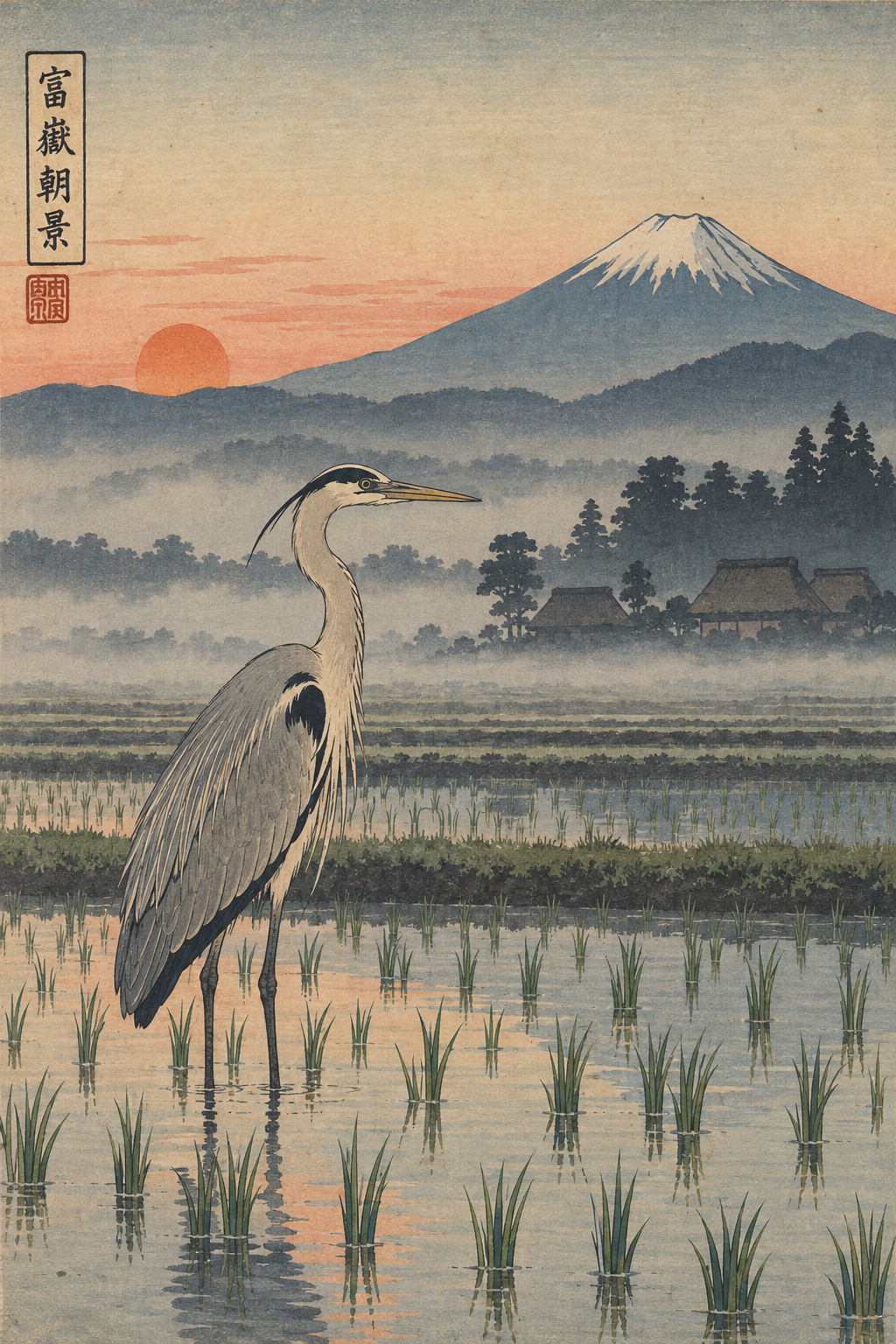
A ukiyo-e style print on GPT Image 2.5 for 2 credits.
Woodblock print in the ukiyo-e style of a grey heron standing in a misty rice paddy at dawn, a distant mountain with a snow cap, flat bands of color, fine carved line work and visible paper texture.
Walkthrough: from faded snapshot to moving picture
Each tile shows the model, settings and credits it used.
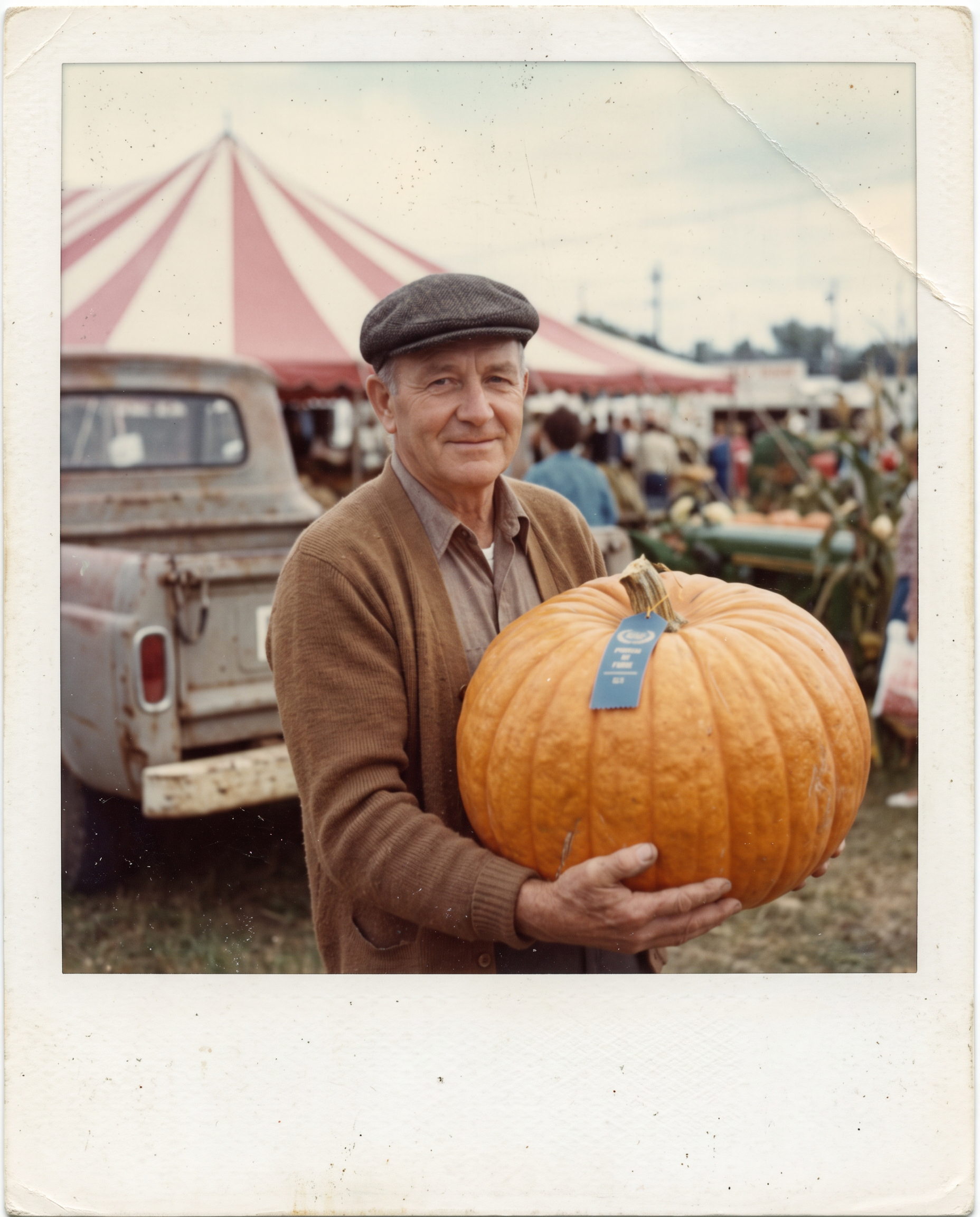
A faded, scratched 1970s color snapshot with a white border: a man in his sixties in a brown cardigan and flat cap proudly holding a huge orange pumpkin with a blue ribbon at a county fair, a striped tent and a farm truck behind him, washed out colors, a crease across one corner, dust specks and soft focus.
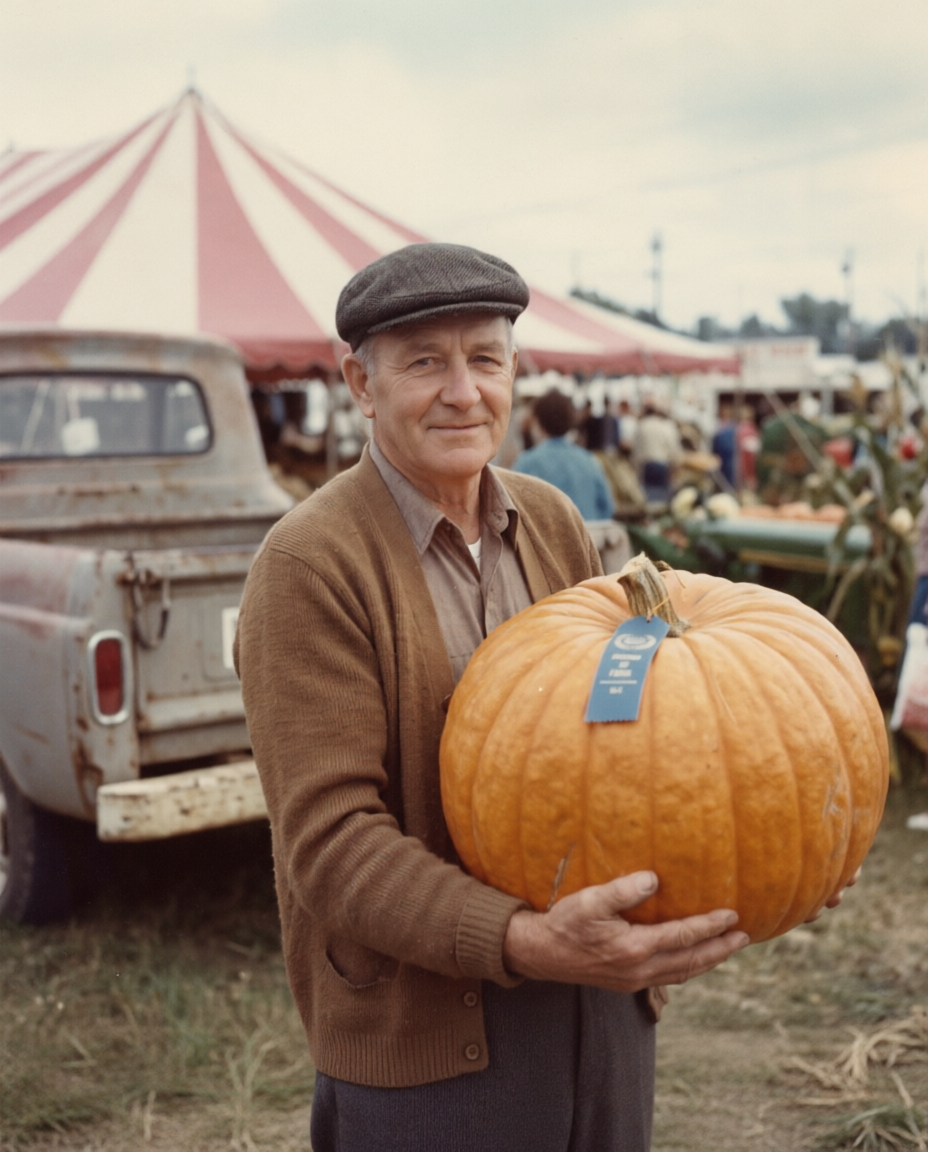
Restore this old photo: remove the scratches, dust specks and the crease in the corner, bring back natural, rich color and sharp focus, and crop away the white border so the photo fills the frame. Keep the man, his face, flat cap, brown cardigan, the pumpkin with its blue ribbon, the striped tent and the truck exactly as they are.
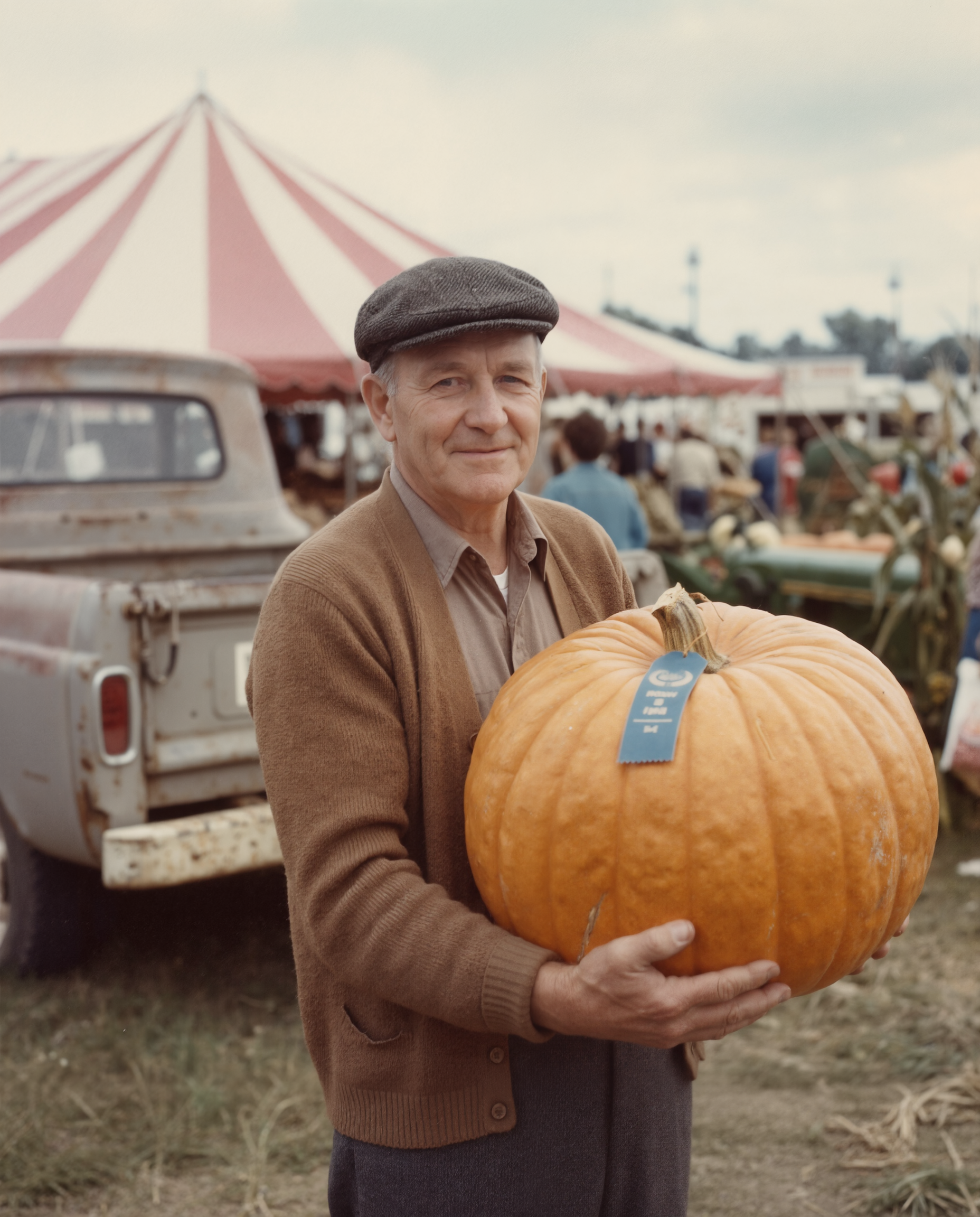
The man shifts the heavy pumpkin in his arms, looks down at the blue ribbon, then back up at the camera with a proud grin as the striped tent flaps in the breeze and fairgoers drift past behind him, the camera holds steady. Sound: a breezy county fair crowd, a distant brass band and canvas flapping.
- Qwen Image 2 Edit cleared the crease, the dust and the border and kept his face, cap and ribbon as they were, for 0.5 credits.
- Clarity Pro doubled the size for 5 credits and sharpened the cardigan knit and the pumpkin ridges without changing his face.
- Seedance 2.5 turned the still into a 5 second clip with fair sound for 30 credits. He looks down at the ribbon and back up with a proud grin.
Do the same with your own photos
Restore first. Upload the scan to Qwen Image 2 Edit and say what to remove and what to keep: the scratches, dust and crease go, the face, clothes and background stay. Naming what stays is what keeps the person recognizable.
Upscale second. Clarity Pro at 2x is a good default for a restored portrait. Each upscaler page shows its credit price at the size you pick.
Animate last. Use the upscaled photo as the start frame on Seedance 2.5 and describe one small, natural action. A glance and a smile read as real. Big movement from an old photo rarely does.
Picwand plans vs Pixel Dojo
Everything in the Picwand column comes from its pricing, upscaler and home pages, read on October 15, 2026.
| Compared on | Picwand | Pixel Dojo |
|---|---|---|
| Plans | VIP Monthly $14.90 for 100 credits, VIP Yearly $84.90 for 1,500, VIP Perpetual $147.90 one time for 3,000 | Lite $10 a month for 160 credits, Pro $25 for 500 credits, Pro Max $50 for 1,100 credits |
| Extra credits | Packs from $14.90 for 100 to $454.90 for 10,000, VIP members only; they need an active VIP plan to use | API credit packs from $5 |
| Upscaling | Image upscaler at 2x, 4x, 6x and 8x | Clarity Pro, Magnific, Portrait Upscaler and Creative Upscaler |
| Video models | Seedance 2.5, Veo 3.1, Wan 2.5 and Kling 3.0 | Seedance 2.5, Veo 3.1, WAN 3.0, Kling 3.0 and more on every plan |
| Price per job | Credit cost per tool not listed on the pricing page | Every model page shows its credit price before you generate |
Why Picwand users switch to Pixel Dojo
Unlimited on every plan
On every paid plan, Relax runs Qwen Image 2.1, FLUX 3 Image Klein and MiniMax H3 Turbo, plus every video and photo effect, unlimited with no credits spent.
Sensei, the AI director
Describe a project and Sensei plans it, prices it, waits for your approval and reviews every take.
Video Studio
Generate, edit and extend a clip in one place, on whichever top video engine suits the shot.
One click video effects
300+ one-click video effects turn a photo into a trend clip, from AI Hug to AI Inflate, with no prompt to write, and 3 are free every day.
One job AI tools
35 single purpose tools each do one edit from an upload: remove a watermark, an object or text, restore and colorize an old photo, swap a background, retouch a portrait or make a thumbnail.
Credits that roll over
Your credits roll over while you stay subscribed, so nothing you pay for disappears at the end of the month.
Every top model, plus an API
More than 80 image and 60 video models in one account, with a public API and a hosted MCP server for your own apps and AI assistants.
What the walkthrough cost
Plans are Lite $10 a month for 160 credits, Pro $25 for 500 credits, Pro Max $50 for 1,100 credits. Every plan includes every model and commercial use. Credits roll over while you stay subscribed.
The snapshot cost 1.5 credits, the restore 0.5, the upscale 5 and the Seedance 2.5 clip 30. Every tile shows its own price.
Under our refund policy, a first purchase can be refunded within 7 days, in full if under 20% of the credits are used and pro-rated after that.
Picwand questions
What is a good alternative to Picwand?
Pixel Dojo covers Picwand's restore, upscale and animate jobs with Qwen Image 2 Edit, Clarity Pro and Seedance 2.5, plus the top image and video generators, with every credit price shown before you generate.
How much does Picwand cost?
Picwand's pricing page lists VIP Monthly at $14.90 for 100 credits, VIP Yearly at $84.90 for 1,500 credits and VIP Perpetual at $147.90 one time for 3,000 credits.
Do Picwand credits expire?
Picwand says purchased credits are valid for life but need an active VIP subscription to use, and credit packs are sold to VIP members only.
Can AI restore and animate an old photo?
Yes. In our walkthrough Qwen Image 2 Edit removed the damage for 0.5 credits, Clarity Pro doubled the size for 5 and Seedance 2.5 made a 5 second clip with sound for 30.
Which video models does Picwand use?
Picwand's pricing page names Seedance 2.5, Veo 3.1, Wan 2.5 and Kling 3.0. Pixel Dojo runs Seedance 2.5, Veo 3.1, Kling 3.0 and WAN 3.0 on every plan.
Video Effects New
Your first video is free. One photo, one click.
310 ready-made effects, from AI Hug and Earth Zoom In to product spins and listing walkthroughs. Upload a photo and press Generate. No prompt to write, and a free account gets 3 a day.






Switch from Picwand to Pixel Dojo today
Write a prompt above or start from any example on this page. One plan covers every top model, six studios and Sensei, and your credits roll over.
Start with Seedance 2.5Sources
Facts about Picwand come from these public pages, checked on Oct 15, 2026. Prices and plans change; check the source before you buy.
- Picwand pricing page (VIP Monthly, Yearly and Perpetual plans, credit packs for VIP members, models listed, Picwand Studio)
- Picwand Image Upscaler page (2x, 4x, 6x and 8x upscaling)
- Picwand home page (video generator, ad generator, viral cloner, video enhancer, photo restoration, colorizer, Windows and Mac apps)