Topaz alternative
Topaz Labs alternative: upscale, compare and animate in one tab
Pixel Dojo runs Clarity Pro, Magnific, a portrait upscaler and a creative upscaler side by side in the browser, prices each one before you click, and puts the image and video models you need next on the same plan.
Topaz Labs makes some of the best known upscaling apps. We wanted to see what the browser route looks like, so we took one documentary photo, enlarged it 2x on four upscalers we carry, then turned the Clarity Pro result into the clip above.
30 credits ($1.88) per 5 s clip at 720p with audio. Included in every plan, from $10/month.
Already a member? Sign in
By Brian Lovett · Updated
What photographers and editors make here next
Every image and clip below was made on Pixel Dojo with the prompt shown.
We fed the Clarity Pro upscale to Seedance 2.5 as a start frame. He works the net, looks up and smiles, with sound built in.
The old fisherman pulls a knot tight in the green net, pauses and looks out across the harbor, the moored boats rock gently on the water, overcast light stays soft and even. Sound: lapping water, a few gulls and the rustle of netting.
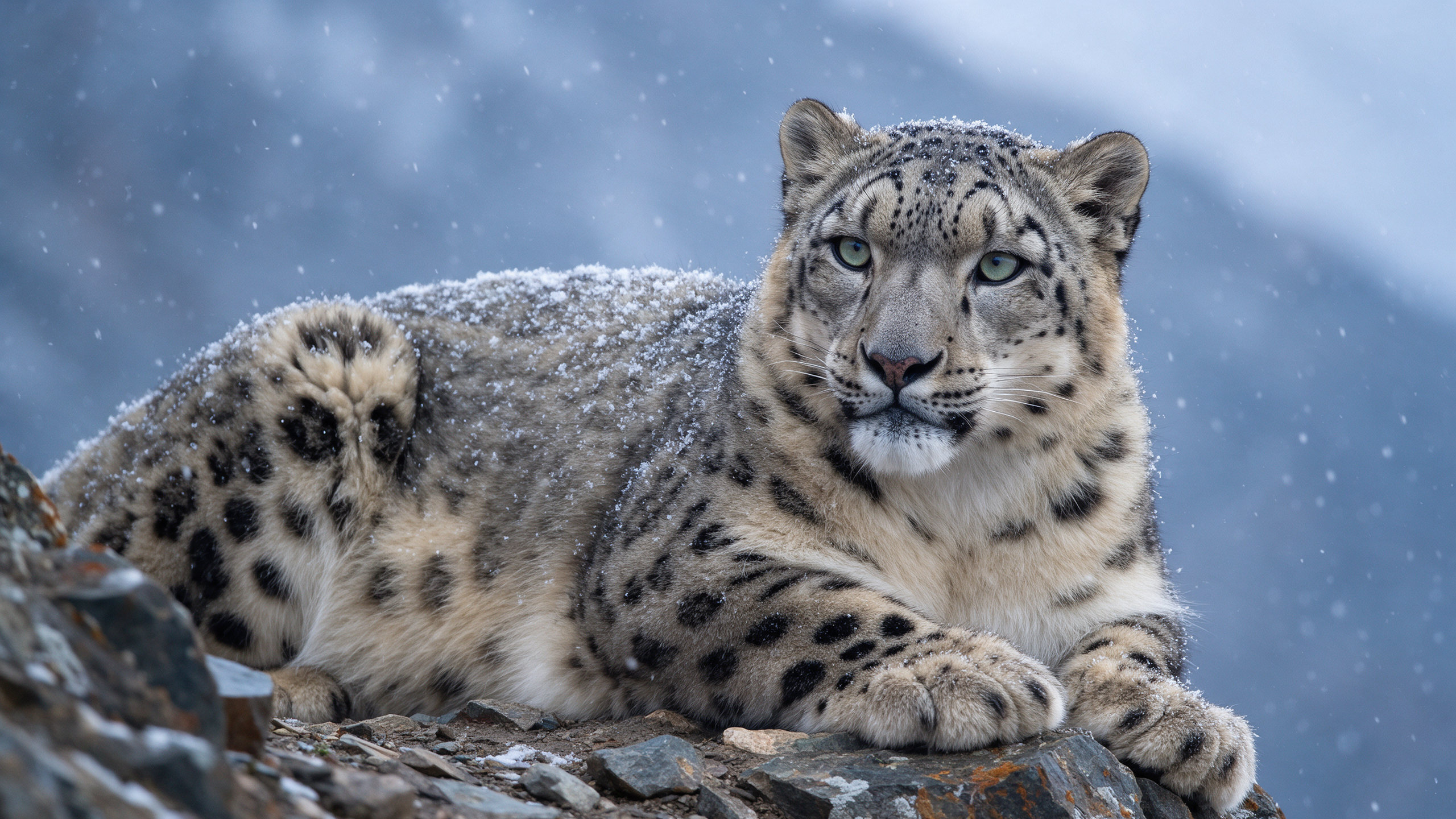
Wildlife on Seedream 5, with every spot and flake sharp at full size.
Wildlife photograph of a snow leopard resting on a rocky ledge as light snow falls, thick spotted fur dusted with flakes, pale green eyes looking past the camera, blue grey mountain haze behind, 600mm telephoto compression, crisp detail.
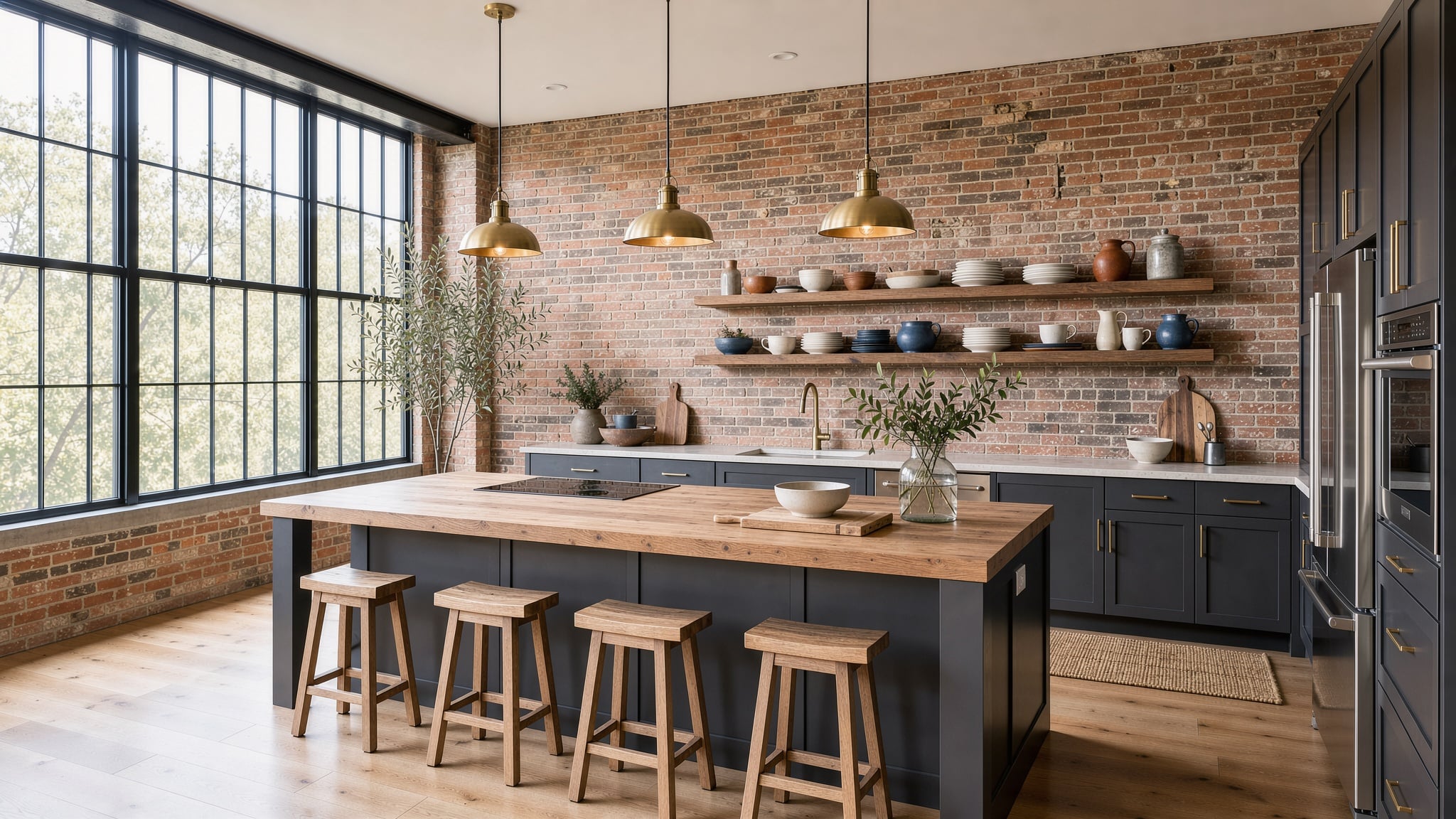
A real estate interior on FLUX 3 Image with level verticals.
Real estate interior photograph of a sunlit loft kitchen with exposed brick, a long oak island with three brass pendant lights, open shelves of ceramics, tall factory windows, wide angle lens kept level, bright airy exposure.
Slow motion on Kling 3.0 with sound built in. Good for nature reels.
Slow motion macro shot of a ruby throated hummingbird hovering at a red trumpet flower, wings a soft blur, iridescent green feathers catching the sun, creamy garden bokeh behind, a soft buzzing hum and distant birdsong.
Topaz Labs vs Pixel Dojo: plans and terms
Everything in the Topaz Labs column comes from its pricing and Gigapixel pages, read on October 15, 2026.
| At a glance | Topaz Labs | Pixel Dojo |
|---|---|---|
| Image upscaling | Topaz Gigapixel $29 a month, or $149 a year | Clarity Pro, Magnific, Portrait Upscaler and Creative Upscaler on every plan |
| Video | Topaz Video $59 a month, or $299 a year, with 25 monthly cloud video credits | Veo 3.1, Kling 3.0, Seedance 2.5 and WAN 3.0 for generating and animating video |
| Everything bundle | Topaz Studio $399 a year for all apps, with 300 monthly cloud video credits | Lite $10 a month for 160 credits, Pro $25 for 500 credits, Pro Max $50 for 1,100 credits |
| Browser option | Topaz for Web Image $19 a month | Everything runs in the browser, nothing to install |
| Where it runs | Desktop apps for Mac and Windows with unlimited local rendering, plus cloud rendering | In the cloud, from any device, with a public API and hosted MCP server |
| Commercial use | Non Pro plans cover personal and commercial use for organizations under $1M a year in revenue | Commercial use on every plan |
One harbor portrait, four AI upscalers
We generated a 1264 by 848 documentary photo on Nano Banana 2.1, then enlarged it 2x to 2528 by 1696 on each upscaler. Each tile shows the settings and credits it used.

Documentary photograph of an elderly fisherman with a white beard mending a green fishing net on a stone harbor wall, overcast morning light, weathered hands and a cable knit sweater, small wooden boats moored behind him, natural color, 50mm lens.




- The Portrait Upscaler stayed closest to the original face and hands while sharpening every wrinkle, and it cost 1.5 credits.
- Clarity Pro kept him recognizable and pulled the most crisp detail out of the cable knit and the beard.
- Magnific added the most new texture, pores and single beard hairs.
- The Creative Upscaler is the one to use for art and renders.
Why upscaling here goes further
Pick the upscaler per photo
Faithful portraits on the Portrait Upscaler, crisp textures on Clarity Pro, extra invented detail on Magnific. You do not have to own one app per look.
Know the price first
Each upscaler page shows its credit price at the size you pick, before you press generate.
From still to motion
Hand an upscaled photo to Seedance 2.5, Kling 3.0 or Veo 3.1 as a start frame, as we did with the fisherman above.
Batch it through the API
Every upscaler runs through the same public endpoint, with docs generated from the model's own spec and API credit packs from $5.
Why one plan with every top model goes further
If your work is mostly new images and video, with upscaling as one step, one plan with every top model is the better deal.
Why Topaz Labs users switch to Pixel Dojo
Unlimited on every plan
On every paid plan, Relax runs Qwen Image 2.1, FLUX 3 Image Klein and MiniMax H3 Turbo, plus every video and photo effect, unlimited with no credits spent.
Sensei, the AI director
Describe a project and Sensei plans it, prices it, waits for your approval and reviews every take.
One job AI tools
35 single purpose tools each do one edit from an upload: remove a watermark, an object or text, restore and colorize an old photo, swap a background, retouch a portrait or make a thumbnail.
Photo effects
45+ photo effects restyle a picture in one click, from a hand painted anime still to a boxed action figure or a magazine cover, and every one starts from your own upload.
Character Studio
Save a face once and call it by @name in any prompt, so the same person shows up in every image and clip.
Credits that roll over
Your credits roll over while you stay subscribed, so nothing you pay for disappears at the end of the month.
Every top model, plus an API
More than 80 image and 60 video models in one account, with a public API and a hosted MCP server for your own apps and AI assistants.
Pixel Dojo pricing for upscaling work
Plans are Lite $10 a month for 160 credits, Pro $25 for 500 credits, Pro Max $50 for 1,100 credits. Every plan includes every model and commercial use. Credits roll over while you stay subscribed.
The four upscales in our test cost between 1.5 and 5 credits each, and every tile lists its own price.
Under our refund policy, a first purchase can be refunded within 7 days, in full if under 20% of the credits are used and pro-rated after that.
Topaz Labs questions
What is a good alternative to Topaz Gigapixel?
Pixel Dojo runs Clarity Pro, Magnific, a portrait upscaler and a creative upscaler in the browser, with the credit price shown first and image and video models on the same plan.
How much does Topaz Gigapixel cost?
Topaz Labs lists Gigapixel at $29 a month or $149 a year, with a Pro version at $499 a year, on its pricing and Gigapixel pages.
Do Topaz cloud credits roll over?
Topaz Labs says cloud video credits expire at the end of each month and do not roll over.
Which upscaler keeps a face looking like the same person?
In our test the Portrait Upscaler stayed closest to the original face, with Clarity Pro next. Pick the Creative Upscaler for art and renders.
Can I upscale and then animate a photo?
Yes. Upscale on Pixel Dojo, then use the result as the start frame on Seedance 2.5, Kling 3.0 or Veo 3.1. The fisherman clip above was made that way.
Video Effects New
Your first video is free. One photo, one click.
310 ready-made effects, from AI Hug and Earth Zoom In to product spins and listing walkthroughs. Upload a photo and press Generate. No prompt to write, and a free account gets 3 a day.

Switch from Topaz Labs to Pixel Dojo today
Write a prompt above or start from any example on this page. One plan covers every top model, six studios and Sensei, and your credits roll over.
Start with Seedance 2.5Sources
Facts about Topaz Labs come from these public pages, checked on Oct 15, 2026. Prices and plans change; check the source before you buy.