TensorPix alternative
TensorPix alternative for bringing old photos back to life
Pixel Dojo is where you restore a photo, upscale it, and then turn it into a moving clip with sound, step by step, each step priced first.
We took an old, faded, creased snapshot of a man fishing off a lake dock and ran it through three steps on Pixel Dojo: restore, upscale, animate. The clip above is the result.
27.5 credits ($1.72) per 5 s clip with audio. Included in every plan, from $10/month.
Already a member? Sign in
By Brian Lovett · Updated
More enhance and animate work on the same plan
Every image and clip below was made on Pixel Dojo with the prompt shown.
The final step: Kling 3.0 used our 2x upscale as its first frame, with sound built in.
The man on the dock casts his fishing line out over the calm lake, then turns to the camera and grins, gentle ripples spreading on the water, a light breeze in the pines, loons calling in the distance and the soft click of the reel
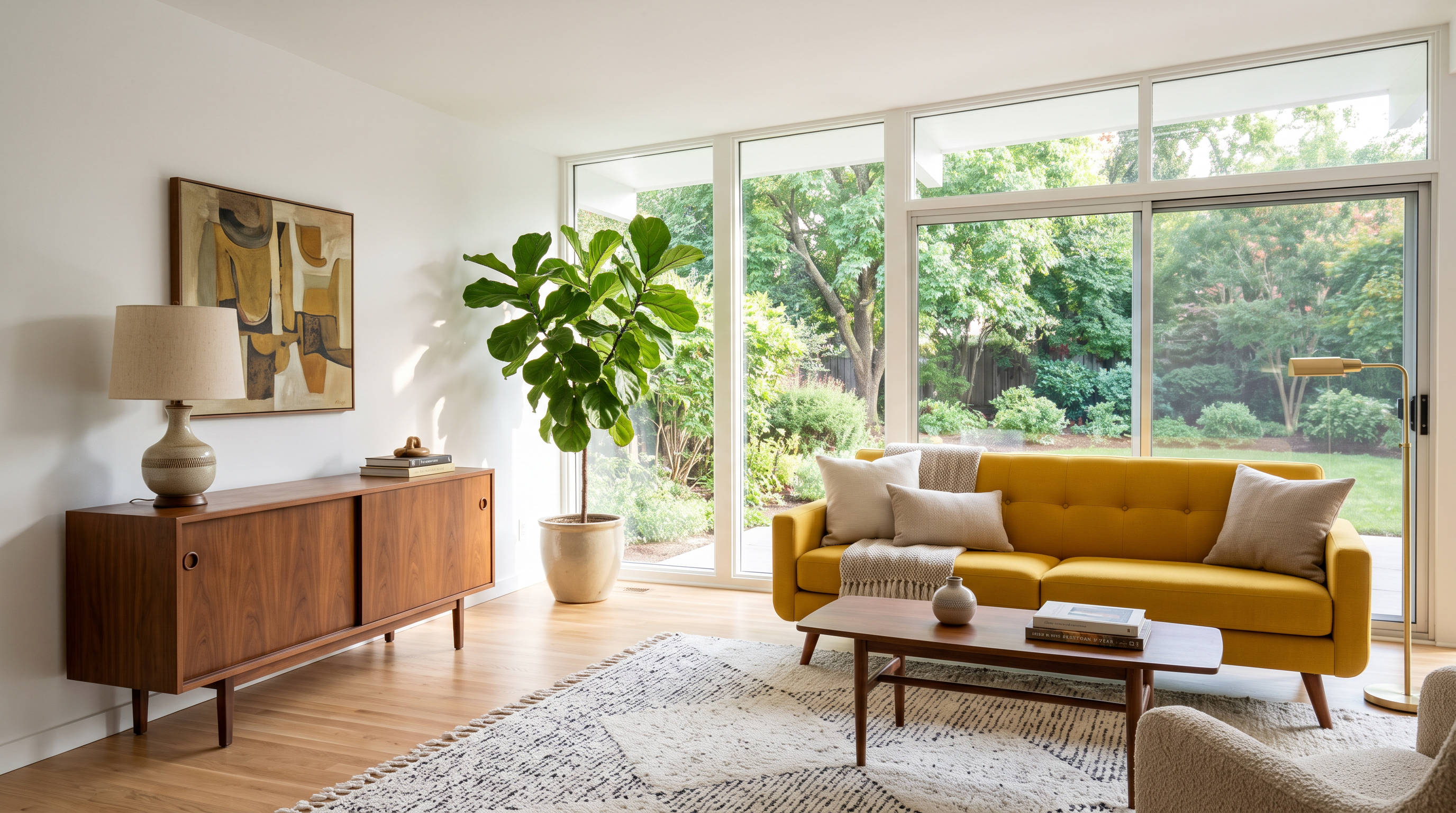
A real estate interior on Nano Banana 2.1 with level verticals.
Real estate interior photo of a bright mid century living room with a walnut sideboard, a mustard yellow sofa, a tall fiddle leaf fig and floor to ceiling windows onto a green garden, level verticals, wide angle lens, soft afternoon light, tidy and staged
That listing photo turned into a smooth walkthrough on Kling 3.0 Standard. Good for property reels.
Slow smooth dolly forward through the living room toward the garden windows, steady gimbal motion, the fig leaves and sheer light shifting gently, quiet room tone and birdsong outside
Low light on Seedance 2.5: deep blacks, wet neon reflections and steam, generated clean from the start.
Handheld night shot in the rain: a delivery rider in a yellow rain cape steers an electric moped slowly through a narrow alley of food stalls, neon signs reflecting in puddles, steam rising from woks, clean low noise image with deep blacks and crisp highlights, 35mm lens look, sound of rain on awnings, sizzling pans and a soft moped hum
From faded print to moving clip in three steps
- 1
Restore the photo
Nano Banana Edit removed the crease, the dust and the magenta cast from the snapshot and kept his face, pose and the dock as they were.
- 2
Upscale it 2x
Clarity Pro doubled the restored photo to 2752 by 1536 and sharpened the flannel, the beard and the pine trees.
- 3
Animate the upscale
Kling 3.0 took the upscale as its first frame, had him cast the line and grin at the camera, and added lake sound.
The snapshot at every stage
These are the actual outputs. We generated the faded original ourselves so no real family photo was used. Each tile shows the settings and credits it used.
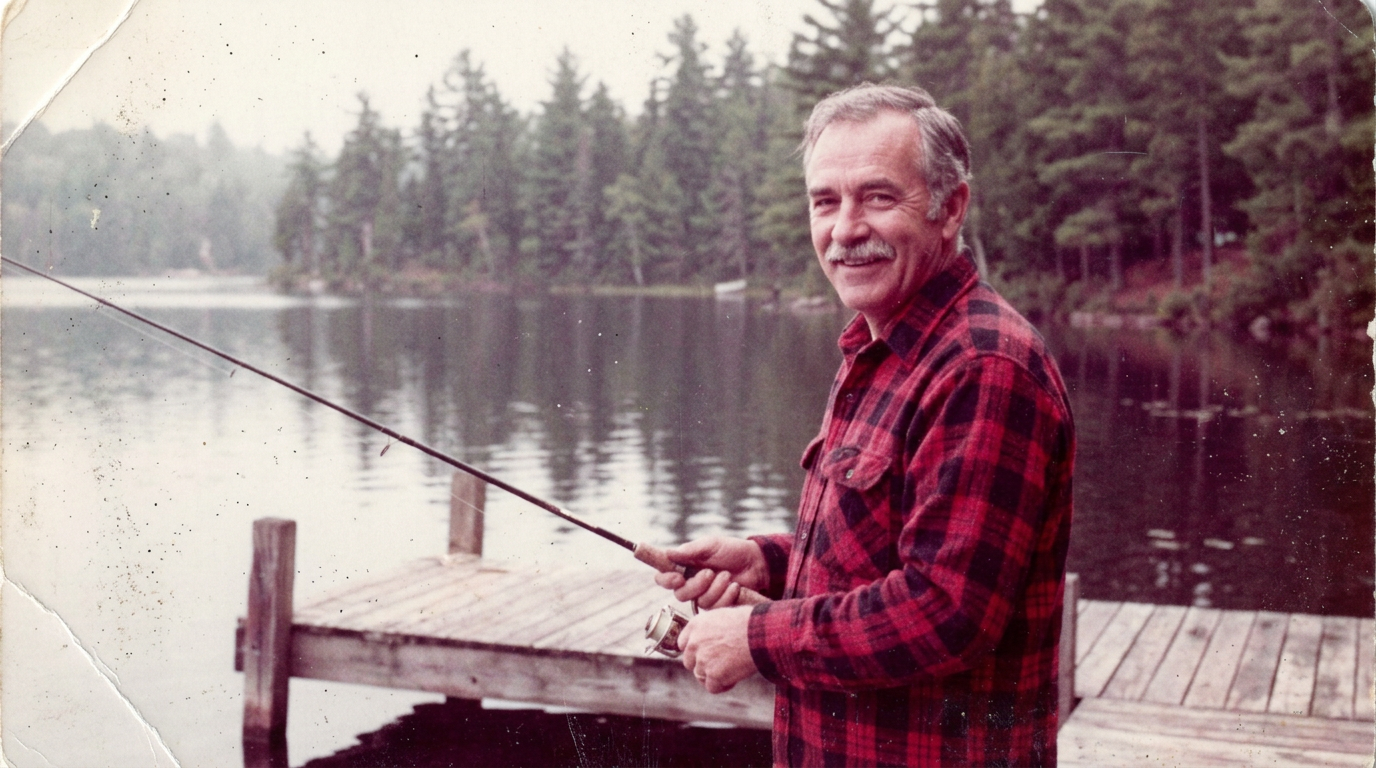
A faded, damaged 1980s color snapshot of a man in his sixties with a grey mustache and a red flannel shirt holding a fishing rod on a wooden lake dock, washed out colors with a strong magenta cast, heavy film grain, soft focus, dust specks and fine scratches, a white crease across one corner, pine trees and calm water behind him
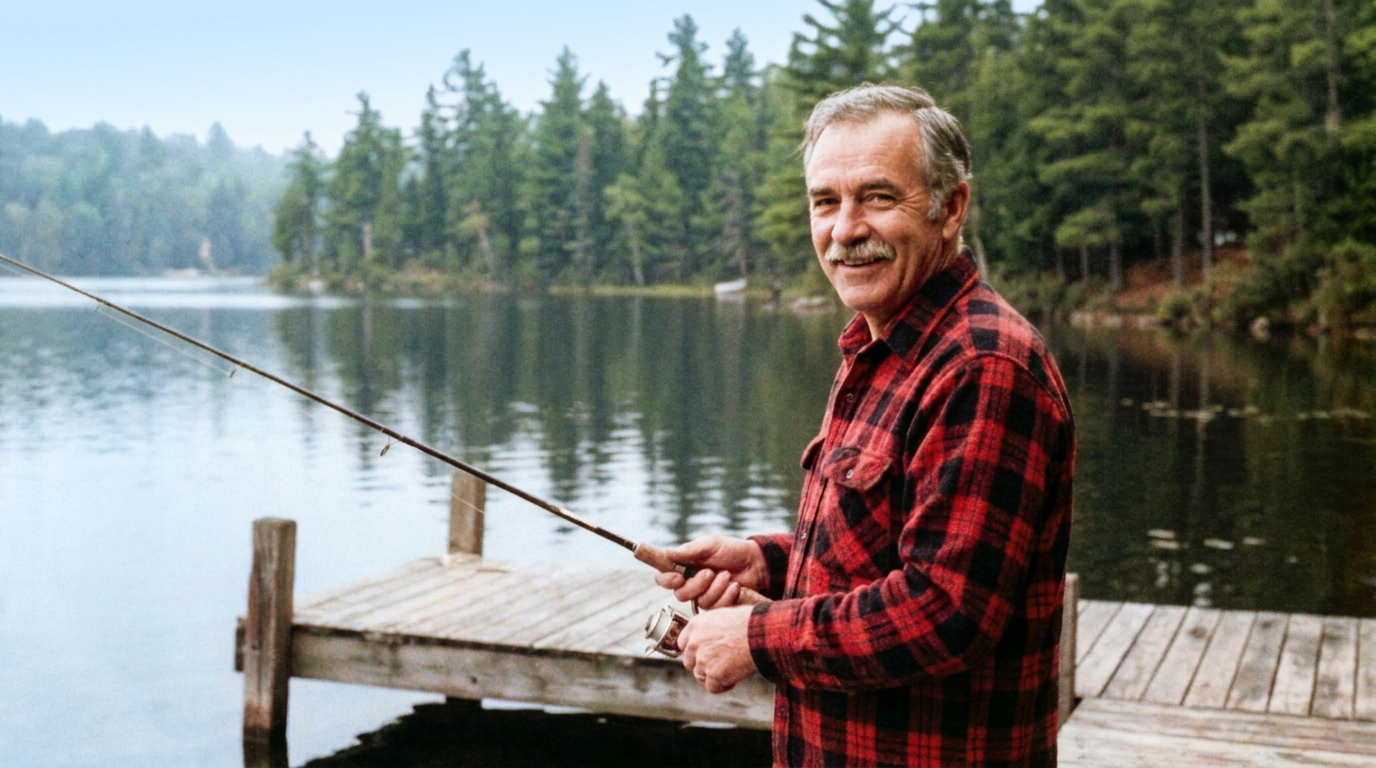
Restore this old photo: remove the white crease, the dust specks and the scratches, correct the magenta color cast to natural daylight colors, reduce the film grain and sharpen the focus. Keep the man's face, expression, pose, clothing, the fishing rod, the dock, the trees and the framing exactly the same.
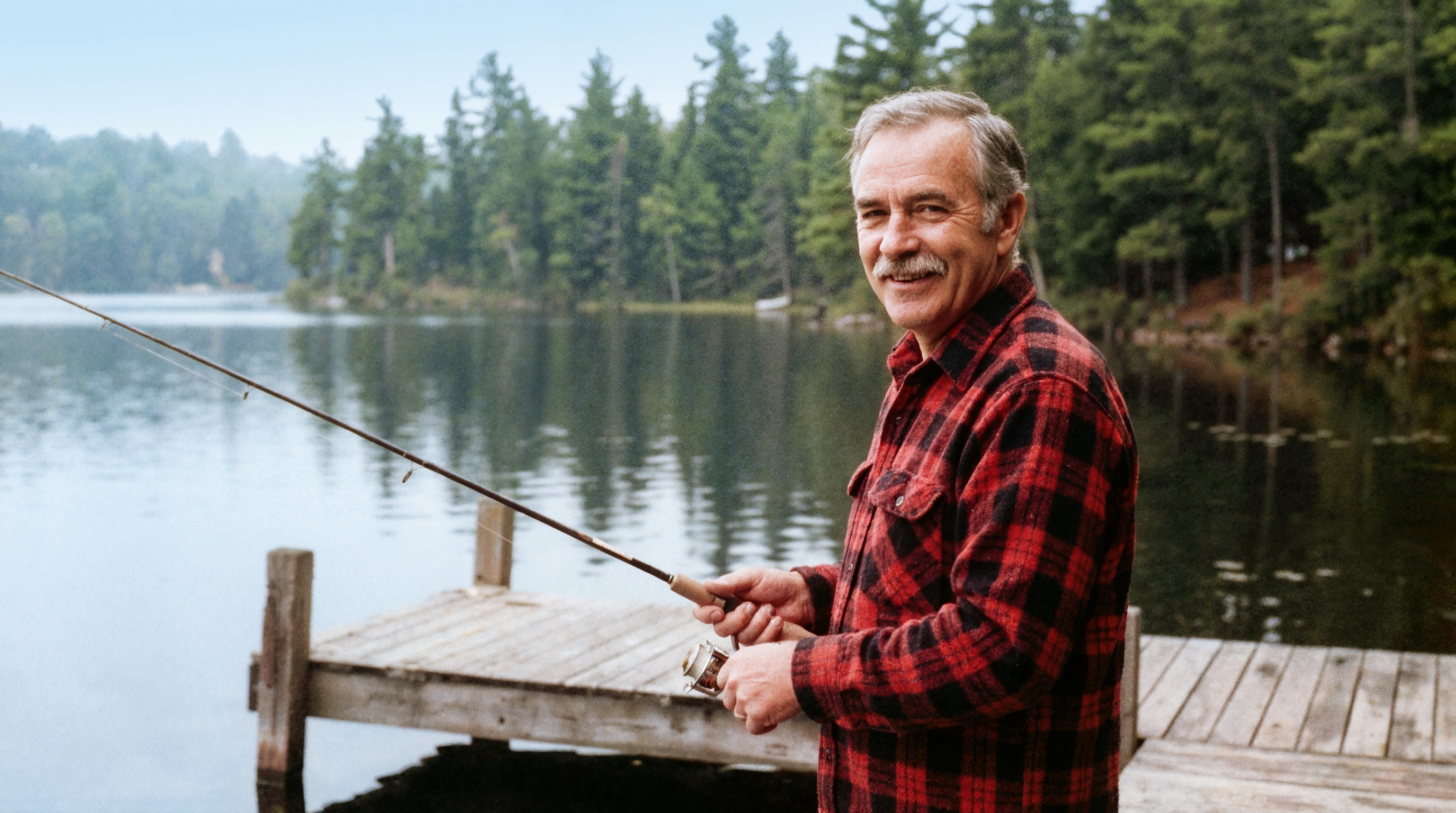
- The restore step fixed the color cast, the crease and the grain in one pass, and kept his mustache, smile and red flannel intact.
- Clarity Pro sharpened the plaid and the pine trees at 2x without changing his face.
- Starting the animation from the upscale kept the clip looking like the same photo: same dock, same trees, same man.
TensorPix plans vs Pixel Dojo
Everything in the TensorPix column comes from its pricing and home pages, read on October 15, 2026.
| At a glance | TensorPix | Pixel Dojo |
|---|---|---|
| Paid plans | Standard $5.5, Premium $12.42 and Elite $30.25 a month, billed annually | Lite $10 a month for 160 credits, Pro $25 for 500 credits, Pro Max $50 for 1,100 credits |
| Monthly credits | 10, 35 or 110; one credit is about 2 minutes of enhanced video, 8 images or 15 seconds of generated video | 160, 500 or 1,100; every model page shows its price before you generate |
| Refunds | Full refund only while purchased credits are unused | A first purchase can be refunded within 7 days, in full if under 20% of the credits are used and pro-rated after that |
| Video enhancement | Upscaling to 4K, denoising, and 60 FPS frame interpolation for existing footage | Built for short clips: FLUX Video Upscale lifts a short clip to 1080p, 2K or 4K |
| API | On Premium and Elite | Public API with credit packs from $5 and a hosted MCP server |
Why TensorPix users switch to Pixel Dojo
Unlimited on every plan
On every paid plan, Relax runs Qwen Image 2.1, FLUX 3 Image Klein and MiniMax H3 Turbo, plus every video and photo effect, unlimited with no credits spent.
Sensei, the AI director
Describe a project and Sensei plans it, prices it, waits for your approval and reviews every take.
Video Studio
Generate, edit and extend a clip in one place, on whichever top video engine suits the shot.
One click video effects
300+ one-click video effects turn a photo into a trend clip, from AI Hug to AI Inflate, with no prompt to write, and 3 are free every day.
One job AI tools
35 single purpose tools each do one edit from an upload: remove a watermark, an object or text, restore and colorize an old photo, swap a background, retouch a portrait or make a thumbnail.
Credits that roll over
Your credits roll over while you stay subscribed, so nothing you pay for disappears at the end of the month.
Every top model, plus an API
More than 80 image and 60 video models in one account, with a public API and a hosted MCP server for your own apps and AI assistants.
What each step cost us
Plans are Lite $10 a month for 160 credits, Pro $25 for 500 credits, Pro Max $50 for 1,100 credits. Commercial use is included on every plan. Credits roll over while you stay subscribed.
The restore step cost 4.5 credits, the 2x upscale 5 credits and the animated clip 27.5 credits, and every tile lists its own price.
Under our refund policy, a first purchase can be refunded within 7 days, in full if under 20% of the credits are used and pro-rated after that.
TensorPix questions
What is a good alternative to TensorPix?
For restoring, upscaling and animating photos, or generating new footage, Pixel Dojo runs edit models, Clarity Pro and video models like Kling 3.0 and Seedance 2.5.
How much does TensorPix cost?
TensorPix lists Standard at $5.5, Premium at $12.42 and Elite at $30.25 a month billed annually, with 10, 35 and 110 monthly credits, plus a free plan with weekly login credits.
Do TensorPix credits roll over?
TensorPix says unused credits roll over for up to a year and expire 12 months after purchase.
Can I turn an old photo into a video?
Yes. Restore it with an edit model, upscale it with Clarity Pro, then use it as the first frame on Kling 3.0 or Seedance 2.5, as we did with the fisherman above.
Can Pixel Dojo upscale a video to 4K?
FLUX Video Upscale in the app lifts short clips to 1080p, 2K or 4K.
Video Effects New
Your first video is free. One photo, one click.
310 ready-made effects, from AI Hug and Earth Zoom In to product spins and listing walkthroughs. Upload a photo and press Generate. No prompt to write, and a free account gets 3 a day.






Switch from TensorPix to Pixel Dojo today
Write a prompt above or start from any example on this page. One plan covers every top model, six studios and Sensei, and your credits roll over.
Start with Kling 3.0Sources
Facts about TensorPix come from these public pages, checked on Oct 15, 2026. Prices and plans change; check the source before you buy.