Beeble alternative
Beeble alternative: relight and restage your footage with a sentence
Pixel Dojo relights and restages clips on WAN 2.7 Video Edit, Kling Video Edit and Runway Aleph, relights stills with Magic Lighting, and generates the shots you have not filmed yet, all on one plan.
Beeble is a VFX tool built on its own relighting models. We wanted to see how far plain language editing gets on the same job, so we shot one flat, grey dance clip and asked three video editors to turn it into a sunset.
13 credits ($0.81) per 2 s clip at 1080p. Included in every plan, from $10/month.
Already a member? Sign in
By Brian Lovett · Updated
Beeble alternatives: quick answers
What does Beeble do?
Beeble is an AI VFX platform. Its SwitchX model swaps background, lighting and style in video, and its VFX Pass Generator outputs normal, basecolor, roughness, metallic, specular, alpha and depth passes for compositing.
What does Beeble cost?
Beeble Creator is $16 a month billed yearly or $19 monthly for 540 credits. Beeble Professional is $60 a month billed yearly or $75 monthly for 2,400 credits, and adds 4K and 10 bit output.
Can Pixel Dojo relight video?
Yes. Describe the new light in a sentence on WAN 2.7 Video Edit, Kling Video Edit or Runway Aleph. Our test below shows all three on the same clip.
More relighting and restaging
We made each of these on Pixel Dojo with the prompt shown. Tap one to start from it.
A background swap on Kling Video Edit: the warehouse becomes a rooftop, her turn stays the same.
Replace the background: the warehouse becomes a city rooftop at blue hour with skyscraper lights behind her and a soft pink sky, lit to match. Keep the dancer, her movement, the dress and the camera exactly the same.
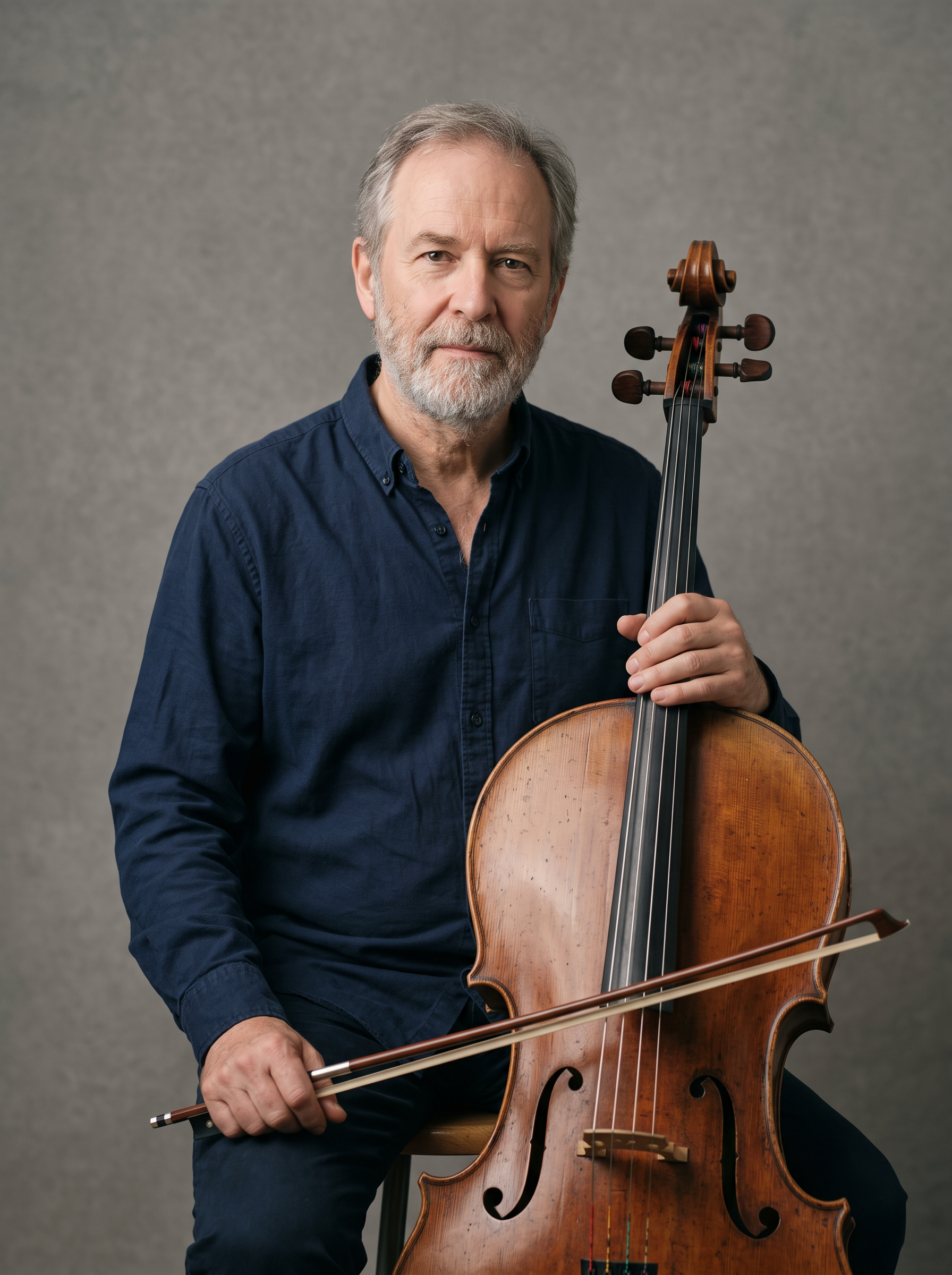
The flat lit portrait we started from, on Nano Banana 2.1.
Studio portrait of a cellist in his sixties with a grey beard and a navy shirt, holding his bow beside the cello, plain mid grey backdrop, flat even front light, sharp focus, 85mm lens.
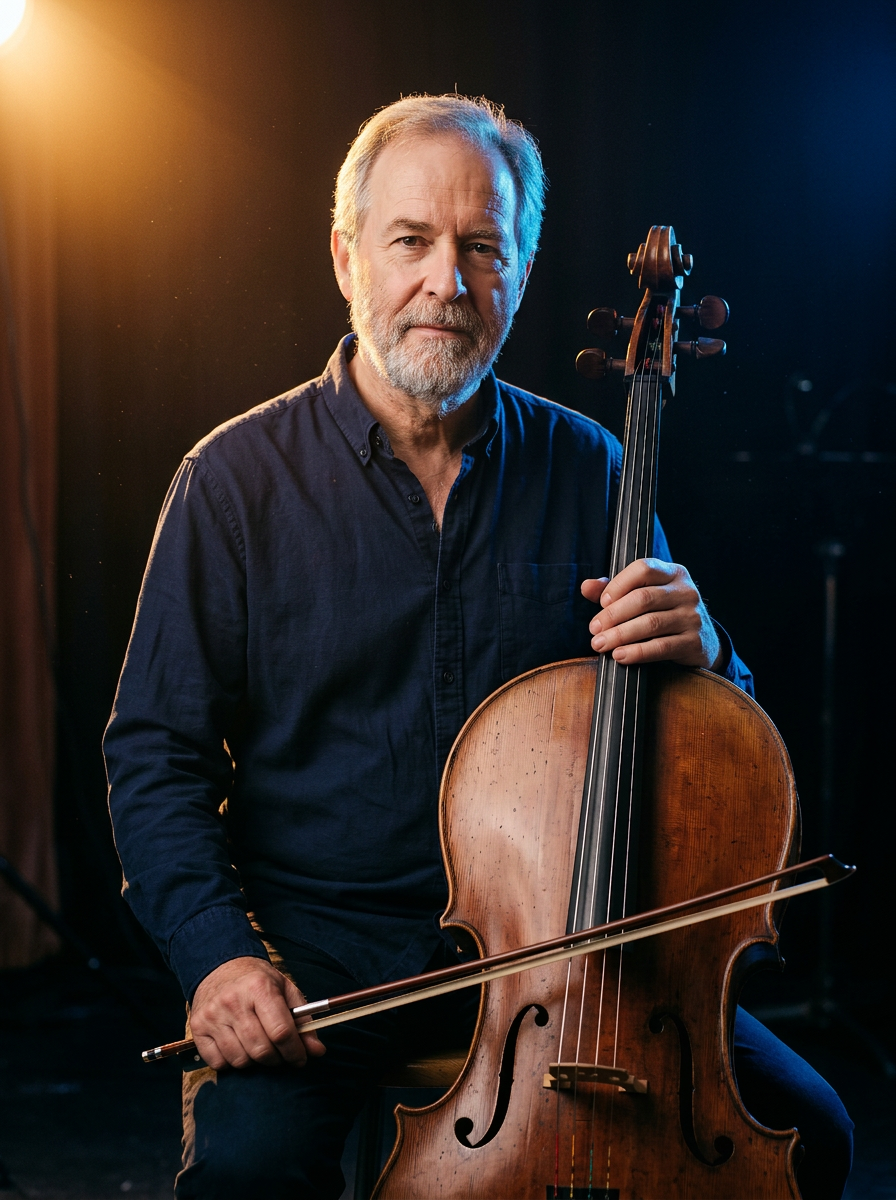
Relit with Magic Lighting for 1 credit, face and cello unchanged.
Relight as a concert stage portrait: one warm amber spotlight from high on the left, a cool blue rim light from behind, the background falls to near black. Keep the man, his face, the cello and the pose exactly the same.
A night street shot on WAN 3.0 when you need the plate itself.
Slow dolly down a narrow cobbled street at night in heavy rain, a figure in a long coat and no hat walks away past a glowing red paper lantern with no lettering, steam rising from a grate, puddles reflecting crimson and teal light, rain hiss and distant thunder.
Deep dive: two ways to relight a shot
Beeble works like a VFX department. It splits a shot into passes and mattes, so you can relight it in a 3D tool, keep the subject pixel exact and output EXR files for grading.
Prompt based video editors work like a reshoot. You describe the new light or the new place, and the model renders the whole clip again with the same performance and camera. There are no passes to manage, and the result is ready to post.
For a music video, an ad or a social cut, that finished look in one pass is the fastest way to a clip you can post.
One grey dance clip, three sunset relights
We generated the source on Seedance 2.5 under flat grey daylight, then gave three video editors the same instruction: a warm, low sunset through the windows, with everything else kept the same. Each tile shows its settings and credits.
Medium wide shot of a flamenco dancer in a black dress turning slowly in an empty concrete warehouse under flat grey daylight, her skirt swinging, dust in the air, static camera. Sound: heel taps echoing off the walls.
Relight the scene: replace the flat grey daylight with a warm low sunset pouring through the tall windows on the left, long orange light shafts across the floor and dust, warm light on the dancer's face and dress, deep blue shadows on her right side. Keep the dancer, her movement, the dress, the room and the camera exactly the same.
Relight the scene: replace the flat grey daylight with a warm low sunset pouring through the tall windows on the left, long orange light shafts across the floor and dust, warm light on the dancer's face and dress, deep blue shadows on her right side. Keep the dancer, her movement, the dress, the room and the camera exactly the same.
Relight the scene: replace the flat grey daylight with a warm low sunset pouring through the tall windows on the left, long orange light shafts across the floor and dust, warm light on the dancer's face and dress, deep blue shadows on her right side. Keep the dancer, her movement, the dress, the room and the camera exactly the same.
- All three kept the dancer's turn, her dress and the locked camera from the source clip.
- WAN 2.7 Video Edit made the strongest change, with long orange shafts and deep shadow, for 23 credits.
- Kling Video Edit was the most restrained, warming the windows and floor while the walls stayed cool grey.
- Runway Aleph gave the most stylized grade, warm light on her hair against deep blue walls, at 50 credits.
Beeble plans vs Pixel Dojo
Beeble figures come from its pricing page and home page, read on October 15, 2026.
| At a glance | Beeble | Pixel Dojo |
|---|---|---|
| Plans | Creator $16 a month yearly for 540 credits, Professional $60 a month yearly for 2,400 credits, Team $84 a seat | Lite $10 a month for 160 credits, Pro $25 for 500 credits, Pro Max $50 for 1,100 credits |
| Video relighting | SwitchX at 6 credits a second at 720p, 20 at 1080p, 80 at 4K | WAN 2.7 Video Edit, Kling Video Edit and Runway Aleph, each priced on its page |
| Still relighting | 3D Relight with point lights, directional lights and HDRIs | Magic Lighting from 1 credit |
| Generating new shots | Image and video generators, including Seedance 2.0 and Kling 3 | Seedance 2.5, Kling 3.0, Veo 3.1 and WAN 3.0 with sound, plus Film Studio |
| Credits | Subscription credits reset monthly and do not roll over; top ups last 90 days | Every model page shows its credit price before you generate |
| Commercial use | Full commercial license | Commercial use on every plan |
Why Beeble users switch to Pixel Dojo
Unlimited on every plan
On every paid plan, Relax runs Qwen Image 2.1, FLUX 3 Image Klein and MiniMax H3 Turbo, plus every video and photo effect, unlimited with no credits spent.
Sensei, the AI director
Describe a project and Sensei plans it, prices it, waits for your approval and reviews every take.
Video Studio
Generate, edit and extend a clip in one place, on whichever top video engine suits the shot.
One click video effects
300+ one-click video effects turn a photo into a trend clip, from AI Hug to AI Inflate, with no prompt to write, and 3 are free every day.
One job AI tools
35 single purpose tools each do one edit from an upload: remove a watermark, an object or text, restore and colorize an old photo, swap a background, retouch a portrait or make a thumbnail.
Credits that roll over
Your credits roll over while you stay subscribed, so nothing you pay for disappears at the end of the month.
Every top model, plus an API
More than 80 image and 60 video models in one account, with a public API and a hosted MCP server for your own apps and AI assistants.
What the relight test costs on Pixel Dojo
Plans are Lite $10 a month for 160 credits, Pro $25 for 500 credits, Pro Max $50 for 1,100 credits. Every plan includes every model and commercial use. Credits roll over while you stay subscribed.
The source clip cost 30 credits, and the three relights cost 23, 28 and 50 credits. Every tile lists its own price.
Under our refund policy, a first purchase can be refunded within 7 days, in full if under 20% of the credits are used and pro-rated after that.
Beeble questions
What is a good alternative to Beeble?
For finished relit or restaged clips, Pixel Dojo runs WAN 2.7 Video Edit, Kling Video Edit and Runway Aleph from a text instruction, plus Magic Lighting for stills and the top video generators.
How much does Beeble cost?
Beeble lists Creator at $16 a month billed yearly for 540 credits and Professional at $60 a month billed yearly for 2,400 credits, with SwitchX from 6 credits a second at 720p.
Do Beeble credits roll over?
No. Beeble says subscription credits reset monthly and do not roll over, and one time top up credits are valid for 90 days.
Which AI model relights video best?
In our test WAN 2.7 Video Edit made the boldest sunset, Kling Video Edit the subtlest and Runway Aleph the most stylized. All three kept the dancer's movement.
Can I change the background of a video with AI?
Yes. Our rooftop clip on this page swapped a warehouse for a city skyline on Kling Video Edit while the dancer's turn stayed the same.
Video Effects New
Your first video is free. One photo, one click.
310 ready-made effects, from AI Hug and Earth Zoom In to product spins and listing walkthroughs. Upload a photo and press Generate. No prompt to write, and a free account gets 3 a day.






Switch from Beeble to Pixel Dojo today
Write a prompt above or start from any example on this page. One plan covers every top model, six studios and Sensei, and your credits roll over.
Start with WAN 2.7 Video EditSources
Facts about Beeble come from these public pages, checked on Oct 15, 2026. Prices and plans change; check the source before you buy.