Weavy alternative
Figma Weave (Weavy) alternative: chain the models, skip the graph
Pixel Dojo runs the same kind of chain a Weave graph does, generate, relight, extend and animate, one step at a time on one plan, with each step priced before you click.
Weavy is now Figma Weave, a node based canvas where you wire AI models and editing tools into workflows. We think most projects never need the wiring. To test that, we took one product photo through four steps by hand.
27.5 credits ($1.72) per 5 s clip with audio. Included in every plan, from $10/month.
Already a member? Sign in
By Brian Lovett · Updated
More design work from the same studio
Every image and clip below was made on Pixel Dojo with the prompt shown.
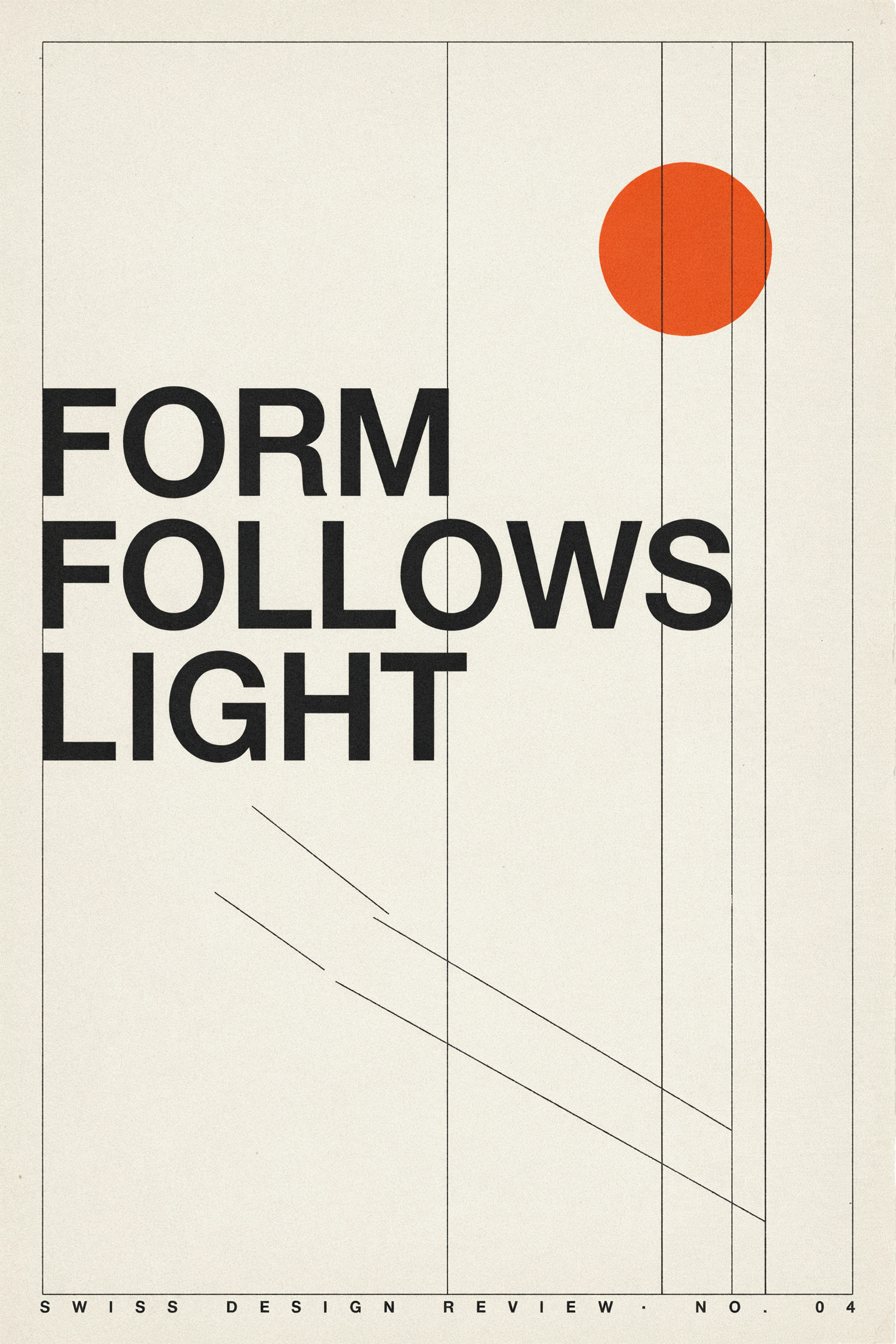
Typography on Ideogram 4.5 with a strict grid, set right on the first run.
Swiss style design poster with the words "FORM FOLLOWS LIGHT" in large black grotesk letters, a single orange circle and three thin diagonal lines on an off white background, strict grid, generous negative space, printed paper texture.
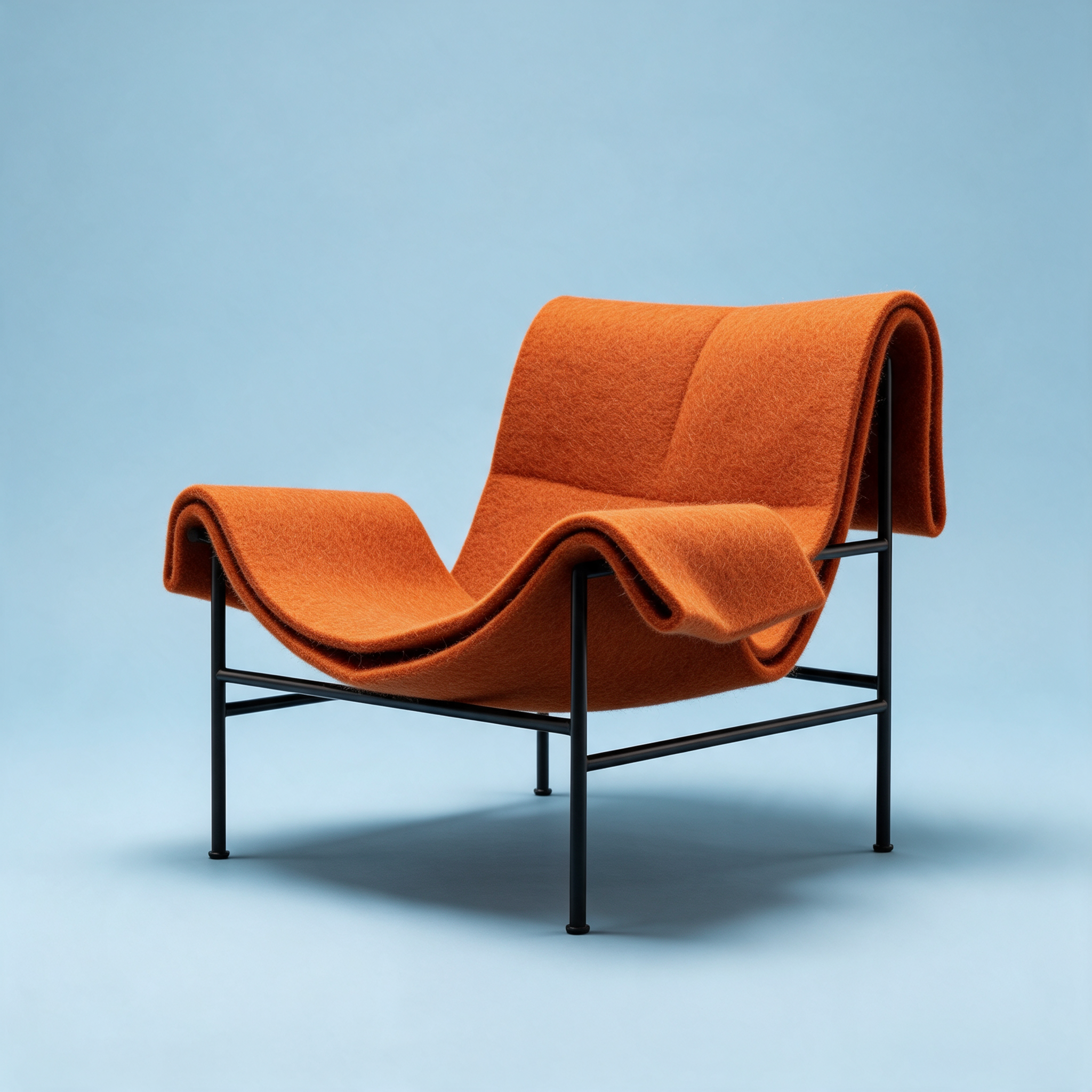
A furniture concept render on Seedream 5.
Studio product render of a lounge chair made from thick folded burnt orange felt on a slim black steel frame, seamless pale blue backdrop, soft contact shadow, crisp felt fibers, three quarter view, design magazine style.
Abstract motion design on WAN 3.0 with soft whooshes built in.
Abstract motion design loop: wide ribbons of iridescent fabric fold and unfold through each other in slow motion against a deep navy void, light rippling across the surface in teal and gold, smooth camera orbit. Sound: soft airy whooshes and a low synth pad.

Set design product photography on FLUX 3 Image.
Product photograph of a tall ribbed terracotta vase holding one dried palm leaf on a plaster plinth, a hard diagonal shadow cast on a sand colored wall by a single spotlight, minimal set design, crisp texture, no logos.
Why most projects can skip the node graph
Figma Weave's home page sells a node based platform: put models from Google, Kling, OpenAI, ByteDance, Black Forest Labs, Runway and others on one canvas, add tools like Inpaint, Outpaint, Relight, Upscale and a Z Depth extractor, and save the graph as a workflow your team can run from a simplified UI.
For one campaign, a graph is setup work before the first picture. You have to know which model goes in which node before you have seen what any of them makes.
Our take: pick the step, look at the result, pick the next step. When you do want it automated, Sensei plans the chain, prices it and waits for your approval, and the public API runs the same steps from code.
Four steps on one product shot, no graph
We generated a flat lit product photo of an amber glass carafe, relit it with Magic Lighting, widened it with Image Outpainting and animated the banner on Kling 3.0. Each step used the previous output. Each tile shows its settings and credits.

Product photograph of a hand blown amber glass carafe with a cork stopper and a matching small tumbler on a pale oak side table against a plain warm white wall, flat soft daylight, clean minimal styling, centered, no logos.

Low warm late afternoon sun through window blinds, crisp diagonal stripes of golden light and shadow across the wall and the oak table, the amber glass glowing where the light passes through.

Continue the quiet room on both sides: more pale oak table and warm white wall, the same diagonal stripes of golden sunlight from the blinds, nothing else on the table, calm and minimal.
A hand enters from the right, lifts the amber glass carafe, pulls the cork and pours water into the tumbler, the stripes of sunlight from the blinds drift slowly across the wall and the glass glows where the light passes through, slow push-in. Sound: a soft cork pop, pouring water and quiet room tone.
- Magic Lighting kept the carafe, cork and tumbler exactly in place and changed only the light, the job a Relight node does.
- Outpainting extended the scene without a seam and invented a matching window with blinds to explain where the light comes from.
- Kling 3.0 added the pour we asked for, with the hand entering the frame and the sunlight stripes staying put.
- Each step was a single click with a price shown first, and we could stop and redo any one of them without rebuilding the rest.
Figma Weave plans vs Pixel Dojo
Everything in the Figma Weave column comes from its pricing and home pages, read on October 15, 2026.
| At a glance | Figma Weave | Pixel Dojo |
|---|---|---|
| Paid plans | Starter $24 a month for 1,500 credits; Professional $45 for 4,000; Team $60 per user for 4,500 per user; yearly plans save 30% | Lite $10 a month for 160 credits, Pro $25 for 500 credits, Pro Max $50 for 1,100 credits |
| Free plan | 150 credits a month, image models only, 5 workflows | Plans from $10 a month; a first purchase can be refunded within 7 days |
| How you build | Node graph on a canvas, saved as workflows | One model page per step, Canvas to chain tools, Sensei to plan a project for you |
| API | Running workflows through the API on Enterprise | Public API with docs generated from each model's spec, API credit packs from $5 |
| Custom models | Your own API keys on Enterprise | LoRA trainers for FLUX, Qwen, WAN and Z-Image |
| Figma link | Weave credits cannot be used in Figma and the plans are separate | One plan for every model and tool on the site |
Why Figma Weave users switch to Pixel Dojo
Unlimited on every plan
On every paid plan, Relax runs Qwen Image 2.1, FLUX 3 Image Klein and MiniMax H3 Turbo, plus every video and photo effect, unlimited with no credits spent.
Sensei, the AI director
Describe a project and Sensei plans it, prices it, waits for your approval and reviews every take.
One job AI tools
35 single purpose tools each do one edit from an upload: remove a watermark, an object or text, restore and colorize an old photo, swap a background, retouch a portrait or make a thumbnail.
Photo effects
45+ photo effects restyle a picture in one click, from a hand painted anime still to a boxed action figure or a magazine cover, and every one starts from your own upload.
Character Studio
Save a face once and call it by @name in any prompt, so the same person shows up in every image and clip.
Credits that roll over
Your credits roll over while you stay subscribed, so nothing you pay for disappears at the end of the month.
Every top model, plus an API
More than 80 image and 60 video models in one account, with a public API and a hosted MCP server for your own apps and AI assistants.
What our four step chain cost
Plans are Lite $10 a month for 160 credits, Pro $25 for 500 credits, Pro Max $50 for 1,100 credits. Every plan includes every model and commercial use. Credits roll over while you stay subscribed.
The steps cost 1 credit for the FLUX 3 Image photo, 1 for Magic Lighting, 1 for the outpaint and 27.5 for the Kling 3.0 clip. Each tile lists its own price.
Under our refund policy, a first purchase can be refunded within 7 days, in full if under 20% of the credits are used and pro-rated after that.
Figma Weave questions
Is Weavy now Figma Weave?
Yes. Links to weavy.ai now redirect to weave.figma.com, and Figma Weave's pricing page says the two are now one company with products that operate independently.
What is a good alternative to Figma Weave?
Pixel Dojo runs the same kinds of steps, generate, relight, outpaint, upscale and animate, as single priced actions, with Canvas and Sensei for chaining and a public API for automation.
How much does Figma Weave cost?
Figma Weave lists Free with 150 credits a month, Starter at $24 a month for 1,500 credits, Professional at $45 for 4,000 and Team at $60 per user for 4,500 per user, with 30% off yearly.
Can I relight and extend a product photo without a node editor?
Yes. On Pixel Dojo, run Magic Lighting on the photo, then Image Outpainting on the result, as we did with the carafe above.
Video Effects New
Your first video is free. One photo, one click.
310 ready-made effects, from AI Hug and Earth Zoom In to product spins and listing walkthroughs. Upload a photo and press Generate. No prompt to write, and a free account gets 3 a day.






Switch from Figma Weave to Pixel Dojo today
Write a prompt above or start from any example on this page. One plan covers every top model, six studios and Sensei, and your credits roll over.
Start with Kling 3.0Sources
Facts about Figma Weave come from these public pages, checked on Oct 15, 2026. Prices and plans change; check the source before you buy.