Flat Illustration AI Generator
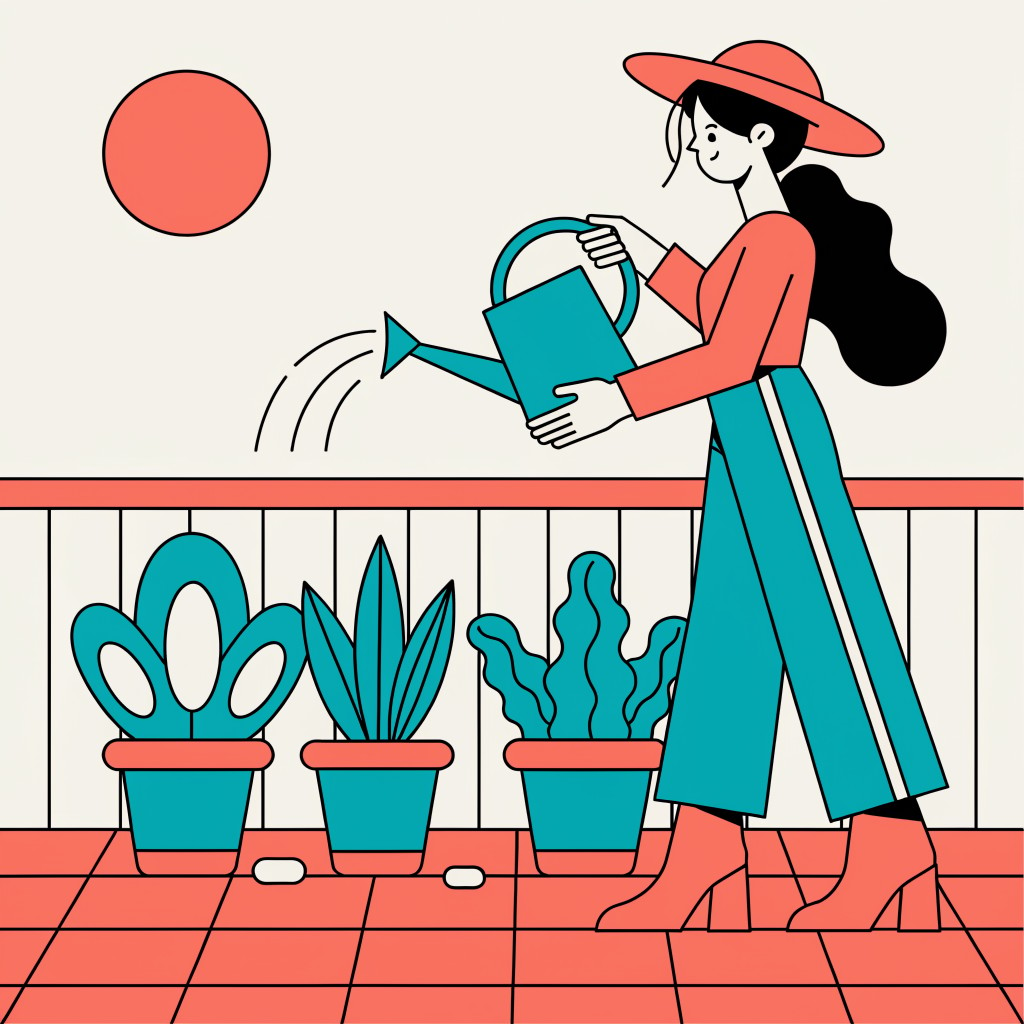
Generated on PixelDojo with Recraft V4.1. Produced by PixelDojo's generation pipeline.
Recraft V4.1 is the best AI model for flat illustration, at 1 credit per image. We sent one flat vector prompt to three models and Recraft returned true flat art: hard shape edges, black outlines, the exact palette asked for and no gradients anywhere. Z Image Turbo is the budget pick at 0.25 credit, with clean minimal shapes. QWEN Image 2.0 at 0.5 credit paints rich, textured editorial art when you want warmth instead of flat.
Side-by-side, same prompt
Every model below ran the identical prompt on PixelDojo so the outputs are directly comparable: “Flat vector illustration of a woman watering plants on a sunny balcony, bold simple shapes, limited palette of coral, teal and cream, no gradients, clean editorial style”
Recraft V4.1
The flat illustration pick. Black outlines, hard edges, zero gradients, and the exact coral, teal and cream asked for. 1 credit.
1 credit per image

Z Image Turbo
The budget pick. Clean unoutlined shapes and a quiet, minimal composition. 0.25 credit.
0.25 credits per image

QWEN Image 2.0
The painterly pick. Rich brush texture and soft light at 2048 by 2048 pixels for textured editorial art. 0.5 credit.
0.5 credits per image at 2048x2048
The ranking, and what each model drew
1. Recraft V4.1, 1 credit
This is what flat illustration is supposed to look like. Every shape has a hard edge and a thin black outline. The sun is a solid coral disc, not a glow. The palette holds to the three colours named, coral on the hat, railing and tiles, teal on the trousers, can and plants, cream as the ground. Nothing in the frame has a gradient. Need a real vector file? Recraft V4.1 SVG returns one for the same 1 credit.
2. Z Image Turbo, 0.25 credit
The value pick. Simple shapes, no shading ramps, plenty of negative space and a very clean minimal composition. No outlines, so the picture reads soft and quiet rather than graphic and bold. The figure is simplified almost to a silhouette, a modern editorial look at a quarter of the price.
3. QWEN Image 2.0, 0.5 credit
The most painterly picture in the set, at 2048 by 2048 pixels. Real weight in the pose, an angled light shaft, a lovely muted palette, and visible brush and paper texture across every surface. Reach for it when you want illustrated warmth rather than flat graphics.
One prompt, three models, side by side. Recraft V4.1 also comes in SVG for real vector files.
Why Choose Pixel Dojo for Flat Illustration
Professional-quality results with cutting-edge AI technology
Ranked on the brief
The prompt named three constraints: bold simple shapes, a fixed three colour palette, and no gradients. We ranked by how many held, then by price.
Every top model in one place
80+ image models and 60+ video models, including FLUX 3 Image, Nano Banana 2.1, Seedream 5, Qwen Image 2.1 and Ideogram 4.5. Every new model lands in the same plan. One subscription replaces five.
Unlimited on every plan
Relax mode runs FLUX 3 Image Klein and Qwen Image 2.1 at zero credits, as much as you want. Credits roll over every month while you are subscribed. Plans from $10/mo.
Sensei directs the rest
Describe what you want and Sensei, the AI director, picks the models, reviews every take and hands you the finished result.
How It Works
Run the comparison yourself:
Write the constraints into the prompt
Say bold simple shapes, name the exact colours, and say no gradients. Those three phrases are what separated the results. Models that ignore them are telling you they will not do flat work.
Send the same prompt to all three, unchanged
No negative prompts, no style presets, no per model tweaks. Recraft V4.1, Z Image Turbo and QWEN Image 2.0 each got the identical string so the differences are the models, not the prompting.
Judge on the constraints, then on price
Zoom in and check for gradients first. Then pick the price: Recraft V4.1 at 1 credit, Z Image Turbo at 0.25.
Loved by creators on PixelDojo
Real feedback from people using PixelDojo, pulled from our in-product surveys.
awesome functionality, UX, constant flood of improvements, discord interactivity
Awesome site with so many features
Love how I can almost create anything
The Flux Pro Ultra is just amazing!
Very easy to use, and they have fast wan 2.2 video generation with custom loras available.
The overall quality of the site and it's amazing variety of tools. The continued updates of the UI. The unbelievable level of tech support.
Explore more AI tools on PixelDojo
Popular AI Models
AI Tools
Compare & Switch
- All AI Tool Alternatives
- Pollo AI Alternative
- PixelDojo vs Pollo AI
- Pollo AI Review
- MotionMuse AI Alternative
- MioCreate Alternative
- Dessi AI Alternative
- Runway Alternatives
- CapCut Alternatives
- Leonardo Alternatives
- OpenArt Alternatives
- Midjourney Alternatives
- Canva AI Alternatives
- Pika Alternatives
- InVideo Alternatives
- Higgsfield Alternatives
- Krea Alternatives
- Luma Alternatives
- Magic Hour Alternatives
- HeyGen Alternatives
- PixAI Alternatives
- Vidu Alternatives
- Seedream Alternatives
- Tensor.Art Alternatives
Common Questions
Everything you need to know about Flat Illustration
Which AI model is best for flat illustration?
Recraft V4.1, at 1 credit per image. It returns hard edged shapes with outlines, a locked palette and no gradients, which is the definition of flat.
What is the cheapest model that still produces flat art?
Z Image Turbo at 0.25 credit. It returns a clean, minimal flat composition without outlines.
Can I get an actual SVG file?
Yes. Recraft V4.1 SVG returns a vector file for 1 credit, and Recraft V4.1 Pro SVG for 5 credits.
Which model should I use?
All of them. 80+ image models and 60+ video models sit behind one plan. Switch with one click, or tell Sensei what you want and it picks the best model for every shot.
Can I use the images commercially?
Yes. You own what you create, on every plan. No watermark on paid plans.
Is it free to try?
Yes. A free account gets 3 free effects every day, no card needed. Plans from $10/mo unlock every model, with Unlimited on every plan.