Consistent Characters AI Generator
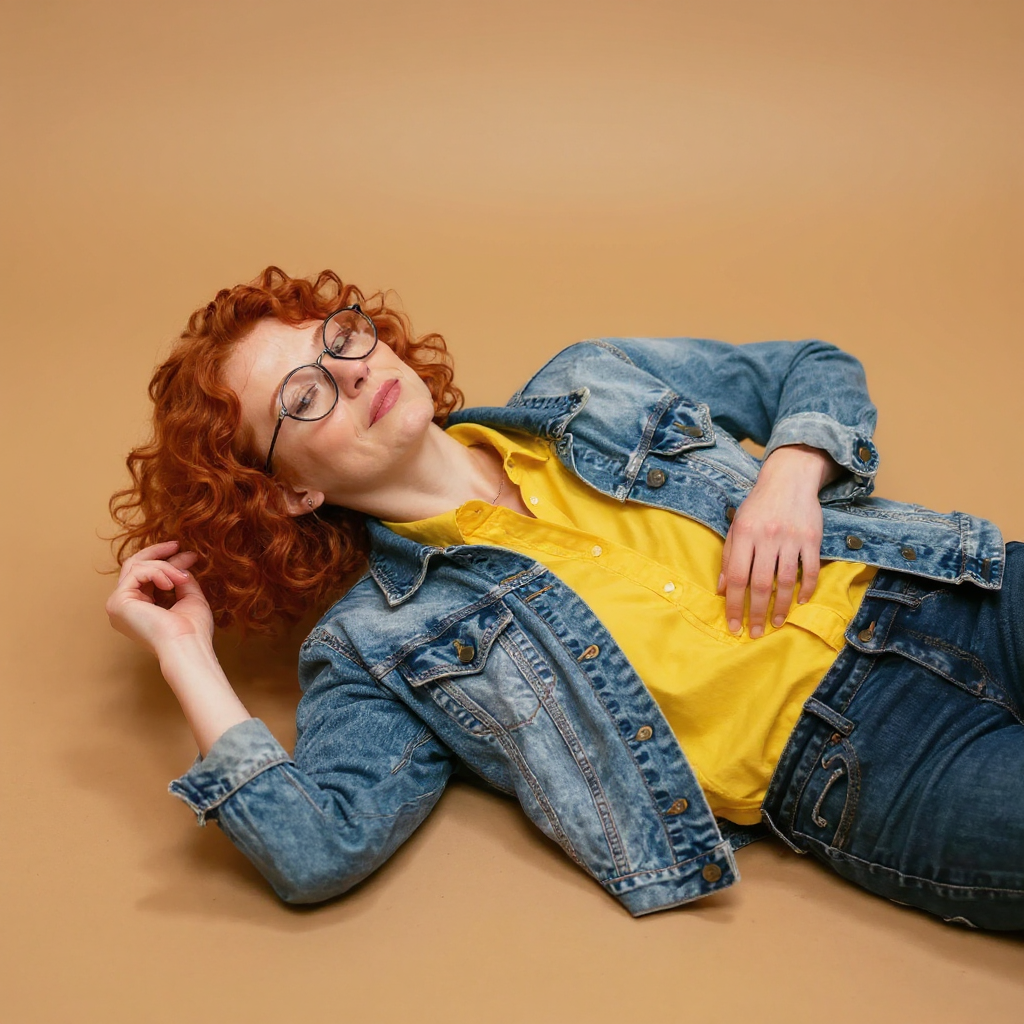
Generated on PixelDojo with Consistent Characters. Produced by PixelDojo's generation pipeline.
Consistent Characters costs 1.25 credits per image on its default Flux Kontext engine. Feed it one reference photo and it returns new poses, backgrounds and lighting for the same person, on eleven engines from 0.5 credit. Face, hair, glasses and outfit carry over. Save the result in Character Studio and type @Name in any prompt to bring the character into every image and video model.
One photo in, the same person out
Every example below was produced on PixelDojo. Hover to see the prompt.
show me character from a random angle with a random background and random lighting. ultra sharp, high resolution, 4k photos
Consistent Characters
How Consistent Characters is actually built
One reference image in, up to twelve variations out
The request takes a single input_image and a num_images field from 1 to 12, priced per image.
What came back
The source was a woman with short curly red hair, round glasses and a denim jacket over a yellow shirt. The new pose kept every one of those, now reclining against a warm tan background.
Eleven engines, from 0.5 credit
Flux Kontext is the default at 1.25 credits. Seedream 5 Flash and WAN 2.7 are 0.5. Nano Banana 2.1, Flux 2 Dev, Flux Kontext Dev, Grok Imagine and Seedream 4.5 are 1. QWEN Image 2 Pro is 1.5, Seedream 5 Pro is 2.5, and Nano Banana Pro is 4.5 for the hero portrait.
A background control, on the default engine
Flux Kontext accepts a background setting: white, gray, black, green screen, neutral, or original (keep the reference photo's own background). The other engines ignore this field and pick their own backgrounds instead, which is what produced the tan backdrop in our result.
randomize_images spreads out the set
On by default, this setting varies the pose and background across a multi-image request so a batch of four does not return four near-identical frames.
One reference photo in, the same person in every pose out. Used by 1M+ creators on Pixel Dojo.
Why Choose Pixel Dojo for Consistent Characters
Professional-quality results with cutting-edge AI technology
1.25 credits per image
On the default Flux Kontext engine. Ask for up to twelve variations in one call.
Identity holds across the pose change
Hair color and curl, glasses shape, jacket and shirt all carry into a completely different pose and background.
Use it everywhere with @Name
Save the character in Character Studio and type @Name in any image or video prompt. Its photos ride along automatically.
Sensei directs the rest
Describe what you want and Sensei, the AI director, picks the models, reviews every take and hands you the finished result.
How It Works
How we generated one variant:
Start from one clear reference photo
Ours showed a woman with curly red hair, round glasses, a denim jacket, and a yellow shirt against a plain background. A clean, well lit source photo is what the identity lock needs to work from.
Pick the engine and the count
The default Flux Kontext engine is 1.25 credits per image. Raise num_images for more variations in one call.
Save it and reuse it
Run it from the tool page or POST to /api/v1/models/consistent-characters/run, then save the character in Character Studio for @Name.
Loved by creators on PixelDojo
Real feedback from people using PixelDojo, pulled from our in-product surveys.
Amazing features, easy to use, privacy
the number of options, and especially the quick response to questions on Discord
Love you guys!!
Trained my Lora super fast. Still working out how to creat content wit it, but I love it so far.
I love this app
It has all the tools I can think of...
Explore more AI tools on PixelDojo
Popular AI Models
AI Tools
Compare & Switch
- All AI Tool Alternatives
- Pollo AI Alternative
- PixelDojo vs Pollo AI
- Pollo AI Review
- MotionMuse AI Alternative
- MioCreate Alternative
- Dessi AI Alternative
- Runway Alternatives
- CapCut Alternatives
- Leonardo Alternatives
- OpenArt Alternatives
- Midjourney Alternatives
- Canva AI Alternatives
- Pika Alternatives
- InVideo Alternatives
- Higgsfield Alternatives
- Krea Alternatives
- Luma Alternatives
- Magic Hour Alternatives
- HeyGen Alternatives
- PixAI Alternatives
- Vidu Alternatives
- Seedream Alternatives
- Tensor.Art Alternatives
Common Questions
Everything you need to know about Consistent Characters
How much does Consistent Characters cost?
1.25 credits per image on the default Flux Kontext engine, from 0.5 credit on other engines. The default request returns four images.
Which engine should I pick?
Flux Kontext at 1.25 credits for quick character sheets. Nano Banana 2.1 at 1 credit holds a face sharply through big pose and scene changes. Nano Banana Pro at 4.5 credits for the single hero shot.
Can I control the background?
Yes, on the Flux Kontext engine: white, gray, black, green screen, neutral, or the original background.
Will my character stay the same?
Yes. Character Studio locks the face across every image and video: save a character once and type @Name in any prompt. Train a LoRA when you want it perfect.
Can I use the images commercially?
Yes. You own what you create, on every plan. No watermark on paid plans.
Can I automate it?
Yes. Every model is in the API and the MCP server. POST to /api/v1/models/consistent-characters/run with your key, or use Pixel Dojo inside Claude, ChatGPT and Cursor at https://pixeldojo.ai/mcp.