WAN 2.6 Image Edit
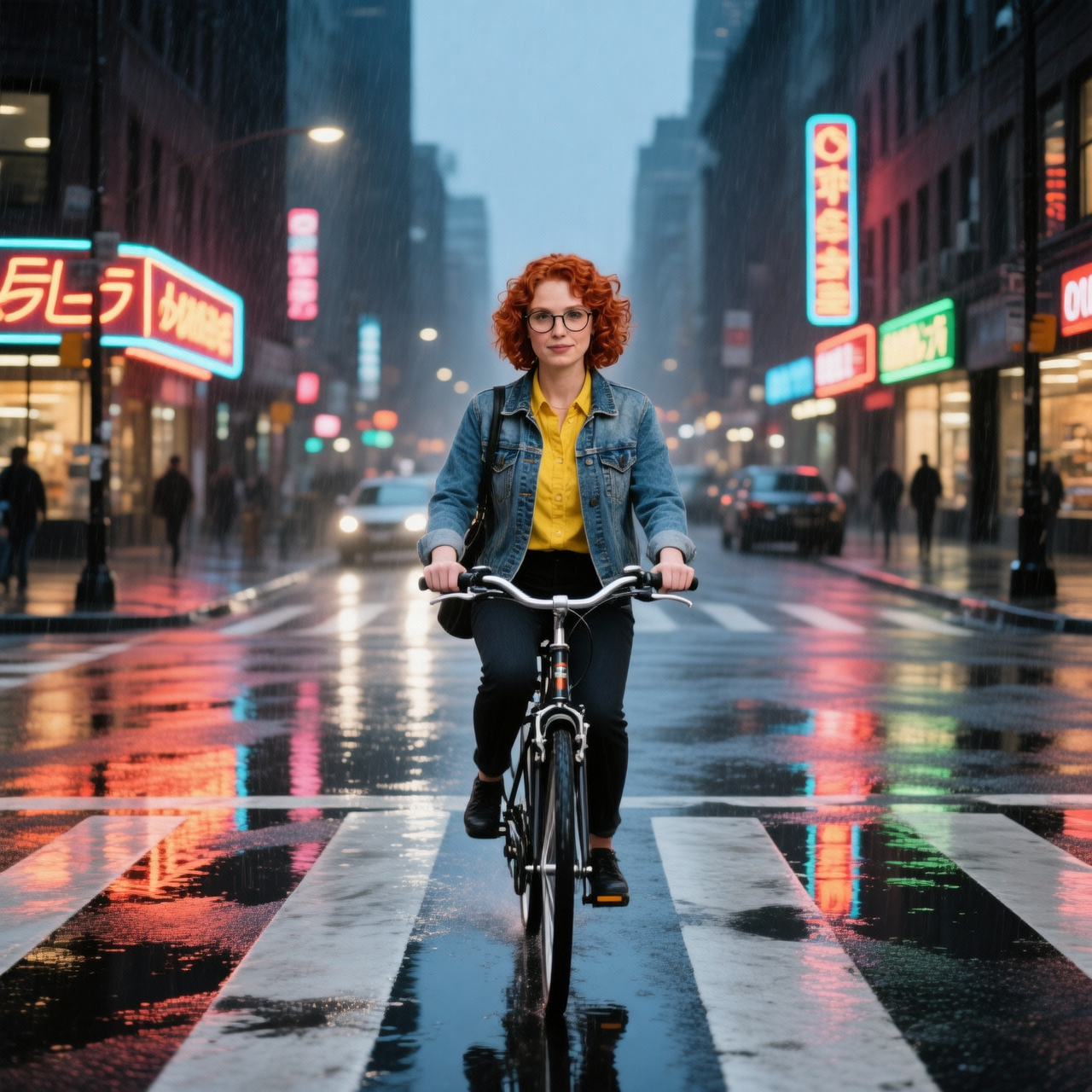
Generated on PixelDojo with WAN 2.6 Image Edit. Produced by PixelDojo's generation pipeline.
WAN 2.6 Image Edit costs a flat 1 credit per job. Send it a photo and an instruction, and it moves your character into a whole new scene while the face, the glasses, the hair and the outfit stay exactly the same. It fuses up to 4 images in one instruction, and it runs in Canvas and over the API. For up to 9 references, WAN 2.7 Image Edit runs at 0.5 credits on Standard and 1.5 on Pro.
Same woman, new street
Every example below was produced on PixelDojo. Hover to see the prompt.
Place this exact woman on a bicycle crossing a rainy city crosswalk at dusk, neon shop signs reflecting in puddles, cinematic wide shot, keep her face, glasses, red curly hair, denim jacket and yellow shirt identical
WAN 2.6 Image Edit
How it handles a full scene swap
Flat 1 credit, regardless of input count
The price does not change whether you send 1 reference image or the full 4-image maximum for a fusion edit.
It kept the identity markers intact
The prompt named five things to preserve: face, glasses, red curly hair, denim jacket, yellow shirt. All five carried over into the new scene, on a bicycle, at a rainy crosswalk, with the original studio background fully replaced.
Default output matches the input's footprint
Size defaults to a 1K tier that follows your input image. Our square source came back at the same 1280 by 1280 footprint.
Up to 4 reference images per call
Beyond a single edit, it can fuse up to 4 images into one instruction, useful for placing a subject from one photo into a background from another.
Built into Canvas and the API
Run it as an edit step in Canvas, chained with generate, upscale and animate, or call it directly over the API.
Why Choose Pixel Dojo for WAN 2.6 Image Edit
Professional-quality results with cutting-edge AI technology
1 credit flat
Same price for a single-image edit or a 4-image fusion.
Identity holds across a full scene change
Face, glasses, hairstyle and outfit carried over even as the background, lighting and pose changed completely.
The same face everywhere
Save your character in Character Studio and type @Name in any prompt to keep that face in every image and video.
How It Works
Three steps:
Name every detail that must stay
List the face, glasses, hair colour, jacket and shirt in your prompt. All of them carry into the new scene.
Send one to four images
One image for an edit, up to 4 to fuse a subject into a new background.
Run it in Canvas or over the API
POST to /api/v1/models/wan-2.6-image-edit/run with the prompt and image_urls, or add it as an edit step in Canvas.
Loved by creators on PixelDojo
Real feedback from people using PixelDojo, pulled from our in-product surveys.
The Flux Pro Ultra is just amazing!
Very easy to use, and they have fast wan 2.2 video generation with custom loras available.
The overall quality of the site and it's amazing variety of tools. The continued updates of the UI. The unbelievable level of tech support.
THIS IS SO DOPE !
I have already recommended it to friends
All the tools, plus the guidance
Explore more AI tools on PixelDojo
Popular AI Models
AI Tools
Compare & Switch
- All AI Tool Alternatives
- Pollo AI Alternative
- PixelDojo vs Pollo AI
- Pollo AI Review
- MotionMuse AI Alternative
- MioCreate Alternative
- Dessi AI Alternative
- Runway Alternatives
- CapCut Alternatives
- Leonardo Alternatives
- OpenArt Alternatives
- Midjourney Alternatives
- Canva AI Alternatives
- Pika Alternatives
- InVideo Alternatives
- Higgsfield Alternatives
- Krea Alternatives
- Luma Alternatives
- Magic Hour Alternatives
- HeyGen Alternatives
- PixAI Alternatives
- Vidu Alternatives
- Seedream Alternatives
- Tensor.Art Alternatives
Common Questions
Everything you need to know about WAN 2.6 Image Edit
What does WAN 2.6 Image Edit cost?
A flat 1 credit per job, whether you send 1 image or fuse up to 4 into one instruction.
How many reference images can it take?
Up to 4 per request, for single-image edits or multi-image fusion, like placing a subject from one photo into a scene from another.
How does it compare to WAN 2.7 Image Edit?
WAN 2.7 Image Edit takes up to 9 reference images and offers a Standard tier at 0.5 credits and a Pro tier at 1.5. WAN 2.6 Image Edit is one flat price.
Will my character stay the same across shots?
Yes. Character Studio locks the face across every image and video: save the character once and type @Name in any prompt. Train a LoRA when you want it perfect.
Can I automate it?
Yes. Every model is in one REST API at /api/v1/models/{apiId}/run, and the Pixel Dojo MCP server at pixeldojo.ai/mcp puts it inside Claude, ChatGPT, Cursor and any MCP client.
Is Pixel Dojo free to try?
Yes. A free account gets 3 free effects every day, no card needed. Plans from $10/mo unlock every model, every studio and Sensei, with Unlimited on every plan.