QWEN Image 2.0 Pro
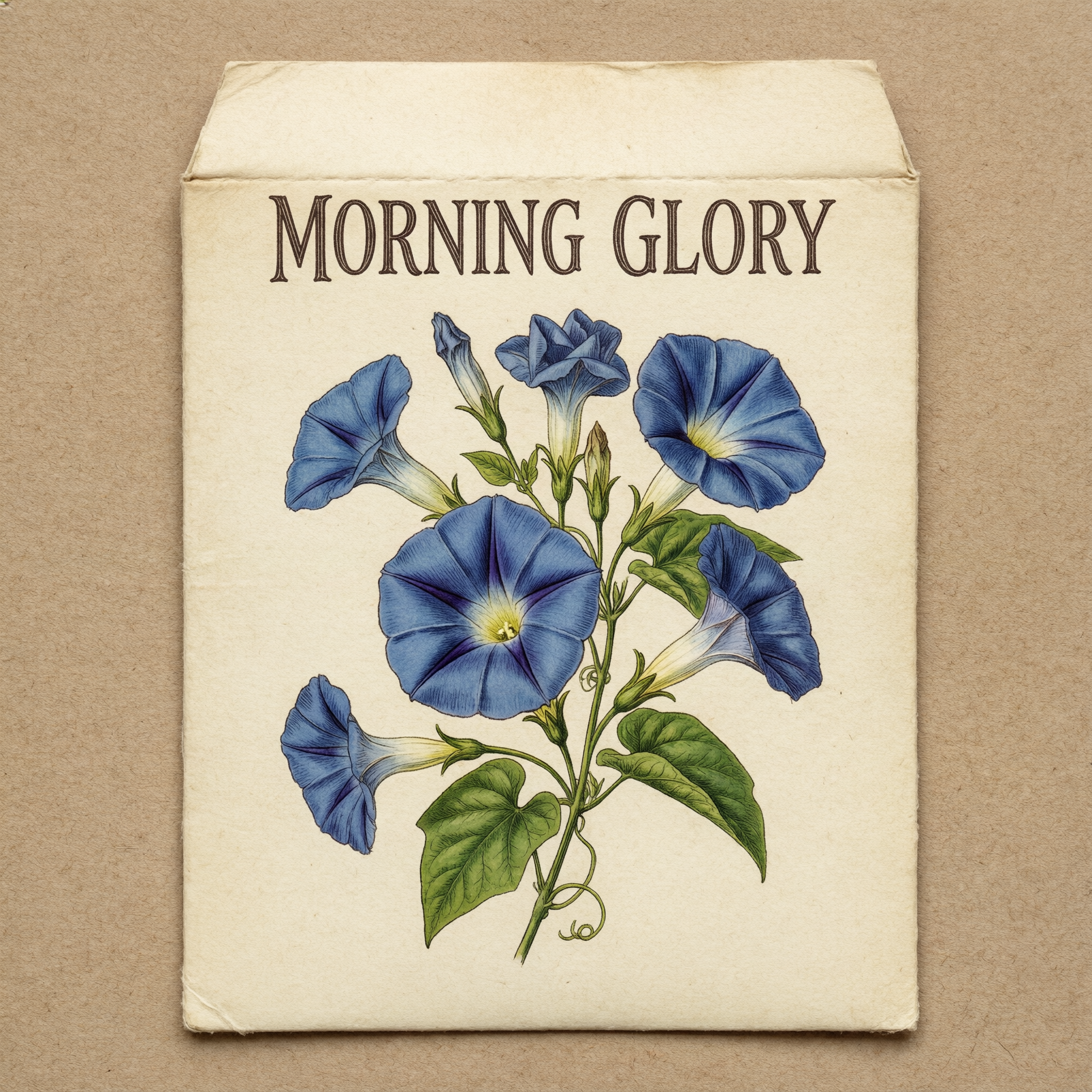
Generated on PixelDojo with QWEN Image 2.0 Pro. Produced by PixelDojo's generation pipeline.
QWEN Image 2.0 Pro costs 1.5 credits per image, and it spells. We asked for a vintage seed packet reading MORNING GLORY and got all twelve letters right on the first try, set in an elegant engraved serif. The standard QWEN Image 2.0 is 0.5 credit for general illustration, and the newer QWEN Image 2.1 runs at 1.5 credits with a 0.5 credit Turbo tier.
MORNING GLORY, spelled right the first time
Every example below was produced on PixelDojo. Hover to see the prompt.
A vintage seed packet design with the words 'MORNING GLORY' in hand-lettered type, botanical illustration of blue flowers, cream paper texture
QWEN Image 2.0 Pro
The settings that make it work
The default size is the top tier
Sizes come in three tiers, roughly 1K, 2K and a maximum tier, and the default is 2048 by 2048. There are 21 size options in total covering square, portrait, landscape and ultrawide shapes.
Prompt rewriting is off unless you ask
Many models quietly expand your prompt with a language model first. Here that behaviour is off by default, so the words you typed are the words that get rendered. For a lettering job that is the setting you want.
Up to six images in one request
The count field takes 1 to 6 and each image is 1.5 credits, so a six image sweep is 9 credits. Useful when you are hunting for one layout that reads well.
Negative prompts are supported
There is a separate field for what to avoid, which is the fastest way to kill unwanted borders, watermark-looking marks or extra text blocks in a design layout.
Reference images for consistency
Up to three reference images can ride along with the prompt, which is how you keep a character or a product looking the same across a set.
Dated snapshots for repeatable output
Alongside the rolling model name there are dated snapshot variants. Pin one when you need the same behaviour months from now instead of whatever the rolling name points at.
Watermarking is off by default
The watermark toggle exists and starts switched off, so the output you download is clean.
Twelve letters, first try, no retries. One of 80+ image models on Pixel Dojo, used by 1M+ creators.
Why Choose Pixel Dojo for QWEN Image 2.0 Pro
Professional-quality results with cutting-edge AI technology
The spelling comes out right
MORNING GLORY, correct letter for letter, evenly spaced across the top of the packet. Clean, legible lettering inside the image.
Period-perfect type
An engraved serif in small caps with wide letter spacing, gently arched. Exactly the look of a vintage seed catalog.
The whole brief lands
Blue morning glory blooms in botanical illustration style, heart shaped leaves, curling tendrils and a cream paper envelope on kraft paper. Everything asked for is in the frame.
Unlimited on every plan
Relax mode runs FLUX 3 Image Klein and Qwen Image 2.1 at zero credits, as much as you want. Credits roll over every month while you are subscribed. Plans from $10/mo.
How It Works
Reproduce this test in three steps:
Select the Pro tier
The QWEN Image 2 tool offers the standard model and the Pro model. Pro is the 1.5 credit option and the one tuned for lettering.
Put the words in quotes and keep them short
We wrote the exact words we wanted inside quote marks in the prompt. Short strings survive best. Leave prompt rewriting off so your wording reaches the model unchanged.
Generate and read the letters
Zoom in on the text before you accept the image. Ours was correct the first time.
Loved by creators on PixelDojo
Real feedback from people using PixelDojo, pulled from our in-product surveys.
Very easy to use
super easy to use
it's very easy to use
Practically every Ai suite in one place? Who wouldn't?
versatile menu of tools
Best AI tool availble the suite is rad
Explore more AI tools on PixelDojo
Popular AI Models
AI Tools
Compare & Switch
- All AI Tool Alternatives
- Pollo AI Alternative
- PixelDojo vs Pollo AI
- Pollo AI Review
- MotionMuse AI Alternative
- MioCreate Alternative
- Dessi AI Alternative
- Runway Alternatives
- CapCut Alternatives
- Leonardo Alternatives
- OpenArt Alternatives
- Midjourney Alternatives
- Canva AI Alternatives
- Pika Alternatives
- InVideo Alternatives
- Higgsfield Alternatives
- Krea Alternatives
- Luma Alternatives
- Magic Hour Alternatives
- HeyGen Alternatives
- PixAI Alternatives
- Vidu Alternatives
- Seedream Alternatives
- Tensor.Art Alternatives
Common Questions
Everything you need to know about QWEN Image 2.0 Pro
How much does QWEN Image 2.0 Pro cost per image?
1.5 credits per image at any size. A request can return up to six images.
Can QWEN Image 2.0 Pro spell words in an image?
Yes. Put the exact words in quotes in your prompt. Our seed packet came back reading MORNING GLORY, all twelve letters correct, on the first attempt.
How does it compare with QWEN Image 2.1 and Ideogram 4.5?
QWEN Image 2.1 is the newer QWEN release at 1.5 credits, with a 0.5 credit Turbo tier for fast drafts. Ideogram 4.5 at 2 credits is the text specialist for posters, logos and exact typographic styles.
Which model should I use?
All of them. 80+ image models and 60+ video models sit behind one plan. Switch with one click, or tell Sensei what you want and it picks the best model for every shot.
Is it free to try?
Yes. A free account gets 3 free effects every day, no card needed. Plans from $10/mo unlock every model, with Unlimited on every plan.
Can I automate it?
Yes. Every model is in the API and the MCP server. POST to /api/v1/models/qwen-image-2.0-pro/run with your key, or use Pixel Dojo inside Claude, ChatGPT and Cursor at https://pixeldojo.ai/mcp.